pengenalan
Welcome to the Hot Pepper Ghost Smartphone User Manual. This guide provides essential information on setting up, operating, maintaining, and troubleshooting your new device. The Hot Pepper Ghost is a certified unlocked smartphone designed for compatibility with major carriers, featuring 3GB RAM, 32GB ROM, and an expandable microSD slot.
Apa yang ada dalam Kotak
- Telefon Pintar Hantu Lada Panas
- Kabel USB
- (Note: Other accessories like charger, headphones, or SIM ejector tool may be sold separately or vary by region.)
Produk Selesaiview

Rajah 1: Depan view of the Hot Pepper Ghost smartphone, showcasing paparan.
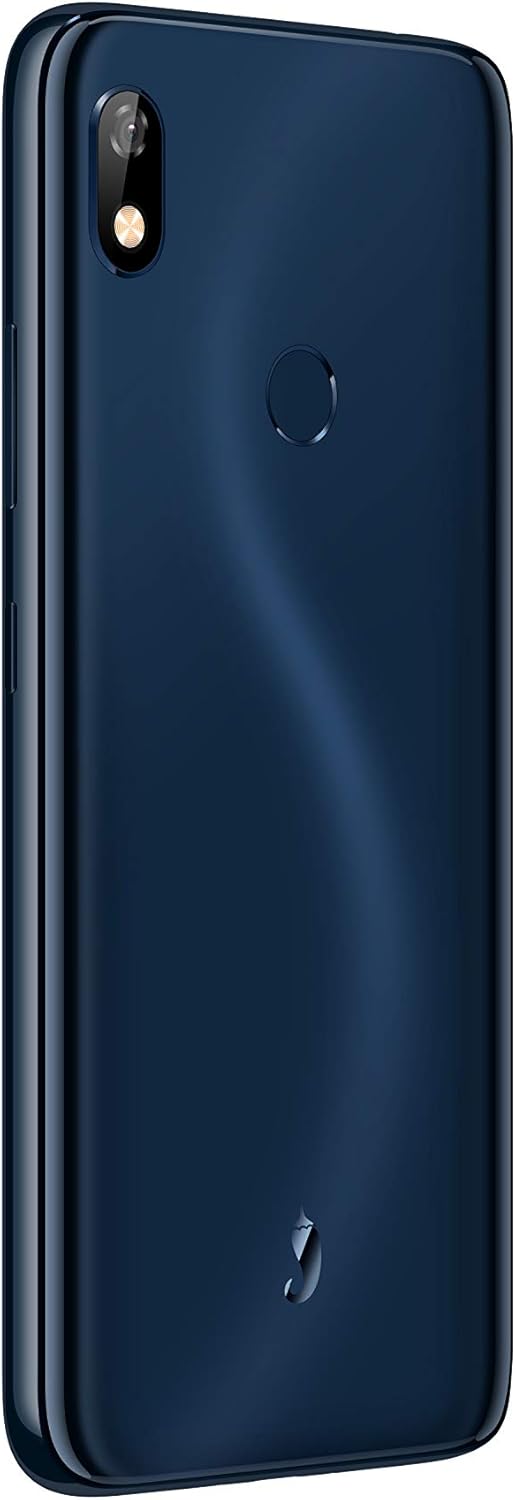
Rajah 2: belakang view of the Hot Pepper Ghost smartphone, showing the camera module and fingerprint sensor.
Komponen Utama:
- paparan: 6-inch LCD touchscreen.
- Kamera Belakang: Terletak di bahagian atas kiri panel belakang.
- Sensor cap jari: Circular sensor located on the back panel for secure unlocking.
- Jack Audio: Bicu audio 3.5mm untuk fon kepala.
- Port Pengecasan: Port pengecasan jenis-C.
- Penceramah: Terletak di bahagian bawah peranti.
Persediaan
1. Pemasangan Kad SIM
- Cari dulang SIM di sisi peranti anda.
- Insert a SIM ejector tool (if available) or a small paperclip into the small hole next to the tray to open it.
- Tarik keluar dulang SIM dengan berhati-hati.
- Letakkan kad Nano-SIM anda ke dalam slot yang ditetapkan pada dulang, pastikan sesentuh emas menghadap ke bawah.
- Tolak dulang perlahan-lahan ke dalam telefon sehingga ia berbunyi pada tempatnya.
2. Pemasangan Kad MicroSD
The Hot Pepper Ghost supports expandable storage via a microSD slot.
- Ikuti langkah 1-3 untuk pemasangan kad SIM untuk membuka dulang.
- Place your microSD card into the dedicated slot on the tray.
- Gently push the tray back into the phone.
3. Hidupkan dan Pengecasan Awal
- To power on, press and hold the Power button (usually on the right side) until the Hot Pepper logo appears.
- For first use, it is recommended to fully charge the device. Connect the provided USB cable to the Type-C port on your phone and the other end to a compatible USB power adapter (not included) or computer.
- Pengecasan penuh mengambil masa kira-kira 2.75 jam.
Mengendalikan Peranti Anda
Basic Navigation (Android 9 Pie)
- Skrin Utama: Leret ke kiri atau kanan untuk mengakses skrin utama yang berbeza.
- Laci Apl: Leret ke atas dari bahagian bawah skrin untuk mengakses semua aplikasi yang dipasang.
- Pemberitahuan & Tetapan Pantas: Leret ke bawah dari bahagian atas skrin ke view pemberitahuan dan togol tetapan pantas.
- Kembali, Laman Utama, Aplikasi Terkini: Use the on-screen navigation buttons at the bottom of the display.
Ketersambungan
- Wi-Fi: Go to Settings > Network & internet > Wi-Fi to connect to available networks. Supports 2.4GHz/5GHz.
- Bluetooth: Go to Settings > Connected devices > Bluetooth to pair with Bluetooth 5.0 compatible devices.
- Data mudah alih: Pastikan kad SIM anda aktif dan data mudah alih didayakan dalam Tetapan > Rangkaian & internet > Rangkaian mudah alih.
Penggunaan Kamera
- Buka apl Kamera daripada skrin utama atau laci apl anda.
- Ketik butang pengatup untuk mengambil foto.
- Bertukar antara kamera hadapan dan belakang menggunakan ikon togol kamera.
Penderia Cap Jari
- To set up your fingerprint, go to Settings > Security & location > Fingerprint.
- Ikut arahan pada skrin untuk mendaftarkan cap jari anda.
- Once registered, you can use your fingerprint to unlock the device and authorize purchases.
Penyelenggaraan
Penjagaan Bateri
- Elakkan suhu yang melampau, yang boleh merendahkan hayat bateri.
- Jangan biarkan telefon dicas untuk tempoh yang lama selepas ia mencapai 100%.
- Untuk kesihatan bateri yang optimum, cuba kekalkan tahap cas antara 20% dan 80%.
Membersihkan Peranti Anda
- Gunakan kain lembut dan tidak berbulu untuk membersihkan skrin dan badan.
- Untuk calitan degil, sedikit dampen kain dengan air atau pembersih skrin.
- Elakkan bahan kimia yang keras atau bahan yang melelas.
Kemas Kini Perisian
Your Hot Pepper Ghost smartphone runs on Android 9 Pie and receives regular updates for up to 2 years. These updates provide security patches, performance improvements, and new features.
- To check for updates, go to Settings > System > Advanced > System update.
- Ensure your device is connected to Wi-Fi and has sufficient battery life before performing an update.
Menyelesaikan masalah
If you encounter issues with your Hot Pepper Ghost smartphone, please refer to the following common solutions:
- Device Not Responding/Freezing: Tekan dan tahan butang Kuasa selama kira-kira 10-15 saat untuk memaksa mulakan semula.
- Bateri Habis Cepat: Check background app usage in Settings > Battery. Reduce screen brightness and disable unnecessary features like GPS or Bluetooth when not in use.
- Connectivity Issues (Wi-Fi/Bluetooth/Mobile Data):
- Toggle Wi-Fi/Bluetooth/Mobile Data off and on.
- Mulakan semula telefon anda.
- For Wi-Fi, try forgetting the network and reconnecting.
- For mobile data, ensure your APN settings are correct for your carrier (Settings > Network & internet > Mobile network > Advanced > Access Point Names).
- Call Quality Issues (Cannot Hear/Be Heard):
- Ensure nothing is blocking the microphone or earpiece.
- Test with headphones to determine if the issue is with the phone's speaker/mic or the network.
- Mulakan semula peranti.
- Slow Performance/App Loading:
- Tutup apl yang tidak digunakan yang berjalan di latar belakang.
- Clear app caches (Settings > Apps & notifications > [App Name] > Storage & cache > Clear cache).
- Pastikan anda mempunyai ruang simpanan kosong yang mencukupi.
- Sensor Cap Jari Tidak Berfungsi:
- Pastikan jari anda bersih dan kering.
- Re-register your fingerprint if the issue persists (Settings > Security & location > Fingerprint).
- Text Message Issues:
- Verify your mobile data connection.
- Check your messaging app settings.
- Contact your carrier if the issue persists across different messaging apps.
- Tetapan semula kilang: Sebagai langkah terakhir, jika masalah perisian berterusan, anda boleh melakukan tetapan semula kilang. Amaran: Ini akan memadamkan semua data pada telefon anda. Sandarkan data penting sebelum meneruskan. Go to Settings > System > Advanced > Reset options > Erase all data (factory reset).
Spesifikasi
| Ciri | Perincian |
|---|---|
| Nombor Model | HPP-GS1 |
| Sistem Operasi | Android 9 Pie |
| RAM | 3 GB |
| Storan Dalaman | 32 GB |
| Storan Boleh Dikembangkan | slot microSD |
| Pemproses | Mediatek MTK6762 8-core |
| Saiz Skrin | 6 Inci |
| Resolusi | 1280 x 720 |
| Teknologi Paparan | LCD |
| Kapasiti Bateri | Ion Litium 3850 mAh (termasuk) |
| Masa Mengecas | lebih kurang 2.75 Jam |
| Teknologi Tanpa Wayar | Bluetooth 5.0, Wi-Fi (2.4GHz/5GHz) |
| Teknologi Selular | 4G (Compatible with AT&T, Cricket, T-Mobile, Verizon) |
| Bicu Audio | 3.5 mm |
| Port Pengecasan | Jenis-C |
| Dimensi (L x W x H) | 6.43 x 3.06 x 0.37 inci (163.4mm x 77.7mm x 9.5mm) |
| Berat Barang | 14.8 auns (160g) |
| warna | Biru |
Maklumat Waranti
The Hot Pepper Ghost smartphone comes with a US Warranty. For specific details regarding warranty coverage, terms, and conditions, please refer to the warranty card included with your product or visit the official Hot Pepper webtapak. Simpan bukti pembelian anda untuk tuntutan waranti.
Sokongan
For further assistance, technical support, or service inquiries, please contact Hot Pepper customer support.
- Sokongan dalam talian: Visit the official Hot Pepper webtapak untuk Soalan Lazim, artikel sokongan dan borang hubungan.
- Sokongan E-mel: Rujuk kepada pembungkusan produk anda atau pegawai rasmi website for email contact information.
- Sokongan Telefon: Rujuk kepada pembungkusan produk anda atau pegawai rasmi weblaman web untuk nombor sokongan telefon.
When contacting support, please have your model number (HPP-GS1) and purchase information ready.


