1. Pengenalan
This manual provides detailed instructions for the installation, operation, and maintenance of your ZEBRONICS H81 LGA 1150 Socket Motherboard. Designed for Intel Core i7/i5/i3 processors, this ATX motherboard supports DDR3 memory and features an Intel H81 Chipset. Please read this manual thoroughly before proceeding with installation to ensure proper functionality and to prevent damage.

Imej 1: Utama view of the ZEBRONICS H81 LGA 1150 Motherboard, showcasing its layout and components.
2. Spesifikasi
The following table outlines the key technical specifications of the ZEBRONICS H81 Motherboard:
| Ciri | Penerangan |
|---|---|
| Sokongan Pemproses | Intel Core i7/i5/i3 processors (LGA 1150 Socket) |
| Chipset | Intel H81 |
| Sokongan Memori | 2 x DDR3 dual-channel slots, 1066/1333/1600MHz, Max 32GB |
| LAN | Realtek 8105E 100/1000 Mbps |
| Audio | Realtek 662, 3x Audio Jacks for 6 channel HD Audio |
| Pelabuhan Panel Belakang | 1x USB Mouse/Keyboard, 1x VGA, 1x HDMI, 2x USB 3.0, 2x USB 2.0, 1x LAN, 3x Audio Jacks |
| Penyambung Atas Papan | Front panel, Speaker, Front panel audio, USB 2.0, 4x SATA, 4-pin CPU fan, SYS fan, 24-pin ATX power, 4-pin ATX 12V power, Clear CMOS header |
| Slot Pengembangan | 1 x slot PCI Express x16 |
| Faktor Bentuk | ATX |
| Dimensi | 21.3 x 5.7 x 26.8 cm |
| Berat badan | 560 g |

Image 2: Visual representation of key features including H81 Chipset, DDR3 support, LGA 1150 socket, HDMI, 5.1 Audio, 100/1000 LAN, 4 SATA ports, and PCIe slot.
3. Panduan Persediaan
Follow these steps for proper installation of your motherboard and its components:
- Penyediaan: Ensure your computer case is compatible with the ATX form factor. Gather necessary tools including a screwdriver, thermal paste, and anti-static wrist strap.
- Pasang CPU: Open the CPU socket lever. Carefully align the CPU with the socket (match the golden triangle on the CPU with the triangle on the socket) and gently place it in. Close the lever to secure the CPU. Apply a thin, even layer of thermal paste to the CPU's heat spreader.
- Pasang Penyejuk CPU: Mount the CPU cooler according to its manufacturer's instructions, ensuring good contact with the CPU and proper fan orientation. Connect the CPU fan cable to the 4-pin CPU fan connector on the motherboard.
- Pasang RAM: Open the clips on both ends of the DDR3 memory slots. Align the RAM modules with the slots, ensuring the notch on the module matches the key in the slot. Press down firmly on both ends until the clips snap into place.
- Pasang Papan Induk: Install the I/O shield into the rear opening of your computer case. Carefully place the motherboard into the case, aligning the screw holes with the standoffs. Secure the motherboard with screws.
- Sambungkan Kuasa: Connect the 24-pin ATX main power connector and the 4-pin ATX 12V CPU power connector from your power supply to the corresponding ports on the motherboard.
- Sambungkan Peranti Storan: Use SATA cables to connect your hard drives or SSDs to the SATA ports on the motherboard. Connect the power cables from your power supply to these devices.
- Sambungkan Kabel Panel Depan: Connect the power switch, reset switch, HDD LED, power LED, and front panel audio/USB cables from your case to the respective headers on the motherboard. Refer to the motherboard diagram for correct pin assignments.
- Install Expansion Cards (Optional): If installing a graphics card or other PCI Express cards, insert them into the appropriate slots and secure them with a screw.
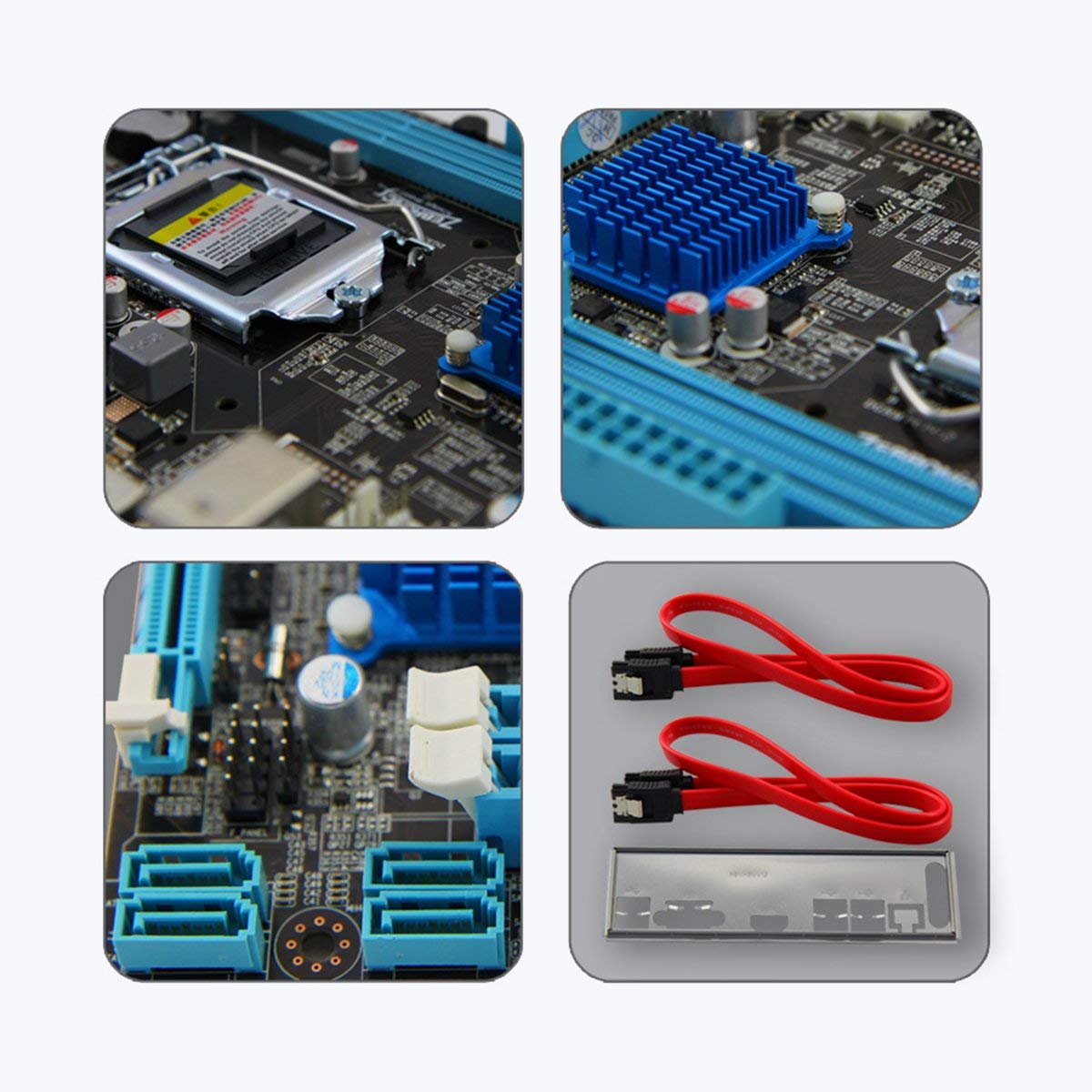
Imej 3: Jarak dekat views of motherboard components such as the CPU socket, chipset heatsink, SATA ports, and included accessories like SATA cables and the I/O shield.
4. Arahan Operasi
Once all components are installed and connected, you can power on your system:
- Kuasa Awal Hidup: After ensuring all connections are secure, connect your monitor, keyboard, and mouse. Plug in the power cord and press the power button on your computer case.
- Persediaan BIOS/UEFI: During startup, repeatedly press the designated key (usually DEL or F2) to enter the BIOS/UEFI setup utility. Here you can configure boot order, system time, and other advanced settings. Save changes and exit to continue booting.
- Pemasangan Sistem Operasi: Masukkan media pemasangan sistem pengendalian anda (pemacu USB atau DVD) dan ikuti arahan pada skrin untuk memasang OS.
- Pemasangan Pemandu: After OS installation, install the necessary drivers for your motherboard (chipset, LAN, audio, graphics) from the included driver CD or the ZEBRONICS webtapak.
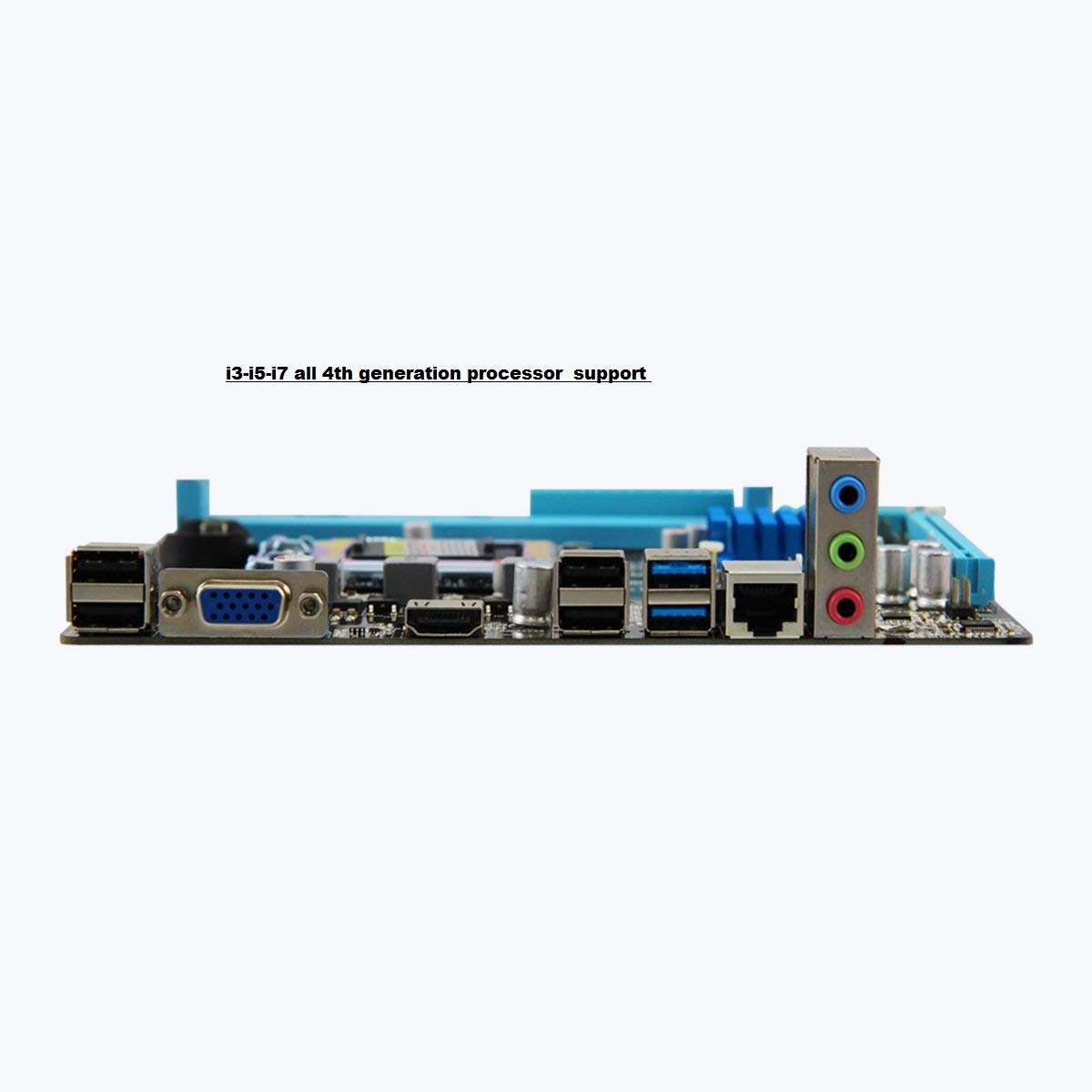
Image 4: Rear I/O panel of the ZEBRONICS H81 Motherboard, showing ports for USB, VGA, HDMI, LAN, and audio.
5. Penyelenggaraan
Penyelenggaraan berkala membantu memastikan jangka hayat dan prestasi optimum papan induk anda:
- Penyingkiran habuk: Periodically clean dust from inside your computer case, especially from heatsinks and fans, using compressed air. Ensure the system is powered off and unplugged before cleaning.
- Kemas Kini Pemandu: Keep your motherboard drivers (chipset, LAN, audio) updated to the latest versions available from the ZEBRONICS official webtapak untuk memastikan keserasian dan prestasi.
- Kemas Kini BIOS/UEFI: Only update the BIOS/UEFI if necessary, following the instructions provided by ZEBRONICS carefully. Incorrect BIOS updates can render your motherboard inoperable.
- Pengurusan Kabel: Pastikan kabel dalaman disalurkan dengan kemas untuk meningkatkan aliran udara dan mengelakkan gangguan.
6. Penyelesaian masalah
Jika anda menghadapi masalah dengan papan induk anda, rujuk langkah penyelesaian masalah biasa berikut:
- Tiada Kuasa/Tiada But:
- Check all power connections (24-pin ATX, 4-pin ATX 12V, CPU fan).
- Ensure the power supply is switched on and functioning.
- Verify front panel power switch connection.
- Try clearing the CMOS (refer to the Clear CMOS header on the motherboard).
- Tiada Paparan:
- Ensure the monitor is connected to the correct video output (VGA or HDMI on the motherboard, or dedicated graphics card).
- Reseat the RAM modules. Try booting with only one RAM module.
- Jika menggunakan kad grafik khusus, pastikan ia diletakkan dan dikuasakan dengan betul.
- Ketidakstabilan/Ranap Sistem:
- Check for overheating. Ensure CPU cooler is properly installed and fans are spinning.
- Jalankan alat diagnostik memori untuk memeriksa integriti RAM.
- Update motherboard drivers and BIOS/UEFI.
- Peripheral Issues (USB, LAN, Audio):
- Ensure drivers for these components are installed and up to date.
- Periksa sambungan fizikal kabel dan peranti.
- Test with different peripherals to isolate the issue.
7. Waranti dan Sokongan
Your ZEBRONICS H81 Motherboard comes with a Waranti 2 tahun provided by CORE COMPUTERS. Please retain your proof of purchase for warranty claims.
For technical support, driver downloads, or further assistance, please visit the official ZEBRONICS support webtapak atau hubungi perkhidmatan pelanggan mereka.


