pengenalan
Welcome to the user manual for the BLU Vivo X5 smartphone. This guide provides essential information for setting up, operating, maintaining, and troubleshooting your device.
The BLU Vivo X5 features a 5.7-inch HD+ 18:9 Curved Glass Display, an Octa-Core 1.6GHz processor, 13MP A.I. main camera, 8MP front camera, 64GB internal storage, 3GB RAM, and runs on Android 9 Pie. It supports 4G LTE connectivity and includes a fingerprint sensor for enhanced security.
Apa yang ada dalam Kotak
Upon unboxing your BLU Vivo X5, verify that all standard components are present:
- BLU Vivo X5 Device
- Pengecas
- Panduan Cepat

This image displays the BLU Vivo X5 smartphone, its packaging, a screen protector, a protective case, a charger, a USB cable, earphones, and a quick guide.
Persediaan Peranti
Inserting SIM and MicroSD Cards
Your BLU Vivo X5 supports dual SIM cards and one MicroSD card for expandable storage.
- Cari dulang kad SIM/MicroSD di sisi peranti.
- Gunakan alat ejektor SIM yang disediakan untuk membuka dulang.
- Carefully place your Nano-SIM cards and MicroSD card into their respective slots, ensuring correct orientation.
- Tolak dulang perlahan-lahan ke dalam peranti sehingga ia berbunyi pada tempatnya.
Mengecas Peranti
Before initial use, fully charge your BLU Vivo X5.
- Sambungkan kabel USB ke penyesuai pengecas.
- Pasangkan penyesuai pengecas ke soket kuasa.
- Sambungkan kabel USB ke port pengecasan pada telefon anda.
- Penunjuk bateri pada skrin akan menunjukkan kemajuan pengecasan.
Kuasa Awal dan Konfigurasi
To power on your device, press and hold the power button located on the side until the BLU logo appears. Follow the on-screen prompts to complete the initial setup, including language selection, Wi-Fi connection, Google account setup, and security settings.
Mengendalikan Peranti Anda
Navigasi Asas
The BLU Vivo X5 runs on Android 9 Pie. Navigate using on-screen gestures or the traditional navigation bar (Back, Home, Recent Apps).
Membuat Panggilan dan Menghantar Mesej
Use the Phone app to make calls and the Messages app for SMS/MMS.
Fungsi Kamera
Your device is equipped with a 13MP A.I. main camera with flash and an 8MP front camera with flash.
- Buka apl Kamera daripada skrin utama atau laci apl.
- Pilih mod yang anda inginkan (Foto, Video, Potret, dll.).
- Ketik butang pengatup untuk menangkap imej atau memulakan/menghentikan rakaman video.
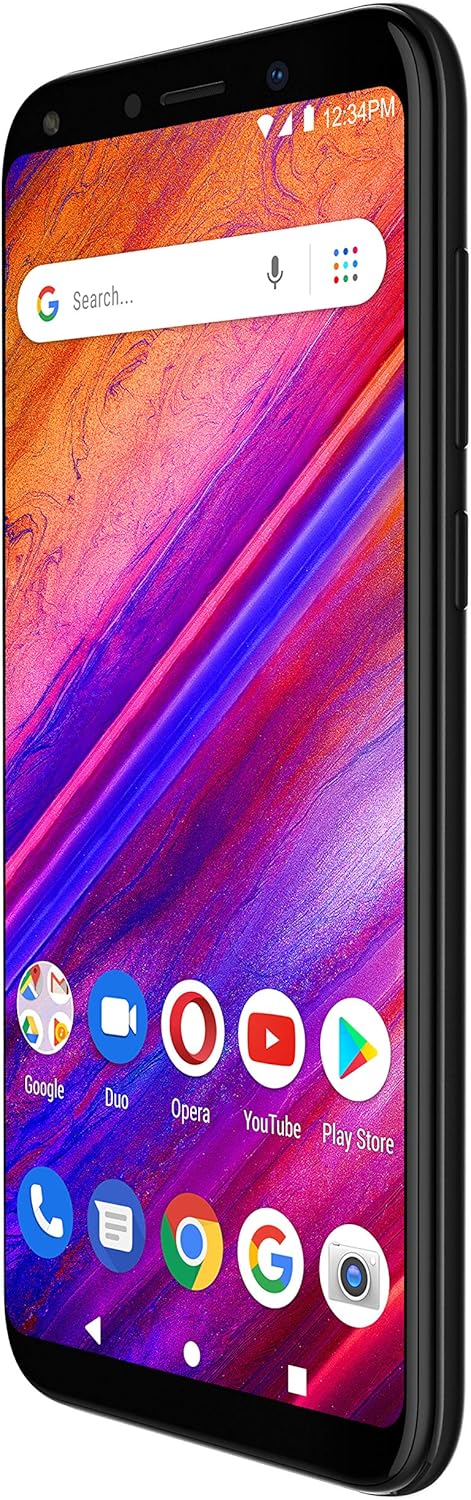
This image shows the front of the BLU Vivo X5 smartphone with its display active, showcasing the Android home screen with various application icons and a search bar.
Ketersambungan
The BLU Vivo X5 supports 4G LTE for cellular data and Wi-Fi for wireless internet access.
- Wi-Fi: Pergi ke Tetapan > Rangkaian & Internet > Wi-Fi untuk menyambung ke rangkaian yang tersedia.
- Data mudah alih: Pastikan data mudah alih didayakan dalam Tetapan > Rangkaian & internet > Rangkaian mudah alih.
- Bluetooth: For connecting wireless accessories, go to Tetapan > Peranti yang disambungkan > Bluetooth.
Penderia Cap Jari
For enhanced security, set up the fingerprint sensor.
- Pergi ke Settings > Security & location > Fingerprint.
- Ikut arahan pada skrin untuk mendaftar cap jari anda.
- The sensor is located on the back of the device.

This image displays the back of the BLU Vivo X5 smartphone, highlighting the leather-patterned finish and the circular fingerprint sensor below the camera module.
Penyelenggaraan Peranti
Penjagaan Bateri
To prolong battery life, avoid extreme temperatures and fully discharging the battery frequently. Use only the provided charger.
Kemas Kini Perisian
Semak kemas kini sistem secara kerap untuk memastikan prestasi dan keselamatan yang optimum. Pergi ke Settings > System > Advanced > System update.
Membersihkan Peranti Anda
Use a soft, lint-free cloth to clean the screen and body of your phone. Avoid harsh chemicals.
Sandaran Data
Regularly back up your important data to a cloud service or a computer to prevent data loss.
Menyelesaikan Masalah Isu Biasa
Peranti Tidak Dihidupkan
Ensure the battery is charged. Connect the charger and wait a few minutes before attempting to power on again. If the issue persists, contact support.
Isu Ketersambungan Rangkaian
Check if your SIM card is properly inserted. Verify that mobile data or Wi-Fi is enabled. Restart the device.
Prestasi Perlahan
Close unused applications. Clear cache from apps. Consider performing a factory reset if performance issues continue after other troubleshooting steps (Amaran: A factory reset will erase all data on your device).
Spesifikasi Teknikal
| Ciri | Spesifikasi |
|---|---|
| Nombor Model | V0490LL |
| Sistem Operasi | Android 9.0 Pie |
| Paparan | 5.7" HD+ 18:9 Curved Glass (1280 x 720 resolution) |
| Pemproses | Teras Octa 1.6GHz |
| RAM | 3 GB |
| Storan Dalaman | 64 GB |
| Storan Boleh Dikembangkan | Micro SD hingga 64GB |
| Kamera Utama | 13MP A.I. with Flash |
| Kamera Depan | 8MP dengan Flash |
| Ketersambungan | 4G LTE (1/3/4/5/7/28), 3G (850/1900/2100), Wi-Fi, Bluetooth, GPS |
| Keselamatan | Penderia Cap Jari |
| Bateri | 1 Litium Ion (termasuk) |
| Dimensi | 6 x 1.97 x 3.43 inci |
| Berat Barang | 0.018 auns |
| warna | Hitam |
Waranti dan Sokongan
For warranty information, please refer to the warranty card included with your product or visit the official BLU webtapak.
For technical support or service inquiries, please contact BLU customer service. Contact details can typically be found on the BLU website or in the quick guide provided with your device.


