pengenalan
This manual provides detailed instructions for the setup, operation, and maintenance of your HORI PS4 Onyx Plus Wireless Controller. Please read this manual thoroughly before use to ensure proper functionality and longevity of your device.
Produk Selesaiview
The HORI PS4 Onyx Plus Wireless Controller is designed for use with the PlayStation 4 console, offering wireless connectivity and a range of features for an enhanced gaming experience.
Ciri-ciri Utama
- Kesambungan Tanpa Wayar: Connects wirelessly to the PS4 console.
- Adjustable Triggers: Customizable trigger pressure.
- Dual Analog Sticks: Untuk kawalan yang tepat.
- Mikrofon terbina dalam: For online chat and voice commands.
- Pelbagai Fungsi: Various buttons and features for diverse gameplay.
Susun atur Pengawal
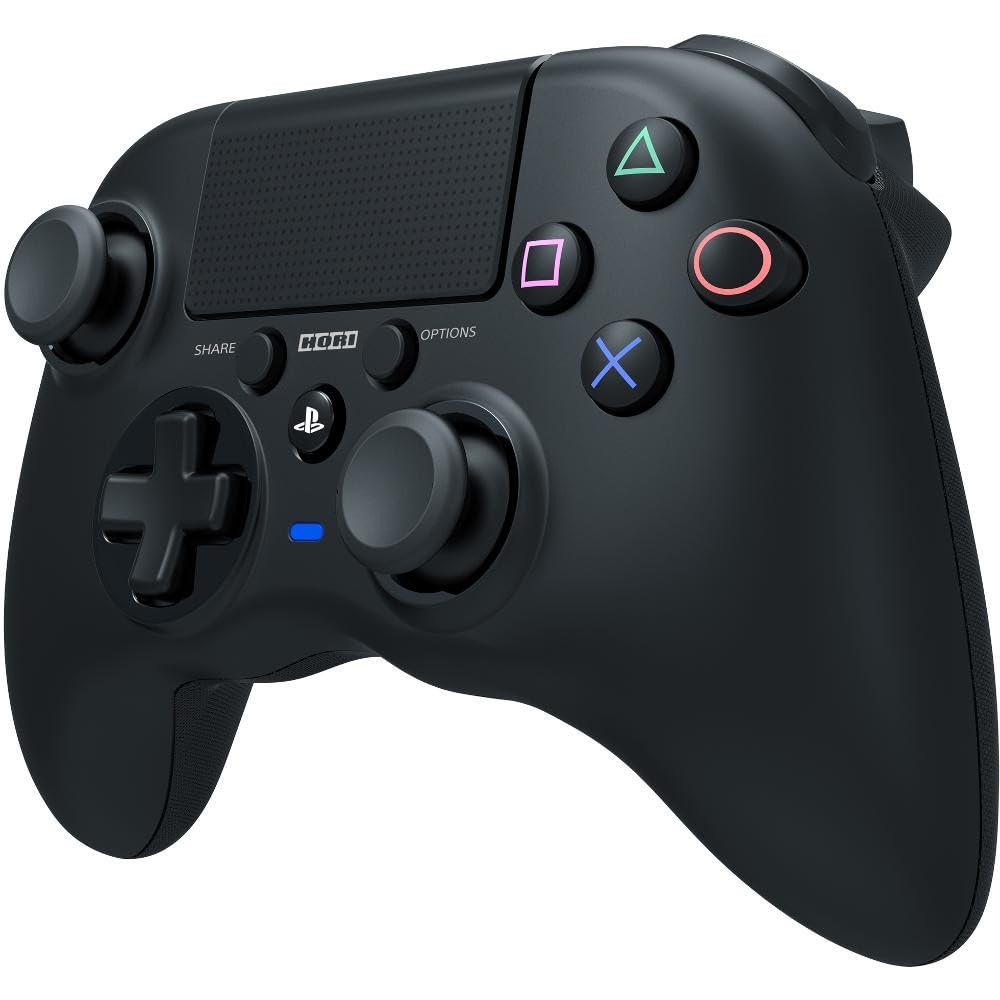
Imej: Depan view of the HORI PS4 Onyx Plus Wireless Controller. It features two analog sticks, a D-pad, four action buttons (Triangle, Circle, Cross, Square), Share and Options buttons, a PS button, a touchpad, and a light bar. The controller is black with textured grips.
Persediaan dan Sambungan Awal
Mengecas Pengawal
The controller includes a built-in rechargeable battery. Before first use, fully charge the controller using a standard USB charging cable. Connect the cable to the controller's charging port and a powered USB port on your PS4 console or a USB wall adapter. The light bar on the controller will indicate charging status.
Berpasangan dengan PlayStation 4
- Pastikan konsol PlayStation 4 anda dihidupkan.
- With the controller powered off, press and hold the Butang PS dan butang SHARE simultaneously until the light bar begins to flash rapidly.
- On your PS4 console, navigate to tetapan > Peranti > Peranti Bluetooth.
- Select the "HORI Onyx Plus" controller from the list of available devices.
- Once paired, the light bar will glow a solid color, indicating a successful connection.
Note: Some versions of this controller may require a USB wireless dongle for connection. If direct Bluetooth pairing is unsuccessful, refer to any included quick start guide for dongle-specific instructions.
Mengendalikan Pengawal
Kawalan Asas
The HORI PS4 Onyx Plus Wireless Controller features standard PlayStation button layouts:
- Kayu Analog: Used for movement and camera control. Push the sticks in for L3/R3 functions.
- D-Pad: For directional input in menus and certain games.
- Butang Tindakan (Segitiga, Bulatan, Palang, Petak): Lakukan tindakan dalam permainan.
- Butang SHARE: Access sharing options (screenshots, video clips).
- Butang OPTIONS: Pause games or access in-game menus.
- Butang PS: Access the PS4 Home screen, switch users, or power off the console.
- Pad sentuh: Functions as a clickable button and a touch-sensitive surface for specific game interactions.
Adjustable Triggers
The L2 and R2 triggers feature adjustable pressure. Consult your game's settings or the controller's specific software (if available) for customization options. This allows users to fine-tune trigger sensitivity for different game genres.
Mikrofon Terbina dalam
The integrated microphone allows for voice chat in online multiplayer games and voice commands for the PS4 system. Ensure your PS4 audio settings are configured to use the controller's microphone.
Penyelenggaraan dan Penjagaan
Pembersihan
Untuk membersihkan pengawal, gunakan kain lembut dan kering. Untuk kotoran degil, sedikit dampbilas kain dengan air. Elakkan menggunakan bahan kimia, pelarut atau bahan kasar yang keras, kerana ini boleh merosakkan kemasan pengawal dan komponen dalaman.
Penjagaan Bateri
- Elakkan menyahcas sepenuhnya bateri dengan kerap untuk memanjangkan jangka hayatnya.
- Simpan pengawal di tempat yang sejuk dan kering apabila tidak digunakan untuk tempoh yang lama.
- Jangan dedahkan pengawal kepada suhu yang melampau.
Menyelesaikan masalah
Isu Sambungan
- Pengawal tidak bersambung: Ensure the controller is charged. Re-attempt the pairing process as described in the "Pairing with PlayStation 4" section. Move closer to the PS4 console to rule out range issues.
- Sambungan terputus-putus: Check for potential interference from other wireless devices. Ensure the controller is fully charged. If using a dongle, ensure it is securely plugged into the PS4.
Sensitiviti pad sentuh
Some users may find the touchpad to be highly sensitive. If accidental inputs occur, adjust your grip or check in-game settings for touchpad sensitivity options. There is no physical adjustment for touchpad sensitivity on the controller itself.
Petunjuk Hayat Bateri
The controller does not display battery life on the PS4 system menu. The light bar will indicate charging status, and the controller will power off when the battery is depleted.
Controller Not Turning On Console
This controller may not support turning on the PS4 console directly from a powered-off state. Power on the console manually before connecting the controller.
Spesifikasi
| Ciri | Perincian |
|---|---|
| Nombor Model | PS4-149E |
| Ketersambungan | Tanpa wayar |
| Dimensi (L x W x H) | 2.76 x 6.3 x 7.09 inci |
| Berat badan | 8.1 auns |
| Bateri | 1 Bateri (termasuk) |
| Pertama Tersedia | 30 Januari 2022 |
Waranti dan Sokongan
Waranti Produk
For information regarding the product warranty, please refer to the warranty card included with your purchase or visit the official HORI webtapak. Terma dan syarat waranti mungkin berbeza mengikut wilayah.
Sokongan Pelanggan
If you encounter any issues not covered in this manual or require further assistance, please contact HORI customer support. You can find contact information on the official HORI webtapak atau melalui peruncit tempat anda membeli produk tersebut.
Visit the HORI Store on Amazon untuk mendapatkan lebih banyak maklumat produk dan sumber sokongan.


