1. Pengenalan
Thank you for choosing the DAEWOO DCOOL12D 60W White Fan. This manual provides important information regarding the safe operation, installation, maintenance, and troubleshooting of your new fan. Please read this manual thoroughly before using the appliance and keep it for future reference.
2. Arahan Keselamatan Penting
Sentiasa ikuti langkah berjaga-jaga keselamatan asas apabila menggunakan peralatan elektrik untuk mengurangkan risiko kebakaran, renjatan elektrik dan kecederaan kepada orang.
- Baca semua arahan sebelum menggunakan kipas ini.
- Pastikan bekalan kuasa sepadan dengan voltage specified on the fan's rating label (220V AC).
- Jangan kendalikan mana-mana kipas dengan kord atau palam yang rosak. Buang kipas atau kembalikan ke kemudahan servis yang dibenarkan untuk pemeriksaan dan/atau pembaikan.
- Jangan gunakan tali di bawah permaidani. Jangan tutup tali dengan permaidani lempar, pelari, atau penutup yang serupa. Susun kord jauh dari kawasan lalu lintas dan di mana ia tidak akan tersandung.
- Jangan masukkan atau benarkan jari atau objek asing memasuki sebarang pengudaraan atau bukaan ekzos kerana ini boleh menyebabkan kejutan elektrik atau kebakaran, atau merosakkan kipas.
- Do not use outdoors. This fan is designed for indoor use only.
- Always unplug the fan before moving, cleaning, or when not in use.
- Jangan gunakan kipas dalam keadaan basah atau damp lokasi seperti bilik mandi atau kawasan dobi.
- Jauhkan kipas daripada sumber haba, nyalaan api terbuka dan bahan mudah terbakar.
- Supervise children when the fan is in use.
3. Produk Lebihview
The DAEWOO DCOOL12D is a 60W floor fan designed to provide efficient air circulation. It features multiple speed settings, a timer function, and an oscillating grille for wide coverage.
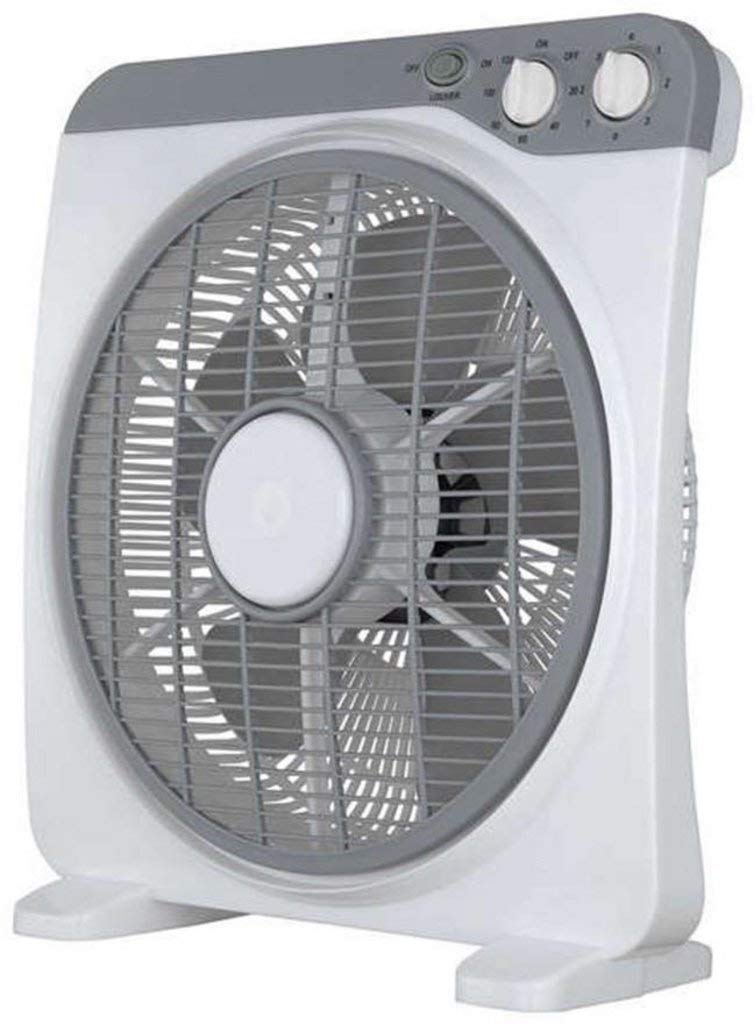
Rajah 1: DAEWOO DCOOL12D 60W White Fan. This image shows the complete fan unit, including the base, stand, motor housing, and fan blades protected by the grille.
Komponen:
- Ketua Kipas: Contains blades, motor, and protective grille.
- Panel Kawalan: Buttons/knobs for speed, timer, and oscillation.
- Stand/Pole: Connects the fan head to the base.
- Pangkalan: Provides stability for the fan.
- Kord Kuasa: Untuk menyambung ke salur keluar elektrik.
4. Persediaan
4.1 Membongkar dan Memasang
- Keluarkan semua komponen dari pembungkusan dengan berhati-hati.
- Letakkan tapak pada permukaan yang rata dan stabil.
- Attach the stand to the base, ensuring it is securely fastened.
- Mount the fan head onto the top of the stand, securing it with the provided fasteners.
- Ensure all parts are correctly assembled and tightened before plugging in the fan.
4.2 Penempatan
Position the fan on a firm, level surface where it cannot be easily knocked over. Ensure there is adequate space around the fan for proper air circulation and to prevent obstruction of the air intake/outlet. Keep it away from curtains or other objects that could be drawn into the fan blades.
5. Arahan Operasi
Before operating, ensure the fan is properly assembled and plugged into a 220V AC power outlet.
5.1 Hidupkan/Mati Kuasa
- To turn on the fan, rotate the speed control knob or press the power button (depending on model variation) to your desired speed setting.
- To turn off the fan, rotate the speed control knob to the "OFF" position or press the power button again.
5.2 Tetapan Kelajuan
The DCOOL12D fan offers 3 speed settings:
- Kelajuan 1: Low speed for gentle air circulation.
- Kelajuan 2: Kelajuan sederhana untuk penyejukan sederhana.
- Kelajuan 3: Kelajuan tinggi untuk aliran udara maksimum.
Adjust the speed by rotating the control knob or pressing the corresponding button on the control panel.
5.3 Fungsi Pemasa
The fan is equipped with a 120-minute timer. To set the timer:
- Rotate the timer knob to the desired operating duration (up to 120 minutes).
- Kipas akan mati secara automatik sebaik sahaja masa yang ditetapkan telah berlalu.
- To override the timer, turn the timer knob to the "ON" position (if available) or manually turn off the fan.
5.4 Pengayun
The fan features a 360° oscillating grille to distribute air across a wider area.
- To activate oscillation, press the oscillation button or pull up the oscillation knob located on the motor housing.
- To stop oscillation, press the oscillation button again or push down the oscillation knob.
6. Penyelenggaraan
Regular cleaning and proper storage will ensure the longevity and efficient operation of your fan.
6.1 Pembersihan
- Sentiasa cabut plag kipas dari salur keluar kuasa sebelum membersihkan.
- Gunakan yang lembut, damp kain untuk mengelap permukaan luar kipas. Jangan gunakan pembersih atau pelarut yang melelas.
- To clean the fan blades, carefully remove the front grille (refer to assembly instructions for reverse steps if necessary). Wipe the blades with a soft cloth. Ensure the blades are completely dry before reattaching the grille.
- Jangan rendam kipas di dalam air atau biarkan air menitis ke dalam perumahan motor.
6.2 Penyimpanan
When not in use for extended periods, store the fan in its original packaging or cover it to protect it from dust. Store in a cool, dry place.
7. Penyelesaian masalah
| Masalah | Kemungkinan Punca | Penyelesaian |
|---|---|---|
| Kipas tidak dihidupkan. | Tiada bekalan kuasa. Kipas tidak dipasang dengan betul. Suis kuasa dimatikan. |
Periksa sama ada salur keluar kuasa berfungsi. Pastikan palam dimasukkan sepenuhnya. Turn the power switch to an "ON" position. |
| Aliran udara yang lemah. | Kelajuan kipas ditetapkan terlalu rendah. Grille or blades are dirty. Obstruction near the fan. |
Tingkatkan tetapan kelajuan kipas. Clean the fan grille and blades (refer to Maintenance section). Remove any objects blocking the airflow. |
| Kipas membuat bunyi yang luar biasa. | Bahagian longgar. Kipas bukan pada permukaan yang rata. Objek asing di dalam. |
Check for loose screws or components and tighten them. Letakkan kipas pada permukaan yang stabil dan rata. Unplug the fan and carefully inspect for any foreign objects. |
| Ayunan tidak berfungsi. | Fungsi ayunan tidak diaktifkan. | Activate the oscillation function (refer to Operating Instructions section). |
If you encounter problems not listed above, or if the issue persists after attempting the solutions, please contact customer support.
8. Spesifikasi
| Ciri | Spesifikasi |
|---|---|
| Jenama | Daewoo |
| Model | DCOOL12D |
| kuasa | 60 Watt |
| Voltage | 220 Volt (AC) |
| Berat Produk | 4.5 kg |
| Jenis Kipas | Kipas lantai |
| Sumber Kuasa | Elektrik Bertali |
| Ciri Khas | Pemasa (120 minit) |
| Jenis Pemasangan | Lantai Lantai |
| bahan | plastik |
| Bilangan Kelajuan | 3 |
| Bilangan Bilah | 3 |
| Oscillation | 360° Oscillating Grille |
9. Waranti dan Sokongan
9.1 Maklumat Waranti
This product is covered by a manufacturer's warranty in accordance with local regulations. Please retain your proof of purchase for any warranty claims. The warranty typically covers defects in materials and workmanship under normal use. It does not cover damage resulting from misuse, accident, alteration, or unauthorized repair.
9.2 Sokongan Pelanggan
For technical assistance, service, or warranty inquiries, please contact your retailer or the authorized Daewoo service center in your region. Please have your model number (DCOOL12D) and proof of purchase ready when contacting support.
Manufacturer: Daewoo


