1. Pengenalan
The BenQ TK860i Smart Home Theater Projector delivers an authentic 4K HDR viewing experience, ideal for brightly lit living rooms. Featuring HDR-PRO technology, it projects a large 100-inch+ 4K UHD picture with striking clarity and defined details. This projector integrates Android TV with Netflix and Chromecast, along with Dolby Digital Plus for enhanced audio. Designed for ease of use, it includes 2D Keystone correction, built-in 10W speakers, and Wi-Fi connectivity.
Ciri-ciri Utama:
- Resolusi UHD 4K: True 8.3 million pixels for sharp, detailed images.
- HDR-PRO (HDR10/HLG): Enhanced contrast and brightness for realistic visuals.
- Vivid Colors: Over 3000 ANSI lumens and 98% Rec. 709 for use in various lighting conditions.
- Pengalaman Sukan Imersif: Dedicated Sport modes with CinemaMaster Audio+2.
- Pemasangan Mudah: 1.3X big zoom and lens shift for flexible setup.
- Android TV: Integrated smart TV platform with streaming apps.
- Pembesar Suara Terbina dalam: Dual 10W speakers for integrated audio.
2. Produk Lebihview

Rajah 2.1: Depan view of the BenQ TK860i projector, showcasinreka bentuk dan kantanya yang anggun.

Rajah 2.2: sebelah view of the BenQ TK860i projector, highlighting its ventilation and compact form factor.
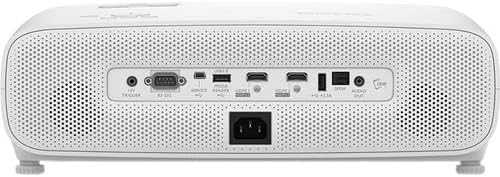
Rajah 2.3: belakang view of the BenQ TK860i projector, displaying the various input and output ports for connectivity.
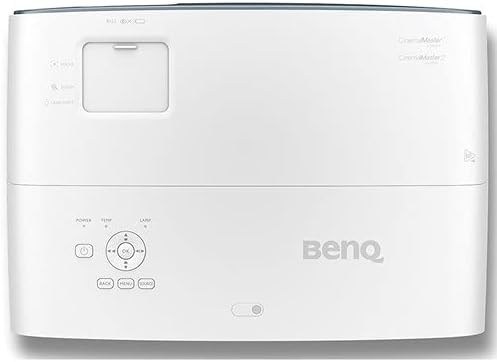
Rajah 2.4: Atas view of the BenQ TK860i projector, showing the control panel and adjustment dials.
3. Persediaan
3.1 Penempatan
Position the projector on a stable, flat surface or mount it to the ceiling. Ensure adequate ventilation around the unit. The TK860i features a 1.3X big zoom and lens shift, allowing for flexible placement and image adjustment without moving the projector itself. For a 100-inch screen, the projector can be placed approximately 8.2 feet away from the screen.
3.2 Sambungan Kuasa
- Connect the power cord to the projector's AC IN port.
- Palamkan hujung kord kuasa yang lain ke dalam salur keluar elektrik yang dibumikan.
3.3 Menyambung Peranti
The TK860i offers multiple connectivity options:
- HDMI: Connect Blu-ray players, gaming consoles, streaming devices, or computers using HDMI cables. The projector features multiple HDMI ports.
- USB: Use the USB ports for media playback or to power compatible streaming dongles.
- Keluar Audio: Connect external audio systems if desired.
4. Arahan Operasi
4.1 Menghidupkan/Mematikan
- Press the Power button on the projector or the remote control to turn the unit on.
- To turn off, press the Power button again. A confirmation message may appear; confirm to shut down.
4.2 Initial Setup and Image Adjustment
- Upon first power-on, follow the on-screen prompts to select your preferred language and projector position (e.g., Front, Rear, Front Ceiling, Rear Ceiling).
- Gunakan Fokus dan Zum rings near the lens to adjust the image clarity and size.
- Gunakan Peralihan Lensa feature (if available on your model) to vertically or horizontally adjust the image position without tilting the projector.
- Mohon Batu Kunci 2D correction via the menu to square the image if the projector is not perfectly perpendicular to the screen.
4.3 Pemilihan Sumber Input
Tekan ke Sumber button on the remote control or the projector's control panel to cycle through available input sources (HDMI1, HDMI2, USB, etc.).
4.4 Ciri TV Pintar (TV Android)
The integrated Android TV dongle provides access to a wide range of streaming applications, including Netflix, YouTube, and Prime Video. Use the remote control to navigate the Android TV interface, browse content, and launch apps.
5. Penyelenggaraan
5.1 Membersihkan Lensa
Gently wipe the projector lens with a soft, lint-free cloth specifically designed for optical surfaces. Avoid using abrasive cleaners or excessive force.
5.2 Pembersihan Penapis Udara
Regularly check and clean the air filter to ensure proper ventilation and prevent overheating. Refer to the full user manual for specific instructions on accessing and cleaning the filter.
5.3 Lamp Penggantian
Projektor lamp mempunyai jangka hayat yang terhad. Apabila lamp life indicator appears, replace the lamp according to the instructions in the full user manual. Always use genuine BenQ replacement lamps.
6. Penyelesaian masalah
6.1 Tiada Gambar
- Pastikan projektor dihidupkan dan sumber input dipilih dengan betul.
- Periksa semua sambungan kabel (HDMI, kuasa) untuk memastikan ia selamat.
- Verify that the connected source device is powered on and outputting a signal.
6.2 Imej Kabur
- Laraskan gelang fokus pada lensa projektor sehingga imej tajam.
- Ensure the projector is at the correct distance from the screen for optimal focus.
6.3 Tiada Audio
- Periksa tahap kelantangan pada kedua-dua projektor dan peranti sumber yang disambungkan.
- Jika menggunakan pembesar suara luaran, pastikan ia disambungkan dengan betul dan dihidupkan.
- Sahkan tetapan audio dalam menu projektor.
7. Spesifikasi
| Ciri | Spesifikasi |
|---|---|
| Dimensi Produk | 19 x 15.1 x 7.7 inci |
| Berat Barang | 9.26 paun |
| Nombor Model Item | TK850 |
| Jenama | BenQ |
| Penggunaan yang Disyorkan | Permainan |
| Ciri Khas | Mudah alih |
| Teknologi Ketersambungan | HDMI |
| Resolusi Paparan | 3840 x 2160 (4K UHD) |
8. Video Produk Rasmi
Video 8.1: Berakhirview of the BenQ TK850 projector, highlighting its 4K HDR-PRO capabilities and home entertainment features. This video provides a visual guide to the projector's design and core functionalities.
Video 8.2: A comparison video discussing the features and differences between the BenQ HT3550 and TK850 models, offering insights into their performance and suitability for various home theater setups.
9. Waranti dan Sokongan
BenQ offers an industry-leading 3-year warranty, providing peace of mind with coverage that exceeds many competitors' 1-year warranties. Our US-based customer service team is available to assist with any inquiries or support needs.
For detailed support, troubleshooting, or warranty claims, please refer to the official BenQ webtapak atau hubungi perkhidmatan pelanggan mereka secara langsung.


