1. Produk Lebihview
The BESTEK Portable Power Station is a high-capacity, pure sine wave power source designed for both home and outdoor use. It provides reliable AC100V power, making it suitable for various electronic devices. This unit features a large 180000mAh (648Wh) battery capacity and a maximum output of 1000W. It is PSE certified for safety in Japan and supports solar charging.

Imej: Depan view of the BESTEK Portable Power Station, highlighting its 180000mAh capacity, 648Wh energy, and 1000W maximum output.
2. Safety Instructions and Protection Features
To ensure safe operation and prolong the lifespan of your power station, please adhere to the following safety guidelines. This device incorporates five protective circuit functions for enhanced safety:
- Perlindungan Lebihan: Automatically cuts off AC output if connected devices exceed the maximum output of the product.
- Perlindungan Litar pintas: Automatically cuts off AC output if a short-circuited device is connected.
- Perlindungan Suhu Terlebih: Automatically cuts off AC output if the internal temperature of the product exceeds approximately 65°C.
- Bawah Voltage Perlindungan: Automatically cuts off AC output if an abnormally low voltage dikesan.
- Lebih-Voltage Perlindungan: Prevents damage by not allowing output if an abnormally high voltage dikesan.
Amaran:
- Do not connect the included AC adapter plug to the main unit's output port. This can cause heat generation, rupture, fire, injury, or electric shock.
- Elakkan daripada mendedahkan unit kepada suhu yang melampau, cahaya matahari langsung untuk tempoh yang lama, atau kelembapan yang tinggi.
- Jangan membongkar, memperbaiki atau mengubah unit.
- Jauhkan daripada kanak-kanak.

Image: Diagram illustrating the PSE certification and the five built-in protection features: overload, short circuit, over-temperature, under-voltage, dan lebih-voltage perlindungan.
3. Kandungan Pakej
Please check that all items are present and undamaged upon opening the package:
- BESTEK Portable Power Station Unit
- Penyesuai AC untuk Pengecasan
- Manual Arahan (dokumen ini)
Note: Solar panels are not included and must be purchased separately.

Image: The BESTEK Portable Power Station, its AC adapter, and the instruction manual, illustrating the items included in the package.
4. Product Features and Parts Identification
Familiarize yourself with the various ports and controls on your BESTEK Portable Power Station:
- Anderson Connector Output: For specific DC output needs.
- Skrin LCD: Displays battery level, input/output status, and other operational information.
- Port Input AC: For charging the unit using the provided AC adapter.
- AC100V Output Ports: Standard Japanese AC outlets for powering household appliances.
- DC12V/10A Output Port: Untuk peranti 12V DC.
- Cigarette Socket Output: Standard 12V car accessory socket.
- QC3.0 USB Ports: For fast charging compatible USB devices.
- Standard USB Output Ports: For charging various USB devices.
- Suis Kuasa AC: To turn AC output on/off.
- pemegang: Untuk mudah dibawa.

Image: Detailed diagram labeling the Anderson connector output, LCD screen, AC input, AC100V output, DC12V/10A output, cigarette socket, QC3.0 USB ports, standard USB ports, AC power switch, and handle.
5. Persediaan
Before first use, it is recommended to fully charge the power station. This ensures optimal battery performance and provides an accurate initial battery level reading.
- Unpack the power station and all accessories.
- Place the unit on a stable, flat surface in a well-ventilated area.
- Proceed to the "Charging" section to fully charge the unit before connecting any devices.
6. Arahan Operasi
To use the power station, follow these steps:
- Hidupkan kuasa: Press and hold the main power button (if available, otherwise the AC power switch) to turn on the unit. The LCD screen will illuminate.
- Keluaran AC: To use the AC outlets, press the AC power switch. The AC indicator on the LCD screen will light up. Plug your AC devices into the AC100V output ports.
- Output DC: To use the DC12V/10A or cigarette socket output, ensure the unit is powered on. Plug your 12V DC devices into the respective ports.
- Output USB: To use the USB ports (QC3.0 or standard), ensure the unit is powered on. Plug your USB devices into the appropriate USB ports.
- Matikan: After use, turn off the AC output by pressing the AC power switch. Then, press and hold the main power button (if applicable) to turn off the entire unit.
Note: If the AC output is not used for approximately 90 minutes with low load or no load, the low-load protection function may activate, and the power will automatically turn off. This is a safety and power-saving feature.
7. Mengecas Stesen Janakuasa
Your BESTEK Portable Power Station can be charged using two primary methods:
7.1. AC Adapter Charging
- Connect the provided AC adapter to the AC input port on the power station.
- Plug the AC adapter into a standard wall outlet (AC100V).
- The LCD screen will indicate charging status. A full charge typically takes approximately one day.
7.2. Solar Panel Charging (Solar Panel Sold Separately)
- Connect a compatible solar panel (not included) to the appropriate input port (e.g., Anderson connector input, if available and compatible).
- Pastikan panel solar diletakkan di bawah cahaya matahari langsung untuk kecekapan pengecasan yang optimum.
- The LCD screen will indicate charging status. Charging time will vary depending on solar panel wattage and sunlight intensity.
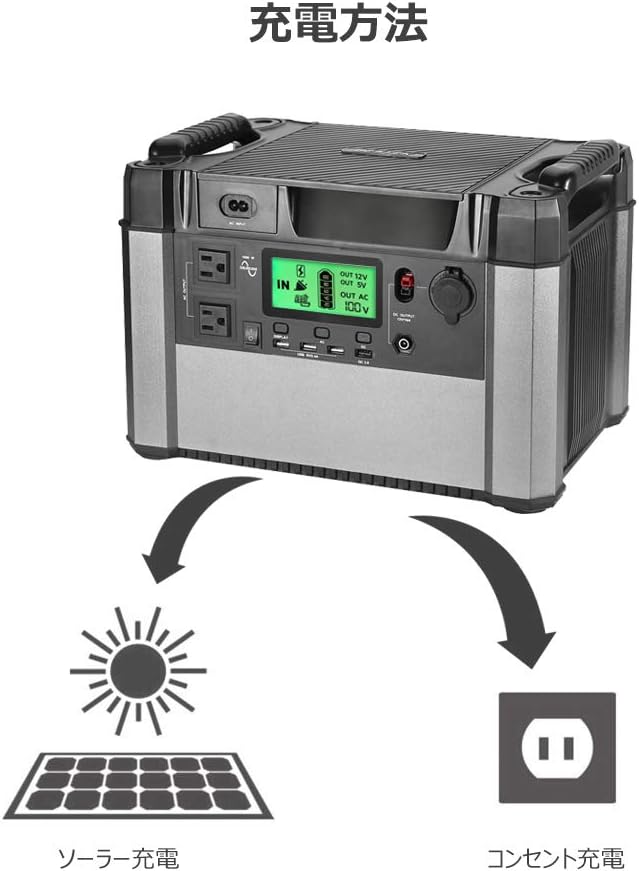
Image: Illustration depicting the two charging methods for the power station: solar charging via a solar panel and wall outlet charging via an AC adapter.
8. Device Compatibility and Estimated Run Times
The BESTEK Portable Power Station is compatible with a wide range of electronic devices. The following are estimated run times for common devices. Actual run times may vary based on device model, power consumption, and usage conditions.
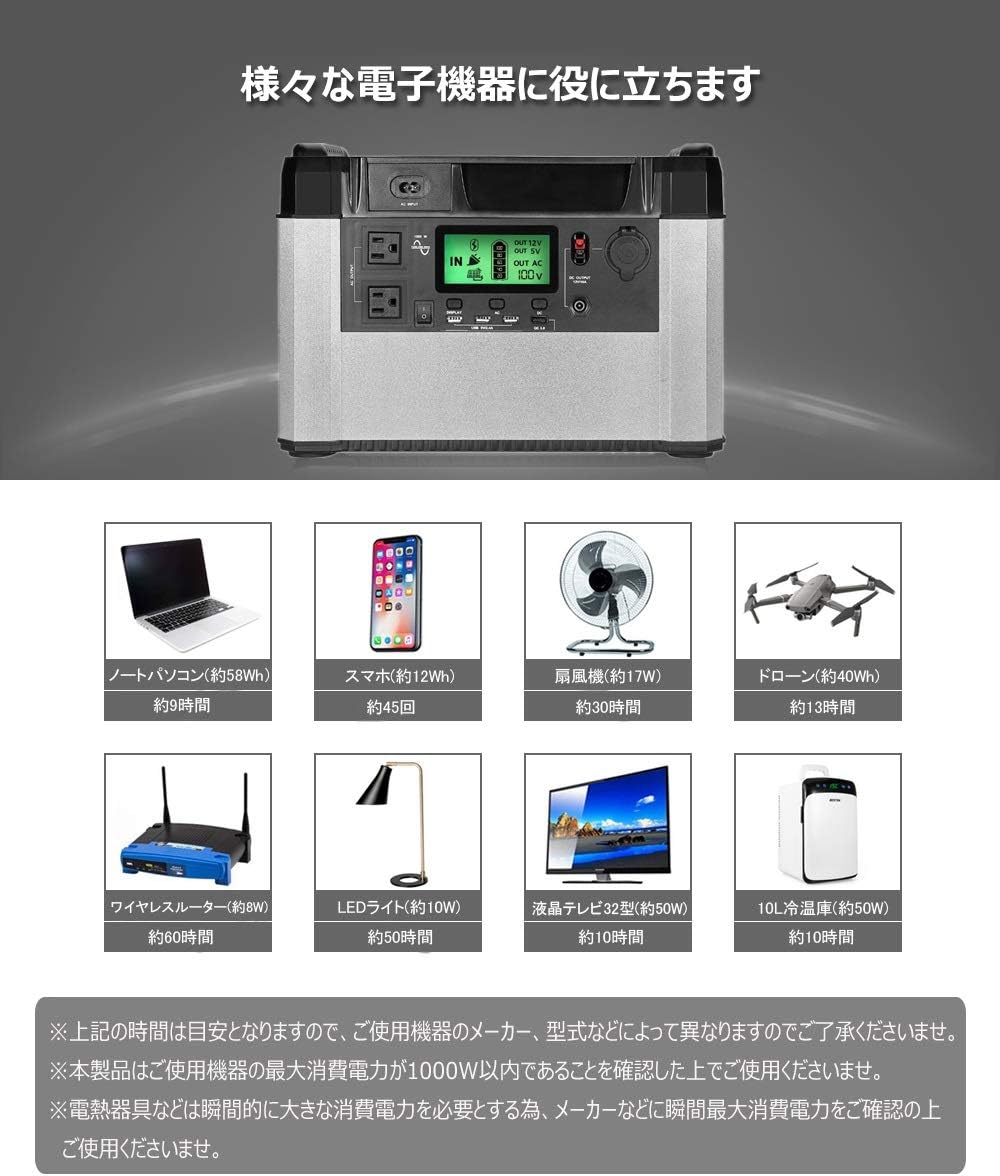
Laptop (approx. 58Wh)
lebih kurang 9 jam
Smartphone (approx. 12Wh)
Approx. 45 charges
Kipas (lebih kurang 17W)
lebih kurang 30 jam
Drone (approx. 40Wh)
lebih kurang 13 jam
Wireless Router (approx. 8W)
lebih kurang 60 jam
LED Light (approx. 10W)
lebih kurang 50 jam
LCD TV (approx. 50W)
lebih kurang 10 jam
10L Refrigerator (approx. 50W)
lebih kurang 10 jam
Image: Visual representation of various electronic devices (laptop, smartphone, fan, drone, wireless router, LED light, LCD TV, 10L refrigerator) and their estimated usage times with the power station.
Note: The above figures are estimates. Please confirm that the maximum power consumption of your device is within 1000W before use. Devices like electric kettles or microwave ovens require significant instantaneous power; please confirm their maximum power consumption with the manufacturer before connecting.
9. Penyelenggaraan
Proper maintenance ensures the longevity and reliability of your power station:
- Storan: Simpan unit di tempat yang sejuk dan kering jauh dari cahaya matahari langsung dan suhu yang melampau.
- Pengecasan Berkala: For optimal battery health, fully charge the power station at least once every 3-6 months, even if not in use. This prevents deep discharge and extends battery life.
- Pembersihan: Gunakan kain kering dan lembut untuk membersihkan bahagian luar unit. Jangan gunakan pembersih cecair atau rendam unit di dalam air.
- Pemeriksaan: Periodically check the unit and cables for any signs of damage. Do not use if damaged.
10. Penyelesaian masalah
If you encounter issues with your power station, refer to the following common troubleshooting steps:
- Unit Tidak Dihidupkan:
- Ensure the battery is charged. Connect to the AC adapter and attempt to charge.
- Tekan dan tahan butang kuasa selama beberapa saat.
- Tiada Output AC:
- Ensure the AC power switch is pressed and the AC indicator is lit on the LCD screen.
- Check if the connected device's power consumption exceeds 1000W. Disconnect high-power devices.
- If the unit has been idle with a low load for an extended period (approx. 90 minutes), the low-load protection may have activated. Turn the AC output off and then on again.
- Check for short circuits in the connected device or cable.
- If the unit feels excessively hot, over-temperature protection may have activated. Allow the unit to cool down in a well-ventilated area.
- No USB/DC Output:
- Pastikan unit utama dihidupkan.
- Check the connected device and cable for faults.
- Pengecasan perlahan:
- When charging via solar panel, ensure the panel is in direct sunlight and not obstructed.
- Verify the solar panel's output matches the power station's input requirements.
- AC charging speed is fixed; a full charge can take up to a day.
Jika masalah berterusan selepas mencuba langkah ini, sila hubungi sokongan pelanggan.
11. Spesifikasi
| Parameter | Nilai |
|---|---|
| Jenama | BESTEK |
| Model | BESTEK 1000W Portable Power Station (B07Y1RL4RC) |
| Kapasiti Bateri | 180000 mAh (648 Wj) |
| Max AC Output | 1000W (Gelombang Sinus Tulen) |
| Vol. ACtage | 100 Volt |
| Jenis Bateri | Litium Ion |
| Keluaran DC | 12V/10A, Cigarette Socket |
| Output USB | USB Type A, USB Type C (QC3.0) |
| Berat Produk | 14.4 Kilogram |
| Dimensi Pakej | 49 x 38.5 x 35.5 cm |
Image: Diagram showing the dimensions of the power station: 366mm (length), 257mm (width), and 257mm (height).
12. Waranti dan Sokongan
This BESTEK Portable Power Station comes with a one-year product warranty dari tarikh pembelian. Sila simpan bukti pembelian anda untuk tuntutan waranti.
The warranty covers defects in materials and workmanship under normal use. It does not cover damage caused by misuse, accidents, unauthorized modifications, or natural disasters.
For technical support, warranty claims, or any inquiries regarding your product, please contact BESTEK customer service through the retailer where you purchased the product or refer to the official BESTEK webtapak untuk maklumat hubungan.
Image: Text indicating a one-year product warranty period.
13. Senario Penggunaan
The BESTEK Portable Power Station is versatile and ideal for various applications, including:
- Aktiviti Luar: Enjoy worry-free outdoor activities like camping, car camping, and road trips without concerns about power outages.
- Persediaan Kecemasan: An essential item for disaster prevention, providing a reliable power source during blackouts or emergencies.
- Sandaran Rumah: Can power essential devices during unexpected power interruptions at home.


Image: Left: Various outdoor scenes including camping and car camping, showing the power station in use. Right: Images depicting disaster scenarios like hurricanes, lightning storms, and earthquakes, with the power station providing emergency lighting.


