1. Pengenalan
This manual provides detailed instructions for the operation and maintenance of your Groov-e Light Curve Touch Control FM Radio Alarm Clock. Please read this manual thoroughly before using the product to ensure proper function and safety.
The Groov-e Light Curve is a versatile light alarm clock featuring an FM radio, multiple alarm sounds, and light simulation functions for both sunrise and sunset. It is designed to provide a natural and gentle wake-up experience and a relaxing environment for sleep.
2. Maklumat Keselamatan
- Jangan dedahkan peranti kepada air atau kelembapan berlebihan.
- Elakkan suhu yang melampau.
- Jangan buka atau cuba membaiki peranti itu sendiri. Rujuk kepada kakitangan perkhidmatan yang berkelayakan.
- Gunakan hanya penyesuai kuasa yang disediakan.
- Jauhkan daripada kanak-kanak.
- Bersihkan peranti dengan kain lembut dan kering. Jangan gunakan pembersih yang kasar.
3. Kandungan Pakej
Sila semak pakej untuk item berikut:
- Groov-e Light Curve Alarm Clock Unit
- Penyesuai Kuasa
- Manual Pengguna (dokumen ini)

Figure 3.1: Groov-e Light Curve unit with included power adapter and cable.
4. Produk Lebihview
Familiarize yourself with the various parts and controls of your Groov-e Light Curve alarm clock.
4.1 Depan View
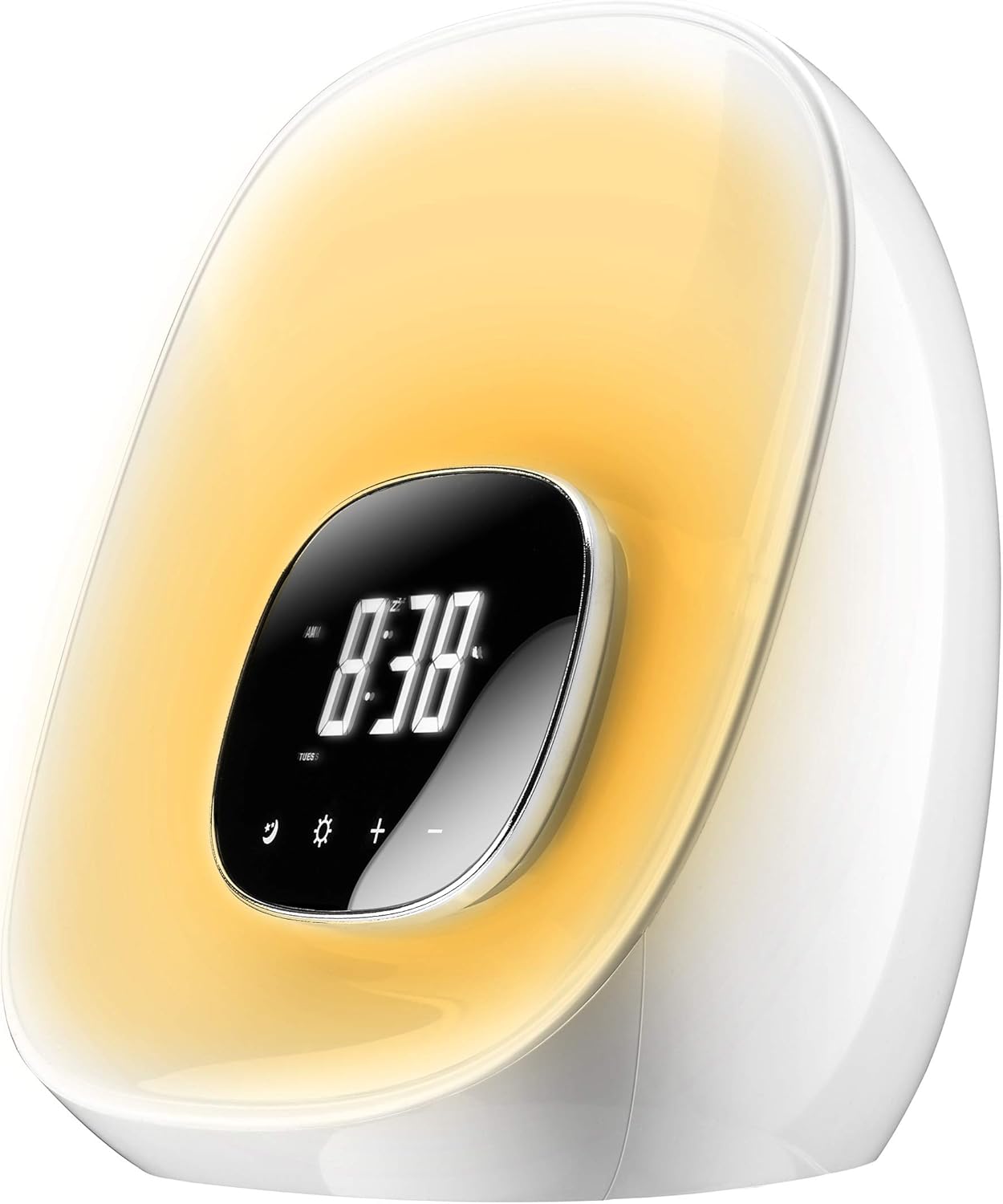
Rajah 4.1: Depan view of the Groov-e Light Curve.
- A. Paparan Digital: Menunjukkan masa, status penggera dan penunjuk lain.
- B. Touch Controls: Icons for various functions (e.g., alarm, light, brightness, volume).
- C. Light Panel: Emits light for sunrise/sunset simulation and mood lighting.
4.2 Atas View

Rajah 4.2: Atas view of the Groov-e Light Curve with control buttons.
- D. Playback Controls: Buttons for radio tuning, volume, and alarm settings.
- E. Snooze/Sleep Button: Activates snooze or sleep function.
- F. Speaker Grille: Untuk output audio.
4.3 Belakang View

Rajah 4.3: Belakang view of the Groov-e Light Curve.
- G. DC 12V/1A Power Input: Sambungkan penyesuai kuasa di sini.
- H. Rear Speaker: Additional speaker for audio output.
5. Persediaan
- Sambungan Kuasa: Connect the provided power adapter to the DC 12V/1A input port on the back of the unit (G) and plug it into a wall outlet. The display will light up.
- Tetapan Masa Awal:
- Tekan ke Masa Ditetapkan button (usually indicated by a clock icon) to enter time setting mode.
- Gunakan +/- buttons to adjust the hour. Press the Masa Ditetapkan button again to confirm and move to minutes.
- Gunakan +/- buttons to adjust the minutes. Press the Masa Ditetapkan button one more time to confirm and exit.
- Bateri Sandaran: The device has a backup battery function that maintains timing for up to 3 months in case of power failure, though the clock display will not be active during an outage.
6. Arahan Operasi
6.1 Fungsi Penggera
The Groov-e Light Curve offers a unique wake-up experience with sunrise simulation and various alarm sounds.
- Menetapkan penggera:
- Tekan ke Set Penggera button (usually indicated by a bell icon) to enter alarm setting mode.
- Gunakan +/- buttons to adjust the alarm hour. Press Set Penggera sekali lagi untuk mengesahkan dan beralih ke minit.
- Gunakan +/- buttons to adjust the alarm minutes. Press Set Penggera sekali lagi untuk mengesahkan.
- Wake-up Light Period: Select the duration for the wake-up light to start before the alarm time (OFF/10/20/30 minutes). This is displayed as "0:10/0:20/0:30". Use +/- untuk memilih.
- Pemilihan Bunyi Penggera: Choose from 8 alarm sounds (1-6 natural sounds, 7 beep, 8 FM radio). Use +/- untuk memilih.
- Mod Penggera: Select "wake-up light + alarm" or "wake-up light only".
- Tekan Set Penggera one last time to save and activate the alarm.
- Simulasi Matahari Terbit: The light will gradually brighten through ten levels, mimicking a sunrise, reaching its brightest point at the set alarm time.
- Fungsi Tunda: Apabila penggera berbunyi, tekan Tunda button (E) to activate a 10-minute snooze. The alarm will sound again after 10 minutes. During snooze, other functions are paused.
- Menghentikan Penggera: To turn off the alarm for the day, press any button other than the Snooze button. The alarm will sound for 1 hour if not turned off.
- Melaraskan Kelantangan Penggera: During the alarm, the volume gradually increases. You can adjust the maximum volume using the volume controls.
6.2 Fungsi Lampu
The device features versatile lighting options for various moods and purposes.
- Adjusting Brightness (White Light):
- When no alarm or wake-up light is active, briefly press the Ikon Matahari (light function button).
- Gunakan +/- buttons to cycle through 10 levels of brightness.
- Pencahayaan Suasana RGB:
- Tekan lama Ikon Matahari to activate the RGB mood light cycle. The light will cycle through different colors.
- Tekan sebentar Ikon Matahari again to pause the cycle on the current color.
- Gunakan +/- buttons to manually select your preferred color from the available options.
- Sunset Simulation (Sleep Function):
- Tekan ke tidur button (often combined with Snooze or a moon icon).
- Select the desired sleep duration (OFF/10/20/30 minutes). The light will slowly dim over this period and then turn off, simulating a sunset.

Figure 6.1: The Groov-e Light Curve offers a range of mood lighting colors.
6.3 Radio FM
The built-in FM radio allows you to listen to your favorite stations.
- Turning On/Off Radio: Tekan ke Radio button (often indicated by a radio icon or FM).
- Stesen Penalaan:
- Gunakan Maju/Mundur buttons (D) to manually tune to a station.
- Tekan lama Maju/Mundur butang untuk mengimbas automatik stesen seterusnya yang tersedia.
- Melaraskan Kelantangan: Gunakan Jilid +/- buttons (D) to adjust the radio volume.
7. Penyelenggaraan
- Pembersihan: Wipe the surface of the device with a soft, dry, lint-free cloth. Do not use liquid or aerosol cleaners.
- Storan: Jika menyimpan peranti untuk tempoh yang lama, putuskan sambungannya daripada kuasa dan simpan di tempat yang sejuk dan kering.
8. Penyelesaian masalah
| Masalah | Kemungkinan Punca | Penyelesaian |
|---|---|---|
| Peranti tidak dihidupkan. | Not connected to power or power outlet is faulty. | Ensure the power adapter is securely connected and the outlet is working. |
| Penggera tidak berbunyi. | Alarm not set, alarm volume too low, or alarm mode incorrect. | Verify alarm settings, ensure alarm is enabled, and check volume. |
| Light does not brighten/dim. | Light function not activated or incorrect mode. | Ensure sunrise/sunset simulation is enabled or adjust brightness manually. |
| Penerimaan radio kurang baik. | Isyarat atau gangguan yang lemah. | Adjust the position of the device or try auto-scanning for stronger signals. |
| Buttons are unresponsive during alarm. | This is normal behavior during the alarm/wake-up process (except snooze). | Press the bell symbol to prevent light from brightening further, or press any other button to stop the alarm. |
9. Spesifikasi
| Ciri | Perincian |
|---|---|
| Jenama | Groov-e |
| Nombor Model | GV-CR01-WE |
| warna | putih |
| Dimensi Produk (L x W x H) | 40 x 20 x 20 cm (approx. 20.4L x 18H cm for main unit) |
| Berat badan | 910 gram |
| bahan | plastik |
| Ciri Khas | Snooze, Mood Light, Adjustable Brightness, Radio, Alarm, Illuminated |
| Jenis Paparan | digital |
| Sumber Kuasa | Battery Powered (backup) / Mains Powered (primary) |
| Bunyi Penggera | 8 types (6 natural, 1 beep, 1 FM radio) |
| Wake-up Light Levels | 10 tahap kecerahan |
10. Waranti dan Sokongan
Your Groov-e Light Curve alarm clock is covered by a standard return policy. For specific details regarding warranty coverage and returns, please refer to your point of purchase or the retailer's policy.
For technical support or further assistance, please contact Groov-e customer service or visit their official webtapak. Simpan resit pembelian anda sebagai bukti pembelian.
Sumber Dalam Talian:
- Groov-e Official Webtapak: www.groov-e.co.uk (Note: This is a general link, specific support pages may vary.)


