
QFX BT-41-FL
Manual Pengguna Pembesar Suara Bluetooth QFX BT-41-Flamingo
Model: BT-41-FL
1. Pengenalan
Terima kasih kerana membeliasing the QFX BT-41-Flamingo Bluetooth Speaker. This portable speaker offers high-quality audio streaming, True Wireless System (TWS) functionality for stereo sound, hands-free calling, and multiple playback options including Bluetooth, USB, TF card, and FM radio. Please read this manual carefully to ensure proper use and to maximize your enjoyment of the product.
2. Kandungan Pakej
Sila tandai kotak untuk item berikut:
- QFX BT-41-Flamingo Bluetooth Speaker
- Kabel Pengecas USB
- Kabel AUX
- Manual Pengguna (dokumen ini)
3. Produk Lebihview
Biasakan diri anda dengan komponen dan kawalan pembesar suara.

Rajah 3.1: Depan View - This image displays the front of the QFX BT-41-Flamingo speaker, highlighting its distinctive pink, yellow, green, and blue geometric pattern. The two circular speaker grilles are prominent on either side, and a handle is visible at the top.
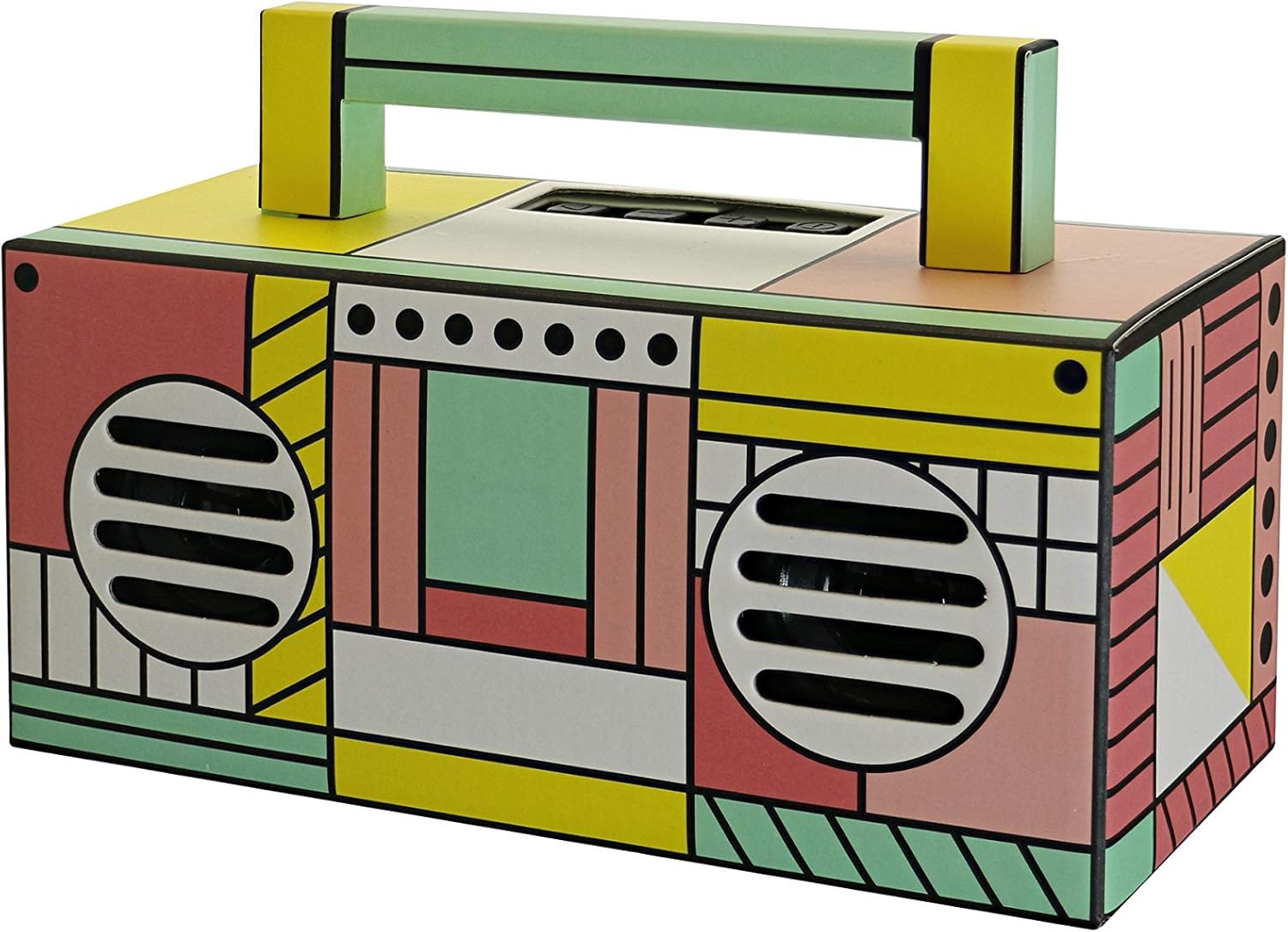
Rajah 3.2: Bahagian Atas Bersudut View - This image provides an angled view of the speaker from the top-front, revealing the control panel located on the top surface. The carry handle is also clearly visible, extending across the top.
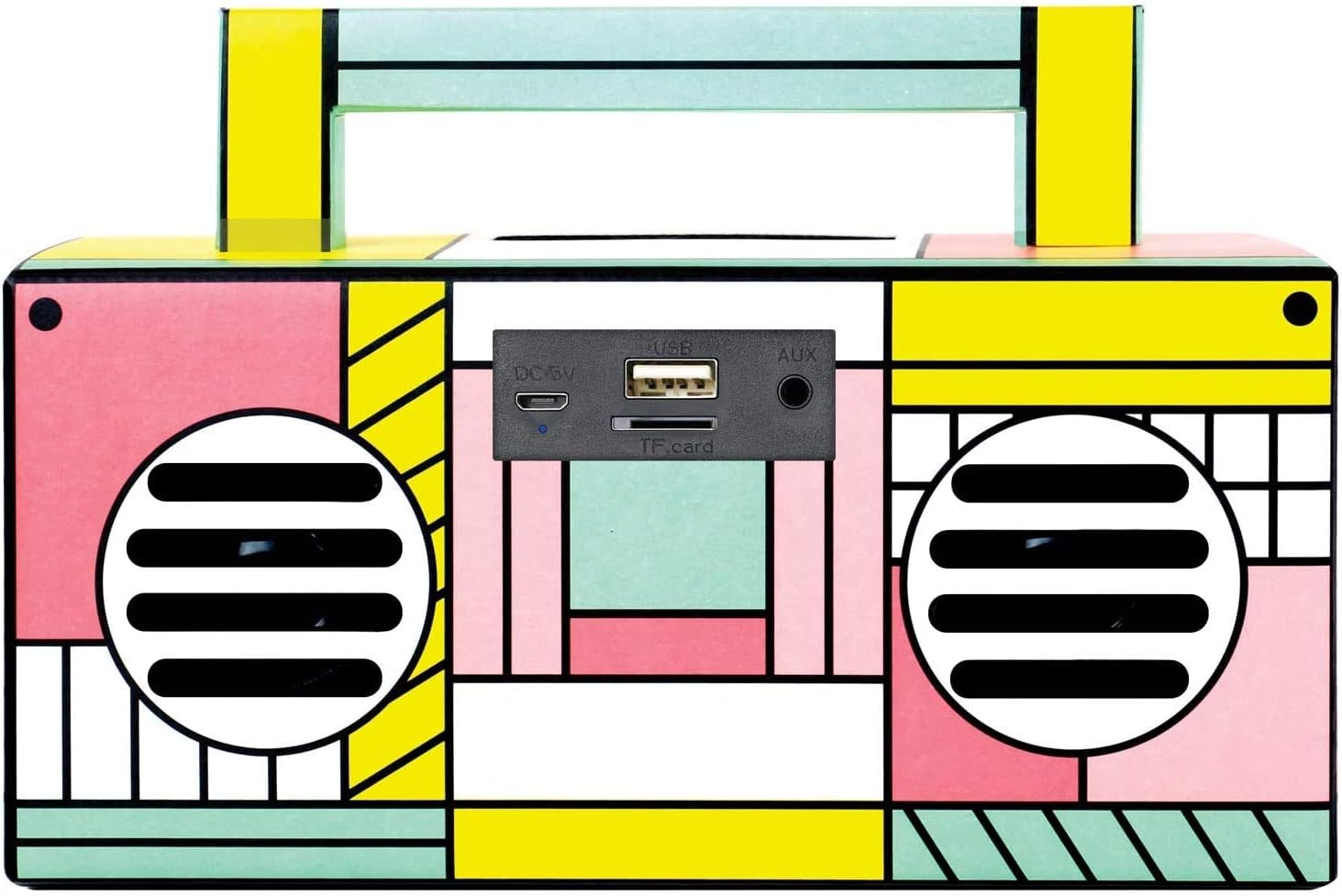
Figure 3.3: Rear Port Panel - This image focuses on the rear of the speaker, detailing the various input ports. From left to right, these include the DC 5V charging port, a USB port for media playback, a TF (Micro-SD) card slot, and an AUX input jack.
4. Persediaan
4.1 Mengecas Speaker
- Connect the supplied USB charging cable to the DC 5V port on the back of the speaker.
- Sambungkan hujung kabel USB yang satu lagi ke penyesuai kuasa USB (tidak disertakan) atau port USB komputer.
- The charging indicator light will illuminate. Once fully charged, the light may change color or turn off, depending on the unit.
- A full charge provides several hours of playback.
4.2 Menghidupkan/Mematikan
- To power on, press and hold the Power button (usually located on the top panel) until the speaker activates.
- Untuk mematikan kuasa, tekan dan tahan butang Kuasa sekali lagi sehingga pembesar suara dimatikan.
5. Arahan Operasi
5.1 Berpasangan Bluetooth
- Hidupkan pembesar suara. Ia akan memasuki mod gandingan Bluetooth secara automatik, ditunjukkan oleh lampu LED berkelip dan gesaan yang boleh didengar.
- Dayakan Bluetooth pada telefon pintar anda atau peranti lain yang didayakan Bluetooth.
- Cari untuk available Bluetooth devices. Select "QFX BT-41" from the list.
- Sebaik sahaja dipasangkan, pembesar suara akan mengeluarkan pengesahan yang boleh didengar dan lampu LED akan berhenti berkelip.
- Anda kini boleh memainkan audio daripada peranti anda melalui pembesar suara.
5.2 Penggandingan Sistem Tanpa Wayar Sejati (TWS)
TWS allows two BT-41 speakers to connect wirelessly for a stereo sound experience. You will need two QFX BT-41 speakers for this feature.
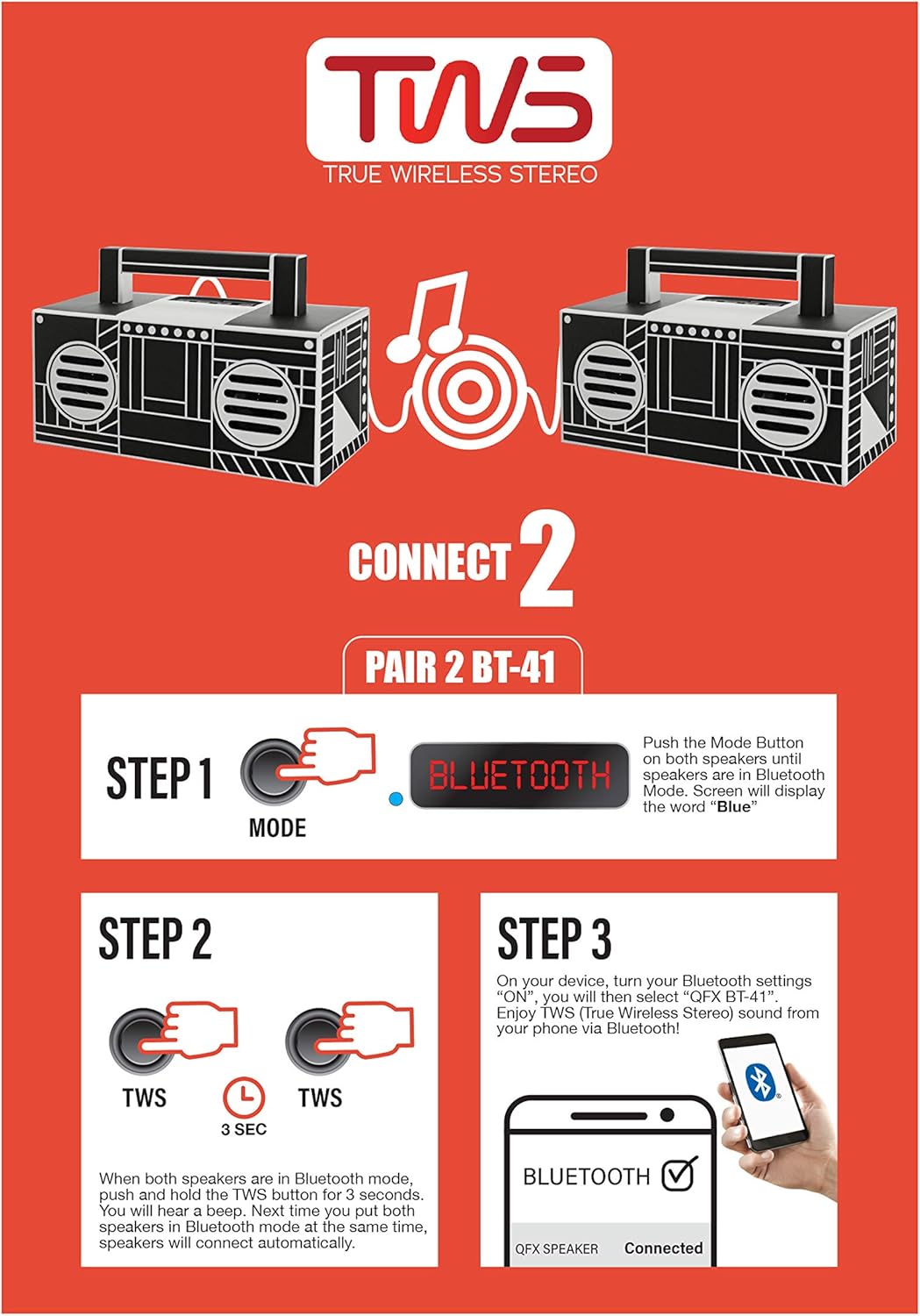
Figure 5.1: TWS Pairing Guide - This diagram visually explains the three steps to connect two BT-41 speakers in True Wireless Stereo mode. It shows pressing the Mode button to enter Bluetooth, then holding the TWS button on both speakers, and finally connecting via a smartphone's Bluetooth settings.
- Langkah 1: Power on both BT-41 speakers. Press the Mod button on each speaker until they are both in Bluetooth mode. The display on each speaker should show "Blue".
- Langkah 2: With both speakers in Bluetooth mode, press and hold the TWS butang hidup satu of the speakers for approximately 3 seconds. You will hear a beep. Then, press and hold the TWS butang pada kedua speaker for 3 seconds. The speakers will automatically connect to each other.
- Langkah 3: On your Bluetooth-enabled device, go to your Bluetooth settings. Cari untuk and select "QFX BT-41". Once connected, you will enjoy True Wireless Stereo sound from your device.
5.3 Main Semula Kad USB/TF
- Insert a USB flash drive or TF (Micro-SD) card into the corresponding port on the speaker.
- Pembesar suara akan mengesan peranti storan secara automatik dan mula memainkan audio files.
- Gunakan kawalan main balik (Main/Jeda, Trek Seterusnya/Sebelumnya) pada pembesar suara untuk mengurus muzik anda.
5.4 Radio FM
- Tekan ke Mod butang untuk bertukar kepada mod radio FM.
- Tekan dan tahan butang Main/Jeda untuk mengimbas dan menyimpan stesen FM yang tersedia secara automatik.
- Gunakan butang Trek Seterusnya/Sebelumnya untuk menavigasi antara stesen yang disimpan.
5.5 Input AUX
- Connect one end of the supplied AUX cable to the AUX input port on the speaker.
- Sambungkan hujung kabel AUX yang satu lagi ke bicu fon kepala atau output audio peranti audio luaran anda.
- Tekan ke Mod button to switch to AUX input mode.
- Kawal main balik dan kelantangan daripada peranti luaran anda.
5.6 Panggilan Bebas Tangan
Apabila disambungkan melalui Bluetooth ke telefon pintar:
- To answer an incoming call, press the Play/Pause button.
- Untuk menamatkan panggilan, tekan butang Main/Jeda sekali lagi.
- Mikrofon terbina dalam membolehkan komunikasi yang jelas.
6. Penyelenggaraan
6.1 Pembersihan
- Pastikan pembesar suara dimatikan dan diputuskan sambungannya daripada sebarang sumber kuasa sebelum membersihkannya.
- Use a soft, dry, lint-free cloth to wipe the exterior surfaces of the speaker.
- Jangan gunakan pembersih, lilin atau pelarut yang melelas kerana ia boleh merosakkan kemasan.
- Elakkan mendapatkan kelembapan ke dalam mana-mana bukaan.
6.2 Penyimpanan
- Simpan pembesar suara di tempat yang sejuk dan kering jauh dari cahaya matahari langsung dan suhu yang melampau.
- If storing for an extended period, charge the battery periodically (e.g., every 3-6 months) to maintain battery health.
7. Penyelesaian masalah
Jika anda menghadapi masalah dengan pembesar suara anda, rujuk masalah dan penyelesaian biasa berikut:
- Tiada Kuasa:
Ensure the speaker is fully charged. Connect the USB charging cable and allow it to charge for at least 30 minutes before attempting to power on again. - Tiada Bunyi:
Check the volume level on both the speaker and your connected device. Ensure the correct input mode (Bluetooth, AUX, USB/TF, FM) is selected. If using Bluetooth, ensure the device is properly paired. - Bluetooth Tidak Bersambung:
Make sure the speaker is in Bluetooth pairing mode. Turn off Bluetooth on your device and then turn it back on. Forget "QFX BT-41" from your device's Bluetooth list and attempt to re-pair. Ensure no other devices are currently connected to the speaker. - TWS Pairing Fails:
Ensure both speakers are in Bluetooth mode before attempting TWS pairing. Make sure you are pressing and holding the TWS button on both speakers as instructed. Try powering both speakers off and on again, then repeat the TWS pairing steps. - Penerimaan FM yang lemah:
Relocate the speaker to an area with better signal. Extend the AUX cable (if connected) as it can sometimes act as an antenna.
8. Spesifikasi
| Ciri | Spesifikasi |
|---|---|
| Nama Model | Qfx |
| Nombor Model Item | BT-41-FL |
| Jenis Pembesar Suara | Multimedia |
| Ciri Khas | Radio |
| Penggunaan yang Disyorkan | Muzik |
| Peranti Serasi | Telefon pintar |
| Diameter Subwoofer | 2 Inci |
| Konfigurasi Saluran Bunyi Sekeliling | 2.0 |
| warna | Flamingo merah jambu |
| Dimensi Produk (D x W x H) | 7.83" x 3.5" x 3.66" |
| Berat Barang | 1.4 paun (kira-kira 0.63 kg) |
| Kalis air | Tidak |
| Bilangan Item | 1 |
| Saiz Pembesar Suara | 2 Inci |
| Sumber Kuasa | Dikuasakan Bateri |
| Jenis Bateri | 1 bateri Lithium Ion (termasuk) |
| UPC | 606540039236 |
| Pengeluar | Qfx |
| Kuasa Output Maksimum Pembesar Suara | 10 Watt |
| Teknologi Ketersambungan | Bluetooth, USB |
| Mod Keluaran Audio | Stereo |
| Jenis Pemasangan | Berdiri Bebas, Pasang Palam |
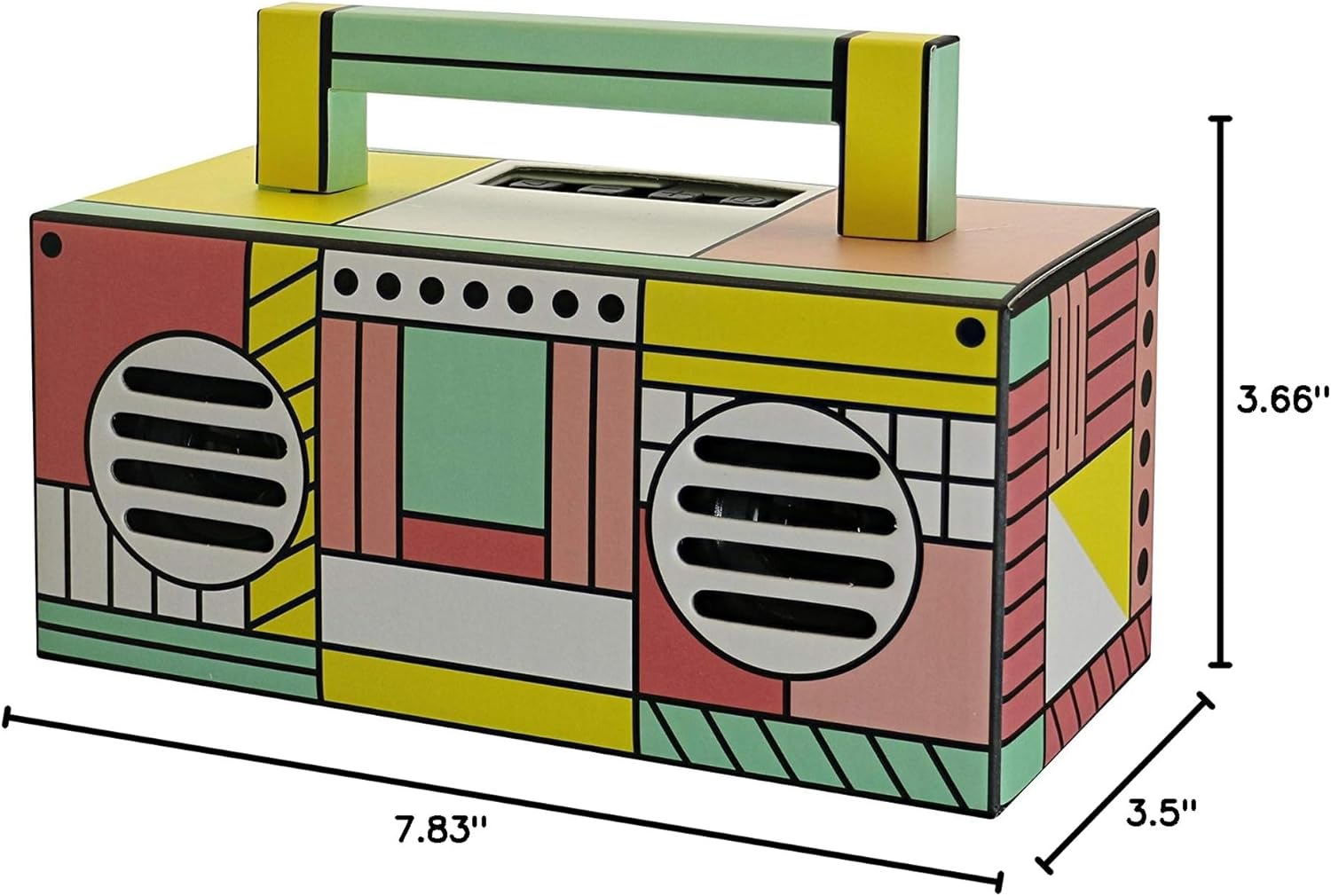
Rajah 8.1: Dimensi Produk - This image provides a clear visual representation of the speaker's physical dimensions, indicating a depth of 7.83 inches, a width of 3.5 inches, and a height of 3.66 inches.
9. Waranti dan Sokongan
For warranty information and customer support, please refer to the warranty card included with your product or visit the official QFX webtapak. Simpan resit pembelian anda sebagai bukti pembelian untuk sebarang tuntutan waranti.