pengenalan
Welcome to the user manual for your CHACON 54671 Mini Remote Control Smart Plugs. This manual provides essential information for the safe and efficient operation of your device. Please read it thoroughly before use and retain it for future reference.
Kandungan Pakej
- 4 x CHACON Mini Remote Control Plugs
- 1 x Alat Kawalan Jauh (dengan 1 bateri CR2032 disertakan)
- 1 x Manual Pengguna (dokumen ini)
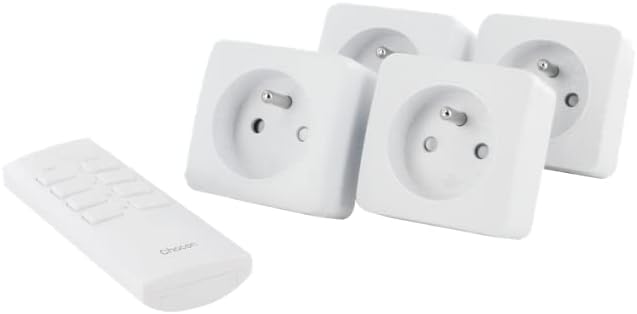
Image: The CHACON set includes four mini remote control plugs and one remote control unit.
Maklumat Keselamatan Penting
- Untuk kegunaan dalaman sahaja.
- Jangan melebihi beban maksimum 2300W.
- Ensure the plugs are fully inserted into the wall socket.
- Do not immerse in water or expose to excessive moisture.
- Jauhkan daripada kanak-kanak.
- Jangan cuba membuka atau membaiki peranti.
Persediaan dan Berpasangan
Your CHACON Mini Remote Control Plugs are pre-paired from the factory. If re-pairing is necessary or if you wish to change the assigned channel, follow these steps:
- Plug the mini remote control plug into a wall socket. The LED indicator on the plug will flash.
- Within 6 seconds of plugging in, press the desired "ON" button (1, 2, 3, or 4) on the remote control.
- The LED indicator on the plug will stop flashing and remain lit for a moment, then turn off, indicating successful pairing.
- Repeat for each plug and desired remote control channel.

Image: A single CHACON mini plug shown next to the remote control, illustrating the components involved in the pairing process.
Operasi
The remote control allows you to switch connected devices ON and OFF wirelessly.
Menggunakan Alat Kawalan Jauh
- Each pair of "ON" and "OFF" buttons (1-4) corresponds to a specific plug.
- To turn a device ON: Press the corresponding "ON" button (e.g., "1 ON").
- To turn a device OFF: Press the corresponding "OFF" button (e.g., "1 OFF").
Manual Override
Each plug has a manual button on its side. Pressing this button will toggle the power state (ON/OFF) of the connected device.

Image: Close-up of the CHACON remote control, showing the numbered ON/OFF buttons.
Penyelenggaraan
Pembersihan
Wipe the plugs and remote control with a dry, soft cloth. Do not use abrasive cleaners or solvents.
Penggantian Bateri Kawalan Jauh
Alat kawalan jauh menggunakan satu bateri CR2032.
- Cari petak bateri di belakang alat kawalan jauh.
- Buka petak menggunakan pemutar skru kecil atau syiling.
- Remove the old battery and insert a new CR2032 battery, ensuring correct polarity (+/-).
- Tutup petak bateri dengan selamat.
Menyelesaikan masalah
| Masalah | Kemungkinan Punca | Penyelesaian |
|---|---|---|
| Plug does not respond to remote. | Tidak dipasangkan dengan betul. | Re-pair the plug with the remote control (see Setup section). |
| Plug does not respond to remote. | Remote control battery is low or dead. | Gantikan bateri CR2032 dalam alat kawalan jauh. |
| Plug does not respond to remote. | Obstruction or distance. | Ensure the remote is within the 30m range and there are no major obstructions. |
| Peranti yang disambungkan ke palam tidak dihidupkan. | Device is faulty or switched off manually. | Check the device's power switch and ensure it is functioning correctly. |
| Plug LED does not light up. | Tiada kuasa ke soket dinding. | Check the wall socket with another device. |

Image: A CHACON mini plug inserted into a wall socket, demonstrating typical installation.
Spesifikasi Teknikal
- Jenama: CHACON
- Nombor Model: 54671
- warna: putih
- Dimensi (L x W x H): 7 x 6 x 6 cm
- Berat: 470 g (total for set)
- Bahan: plastik
- Frekuensi radio: 433.92 MHz
- Jarak penghantaran: Sehingga 30 meter (padang terbuka)
- Kuasa Maksimum: 2300W
- Sumber Kuasa: Cable Electric (for plugs), 1 x CR2032 battery (for remote)
- Ciri Khas: Outlet Kawalan Jauh
Waranti dan Sokongan
For warranty information or technical support, please refer to the contact details provided by your retailer or visit the official CHACON webtapak. Simpan bukti pembelian anda untuk tuntutan waranti.


