1. Produk Lebihview
The PERLESMITH Universal TV Stand (Model PSTVS11) is a height-adjustable table top TV base designed to securely hold most 32-82 inch LCD, LED, OLED, and 4K flat screen televisions. It features a tempered glass base for stability and integrated cable management to maintain a tidy appearance. This stand offers a versatile solution for placing your TV on a surface without requiring wall mounting.

Image: The PERLESMITH Universal TV Stand supporting a large television on a media console.
2. Kandungan Pakej
Sebelum memulakan pemasangan, sila sahkan bahawa semua komponen yang disenaraikan di bawah ada dan tidak rosak. Jika mana-mana bahagian yang hilang atau rosak, sila hubungi sokongan pelanggan.
- TV Stand Base (Tempered Glass)
- Tiang Sokongan
- Pendakap Pemasangan TV
- Mounting Hardware Kit (various screws, washers, spacers for TV attachment)
- Alat Pemasangan (Sepana Allen, sepana kecil)
- Manual Arahan
3. Persediaan dan Pemasangan
This TV stand features a one-piece design for simplified assembly. Follow these steps for quick and easy installation, typically completed within 15 minutes.
3.1 Memasang Tiang Sokongan pada Pangkalan
- Letakkan tapak kaca terbaja dengan berhati-hati pada permukaan yang lembut dan bersih untuk mengelakkan calar.
- Align the bottom of the support pillar with the designated holes on the tempered glass base.
- Secure the pillar to the base using the provided screws and the appropriate tools. Ensure all screws are tightened firmly.
3.2 Attaching the TV Mounting Bracket to the TV
- Identify the VESA mounting holes on the back of your television.
- Select the correct size screws, washers, and spacers from the hardware kit that fit your TV's VESA pattern.
- Attach the vertical mounting arms to the back of your TV, ensuring they are securely fastened. The arms should be positioned to allow for height adjustment later.
3.3 Mounting the TV to the Stand
- With assistance, carefully lift the TV and hook the attached mounting arms onto the support pillar's bracket.
- Ensure the TV is level and securely seated on the stand.
- Pasangkan sebarang kunci keselamatan atau skru untuk mengelakkan tercabut secara tidak sengaja.

Image: Visual guide for the one-piece installation process and integrated cable management system.
Video: Official PERLESMITH video demonstrating the assembly of the Universal TV Stand (PSTVS11).
4. Arahan Operasi
4.1 Pelarasan Ketinggian
The TV stand offers 9 mounting height options to achieve an optimal viewing experience. To adjust the height:
- With assistance, carefully lift the TV slightly to disengage the mounting arms from their current position on the support pillar.
- Slide the TV up or down to the desired height setting.
- Ensure the mounting arms are securely re-engaged in the new position and any safety locks are fastened.
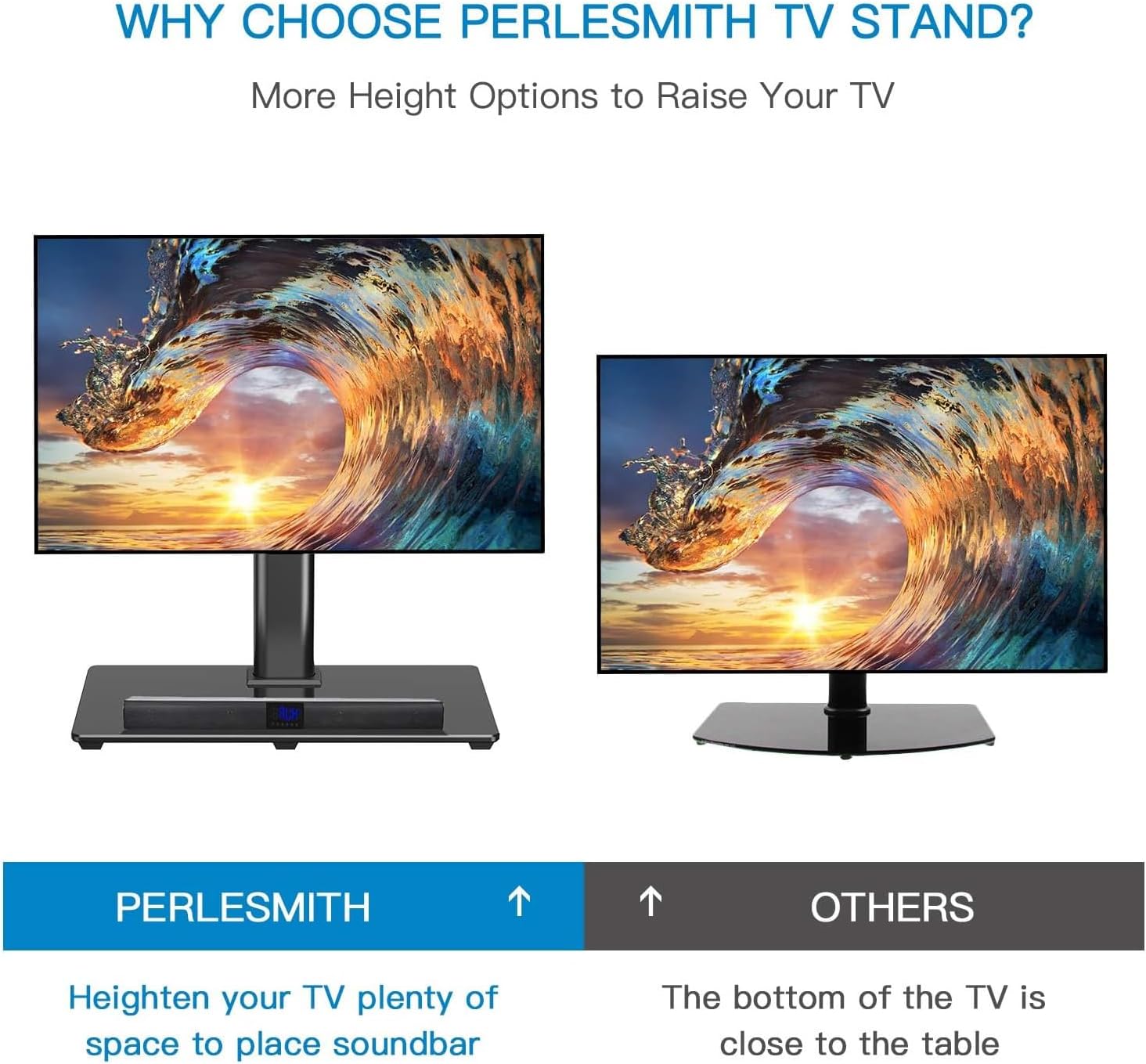
Image: Illustration of the multiple height adjustment options available for the TV mounting plate and hooks.

Image: Visual comparison demonstrating how the adjustable height provides ample space for a soundbar or other accessories beneath the TV.
4.2 Swivel Functionality
The stand allows for a swivel of 30 degrees to the right or left, providing flexible viewing angles. Gently rotate the television to the desired position.
Video: Official PERLESMITH video showcasing the swivel functionality of the TV stand.
4.3 Pengurusan Kabel
Utilize the integrated cable management clips along the back of the support pillar to keep wires neat, organized, and out of sight.

Imej: Jarak dekat view of the stand's design features, highlighting the cable management system, non-slip feet, and safety lock mechanism.
5. Penyelenggaraan
To ensure the longevity and optimal performance of your PERLESMITH TV stand, follow these maintenance guidelines:
- Pembersihan: Gunakan yang lembut, damp cloth to clean the tempered glass base and metal components. Avoid abrasive cleaners or harsh chemicals that may damage the finish.
- Pemeriksaan biasa: Periodically inspect all screws and connections to ensure they remain tight and secure. Retighten if necessary.
- Had Berat: Jangan melebihi kapasiti berat maksimum 99 paun (45 kg) untuk mengelakkan kerosakan atau ketidakstabilan.
6. Penyelesaian masalah
Jika anda menghadapi sebarang masalah dengan penyangga TV anda, sila rujuk penyelesaian biasa berikut:
- Ketidakstabilan: Ensure the stand is placed on a flat, level surface. Verify all assembly screws are securely tightened.
- TV Not Fitting: Double-check your TV's VESA mounting pattern against the stand's compatibility (100x100mm to 600x400mm). Ensure you are using the correct screws and spacers for your TV model.
- Bahagian yang hilang: If any parts were missing from the package, please contact PERLESMITH customer service immediately for assistance.
7. Spesifikasi
| Ciri | Spesifikasi |
|---|---|
| Nombor Model | PSTVS11 |
| Saiz TV yang Serasi | 32" - 82" |
| Kapasiti Beban Maksimum | 99 paun (45 kg) |
| Keserasian VESA | 100x100mm hingga 600x400mm |
| Dimensi Asas | 20.47" x 11.02" (Kaca Tempered) |
| Pelarasan Ketinggian | 9 options (approx. 14.76" to 21.46" from table to center of TV mounting plate) |
| Julat Putar | 30 degrees left/right |
| bahan | Keluli Aloi, Kaca Terbaja |
| warna | Hitam |

Image: Detailed dimensions and VESA compatibility range for the PERLESMITH Universal TV Stand.

Image: The tempered glass base, highlighting its dimensions of 20.47 inches by 11.02 inches for enhanced stability.
8. Waranti dan Sokongan
The PERLESMITH Universal TV Stand (Model PSTVS11) comes with a Waranti 3 Tahun, ensuring confidence in its value and performance.
For any questions, assistance, or warranty claims, please contact our US-based product support team. Refer to the product packaging or the official PERLESMITH webtapak untuk maklumat hubungan terkini.


