1. Pengenalan
The Maxell Bass 13 Wireless Headphones (Model B13-WHPS) are designed to provide a versatile audio experience. These headphones feature 40mm drivers for clear sound, an integrated microphone for communication, and comfortable ear pads for extended listening. They offer both wireless Bluetooth connectivity and a traditional 3.5mm wired option.
2. Apa yang ada di dalam Kotak
- Maxell Bass 13 Wireless Headphones
- Kabel Pengecas USB
- 3.5mm Audio Cable (if applicable, not explicitly listed but common for hybrid headphones)
- Manual Pengguna
3. Produk Lebihview
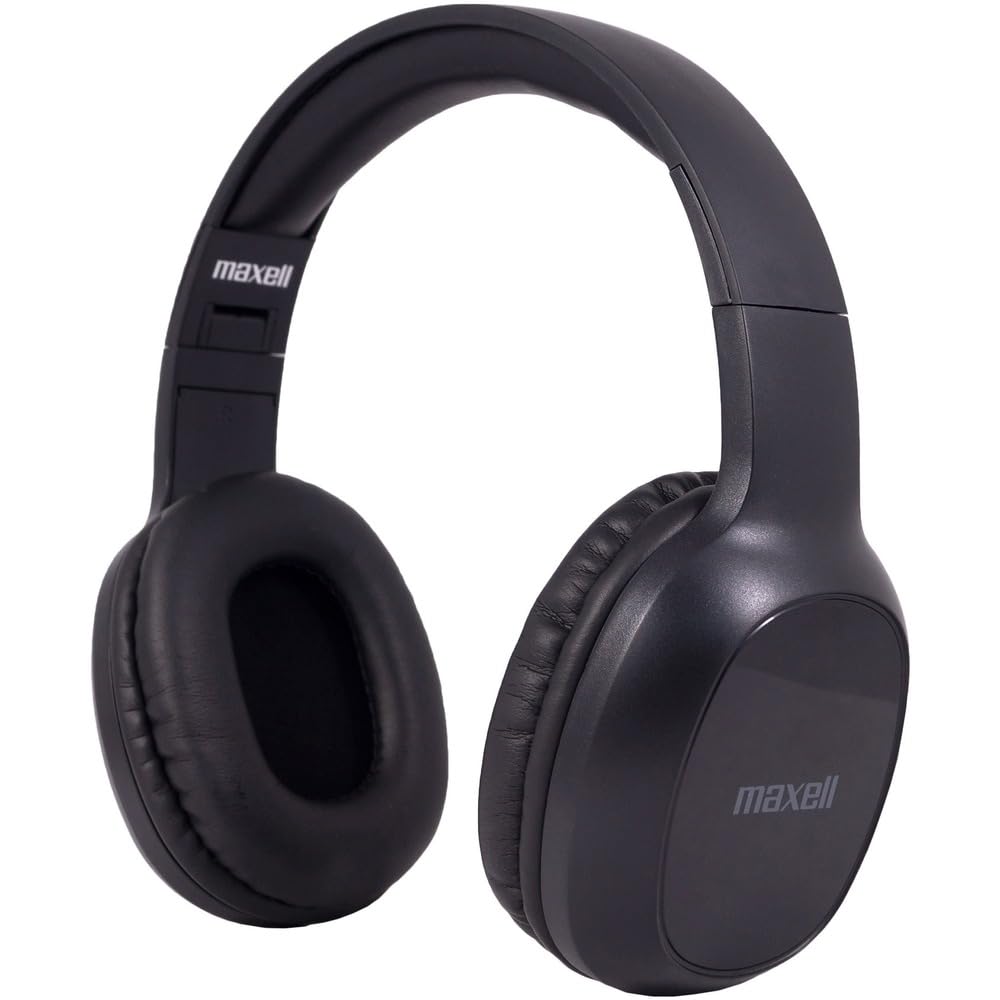
Figure 1: Maxell Bass 13 Wireless Headphones

Figure 2: Earcup Controls (Power, Volume, Play/Pause)
Ciri-ciri Utama:
- Pemacu Dinamik 40mm: Deliver clear and powerful audio performance.
- Mikrofon Bersepadu: Membolehkan panggilan bebas tangan.
- Noise-Isolating Earpads: Provide comfort and help reduce external distractions.
- Kesambungan Bluetooth 5.0: For stable wireless connection.
- Bicu Audio 3.5mm: Allows for wired connection to compatible devices.
- Destar boleh laras: Memastikan kesesuaian yang selesa untuk pelbagai saiz kepala.
- Hayat Bateri Sehingga 8 Jam: For extended listening and talk time.
4. Persediaan
4.1 Mengecas Fon Kepala

Figure 3: Connecting the USB Charging Cable
- Locate the charging port on the headphone earcup.
- Connect the small end of the provided USB charging cable to the headphone's charging port.
- Connect the larger end of the USB cable to a USB power source (e.g., computer USB port, USB wall adapter).
- The LED indicator on the headphones will illuminate to show charging status. It will typically turn off or change color when fully charged.
- A full charge provides up to 8 hours of continuous talk/play time.
4.2 Berpasangan Bluetooth
- Pastikan fon kepala dicas sepenuhnya.
- Press and hold the Power button on the headphone earcup until the LED indicator flashes blue and red, indicating pairing mode.
- Pada peranti anda (telefon pintar, tablet, komputer), pergi ke tetapan Bluetooth.
- Cari untuk available devices. Select "Maxell Bass 13" from the list.
- Once paired, the LED indicator will typically show a solid blue light or flash blue slowly.
- Jika digesa untuk kod laluan, masukkan "0000".
4.3 Wired Connection (3.5mm Audio Jack)

Figure 4: Connecting the 3.5mm Audio Cable
For devices without Bluetooth or when battery is low, you can use the 3.5mm audio cable:
- Palamkan satu hujung kabel audio 3.5mm ke dalam bicu input audio pada cuping telinga fon kepala.
- Palamkan hujung yang satu lagi ke dalam bicu output audio 3.5mm peranti anda.
- Fon kepala akan beroperasi dalam mod pasif dan fungsi Bluetooth akan dilumpuhkan.
5. Arahan Operasi
5.1 Hidupkan/Mati Kuasa
- Hidupkan kuasa: Tekan dan tahan butang Kuasa selama lebih kurang 3 saat sehingga penunjuk LED menyala.
- Matikan: Tekan dan tahan butang Kuasa selama lebih kurang 3-5 saat sehingga penunjuk LED padam.
5.2 Kawalan Kelantangan
- Tingkatkan Kelantangan: Tekan butang Kelantangan Naik (+).
- Kurangkan Kelantangan: Tekan butang Turun Kelantangan (-).
5.3 Main balik Muzik
- Main/Jeda: Tekan butang Pelbagai fungsi (selalunya butang Kuasa atau butang Main/Jeda khusus) sekali.
- Lagu Seterusnya: Press and hold the Volume Up (+) button (or double-press, refer to specific product button layout).
- Trek Sebelumnya: Press and hold the Volume Down (-) button (or double-press, refer to specific product button layout).
5.4 Pengurusan Panggilan
- Jawab/Tamatkan Panggilan: Tekan butang Pelbagai fungsi sekali.
- Tolak Panggilan: Tekan dan tahan butang Berbilang fungsi selama lebih kurang 2 saat.
- Dail Semula Nombor Terakhir: Tekan dua kali butang Berbilang fungsi.
6. Penyelenggaraan
6.1 Pembersihan
- Lap fon kepala dengan kain lembut, kering dan tidak berbulu.
- Jangan gunakan pembersih, pelarut atau semburan aerosol yang kasar.
- Elakkan mendapatkan kelembapan ke dalam mana-mana bukaan.
6.2 Penyimpanan

Figure 5: Headphones Folded for Storage
- Simpan fon kepala di tempat yang sejuk dan kering jauh dari suhu yang melampau.
- When not in use for extended periods, ensure the headphones are fully charged before storage to preserve battery health.
- The headphones feature a foldable design for compact storage and portability.
6.3 Penjagaan Bateri
- Elakkan menyahcas sepenuhnya bateri dengan kerap.
- Charge the headphones regularly, even if not used often.
- Do not expose the battery to excessive heat or direct sunlight.
7. Penyelesaian masalah
| Masalah | Kemungkinan Punca | Penyelesaian |
|---|---|---|
| Fon kepala tidak dihidupkan | Bateri lemah | Cas fon kepala sepenuhnya. |
| Tidak boleh berpasangan melalui Bluetooth | Fon kepala tiada dalam mod berpasangan; Bluetooth peranti dimatikan; Terlalu jauh dari peranti | Pastikan fon kepala berada dalam mod berpasangan (berkelip biru/merah). Hidupkan Bluetooth peranti. Alihkan fon kepala lebih dekat dengan peranti. |
| Tiada bunyi | Volume too low; Incorrect audio source; Headphones not connected | Increase headphone and device volume. Check if headphones are properly paired/connected. Verify audio output settings on your device. |
| Kualiti panggilan yang lemah | Weak Bluetooth signal; Microphone obstructed | Move closer to your device. Ensure microphone is not covered. |
8. Spesifikasi
| Ciri | Perincian |
|---|---|
| Nombor Model | B13-WHPS |
| Jenama | Maxell |
| Teknologi Ketersambungan | Bluetooth 5.0 |
| Saiz Pemacu Audio | 40 mm |
| Hayat Bateri | Up to 8 Hours (continuous talk/play time) |
| Jack Fon Kepala | Jack 3.5 mm |
| Ciri Kawalan Bunyi | Sound Isolation, Noise Cancelling |
| Impedans | 32 ohm |
| Sensitiviti | 100 dB |
| Respons Kekerapan | 20 Hz |
| Penempatan Telinga | Di Telinga |
| Faktor Bentuk | Atas Telinga |
| Dimensi Produk | 7.25 x 3 x 9 inci |
| Berat Barang | 8.4 auns |
| bahan | Electronic Components, Foam, Plastic, Wire |
| Peranti Serasi | Tablets, Laptops, Desktops, Portable Devices with 3.5mm Audio Jack |
9. Video Produk Rasmi
Video 1: Maxell Bass 13 Bluetooth Headphones Overview. This video provides a visual demonstration of the headphones' features and design.
10. Waranti dan Sokongan
Maxell products are designed for reliability and performance. For specific warranty information, please refer to the warranty card included with your purchase or visit the official Maxell website. For technical support or customer service inquiries, please contact Maxell customer support through their official channels.


