1. Pengenalan
Thank you for choosing the Kaidi KD-750 Bluetooth Headphones. This manual provides essential information for the proper setup, operation, and maintenance of your device. Please read it thoroughly before use to ensure optimal performance and longevity of your headphones.
2. Kandungan Pakej
Sahkan bahawa semua item terdapat dalam pakej anda:
- 1 x Kaidi KD-750 Bluetooth Headphones
- 1 x Kabel Pengecas USB
- 1 x Reinforced 3.5mm Audio Cable with Microphone (P2 Cable)
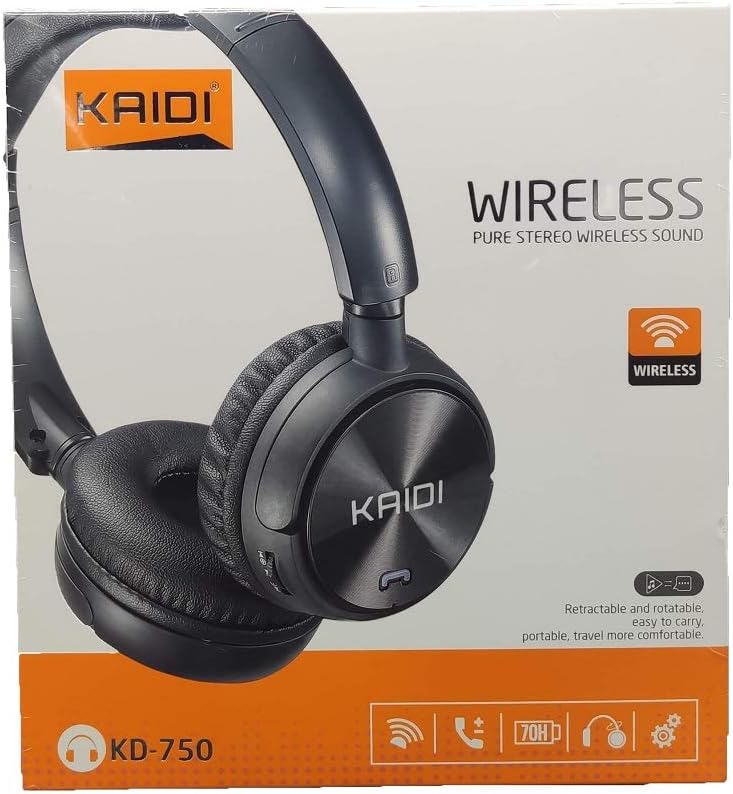
Imej: Depan view of the Kaidi KD-750 retail packaging, showing the headphones and branding.
3. Produk Lebihview
Familiarize yourself with the various parts and controls of your Kaidi KD-750 headphones.

Imej: Depan view of the Kaidi KD-750 Bluetooth Headphones, showcasing the earcups with Kaidi logo and the adjustable headband.
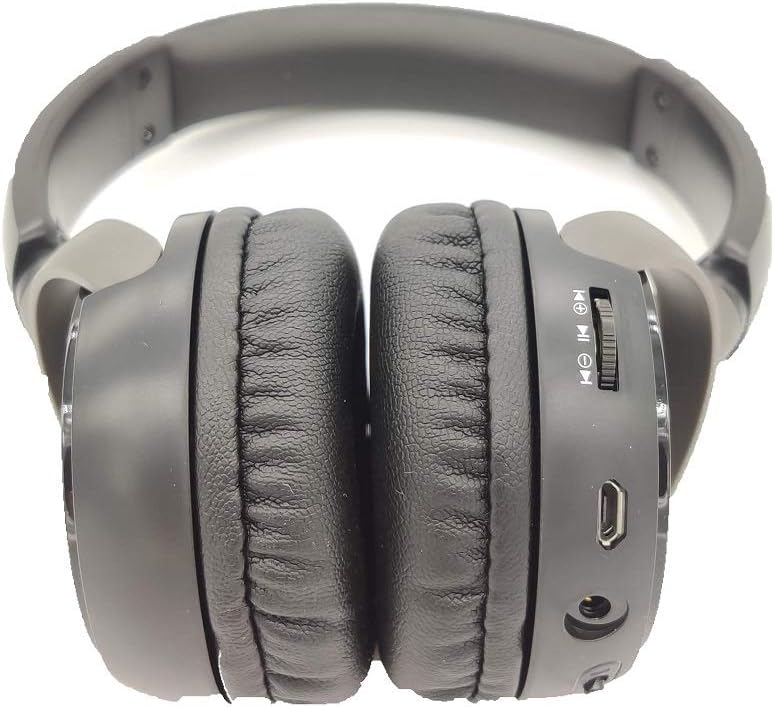
Imej: Sisi view of the Kaidi KD-750 Bluetooth Headphones, highlighting the control buttons, charging port, and audio jack on the earcup.

Image: Back of the Kaidi KD-750 retail box, featuring a diagram of the headphone controls and key product features.
3.1. Kawalan dan Pelabuhan
- Butang Kuasa / Butang Pelbagai Fungsi: Hidup/Mati, Main/Jeda, Jawab/Tamatkan Panggilan.
- Butang Naikkan Kelantangan / Trek Seterusnya: Tekan sebentar untuk Naikkan Kelantangan, Tekan lama untuk Trek Seterusnya.
- Butang Kelantangan Kurang / Trek Sebelumnya: Tekan sebentar untuk Kurangkan Kelantangan, Tekan lama untuk Trek Sebelumnya.
- Butang Mod (M): Switch between Bluetooth, FM Radio, and SD Card modes.
- Port Pengecasan USB Mikro: Untuk mengecas fon kepala.
- Input AUX 3.5mm: Untuk sambungan berwayar menggunakan kabel audio yang disertakan.
- Slot Kad Mikro SD: Untuk memainkan muzik terus dari kad SD Mikro.
- mikrofon: Untuk panggilan bebas tangan.
4. Persediaan
4.1. Mengecas Fon Kepala
Sebelum penggunaan pertama, cas sepenuhnya fon kepala anda.
- Sambungkan hujung Mikro USB kabel pengecas ke port pengecasan pada fon kepala.
- Sambungkan hujung USB-A kabel pengecasan ke penyesuai kuasa USB (tidak disertakan) atau port USB komputer.
- The LED indicator will illuminate (usually red) during charging.
- Once fully charged (approximately 2 hours), the LED indicator will change color or turn off (refer to specific LED behavior in the specifications).
Nota: Hayat bateri adalah kira-kira 5 jam pada cas penuh.
4.2. Berpasangan Bluetooth
Pasangkan fon kepala anda dengan peranti yang didayakan Bluetooth.
- Pastikan fon kepala dimatikan.
- Press and hold the Power Button for approximately 3-5 seconds until the LED indicator flashes blue and red alternately, indicating pairing mode.
- Pada peranti anda (telefon pintar, tablet, komputer), dayakan Bluetooth dan cari peranti yang tersedia.
- Select "KD-750" from the list of found devices.
- Once paired, the LED indicator will typically flash blue slowly or remain solid blue.
- Jika kata laluan diperlukan, masukkan "0000".
Julat Bluetooth yang berkesan adalah lebih kurang 10 meter (33 kaki).
5. Arahan Operasi
5.1. Hidupkan/Mati Kuasa
- Hidupkan kuasa: Press and hold the Power Button for 2-3 seconds until the LED indicator lights up.
- Matikan: Press and hold the Power Button for 3-4 seconds until the LED indicator turns off.
5.2. Main Semula Muzik (Mod Bluetooth)
- Main/Jeda: Tekan pendek Butang Kuasa.
- Lagu Seterusnya: Tekan lama butang Kelantangan Naik.
- Trek Sebelumnya: Tekan lama butang Kurangkan Kelantangan.
- Kelantangan: Tekan pendek butang Kelantangan Naik.
- Perlahankan suara: Tekan pendek butang Kurangkan Kelantangan.
5.3. Panggilan Telefon
- Jawab Panggilan: Tekan Butang Kuasa sebentar apabila panggilan masuk berdering.
- Tamatkan Panggilan: Tekan Butang Kuasa sebentar semasa panggilan.
- Tolak Panggilan: Tekan lama Butang Kuasa apabila panggilan masuk berdering.
- Dail Semula Nombor Terakhir: Double-press the Power Button.
5.4. Mode Switching (FM Radio / SD Card / AUX)
Tekan ke Butang Mod (M). to cycle through available modes: Bluetooth, FM Radio, and SD Card playback.
5.4.1. Mod Radio FM
- Switch to FM mode using the Mode (M) Button.
- Long press the Power Button to automatically scan and save available FM stations.
- Short press the Volume Up/Down buttons to adjust volume.
- Long press the Volume Up/Down buttons to switch between saved stations.
5.4.2. Main Semula Kad Mikro SD
- Insert a Micro SD card (with MP3 files) into the SD card slot.
- Switch to SD Card mode using the Mode (M) Button. The headphones will automatically begin playing music from the card.
- Use the Play/Pause, Volume Up/Down, and Next/Previous Track controls as in Bluetooth mode.

Imej: Jarak dekat view of the Micro SD card slot on the Kaidi KD-750 headphones.
5.4.3. AUX Wired Mode
- Connect one end of the included 3.5mm audio cable to the AUX input on the headphones.
- Sambungkan hujung yang satu lagi ke output audio 3.5mm peranti anda.
- Fon kepala akan bertukar kepada mod AUX secara automatik.
- In AUX mode, controls on the headphones (volume, track control) may not function; use your connected device for control.
6. Penyelenggaraan dan Penjagaan
- Bersihkan fon kepala dengan kain lembut dan kering. Jangan gunakan pembersih atau pelarut yang kasar.
- Elakkan dedahkan fon kepala kepada suhu yang melampau, kelembapan atau cahaya matahari langsung.
- Jangan rendam fon kepala di dalam air atau sebarang cecair lain.
- Simpan fon kepala di tempat yang sejuk dan kering apabila tidak digunakan.
- Cas fon kepala secara berkala, walaupun tidak digunakan untuk tempoh yang lama, untuk mengekalkan kesihatan bateri.
7. Penyelesaian masalah
7.1. Fon kepala tidak boleh dihidupkan.
Penyelesaian: The battery may be depleted. Connect the headphones to a power source using the USB charging cable and allow them to charge for at least 30 minutes before attempting to power on again.
7.2. Cannot pair with a Bluetooth device.
- Penyelesaian 1: Ensure the headphones are in pairing mode (LED flashing blue and red alternately).
- Penyelesaian 2: Make sure Bluetooth is enabled on your device and it is within 10 meters of the headphones.
- Penyelesaian 3: Matikan Bluetooth pada peranti anda, kemudian hidupkannya semula dan cuba cari sekali lagi.
- Penyelesaian 4: If previously paired, try "forgetting" or "unpairing" the headphones from your device's Bluetooth list and then re-pairing.
7.3. Tiada bunyi atau kelantangan rendah.
- Penyelesaian 1: Semak tahap kelantangan pada kedua-dua fon kepala dan peranti anda yang disambungkan.
- Penyelesaian 2: Ensure the headphones are properly connected via Bluetooth or the 3.5mm AUX cable.
- Penyelesaian 3: If using AUX mode, ensure the cable is fully inserted into both the headphones and the audio source.
7.4. FM radio reception is poor.
Penyelesaian: Move to an open area away from obstructions or electronic interference. The 3.5mm audio cable can sometimes act as an antenna; try connecting it even if not using AUX mode for improved reception.
8. Spesifikasi
| Versi Bluetooth: | v4.2 |
| Protokol yang disokong: | AVRCP1.3, A2DP1.0, HFP1.5, HSP1.0 |
| Julat Berkesan: | 10 meter (33 kaki) |
| Kekerapan Bekerja: | 2.402GHz - 2.480GHz |
| Jenis Bateri: | Built-in 3.7V 300mAh Rechargeable Lithium Battery |
| Mengecas Voltage: | DC 4.2V - 5.5V |
| Masa Pengecasan: | Lebih kurang 2 jam |
| Tempoh Bateri: | Approximately 5 hours (playback) |
| Impedans Pembesar Suara: | 32 ohm |
| Kawalan Bunyi: | Pembatalan Bunyi Pasif |
| Teknologi Ketersambungan: | Bluetooth, Bicu 3.5mm |
| Peranti Serasi: | Any device supporting Bluetooth connectivity |
| Berat produk: | 190 g |
| warna: | Hitam |
9. Waranti dan Sokongan
The Kaidi KD-750 Bluetooth Headphones come with a standard manufacturer's warranty against defects in materials and workmanship. Please refer to the warranty card included with your purchase for specific terms and conditions, including the warranty period.
For technical support, troubleshooting assistance, or warranty claims, please contact your retailer or the official Kaidi customer service. Contact information can typically be found on the product packaging or the official Kaidi webtapak.
Sila simpan bukti pembelian anda untuk tujuan waranti.


