pengenalan
Terima kasih kerana membeliasing the ThreeH Desk Wooden Alarm Clock Digital. This manual provides detailed instructions for setting up, operating, and maintaining your new alarm clock. Please read this manual thoroughly before use to ensure proper function and longevity of the product.
This digital alarm clock features a wooden design, digital time and temperature display, multiple alarm settings, and voice control functionality. It is suitable for use in homes, kitchens, and offices.
Produk Selesaiview
The ThreeH Desk Wooden Alarm Clock is designed with a minimalist aesthetic and practical features. It displays time and temperature clearly with adjustable brightness. The clock supports both USB power and battery backup.

Imej: Depan view of the ThreeH Wooden Digital Alarm Clock, displaying time (12:02) and temperature (23°C) in blue LED digits on a brown wooden surface.
Ciri-ciri Utama:
- Digital Time and Temperature Display
- 3 Tetapan Penggera
- Voice Control Functionality
- Adjustable Brightness (3 levels)
- Power Off Memory (CR2032 battery backup)
- Dual Power Supply Options (USB or AAA batteries)
- Modern Wooden Design
Persediaan
Powering the Clock:
The clock can be powered by either a USB power cord or AAA batteries. For continuous display and optimal performance, USB power is recommended.
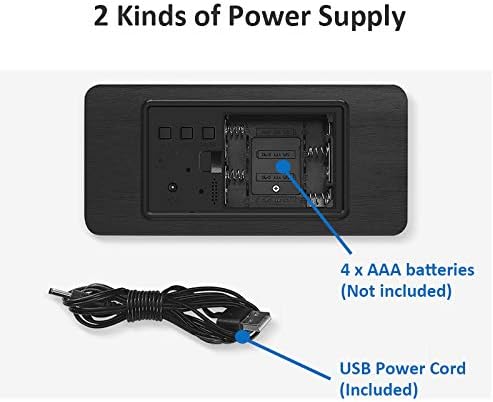
Imej: Belakang view of the alarm clock, illustrating the battery compartment for 4x AAA batteries (not included) and the USB power cord input (included).
- Kuasa USB: Connect the provided USB power cord to the DC5V port on the back of the clock and plug the other end into a USB power adapter (not included) or a powered USB port.
- Kuasa Bateri (Sandaran): Open the battery compartment on the back of the clock. Insert 4 x AAA batteries (not included), ensuring correct polarity (+/-). Note: Batteries are primarily for backup and may not provide continuous display.
- Bateri Memori: The clock also uses a CR2032 button cell battery (usually pre-installed) for "power off memory," which retains time settings even when the main power is disconnected.

Imej: Terperinci view of the clock's rear panel, highlighting the 'SET', 'UP', 'DOWN', and 'RESET' buttons, the USB port, and the CR2032 battery compartment for memory retention.
Arahan Operasi
Menetapkan Masa dan Tarikh:
- Tekan ke SET butang untuk memasuki mod tetapan masa. Digit jam akan berkelip.
- Gunakan UP dan TURUN butang untuk melaraskan jam.
- Tekan SET again to move to minute setting. Adjust minutes with UP dan TURUN.
- Teruskan menekan SET untuk kitaran melalui tetapan tahun, bulan dan hari, melaraskan setiap satu dengan UP dan TURUN.
- Tekan SET kali terakhir untuk keluar dari mod tetapan.
Menetapkan Penggera:
The clock supports up to 3 alarm settings (AL1, AL2, AL3).
- Tekan ke SET button repeatedly until "AL1" appears on the display.
- Tekan SET to enter AL1 setting. The hour digits will flash.
- guna UP dan TURUN untuk menetapkan jam penggera.
- Tekan SET to move to minute setting. Adjust minutes with UP dan TURUN.
- Tekan SET again to enable/disable the alarm (ON/--).
- Repeat for AL2 and AL3 if desired.
Fungsi Kawalan Suara:
In power-saving mode, the display will turn off. To activate the display, make a sound (e.g., clap hands, tap the clock) or touch the clock. The display will light up for approximately 15 seconds before turning off again.
To toggle voice control mode (ON/OFF), refer to the specific instructions in your clock's packaging, as this feature can sometimes be enabled or disabled via a long press of a specific button (e.g., DOWN button) or a combination of buttons.
Melaraskan Kecerahan:
The clock features 3 levels of brightness. While in normal time display mode, press the UP button to cycle through the brightness levels.

Image: A ThreeH Wooden Digital Alarm Clock with a dark wood finish, showing the time and temperature in bright blue LED digits. This image demonstrates the clear display.
Penyelenggaraan
- Pembersihan: Wipe the clock surface with a soft, dry cloth. Do not use abrasive cleaners or solvents, as they may damage the wooden finish or electronic components.
- Penggantian Bateri: If using AAA batteries for backup, replace them when the display becomes dim or inconsistent, or if the clock fails to retain time during power outages. Ensure correct polarity.
- Bateri CR2032: The CR2032 battery for memory retention typically lasts for several years. If the clock loses time settings after a power disconnection, the CR2032 battery may need replacement.
- Persekitaran: Keep the clock away from direct sunlight, extreme temperatures, high humidity, and strong magnetic fields to prevent damage.
Menyelesaikan masalah
| Masalah | Kemungkinan Punca | Penyelesaian |
|---|---|---|
| Paparan dimatikan atau malap. |
|
|
| Clock loses time settings after power disconnection. | Bateri memori CR2032 mati atau hilang. | Replace the CR2032 button cell battery on the back of the clock. |
| Penggera tidak berbunyi. |
|
|
| Kawalan suara tidak berfungsi. | Voice control feature is disabled. | Refer to your clock's specific instructions to enable voice control mode. |
Spesifikasi
| Ciri | Perincian |
|---|---|
| Jenama | TigaH |
| Nombor Model | H-AC11Brown_Blue |
| Dimensi Produk | 4 x 3.81 x 7 cm |
| Berat Barang | 245 g |
| bahan | kayu |
| Jenis Paparan | digital |
| Ciri Khas | Alarm, Voice Control, Temperature Display, Adjustable Brightness |
| Sumber Kuasa | Corded Electric (USB), 4x AAA Batteries (backup), 1x CR2032 (memory) |
Waranti dan Sokongan
For warranty information and customer support, please refer to the documentation included with your purchase or contact ThreeH customer service directly through their official webtapak atau peruncit tempat produk itu dibeli.
Sila simpan bukti pembelian anda untuk sebarang tuntutan waranti.


