pengenalan
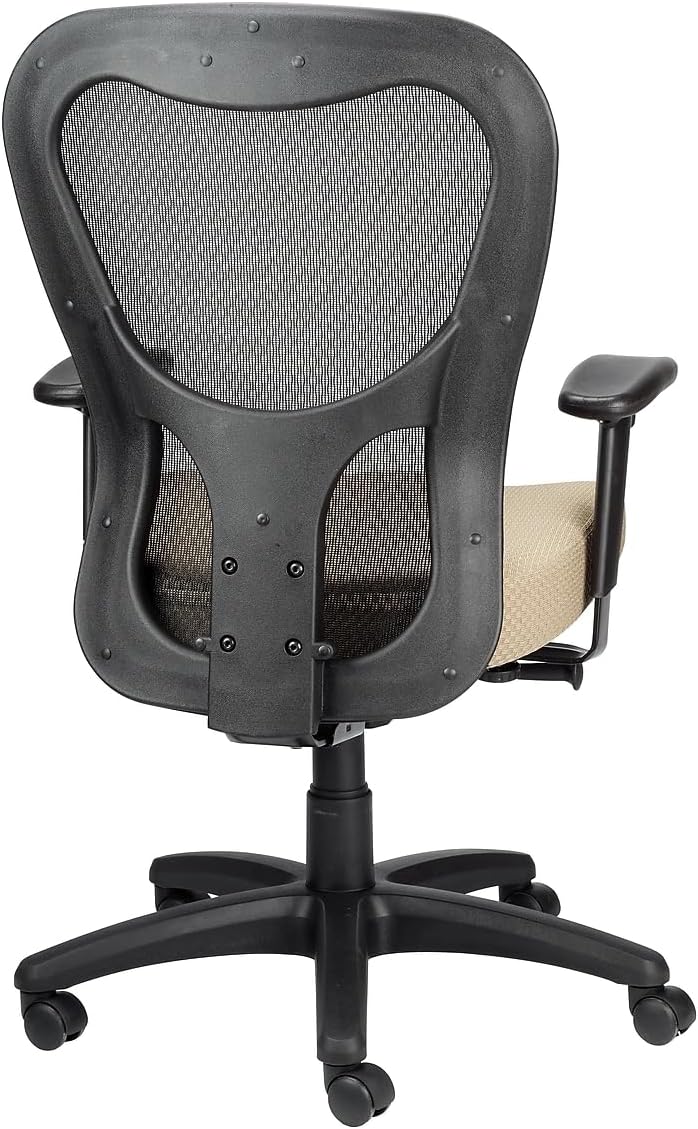
Thank you for choosing the Tempur-Pedic TP9000 Mesh Swivel Task Chair. This manual provides essential information for the safe assembly, operation, maintenance, and troubleshooting of your new office chair. Please read these instructions carefully before use and retain them for future reference.
Maklumat Keselamatan
Always follow basic safety precautions when using this product to reduce the risk of injury. This chair is designed for office use and supports a maximum weight of 275 pounds.
- Pastikan semua komponen diikat dengan selamat sebelum digunakan.
- Jangan berdiri di atas kerusi.
- Avoid placing heavy objects on the chair back or armrests.
- Keep hands and feet clear of moving parts during adjustments.
- Gunakan kerusi di atas permukaan yang rata.
Persediaan dan Perhimpunan
The Tempur-Pedic TP9000 chair requires some assembly. Please ensure all parts are present before beginning. Refer to the included assembly diagram for detailed steps.
- Buka Pembungkusan Komponen: Keluarkan semua bahagian dari bungkusan dengan berhati-hati dan letakkannya di atas permukaan yang bersih dan lembut untuk mengelakkan calar.
- Pasang Kastor ke Pangkalan: Insert the casters into the holes at the end of each leg of the five-star base until they click securely into place.
- Masukkan Pengangkat Gas: Letakkan silinder pengangkat gas ke dalam lubang tengah pangkalan lima bintang.
- Lampirkan Mekanisme pada Tempat Duduk: Pasangkan mekanisme tempat duduk pada bahagian bawah kusyen tempat duduk menggunakan skru yang disediakan. Pastikan bahagian hadapan mekanisme sejajar dengan bahagian hadapan tempat duduk.
- Pasang Sandaran Belakang ke Tempat Duduk: Connect the backrest to the seat assembly using the designated screws.
- Pasang tempat letak tangan: Fasten the armrests to the seat assembly using the appropriate screws.
- Sambungkan Tempat Duduk ke Lif Gas: Carefully place the assembled seat and backrest onto the gas lift cylinder, ensuring it is centered. Apply downward pressure to secure.
- Semakan Akhir: Verify all screws are tightened and all components are stable before using the chair.

Arahan Operasi
Your Tempur-Pedic TP9000 chair features several adjustable components to customize your seating experience for optimal comfort and support.
- Pelarasan Ketinggian Tempat Duduk:
Locate the lever on the right side, beneath the seat. To raise the seat, lift the lever while taking your weight off the seat. To lower the seat, lift the lever while remaining seated. Release the lever at the desired height. - Armrest Height and Width Adjustment:
The armrests can be adjusted for height and width. Look for buttons or levers on the armrest supports. Press the button or lift the lever to move the armrest up or down, or to slide it inward or outward. Release to lock in position. - Synchro Tilt Mechanism with Tilt Lock:
The chair features a Synchro tilt mechanism, allowing the backrest and seat to recline in a synchronized motion. A lever, typically on the left side, controls the tilt. Pull the lever out to allow the chair to recline, and push it in to lock the chair in an upright position. The tilt tension knob, usually located at the front center beneath the seat, can be rotated to adjust the resistance of the recline. Turn clockwise for more resistance, counter-clockwise for less.
Penyelenggaraan
Proper care will extend the life and appearance of your Tempur-Pedic TP9000 chair.
- Pembersihan: The chair upholstery should be spot cleaned only. Use a mild detergent and a damp cloth to gently clean soiled areas. Avoid harsh chemicals or abrasive cleaners.
- Pemeriksaan Berkala: Periksa semua skru dan bolt secara berkala untuk memastikan ia ketat. Ketatkan semula jika perlu.
- Penjagaan Kastor: Pastikan kastor bebas daripada rambut dan serpihan untuk memastikan pergerakan lancar.
- Elakkan Cahaya Matahari Terus: Pendedahan yang berpanjangan kepada cahaya matahari langsung boleh menyebabkan fabrik menjadi pudar.
Menyelesaikan masalah
Jika anda menghadapi masalah dengan kerusi anda, rujuk masalah dan penyelesaian biasa berikut:
| Masalah | Kemungkinan Punca | Penyelesaian |
|---|---|---|
| Kerusi tidak melaraskan ketinggian | Gas lift lever not engaged or gas lift cylinder faulty. | Pastikan tuil ditarik sepenuhnya. Jika masalah berterusan, lif gas mungkin perlu diganti. |
| Chair is wobbly or unstable | Skru longgar atau lantai tidak rata. | Periksa dan ketatkan semua skru pemasangan. Pastikan kerusi berada di atas permukaan yang rata. |
| Bunyi-bunyi berdecit | Sambungan longgar atau geseran antara bahagian. | Ketatkan semua skru. Sapukan sedikit pelincir silikon pada bahagian yang bergerak jika perlu. |
| Seat cushion feels flat | Normal compression over time. | While TEMPUR material is designed for durability, all foams compress with prolonged use. Consider a seat cushion topper if additional padding is desired. |
Spesifikasi
Detailed specifications for the Tempur-Pedic TP9000 Mesh Swivel Task Chair:
- Jenama: Tempur-Pedic
- Nama Model: TP9000
- warna: Beige
- Dimensi Produk: 26.8"D x 26.8"W x 40"H
- Kedalaman Tempat Duduk: 24.8 inci
- Lebar Sandaran Kerusi: 21.7 Inci
- Bahan: Memory Foam (seat), Mesh (back)
- Saran Maksimum Berat: 275 paun
- Berat Barang: 48 paun
- Ciri Khas: Adjustable Height, Synchro Tilt Mechanism with Tilt Lock
- Arahan Penjagaan Produk: Bersih Tempat
- UPC: 669245994927

Waranti dan Sokongan
Your Tempur-Pedic TP9000 Mesh Swivel Task Chair is designed for durability and comfort. For specific warranty details, please refer to the documentation provided at the time of purchase or contact the manufacturer directly.
Optional protection plans are available for purchase, offering extended coverage:
- Pelan Perlindungan 2 Tahun
- Pelan Perlindungan 3 Tahun
- Perlindungan Lengkap (bil bulanan)
For technical assistance, replacement parts, or further inquiries, please contact Tempur-Pedic customer service through their official webtapak atau peruncit tempat produk itu dibeli.