1. Pengenalan
This manual provides detailed instructions for the proper use and maintenance of your KAIDI KD-780 Bluetooth Sports Earphones. Designed for active lifestyles, these earphones feature Bluetooth connectivity and an IPX7 waterproof rating, making them suitable for various sports and outdoor activities. Please read this manual thoroughly before using the product to ensure optimal performance and longevity.
2. Produk Lebihview
The KAIDI KD-780 earphones are engineered for comfort and durability, featuring an ergonomic design with ear hooks for a secure fit during physical activity. They offer high-quality audio and hands-free calling capabilities.
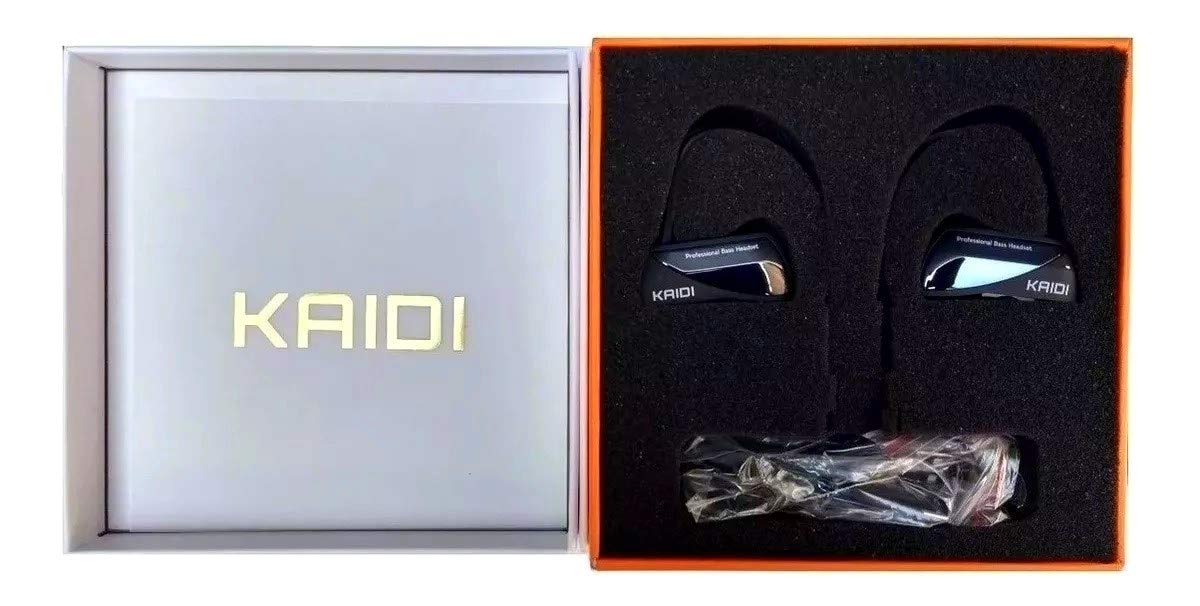
Imej 2.1: KAIDI KD-780 Bluetooth Sports Earphones. This image displays the overall design of the earphones, highlighting the ear-hook style and the connecting cable.
2.1 Kandungan Pakej
Setelah membuka bungkusan, pastikan semua barang ada:
- KAIDI KD-780 Bluetooth Sports Earphones
- Kabel Pengecas USB (Jenis-C)
- Pelbagai saiz hujung telinga
- Manual Pengguna

Imej 2.2: KAIDI KD-780 Earphones and Accessories. This image shows the earphones along with the included USB charging cable and various ear tip sizes.
3. Persediaan
3.1 Mengecas Fon Telinga
- Locate the USB Type-C charging port on the earphones.
- Connect the provided USB charging cable to the earphones and a compatible USB power source (e.g., computer USB port, wall adapter with DC 5V output).
- Lampu penunjuk akan menyala semasa pengecasan.
- Charging typically takes less than 2 hours for a full charge. The indicator light will change or turn off once charging is complete.
Nota: Ensure the earphones are fully charged before first use to maximize battery life.
3.2 Berpasangan Bluetooth
- Hidupkan kuasa: Press and hold the Multi-function button (usually the center button) on the earphones until the indicator light flashes blue and red, indicating pairing mode.
- Aktifkan Bluetooth: Pada telefon pintar atau peranti berdaya Bluetooth anda, pergi ke tetapan Bluetooth dan hidupkan Bluetooth.
- Cari untuk Peranti: Your device will automatically search for nearby Bluetooth devices.
- Select "KD-780": From the list of available devices, select "KD-780" to connect.
- Pengesahan: Once successfully paired, the earphone indicator light will flash blue slowly, and you may hear an audible confirmation.
Nota: The earphones will automatically attempt to reconnect to the last paired device when powered on, if the device's Bluetooth is active and within range (up to 10 meters).
4. Arahan Operasi
4.1 Hidupkan/Mati Kuasa
- Hidupkan kuasa: Press and hold the Multi-function button for approximately 3 seconds until the blue indicator light flashes.
- Matikan: Press and hold the Multi-function button for approximately 5 seconds until the red indicator light flashes and then turns off.
4.2 Main balik Muzik
- Main/Jeda: Tekan butang Pelbagai fungsi sekali.
- Lagu Seterusnya: Tekan dan tahan butang Naik Kelantangan (+).
- Trek Sebelumnya: Tekan dan tahan butang Turun Kelantangan (-).
- Kelantangan: Press the Volume Up (+) button briefly.
- Perlahankan suara: Press the Volume Down (-) button briefly.
4.3 Pengurusan Panggilan
- Jawab/Tamatkan Panggilan: Tekan butang Berbilang fungsi sekali semasa panggilan masuk atau semasa panggilan aktif.
- Tolak Panggilan: Tekan dan tahan butang Berbilang fungsi selama lebih kurang 2 saat semasa panggilan masuk.
- Dail Semula Nombor Terakhir: Tekan dua kali butang Pelbagai fungsi apabila tidak sedang membuat panggilan.
5. Penyelenggaraan
Penyelenggaraan yang betul memastikan ketahanan dan prestasi optimum fon telinga anda.
5.1 Pembersihan
- Gently wipe the earphones with a soft, dry, lint-free cloth.
- For ear tips, remove them and clean with a mild soap solution if necessary, then rinse thoroughly and dry completely before reattaching.
- Jangan gunakan bahan kimia yang keras, pelarut pembersih atau detergen yang kuat.
5.2 Penyimpanan
- Simpan fon telinga di tempat yang sejuk dan kering jauh dari cahaya matahari langsung dan suhu yang melampau.
- Avoid storing with sharp objects that could damage the cables or earphone body.
5.3 Rintangan Air (IPX7)
The KAIDI KD-780 earphones are rated IPX7 waterproof, meaning they can withstand immersion in water up to 1 meter for 30 minutes. This makes them resistant to sweat and rain. However, they are not designed for swimming or prolonged underwater use. Ensure the charging port cover is securely closed before exposure to water.
6. Penyelesaian masalah
| Masalah | Penyelesaian yang Mungkin |
|---|---|
| Fon telinga tidak boleh dihidupkan. | Ensure the earphones are fully charged. Connect to a power source and check the charging indicator. |
| Tidak boleh berpasangan dengan peranti. |
|
| Tiada bunyi atau kelantangan rendah. |
|
| Sambungan terputus-putus. |
|
7. Spesifikasi
| Ciri | Perincian |
|---|---|
| Model | KD-780 |
| Teknologi Ketersambungan | Bluetooth |
| Faktor Bentuk Fon Telinga | In-Ear (Intra-auricular) with Ear Hooks |
| Penilaian Kalis Air | IPX7 |
| Kapasiti Bateri | 120 mAh |
| Masa bermain | 8-10 jam |
| Masa Tunggu Sedia | Lebih kurang 300 jam |
| Masa Mengecas | Kurang 2 jam |
| Mengecas Voltage | DC 5V |
| Julat Kekerapan | 20Hz-20KHz |
| Julat Operasi | Sehingga 10 meter (33 kaki) |
| Berat badan | 19.8g |
| Port Pengecasan | USB Jenis-C |

Imej 7.1: KAIDI KD-780 Product Box with Specifications. This image shows the product packaging, which lists key features and specifications such as IPX7 waterproof rating, battery capacity, and playtime.
8. Waranti dan Sokongan
This product is covered by a standard manufacturer's warranty. For specific warranty details, please refer to the documentation provided with your purchase or contact the retailer. If you encounter any issues or require technical assistance, please contact the seller or manufacturer's customer support with your purchase information.
Sila simpan bukti pembelian anda untuk sebarang tuntutan waranti.


