1. Produk Lebihview
The Ciglow TES200 is a versatile digital integration tester designed for efficient and accurate testing of integrated circuits. It is primarily used to test 74 siri dan 40 siri integrated digital components, capable of testing over 200 different integrations.
This device offers fine workmanship and stable, powerful performance for long-term use. Its simple operation allows users to quickly determine the functionality of integrated logic gates, identifying faulty components with ease. The selection of integration tests is performed through intuitive key operations.

Figure 1.1: The TES200 IC Tester and its accompanying display module.
Video 1.1: Tamatview of the Ciglow IC Tester's functionality and components.
2. Kandungan Pakej
Selepas membuka bungkusan, sila sahkan bahawa semua komponen ada dan tidak rosak:
- 1 x TES200 IC Tester Unit
- 1 x LCD Display Module

Figure 2.1: The TES200 IC Tester and its separate LCD display module.
3. Ciri-ciri Utama
- Digital Integration Test: Specifically designed for 74 series and 40 series integrated digital circuits.
- Keserasian meluas: Capable of testing more than 200 different integrated circuits.
- Operasi Mesra Pengguna: Simple key operations for selecting and performing tests.
- Fault Identification: The test logic can determine if integrated logic gates are faulty.
- Reka Bentuk Mudah Alih: Easy to carry and install, offering strong and stable performance.
- Pembinaan Tahan Lama: Fine workmanship built to strict quality standards for long-term reliability.
4. Persediaan
Before operating the TES200 IC Tester, follow these steps to ensure proper setup:
- Connect the Display: Carefully connect the LCD display module to the main TES200 tester unit. Ensure the pins are correctly aligned and seated firmly.
- Sambungan Kuasa: Connect a 7-12 VDC power supply to the designated power input port on the TES200 unit.
- Hidupkan kuasa: Cari Kuasa SW1 switch on the side of the unit. Slide the switch to the ON position to power on the device. The display should illuminate.

Rajah 4.1: Belakang view of the TES200 main board, showing connection points.
5. Arahan Operasi
The TES200 features a straightforward interface for testing integrated circuits.
5.1 Penerangan Utama
- ARAHAN: Press this button to select the integration type. You can switch between 74 siri dan 40 siri IC.
- KE ATAS: Use this button to select the previous integration model within the chosen series.
- TURUN: Use this button to select the next integration model within the chosen series.
- Ujian: After selecting the desired integration model, press this button to initiate the test.
5.2 Prosedur Pengujian
- Masukkan IC: Carefully insert the integrated circuit into the ZIF (Zero Insertion Force) socket on the TES200. Nota: Ensure the IC is aligned correctly, with pin 1 facing the designated indicator on the socket. Align the IC down when installing for testing.
- Select Series: Tekan ke MODE button to toggle between 74 series and 40 series testing modes, matching the type of IC you are testing.
- Pilih Model: Gunakan UP dan TURUN buttons to navigate through the available IC models until the correct model number for your IC is displayed.
- Jalankan Ujian: Once the correct model is selected, press the Ujian button. The TES200 will perform the test and display the result on the LCD screen, indicating whether the IC is BAIK or if there are issues.

Figure 5.1: The LCD display indicating a successful test with 'IC IS GOOD'.
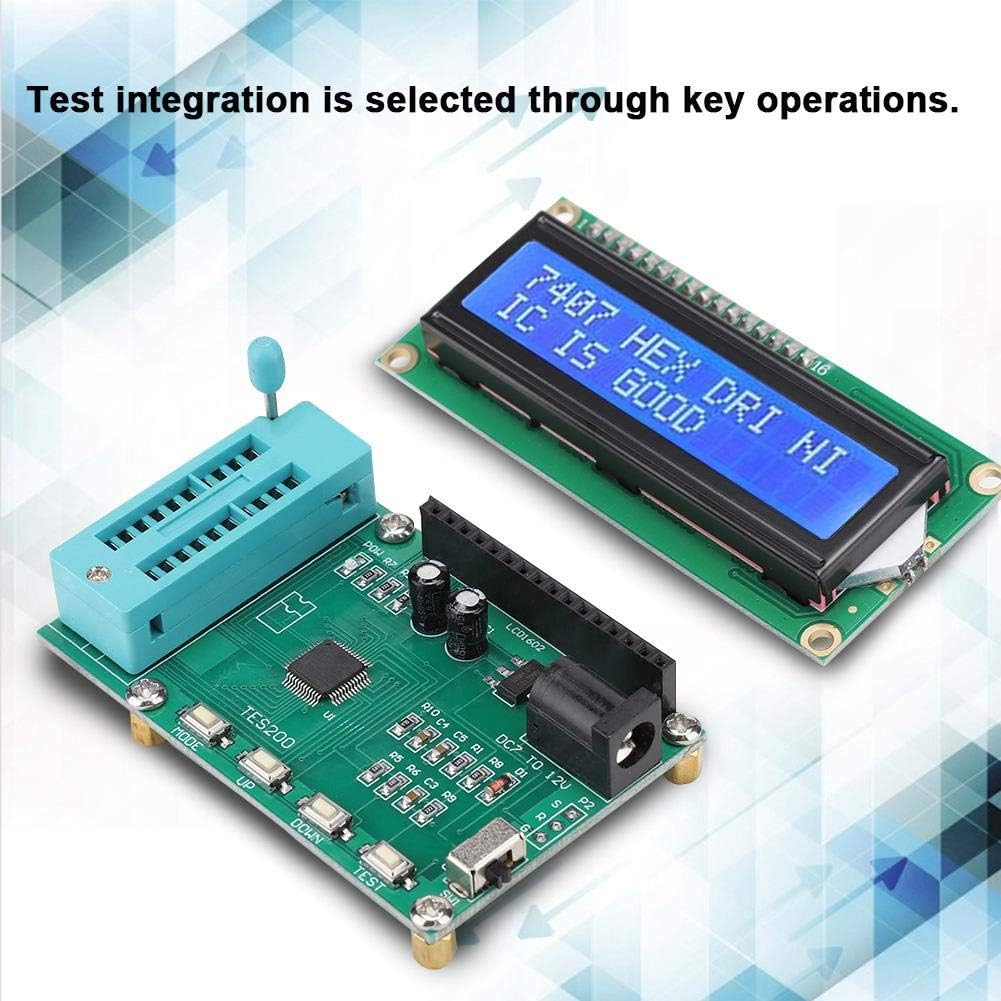
Figure 5.2: The TES200 unit and display during an active test operation.
6. Penyelenggaraan
To ensure the longevity and optimal performance of your TES200 IC Tester, follow these maintenance guidelines:
- Pembersihan: Use a soft, dry cloth to clean the exterior of the device. Avoid using abrasive cleaners or solvents, which can damage the plastic and electronic components.
- Storan: Store the tester in a cool, dry place away from direct sunlight, excessive heat, and moisture. When not in use, it is recommended to store it in its original packaging or a protective case.
- Tangani dengan Berhati-hati: The ZIF socket and display are sensitive components. Avoid applying excessive force when inserting or removing ICs, and protect the display from impacts.
- Matikan Apabila Tidak Digunakan: Always turn off the device using the SW1 Power switch when it is not in active use to conserve power and prevent unnecessary wear.
7. Penyelesaian masalah
If you encounter issues with your TES200 IC Tester, refer to the following common problems and solutions:
- Peranti Tidak Menghidupkan:
- Ensure the power supply is correctly connected and providing 7-12 VDC.
- Check that the SW1 Power switch is in the ON kedudukan.
- Verify the power adapter is functional.
- Display is Blank or Shows Garbled Characters:
- Ensure the LCD display module is securely connected to the main tester unit.
- Power cycle the device (turn off, then turn on again).
- Incorrect Test Results or IC Always Shows 'BAD':
- Verify that the IC is inserted correctly into the ZIF socket, with proper alignment.
- Ensure you have selected the correct IC series (74 or 40) using the MODE butang.
- Confirm that the exact IC model number is selected using the UP/TURUN buttons before pressing Ujian.
- Clean the pins of the IC before insertion to ensure good contact.
- Test a known good IC of the same type to confirm the tester's functionality.
- Butang Tidak Responsif:
- Kitaran kuasa peranti.
- Pastikan tiada serpihan yang tersangkut di sekitar butang.
Jika masalah berterusan selepas mencuba penyelesaian ini, sila hubungi sokongan pelanggan untuk mendapatkan bantuan lanjut.
8. Spesifikasi
| Parameter | Nilai |
|---|---|
| Bekerja Voltage | 7~12 VDC |
| Bekerja Semasa | <30 mA |
| Suhu Bekerja | -40 ℃ ~ 65 ℃ |
| Suhu Penyimpanan | -40 ℃ ~ 65 ℃ |
| Jenama | Ciglow |
| Nombor Model | Ciglowyrmu16w2kc |
| Sumber Kuasa | Elektrik Bertali |
| Gaya | digital |
| Berat Barang | 0.06 Kilogram (2.11 auns) |
| Vol. Operasi Minimumtage | 7 Volt (DC) |
| Penarafan Suhu Atas | 65 Darjah Celsius |
| UPC | 748904525631 |
| ASIN | B07X561WJF |
| Tarikh Mula-mula Tersedia | 29 Ogos 2019 |
9. Waranti dan Sokongan
For warranty information, technical support, or any inquiries regarding your Ciglow TES200 IC Tester, please refer to the contact information provided with your purchase or visit the official Ciglow webtapak. Simpan resit pembelian anda sebagai bukti pembelian untuk tuntutan waranti.