1. Pengenalan
This manual provides detailed instructions for the setup, operation, and maintenance of your Targus M610 AKM610AP Wireless Mouse and Keyboard Combo. This combo offers a reliable 2.4GHz wireless connection, a full-sized keyboard, and a high-definition 1600 DPI optical mouse for efficient and comfortable use.

Figure 1: Targus M610 AKM610AP Wireless Mouse and Keyboard Combo. This image shows the full-sized black wireless keyboard and the matching black wireless mouse.
2. Kandungan Pakej
Sahkan bahawa semua item terdapat dalam pakej anda:
- Targus Wireless Keyboard
- Tetikus Tanpa Wayar Targus
- Penerima USB
- 1 AA Battery (for mouse, included)

Figure 2: The wireless mouse shown alongside its compact USB receiver. The receiver enables wireless connectivity for both the mouse and keyboard.
3. Arahan Persediaan
Follow these steps to set up your Targus Wireless Mouse and Keyboard Combo:
- Pasang Bateri:
- For the mouse: Open the battery compartment cover on the underside of the mouse. Insert the provided AA battery, ensuring correct polarity (+/-). Close the cover.
- For the keyboard: Open the battery compartment cover on the underside of the keyboard. Insert the required batteries (typically AAA, not included for keyboard based on JSON). Ensure correct polarity (+/-). Close the cover.
- Sambungkan Penerima USB:
Locate an available USB port on your computer. Insert the USB receiver firmly into the USB port. Your computer should automatically detect and install the necessary drivers. This is a plug-and-play device, requiring no additional software installation.

Rajah 3: Gambar jarak dekat view of the compact USB receiver, which facilitates the wireless connection for both the keyboard and mouse.
- Hidupkan kuasa:
Ensure the power switch on both the mouse and keyboard (if present) is in the "ON" position. The devices should now be ready for use.
4. Arahan Operasi
4.1. Penggunaan Papan Kekunci
The Targus M610 keyboard features a full-sized layout for comfortable typing.
- Penaipan Standard: Gunakan kekunci abjad angka untuk input teks.
- Kekunci Fungsi (F1-F12): These keys may have secondary multimedia functions (e.g., volume control, media playback) accessible by pressing the Fn kunci serentak.
- Papan kekunci angka: The dedicated numeric keypad on the right provides quick entry for numbers and calculations.
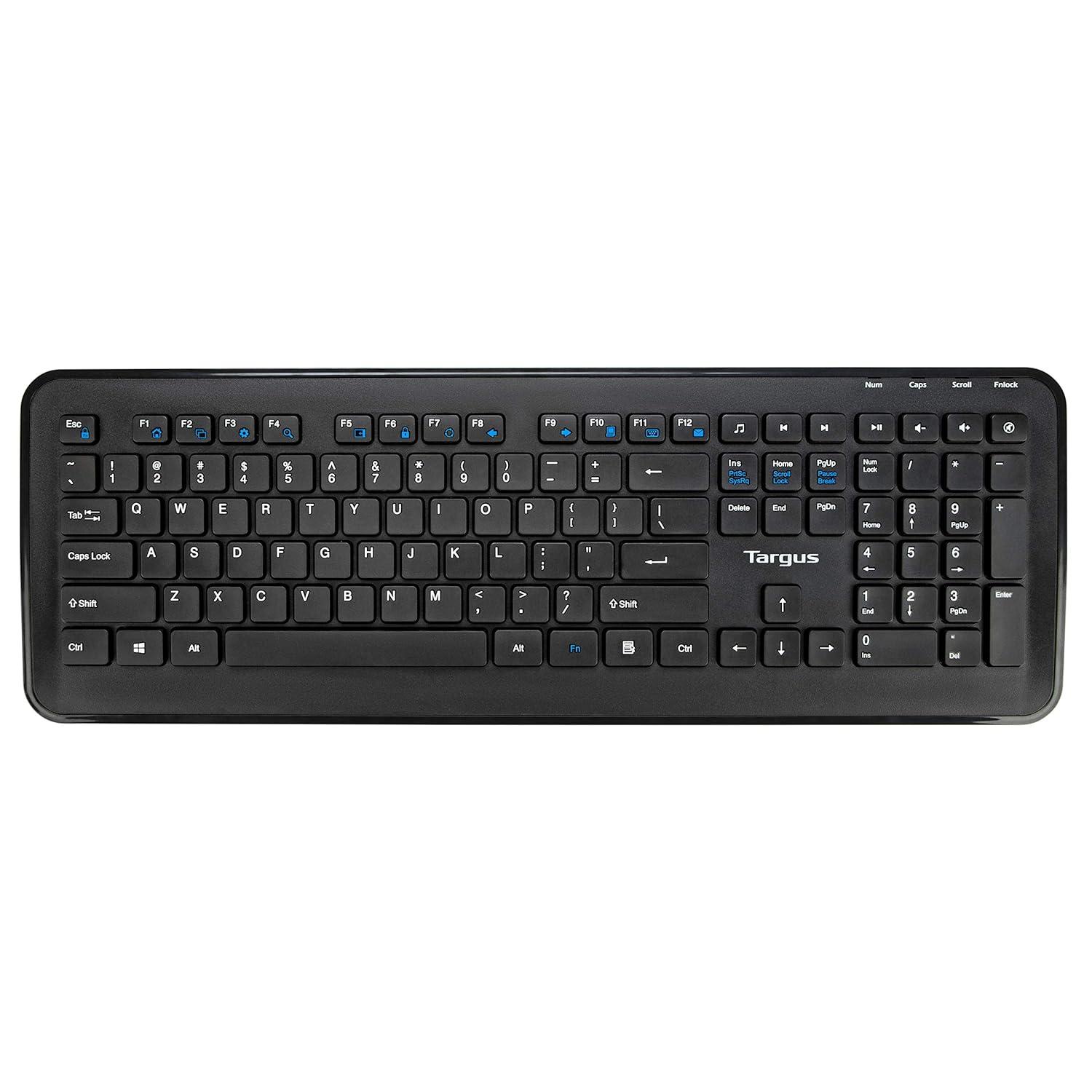
Rajah 4: Atas-bawah view of the full-sized Targus wireless keyboard, highlighting its layout and function keys.
4.2. Penggunaan Tetikus
The Targus M610 mouse is equipped with a high-definition 1600 DPI optical sensor for precise tracking.
- Butang Klik Kiri: Pemilihan dan pengaktifan utama.
- Butang Klik Kanan: Mengakses menu kontekstual.
- Roda Tatal: Menavigasi secara menegak melalui dokumen dan web pages. Can also function as a middle-click button.
- DPI Sensor: The 1600 DPI optical sensor provides accurate and responsive cursor movement.

Rajah 5: Atas view of the Targus wireless mouse, showing the left and right click buttons and the scroll wheel.
5. Penyelenggaraan dan Penjagaan
To ensure the longevity and optimal performance of your Targus Wireless Combo, follow these maintenance guidelines:
- Pembersihan: Gunakan kain lembut dan kering untuk membersihkan permukaan papan kekunci dan tetikus. Untuk kotoran degil, gosok sedikitampen kain dengan air atau larutan pembersih lembut. Elakkan bahan kimia yang keras atau bahan yang melelas.
- Penggantian Bateri: Replace batteries when performance degrades or the low battery indicator (if present) illuminates. Always use fresh, high-quality batteries of the specified type (AA for mouse, typically AAA for keyboard).
- Storan: When not in use for extended periods, store the combo in a cool, dry place. Consider removing batteries to prevent leakage.
- Elakkan Cecair: Keep the keyboard and mouse away from liquids to prevent damage to internal components.
6. Penyelesaian masalah
If you encounter issues with your Targus Wireless Combo, refer to the following common solutions:
| Masalah | Penyelesaian |
|---|---|
| Papan kekunci atau tetikus tidak bertindak balas. |
|
| Intermittent connection or lag. |
|
| Kursor tetikus tidak menentu atau tidak bergerak dengan lancar. |
|
7. Spesifikasi
Detailed technical specifications for the Targus M610 AKM610AP Wireless Mouse and Keyboard Combo:
| Ciri | Perincian |
|---|---|
| Jenama | Targus |
| Nombor Model | AKM610AP |
| Teknologi Ketersambungan | 2.4GHz Wireless, USB Receiver |
| warna | Hitam |
| Penderia Tetikus | Penderia Optik 1600 DPI |
| Jenis Papan Kekunci | Full-sized with Multimedia Keys |
| Peranti Serasi | Personal Computer, Laptop, Television, Projector |
| Sumber Kuasa | Dikuasakan Bateri |
| Bateri Diperlukan | 1 AA battery (for mouse, included) |
| Dimensi Produk (Papan Kekunci) | Approximately 45.5 cm (Width) x 15.7 cm (Height) |
| Dimensi Produk (Tetikus) | Kira-kira 6.6 cm (Panjang) x 3.8 cm (Lebar) x 1.1 cm (Tinggi) |
| Berat Barang | 611 g (total combo weight) |

Figure 6: Diagram illustrating the approximate dimensions of the Targus wireless keyboard, including its width and height, and highlighting the 12 multimedia keys.

Figure 7: Diagram illustrating the approximate dimensions of the Targus wireless mouse (length, width, height) and indicating the high-precision nano receiver.
8. Waranti dan Sokongan
The Targus M610 AKM610AP Wireless Mouse and Keyboard Combo comes with a Waranti 3 Tahun.
For warranty claims, technical support, or further assistance, please contact Targus customer service through their official webtapak atau peruncit tempat produk dibeli. Simpan bukti pembelian anda untuk pengesahan waranti.
For more information, visit the official Targus webtapak: www.targus.com


