1. Pengenalan
Terima kasih kerana membeliasing the Singsation Professional Karaoke Machine. This portable Bluetooth karaoke system is designed to provide hours of entertainment with its advanced voice effects, dynamic sound effects, and captivating light show. This manual will guide you through the setup, operation, and maintenance of your new karaoke machine, ensuring you get the most out of its features.
2. Maklumat Keselamatan
- Baca semua arahan sebelum menggunakan produk.
- Jangan dedahkan unit kepada air atau kelembapan berlebihan.
- Pastikan pengudaraan yang betul; jangan sekat sebarang bukaan pengudaraan.
- Gunakan hanya penyesuai kuasa yang dibekalkan dengan unit.
- Jauhkan unit daripada sumber haba seperti radiator, daftar haba, dapur, atau radas lain (termasuk amppenghidup) yang menghasilkan haba.
- Jangan cuba servis produk ini sendiri. Rujuk semua perkhidmatan kepada pegawai perkhidmatan yang berkelayakan.
- Elakkan meletakkan objek berat di atas unit.
3. Kandungan Pakej
Please check to ensure all items are present in your package:
- Singsation Professional Karaoke Machine Unit
- 2 x Mikrofon
- Alat Kawalan Jauh
- Penyesuai Kuasa
- Manual Pengguna (dokumen ini)
4. Ciri-ciri Produk
The Singsation Professional Karaoke Machine is packed with features to enhance your singing experience:
- 60 Professional-Quality Voice Effects: Transform your voice with various effects like echo, baritone, alien, and more.
- 10 Amazing Sound Effects: Add fun sounds like applause, cheers, and air horn to your performance.
- 25 Room-Filling LED Light Effects: Create a dynamic party atmosphere with multi-color light modes including party, pulse, breathe, and chase.
- Reka Bentuk Mudah Alih: Easy to transport for parties anywhere.
- Kesambungan Bluetooth: Wirelessly stream music from your smartphone or tablet.
- Input Dwi Mikrofon: Includes two microphones for duet singing.

Rajah 4.1: Berakhirview of the Singsation Karaoke Machine's control panel highlighting the extensive light, sound, and voice effects available.

Rajah 4.2: The Singsation Karaoke Machine supports two microphones, enabling duet performances for enhanced entertainment.
5. Persediaan
Follow these steps to set up your Singsation Professional Karaoke Machine:
- Buka bungkusan Unit: Keluarkan semua komponen daripada pembungkusan dengan berhati-hati. Simpan pembungkusan untuk penyimpanan atau pengangkutan pada masa hadapan.
- Sambungan Kuasa: Connect the supplied power adapter to the DC IN port on the back of the karaoke machine and plug it into a standard electrical outlet. The unit can also operate on its internal battery.
- Sambungan Mikrofon: Plug the included microphones into the MIC 1 and MIC 2 XLR ports on the side of the unit.
- penempatan: Place the karaoke machine on a stable, flat surface. Ensure there is adequate space around the unit for ventilation.
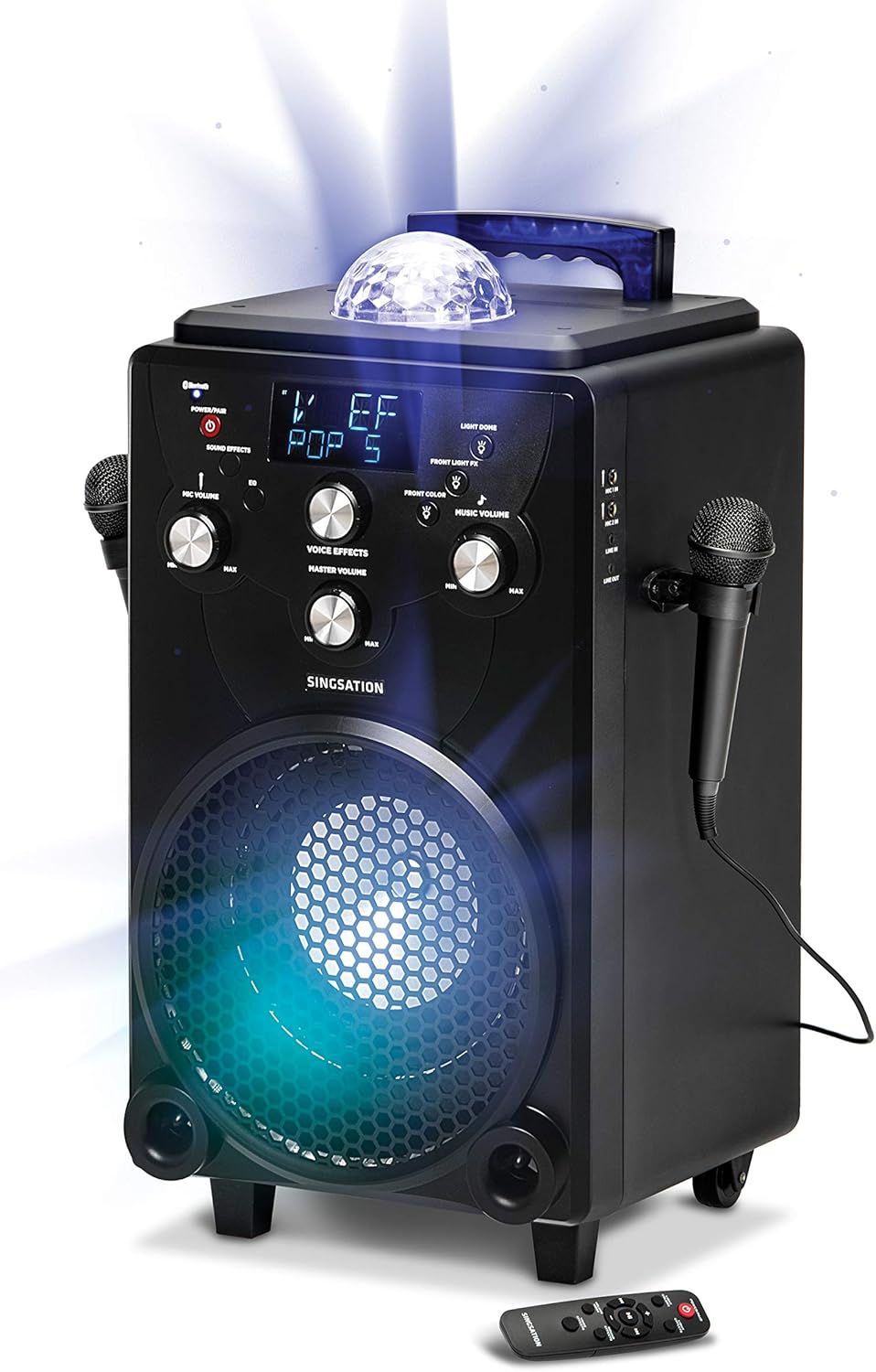
Rajah 5.1: The main unit of the Singsation Professional Karaoke Machine, showing its overall design and primary components.
6. Arahan Operasi
This section details how to operate your karaoke machine's various functions.
6.1. Hidupkan/Mati Kuasa
- Tekan dan tahan butang KUASA / PAIR button on the control panel or the remote control to turn the unit ON or OFF.
6.2. Main balik Muzik
The Singsation Karaoke Machine supports Bluetooth audio streaming and auxiliary input.
6.2.1. Berpasangan Bluetooth
- Turn on the karaoke machine. The Bluetooth indicator will flash, indicating it's in pairing mode.
- Pada telefon pintar atau tablet anda, dayakan Bluetooth dan cari peranti yang tersedia.
- Select "Singsation" from the list of devices. Once paired, the Bluetooth indicator will glow solid.
- Start playing music from your device. Adjust the Music Volume knob on the karaoke machine.
6.2.2. Input Tambahan
- Connect an external audio device (e.g., MP3 player) to the AUX IN port using a 3.5mm audio cable (not included).
- The unit will automatically switch to AUX mode. Adjust the Music Volume knob.
6.3. Penggunaan Mikrofon
- Kelantangan mikrofon: Use the MIC VOLUME knob to adjust the volume of the connected microphones.
- Kesan Suara: Press the VOICE EFFECTS button repeatedly to cycle through the 60 available voice effects. Use the VOICE EFFECTS knob to fine-tune the effect level.
6.4. Kesan Bunyi
- Press the SOUND EFFECTS button to activate one of the 10 built-in sound effects. Press again to cycle through them.
6.5. Pertunjukan Cahaya
- Warna terang: Press the LIGHT COLORS button to switch between different color modes for the main speaker light.
- Kesan Cahaya: Press the LIGHT EFFECTS button to cycle through the 25 dynamic light effects for the main speaker light and the top disco ball light.
- Front Light FX: Use the FRONT LIGHT FX button to control the front-facing light effects.
6.6. Fungsi Alat Kawalan Jauh
Alat kawalan jauh yang disertakan menyediakan akses mudah ke fungsi utama:
- Power/Pair: Turns the unit on/off and initiates Bluetooth pairing.
- Warna terang: Changes the color of the main speaker light.
- Kesan Cahaya: Cycles through light show patterns.
- Mod Kelantangan: Switches between adjusting music volume and microphone volume.
- Kesan Bunyi: Activates and cycles through sound effects.
- Kesan Suara: Cycles through voice transformation effects.
- Kawalan Main Semula: Play/Pause, Skip Forward, Skip Backward.

Rajah 6.1: The Singsation remote control, detailing the functions of each button for convenient operation.
7. Penyelenggaraan
Penjagaan yang betul akan memastikan jangka hayat mesin karaoke anda:
- Pembersihan: Lap unit dengan kain lembut dan kering. Jangan gunakan pembersih atau pelarut yang melelas.
- Storan: Apabila tidak digunakan, simpan unit di tempat yang sejuk dan kering, jauh daripada cahaya matahari langsung dan suhu yang melampau.
- Penjagaan Bateri: If the unit is not used for an extended period, charge the battery periodically to maintain its health.
8. Penyelesaian masalah
If you encounter issues with your Singsation Professional Karaoke Machine, refer to the following common problems and solutions:
| Masalah | Kemungkinan Punca | Penyelesaian |
|---|---|---|
| Unit tidak dihidupkan. | Battery is depleted or power adapter is not connected properly. | Connect the power adapter and ensure it's plugged into a working outlet. Allow the unit to charge for a few minutes before attempting to power on again. |
| Tiada bunyi dari pembesar suara. | Music volume is too low, external device volume is low, or incorrect input mode. | Increase the Music Volume knob. Check the volume on your connected Bluetooth device or auxiliary source. Ensure the correct input mode is selected (Bluetooth/AUX). |
| Mikrofon tidak berfungsi. | Microphone not plugged in, Mic Volume too low, or microphone is faulty. | Ensure microphones are securely plugged into the MIC ports. Increase the MIC VOLUME knob. Test with another microphone if available. |
| Gandingan Bluetooth gagal. | Unit is not in pairing mode, or device is too far away. | Press and hold the POWER/PAIR button to enter pairing mode (indicator will flash). Ensure your device is within 30 feet of the karaoke machine. Try unpairing and re-pairing. |
9. Spesifikasi
| Ciri | Perincian |
|---|---|
| Jenama | Nyanyian |
| Nombor Model | SPKA75 |
| Berat Barang | 20.7 paun |
| Dimensi Produk | 12 x 13 x 25 inci |
| warna | Hitam |
| Peranti Serasi | Telefon Pintar, Tablet |
| Jenis Penyambung | XLR (for microphones) |
| Kiraan Speaker | 1 |
| Sumber Kuasa | Dikuasakan Bateri |
| Voltage | 12 Volt |
| Ciri Khas | Mudah alih |
| Komponen yang Disertakan | Microphone (x2), Remote Control, Power Adapter |
10. Waranti dan Sokongan
For warranty information or technical support, please refer to the contact details provided on the product packaging or visit the official Singsation webtapak. Simpan resit pembelian anda sebagai bukti pembelian untuk sebarang tuntutan waranti.