1. Pengenalan
This manual provides detailed instructions for the installation, operation, and maintenance of your YOSEC Electronic Biometric Gun Safe Keypad Lock. Please read this manual thoroughly before installation and use to ensure proper function and safety.
2. Maklumat Keselamatan Penting
- Always keep the safe's override keys in a secure location, separate from the safe itself, and away from children.
- Do not store the manual or override keys inside the safe.
- Ensure batteries are installed correctly according to polarity markings.
- Replace all batteries simultaneously when the low battery warning is indicated.
- Test the lock functionality multiple times after installation and programming before securing valuable items.
3. Komponen Produk
The YOSEC Electronic Biometric Gun Safe Keypad Lock includes the following main components:
- Keypad with Biometric Fingerprint Reader
- Lock Body Mechanism
- Battery Holder (requires 4 AAA batteries)
- Perkakasan Pemasangan (skru, pencuci)
- Menyambung Kabel

Rajah 3.1: Meletup view showing the keypad, lock body, battery compartment, and connecting cables.

Rajah 3.2: Individual components of the YOSEC biometric lock, including the keypad, lock mechanism, and connecting wires.
4. Persediaan dan Pemasangan
4.1. Semakan Pra-Pemasangan
Before beginning installation, ensure all components are present and undamaged. Verify that the mounting surface on your safe is compatible with the lock's dimensions.
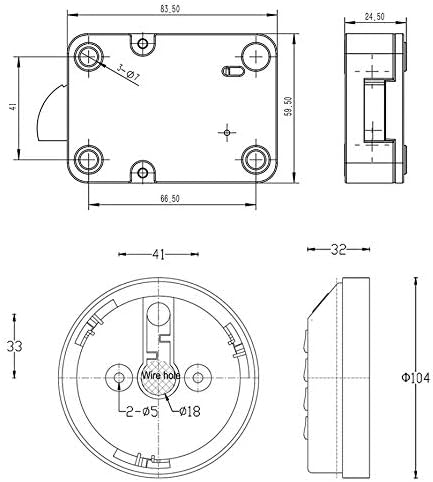
Rajah 4.1: Dimensional drawing of the lock body, showing measurements for installation compatibility.

Rajah 4.2: Dimensional drawing of the keypad unit, indicating diameter and depth for mounting.
4.2. Pemasangan Bateri
- Cari petak bateri, biasanya di bahagian dalam pintu selamat.
- Insert 4 AAA batteries, observing the correct polarity (+/-) as marked.
- Tutup penutup petak bateri dengan selamat.
4.3. Pemasangan Fizikal
Refer to the exploded diagram for component placement during installation.

Rajah 4.3: Exploded diagram illustrating the assembly sequence of the lock components onto a safe door.
- Mount the keypad unit to the exterior of the safe door using the provided screws.
- Connect the keypad cable to the lock body mechanism.
- Secure the lock body mechanism to the interior of the safe door, aligning it with the keypad and the safe's locking bolts.
- Ensure all connections are firm and the lock mechanism moves freely.
5. Arahan Operasi
The lock supports multiple access methods: user code, manager code, super override code, and biometric fingerprint recognition.
5.1. Initial Setup and Programming
Upon first use, it is recommended to set a manager code and register fingerprints.
- Setting Manager Code: Follow the specific instructions provided with your lock for entering programming mode and setting a 4-10 digit manager code. This code has administrative privileges.
- Mendaftar Cap Jari: In programming mode, follow the prompts to register up to 100 unique fingerprints. Ensure the finger is placed firmly and consistently on the sensor for accurate registration.
- Menetapkan Kod Pengguna: The manager can set additional 4-10 digit user codes.
- Super Override Code: This is a master code, typically pre-set or provided, for emergency access. Keep it secure.
5.2. Membuka Peti besi
- Menggunakan Kod: Enter your 4-10 digit user or manager code, then press '#'. The lock will unlock.
- Menggunakan Cap Jari: Place a registered finger firmly on the biometric sensor. The lock will unlock upon successful recognition.
- Dual Control Mode: If configured, the safe may require a combination of methods, e.g., code + fingerprint, or manager code + user code, or manager fingerprint + user fingerprint.
5.3. Time Delay Setting
The lock features a time delay setting, configurable from 1 to 99 minutes. This feature prevents immediate access after entering a valid code or fingerprint, adding an extra layer of security. Refer to the programming instructions for setting or adjusting the time delay.
5.4. Wrong Try Penalty
Repeated incorrect code entries or fingerprint scans will activate a penalty lockout period, during which the lock will not respond to any input. This is a security feature to deter unauthorized access attempts.
6. Penyelenggaraan
6.1. Penggantian Bateri
The lock will indicate a low battery warning with a red light. When this occurs, replace all 4 AAA batteries promptly to ensure continuous operation. Use high-quality alkaline batteries for best performance.
6.2. Pembersihan
Clean the keypad and fingerprint sensor with a soft, dry cloth. Avoid using abrasive cleaners or solvents, as these can damage the surface or internal components.
7. Penyelesaian masalah
| Masalah | Kemungkinan Punca | Penyelesaian |
|---|---|---|
| Kunci tidak bertindak balas. | Dead or low batteries. Incorrect battery installation. | Replace all 4 AAA batteries. Check battery polarity. |
| Cap jari tidak dikenali. | Finger not placed correctly. Fingerprint not registered. Sensor dirty. | Ensure full contact with sensor. Re-register fingerprint. Clean sensor with a soft cloth. |
| Kod tidak diterima. | Incorrect code entered. Lockout period active. | Verify code. Wait for lockout period to expire. |
| Mekanisme kunci adalah kaku. | Improper installation or alignment. | Recheck installation and alignment of lock body and keypad. |
Jika masalah berterusan selepas mencuba penyelesaian ini, sila hubungi sokongan pelanggan.
8. Spesifikasi
- Jenama: YOSEC
- model: B07WFP49GF
- Sumber Kuasa: 4 x Bateri AAA (tidak termasuk)
- Panjang Kod: 4-10 Digits (User, Manager, Super Override)
- Kapasiti cap jari: Sehingga 100 cap jari
- Kelewatan Masa: 1-99 minutes (programmable)
- Bahan: Metal (Stainless Steel Chrome Finish)
- Dimensi Produk: 3.9 x 3.9 x 0.79 inches (Keypad)
- Berat Barang: 1.32 paun (0.6 Kilogram)
- Jenis Paparan: Skrin sentuh
9. Maklumat Waranti
This YOSEC product comes with a Waranti 1 Tahun from the date of purchase. This warranty covers manufacturing defects and malfunctions under normal use. It does not cover damage caused by misuse, unauthorized modification, accident, or improper installation. Please retain your proof of purchase for warranty claims.
10. Sokongan Pelanggan
For technical assistance, troubleshooting, or warranty inquiries, please contact YOSEC customer support through the retailer where the product was purchased or visit the official YOSEC weblaman web untuk maklumat hubungan.
Pengeluar: NINGBO YOSEC INDUSTRIAL CO LTD