pengenalan
This manual provides detailed instructions for the installation, operation, and maintenance of the Norlake 154014 Digital Control, designed for Dixell XC10CX-5P00G units operating at 230V. Please read this manual thoroughly before installation and use to ensure proper function and safety.
Maklumat Keselamatan
Always follow basic safety precautions when installing, operating, or maintaining this device. Failure to do so may result in personal injury or damage to the equipment.
- Ensure the power supply is disconnected before any installation or maintenance procedures.
- This device operates at 230V. Only qualified personnel should perform electrical connections.
- Do not expose the control unit to excessive moisture or extreme temperatures outside its specified operating range.
- Sahkan semua sambungan adalah selamat dan betul sebelum menggunakan kuasa.
Apa yang ada dalam Kotak
The package for your Norlake 154014 Digital Control should contain the following item:
- 1 x Norlake 154014 Digital Control (Replacement Part)
Pemasangan dan Persediaan
The Norlake 154014 Digital Control is designed for integration into compatible refrigeration systems, specifically Dixell XC10CX-5P00G models. Proper installation is crucial for optimal performance.
Memasang Unit Kawalan
The unit is typically panel-mounted. Ensure adequate space for ventilation and access to wiring terminals.
Sambungan Elektrik
Refer to the wiring diagram printed on the top of the control unit for correct electrical connections. The unit requires a 230V power supply.
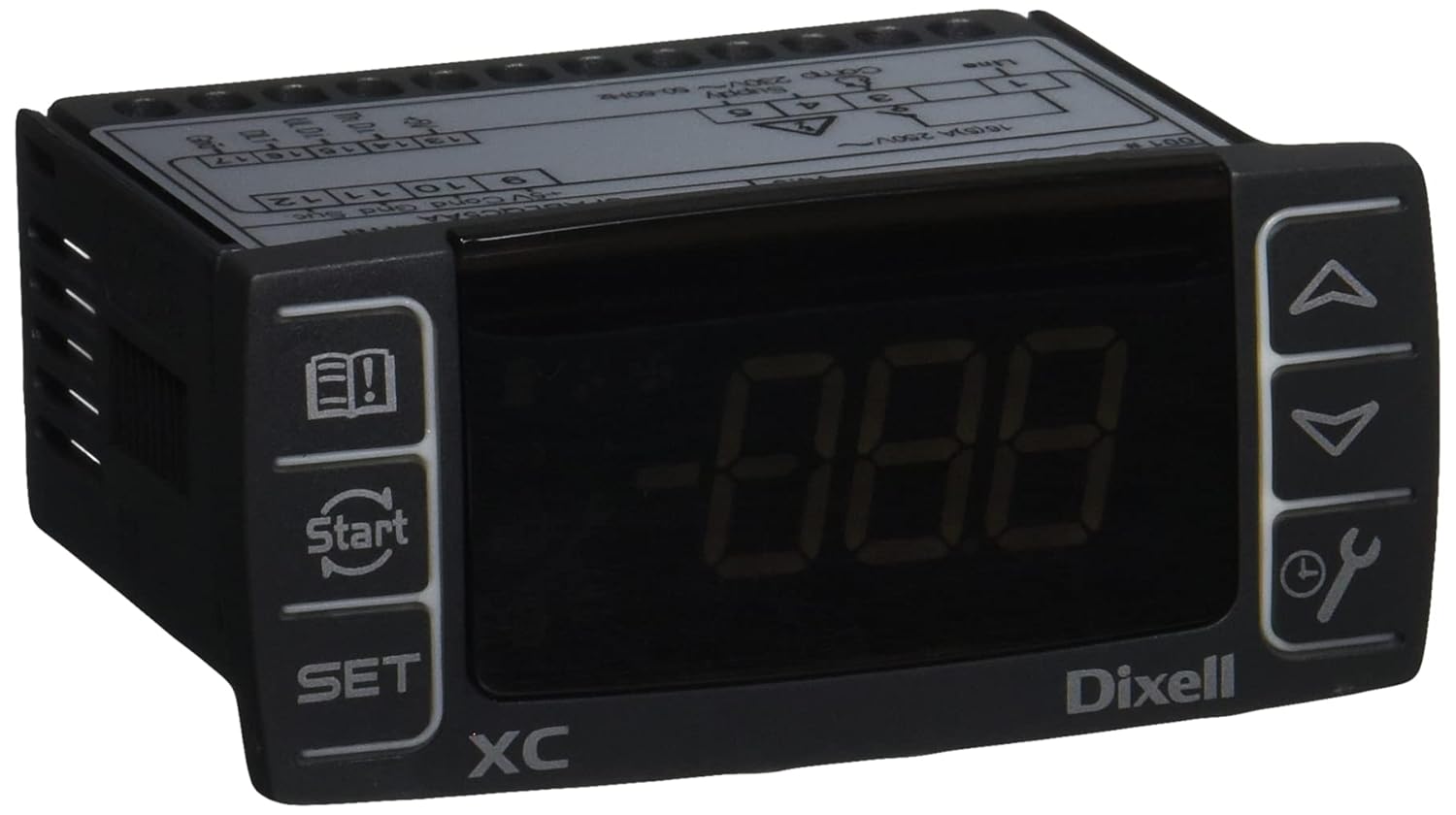
Image: Norlake 154014 Digital Control Unit. This image displays the front face of the digital control unit, featuring a digital display, control buttons (up, down, set, start, manual/wrench icon, and a book/exclamation mark icon), and the "Dixell XC" branding. The top of the unit shows terminal connections and voltage ratings (230V).
Key Connection Points:
- Baris (L): Main power input.
- Supply (230V~ 50-60Hz): Power input terminals (e.g., terminals 4 and 5).
- Compressor (Comp): Output for compressor control.
- 16(5)A 250V~: Arus maksimum dan voltage rating for certain outputs.
- Input Sensor: Terminals for temperature probes (e.g., 10, 11, 12 for NTC sensors).
- Input Digital: Terminals for external switches or signals (e.g., 13, 14, 15, 16, 17).
Ensure all wiring complies with local electrical codes and standards.
Arahan Operasi
The Dixell XC10CX-5P00G digital control provides precise temperature management and system monitoring.
Operasi Asas
- Hidupkan kuasa: Once correctly wired, apply power to the unit. The digital display will illuminate.
- Paparan suhu: The main display typically shows the current temperature of the controlled environment.
- Butang SET: Tekan ke SET butang ke view or modify the setpoint temperature. Use the Up dan Bawah arrows to adjust the value. Press SET sekali lagi untuk mengesahkan.
- Anak panah atas/bawah: Digunakan untuk menavigasi menu dan melaraskan nilai.
- Butang Mula / Berhenti: The button with the circular arrow and "Start" text is typically used to manually start or stop a defrost cycle or other specific functions.
- Manual/Wrench Button: The button with the wrench and clock icon may access advanced settings or manual control functions.
- Information/Alarm Button: The button with the book and exclamation mark icon is often used to view alarms or access information about the unit's status.
Tetapan Lanjutan
Accessing advanced parameters usually involves holding the SET button for several seconds or a combination of buttons. Refer to the comprehensive Dixell XC10CX-5P00G manual for detailed parameter descriptions and adjustment procedures. Incorrect parameter settings can lead to system malfunction.
Penyelenggaraan
Regular maintenance ensures the longevity and reliable operation of your digital control unit.
- Pembersihan: Bersihkan panel hadapan secara berkala dengan kain lembutamp kain. Jangan gunakan pembersih atau pelarut yang melelas.
- Sambungan: Periksa semua sambungan elektrik setiap tahun untuk kesesakan dan tanda-tanda kakisan.
- Integriti Sensor: Ensure temperature sensors are clean and properly positioned.
- Kemas Kini Perisian: Consult Norlake or Dixell for information on any available firmware updates.
Sentiasa putuskan sambungan kuasa sebelum melakukan sebarang penyelenggaraan.
Menyelesaikan masalah
This section provides solutions to common issues you might encounter with the Norlake 154014 Digital Control.
| Masalah | Kemungkinan Punca | Penyelesaian |
|---|---|---|
| Paparan kosong | No power supply; Loose wiring; Blown fuse. | Check power connection; Verify wiring; Replace fuse if necessary. |
| Bacaan suhu tidak betul | Faulty sensor; Sensor not properly connected or positioned. | Check sensor wiring; Reposition sensor; Replace sensor if damaged. |
| Unit tidak bertindak balas terhadap tekanan butang | Keypad malfunction; Unit frozen. | Power cycle the unit; Contact technical support if issue persists. |
| System not cooling/heating as expected | Incorrect setpoint; Parameter misconfiguration; External system issue. | Verify setpoint; Review advanced parameters; Check compressor/fan operation. |
For issues not listed here, or if troubleshooting steps do not resolve the problem, please contact Norlake technical support.
Spesifikasi
- Nombor Model: 154014
- Jenis Produk: Digital Control for Dixell XC10CX-5P00G
- Voltage: 230V
- Kekerapan: 50-60Hz
- Dimensi (Produk): Approximately 9.0" (L) x 6.0" (W) x 5.0" (H) (based on package dimensions)
- Berat (Produk): Kira-kira 8.48 auns
- Negara Asal: Itali
- Pengeluar: Norlake
- ASIN: B07VQJW5QV
Waranti dan Sokongan
For warranty information and technical support regarding your Norlake 154014 Digital Control, please refer to the documentation provided with your original purchase or contact Norlake directly. Keep your purchase receipt and model number handy when contacting support.
Norlake Contact Information: Please visit the official Norlake website or refer to your product packaging for the most current contact details.


