1. Pengenalan
Terima kasih kerana membeliasing the ICQN IQ M7051N03N 1AA Mini Electric Oven. This manual provides important information for the safe and efficient operation of your appliance. Please read it thoroughly before use and keep it for future reference.
2. Arahan Keselamatan Penting
Sentiasa ikuti langkah berjaga-jaga keselamatan asas apabila menggunakan peralatan elektrik untuk mengurangkan risiko kebakaran, renjatan elektrik dan kecederaan kepada orang.
- Baca semua arahan sebelum menggunakan ketuhar.
- Jangan sentuh permukaan panas. Gunakan pemegang atau tombol.
- Untuk melindungi daripada kejutan elektrik, jangan rendamkan kord, palam, atau perkakas di dalam air atau cecair lain.
- Pengawasan rapi diperlukan apabila sebarang perkakas digunakan oleh atau berhampiran kanak-kanak.
- Cabut plag dari soket apabila tidak digunakan dan sebelum membersihkan. Biarkan sejuk sebelum memakai atau menanggalkan bahagian.
- Jangan kendalikan sebarang perkakas dengan kord atau palam yang rosak atau selepas perkakas tidak berfungsi atau rosak dalam apa jua cara.
- Penggunaan lampiran aksesori yang tidak disyorkan oleh pengilang perkakas boleh menyebabkan kecederaan.
- Jangan gunakan di luar rumah.
- Jangan biarkan kord tergantung di tepi meja atau kaunter atau menyentuh permukaan panas.
- Jangan letakkan pada atau berhampiran gas panas atau penunu elektrik, atau dalam ketuhar yang dipanaskan.
- Berhati-hati yang melampau mesti digunakan apabila menggerakkan perkakas yang mengandungi minyak panas atau cecair panas lain.
- Untuk memutuskan sambungan, matikan mana-mana kawalan kepada "mati", kemudian tanggalkan palam dari alur keluar dinding.
- Jangan gunakan perkakas untuk kegunaan selain daripada yang dimaksudkan.
- Makanan bersaiz besar atau perkakas logam tidak boleh dimasukkan ke dalam ketuhar pembakar roti kerana ia boleh menyebabkan kebakaran atau risiko kejutan elektrik.
- A fire may occur if the oven is covered or touching flammable material, including curtains, draperies, walls, etc., when in operation.
- Jangan letakkan mana-mana bahan berikut di dalam ketuhar: kertas, kadbod, plastik atau sebarang bahan lain yang tidak direka khusus untuk kegunaan ketuhar.
- Jangan simpan sebarang bahan, selain aksesori yang disyorkan pengeluar, dalam ketuhar ini apabila tidak digunakan.
- Jangan tutup dulang serbuk atau mana-mana bahagian ketuhar dengan kerajang logam. Ini akan menyebabkan ketuhar menjadi terlalu panas.
3. Produk Lebihview
The ICQN IQ M7051N03N 1AA is a versatile 60-liter mini electric oven designed for various cooking needs. It features interior lighting, a turbo fan for convection cooking, and multiple cooking functions.

Rajah 3.1: Depan view of the ICQN Mini Electric Oven, showcasing its compact design and interior capacity with a roasted chicken.
3.1 Komponen dan Kawalan

Rajah 3.2: Terperinci view of the oven's control panel, including the timer, temperature setting, and cooking function selector dials.
- Dail Pemasa: Sets cooking time from 0 to 90 minutes.
- Dail Suhu: Melaraskan suhu dari 40°C hingga 230°C.
- Dail Fungsi: Selects various cooking modes (e.g., Upper Heating, Lower Heating, Convection).
3.2 Dimensi dan Ciri
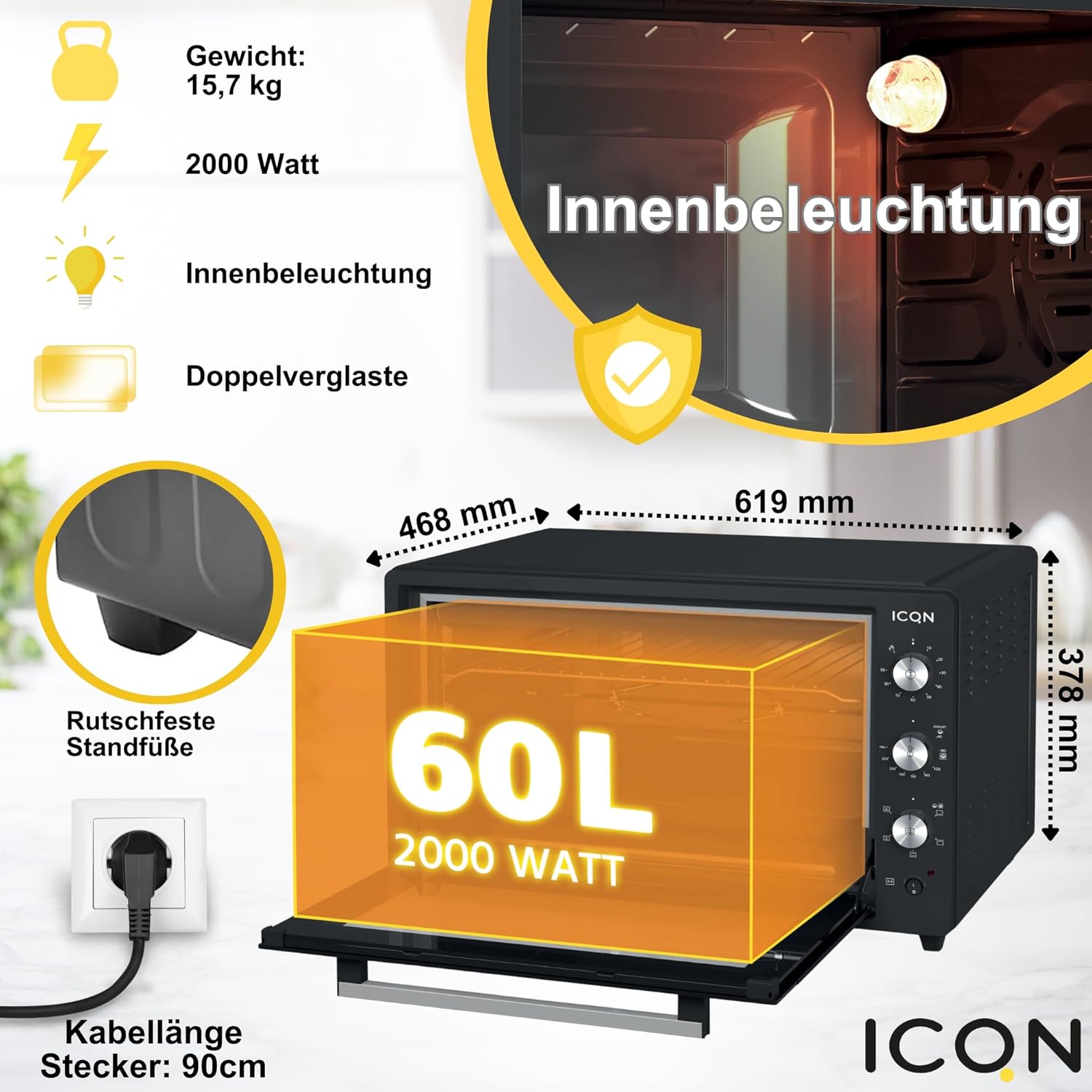
Figure 3.3: Key specifications and features of the oven, including its dimensions (468mm x 619mm x 378mm), 15.7 kg weight, 2000 Watt power, interior lighting, double-glazed door, non-slip feet, and 90cm cable length.
- kapasiti: 60 Liter
- Kuasa: 2000 Watt
- Voltage: 230V
- Dimensi Produk (L x W x H): Kira-kira 61.9 cm x 46.8 cm x 37.8 cm
- Berat: 15.7 kg
- Ciri Khas: Interior Lighting, Turbo Fan (Circular Air), Timer with Automatic Shut-off, Enamel Baking Tray, Easy to Clean, Double-Glazed Door.
3.3 Aksesori Termasuk
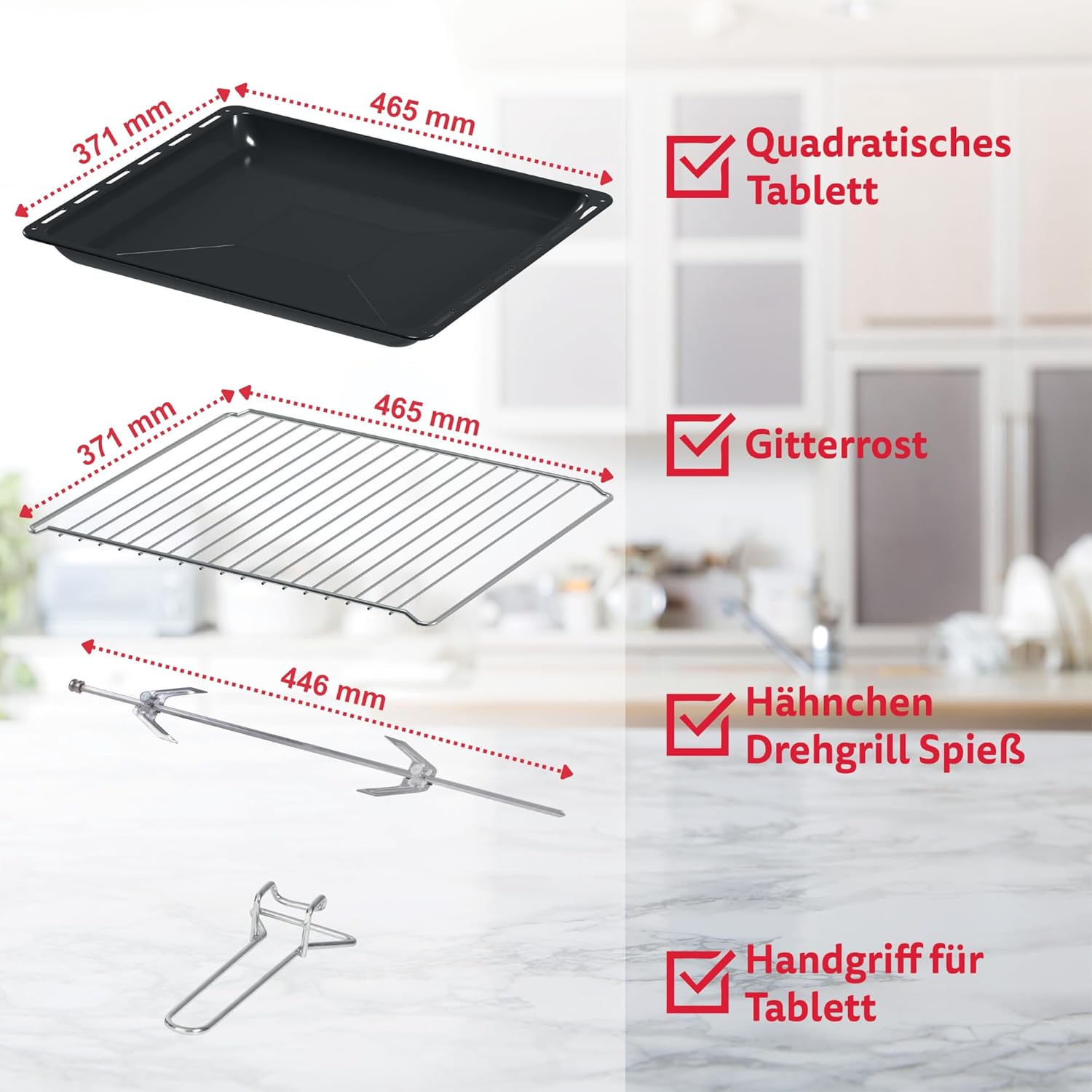
Figure 3.4: Standard accessories provided with the oven, including a square baking tray, a wire rack, a rotisserie spit for roasting, and a handle for safe removal of hot trays.
- Square Baking Tray
- Rak wayar
- Rotisserie Spit
- Pemegang Dulang
4. Persediaan dan Penggunaan Pertama
4.1 Membongkar
- Keluarkan semua bahan pembungkusan dari ketuhar dan aksesorinya.
- Periksa sebarang kerosakan semasa pengangkutan. Jangan gunakan jika rosak.
- Ensure all listed accessories are present.
4.2 Penempatan
- Place the oven on a stable, heat-resistant, and level surface.
- Ensure adequate ventilation around the oven (at least 10-15 cm clearance on all sides).
- Do not place near flammable materials like curtains or walls.
- Ensure the power cord can reach a standard mains socket without tension.
4.3 Sebelum Penggunaan Pertama
- Lap bahagian dalam dan aksesori dengan damp kain dan detergen lembut. Keringkan dengan teliti.
- For the first use, operate the oven empty for about 15 minutes at maximum temperature (230°C) with the convection fan on. This will burn off any manufacturing residues and odors. A slight smoke or odor is normal during this process. Ensure the area is well-ventilated.
- Biarkan ketuhar sejuk sepenuhnya sebelum penggunaan sebenar untuk memasak buat kali pertama.
5. Arahan Operasi
5.1 Operasi Am
- Place food on the appropriate accessory (baking tray or wire rack).
- Slide the accessory into the desired rack position. The oven has 4 levels for flexible placement.

Figure 5.1: Illustration of the four available rack levels within the oven cavity, allowing for versatile cooking and baking.
- Close the oven door. The double-glazed door helps maintain temperature and safety.

Rajah 5.2: Jarak dekat view highlighting the double-glazed oven door, which provides improved insulation and safety.
- Set the desired cooking function using the Function Dial.
- Set the desired temperature using the Temperature Dial.
- Set the cooking time using the Timer Dial. The oven will automatically turn off when the timer reaches zero.
5.2 Fungsi Memasak
The oven offers 6 different cooking functions to suit various recipes:

Figure 5.3: Visual representation of the oven's six distinct heating modes, including top heat, bottom heat, combined heat, and convection options.
- Pemanasan Atas: Ideal for browning and grilling the top of dishes.
- Pemanasan yang lebih rendah: Best for baking bases, pizzas, or slow cooking.
- Pemanasan Atas dan Bawah: Standard baking mode for most dishes.
- Lower Heating + Hot Air Function (Convection): For even cooking from the bottom with fan assistance, good for pastries.
- Upper and Lower Heating + Hot Air Function (Convection): All-around even cooking, suitable for roasting and baking multiple items simultaneously.
- Fungsi Grill: Intense top heat for grilling meats, vegetables, or toasting.
5.3 Fungsi Rotisserie
To use the rotisserie for roasting poultry or larger cuts of meat:
- Skewer the food securely onto the rotisserie spit.
- Insert the spit into the designated rotisserie slots inside the oven.
- Select the appropriate heating function (e.g., Upper and Lower Heating + Hot Air Function or Grill Function).
- Turn the rotisserie switch (if available on your model) to activate rotation.
- Tetapkan suhu dan masa mengikut keperluan.
6. Pembersihan dan Penyelenggaraan
Pembersihan berkala memastikan prestasi optimum dan memanjangkan hayat ketuhar anda. Sentiasa cabut plag ketuhar dan biarkan ia sejuk sepenuhnya sebelum membersihkannya.
- Pembersihan Dalaman: The enamelled interior is designed for easy cleaning. Wipe with a damp cloth and mild detergent. For stubborn stains, use a non-abrasive oven cleaner suitable for enamelled surfaces.
- Pembersihan Luaran: Lap bahagian luar dengan lembut, damp kain. Jangan gunakan pembersih atau penyental yang kasar.
- Aksesori: Wash the baking tray, wire rack, and rotisserie spit in warm soapy water. They are generally dishwasher safe, but hand washing is recommended to preserve their finish.
- Dulang Kerak: Tanggalkan dan bersihkan dulang serbuk roti yang terletak di bahagian bawah ketuhar secara berkala untuk mengelakkan pengumpulan gris dan potensi bahaya kebakaran.
- Kaca Pintu: The double-glazed door can be disassembled for thorough cleaning of the inner glass panels. Refer to the specific instructions in your full manual for this procedure.
- Do NOT immerse the oven body, cord, or plug in water or any other liquid.
7. Penyelesaian masalah
| Masalah | Kemungkinan Punca | Penyelesaian |
|---|---|---|
| Ketuhar tidak dihidupkan. | Tidak dipasang; kuasa outage; pemasa tidak ditetapkan. | Ensure plug is securely in outlet; check household fuse/breaker; set the timer dial to desired cooking time. |
| Makanan tidak masak sekata. | Incorrect rack position; uneven food placement; fan not active (if convection desired). | Adjust rack position; arrange food evenly; ensure convection function is selected if needed. |
| Asap berlebihan semasa operasi. | Food spills; grease buildup; first use burn-off. | Clean interior thoroughly; ensure crumb tray is clean. If first use, ensure ventilation. If persistent, unplug and contact support. |
| Oven door does not close properly. | Obstruction; door hinge issue. | Check for any food debris or accessories blocking the door. If hinges are damaged, contact customer service. |
If the problem persists after trying these solutions, please contact ICQN customer support.
8. Spesifikasi Teknikal
| Ciri | Spesifikasi |
|---|---|
| Jenama | ICQN |
| Nombor Model | IQ M7051N03N 1AA |
| warna | Semua Kelabu |
| Kapasiti | 60 Liter |
| Kuasa / Wattage | 2000 Watt |
| Voltage | 230V |
| Dimensi Produk (L x W x H) | 46 x 61 x 37 cm (approx. 61.9 x 46.8 x 37.8 cm from image) |
| Berat Barang | 15.7 Kilogram |
| bahan | Glass (door), Enamelled interior |
| Auto Shutoff | Ya (Fungsi Pemasa) |
| Ciri Khas | Mini Oven with Circular Air (Convection), Timer function, Enamel Baking Tray, Easy to clean, Double-Glazed Door |
9. Waranti dan Sokongan
ICQN products are manufactured to high-quality standards. For warranty information and customer support, please refer to the warranty card included with your purchase or visit the official ICQN webtapak. Simpan bukti pembelian anda untuk sebarang tuntutan waranti.
For technical assistance or service, please contact:
ICQN Customer Service: support@icqn.com (Cthample email, actual contact info may vary)
Webtapak: www.icqn.com (Cthample website, actual contact info may vary)


