1. Pengenalan
The NEDIS VEXT3470AT HDMI Audio Extractor allows you to separate audio signals from an HDMI source and output them to an audio system, while simultaneously passing the video signal to a display. This device is designed to integrate modern HDMI sources with audio systems that may not have HDMI inputs, providing both digital (Toslink) and analog (L/R stereo) audio outputs.
It supports 3D video and amplifies the digital video signal for reliable transmission.
2. Maklumat Keselamatan
- Baca arahan ini dengan teliti sebelum digunakan.
- Jauhkan peranti daripada air, kelembapan dan suhu yang melampau.
- Jangan cuba membuka atau membaiki peranti sendiri. Rujuk semua servis kepada kakitangan yang berkelayakan.
- Use only the provided power adapter. Using an incorrect adapter may damage the device and void the warranty.
- Pastikan pengudaraan yang betul di sekeliling peranti untuk mengelakkan terlalu panas.
- Putuskan sambungan penyesuai kuasa semasa ribut petir atau apabila tidak digunakan untuk jangka masa yang lama.
3. Kandungan Pakej
Sila semak kandungan pakej untuk memastikan semua item ada dan dalam keadaan baik:
- NEDIS VEXT3470AT HDMI Audio Extractor
- Penyesuai Kuasa
- Manual Pengguna (dokumen ini)
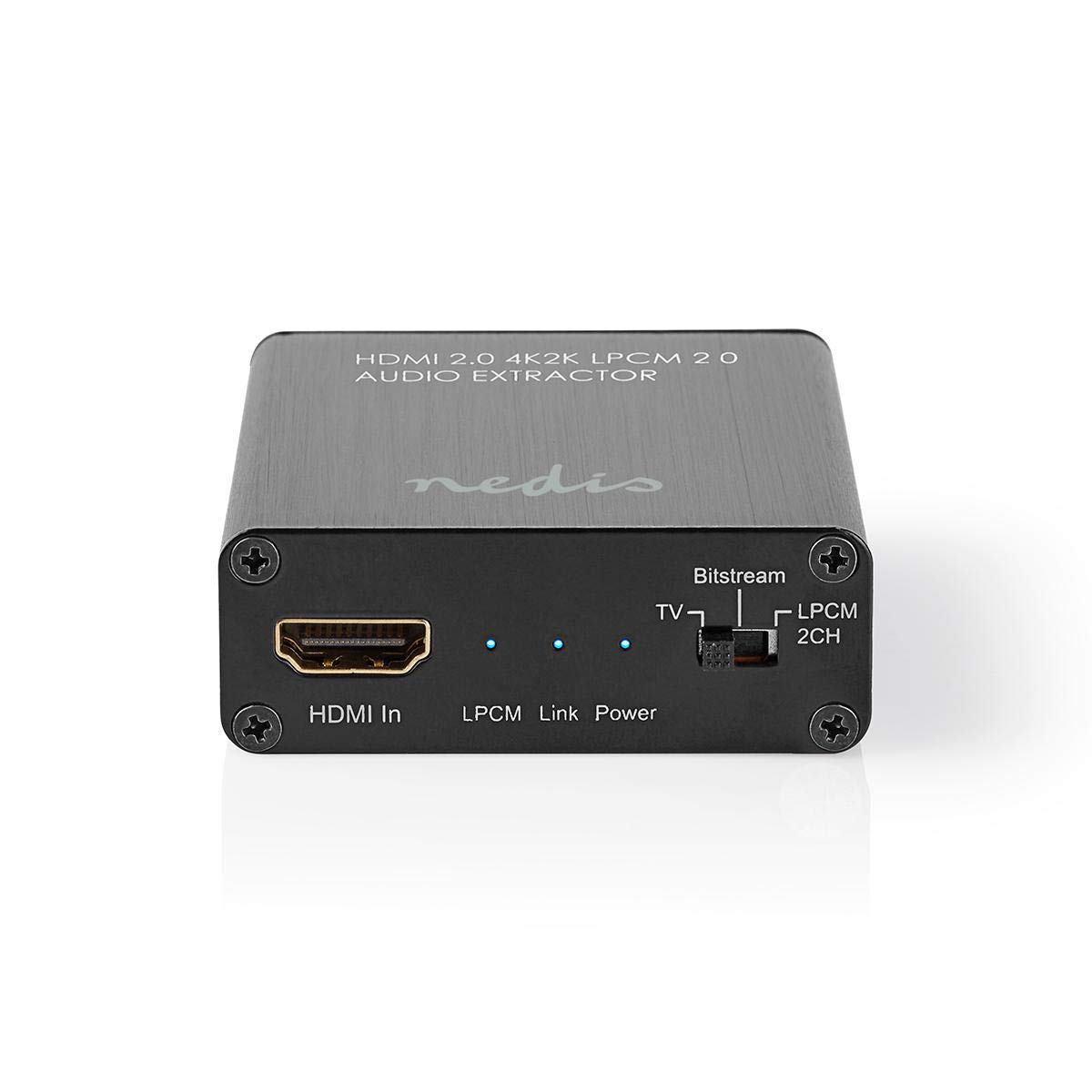
Image: The NEDIS VEXT3470AT HDMI Audio Extractor unit shown alongside its power adapter.
4. Produk Lebihview
Familiarize yourself with the ports and indicators on the HDMI Audio Extractor:
4.1 Input Side
Image: Close-up of the input side of the audio extractor, showing the HDMI In port, LPCM, Link, and Power indicator LEDs, and the Audio Mode Switch.
- HDMI Dalam: Connect your HDMI source device (e.g., DVD/Blu-ray player, game console).
- LPCM LED: Indicates when LPCM audio format is detected.
- Pautan LED: Indicates an active HDMI connection.
- LED kuasa: Menyala apabila peranti dihidupkan.
- Audio Mode Switch:
- Aliran bit: For multi-channel audio formats like Dolby Digital or DTS.
- TV: Passes audio directly from the HDMI source to the TV.
- LPCM 2CH: For 2-channel stereo audio output via L/R analog and Toslink.
4.2 Output Side

Image: Close-up of the output side of the audio extractor, showing the 5V/DC power input, Optical (Toslink) audio output, HDMI Out port, and L/R analog audio outputs.
- 5V/DC: Port input kuasa. Sambungkan penyesuai kuasa yang disediakan di sini.
- Optik: Digital audio output (Toslink). Connect to an audio receiver or soundbar.
- Keluar HDMI: Connect to your TV or display.
- L/R: Analog stereo audio output. Connect to an amplifier or stereo system using RCA cables.
5. Arahan Persediaan
Follow these steps to connect your HDMI Audio Extractor:
- Matikan Peranti: Ensure all devices (HDMI source, TV, audio system) are powered off before making connections.
- Sambungkan Sumber HDMI: Connect an HDMI cable from your source device (e.g., Blu-ray player) to the HDMI Dalam port on the audio extractor.
- Paparan Sambungkan: Connect another HDMI cable from the HDMI Keluar port on the audio extractor to your TV or display.
- Connect Audio System:
- For digital audio, connect an optical Toslink cable from the Optik port on the extractor to your audio receiver or soundbar.
- For analog stereo audio, connect RCA cables from the L/R ports on the extractor to your stereo amppembesar atau pembesar suara aktif.
- Sambungkan Kuasa: Plug the provided power adapter into the 5V/DC port on the extractor, then plug the adapter into a power outlet. The Power LED should illuminate.
- Hidupkan Peranti: Power on your TV/display, audio system, and then your HDMI source device.
6. Arahan Operasi
Once connected, operate the device as follows:
- Pilih Mod Audio: Gunakan Suis Mod Audio on the input side to select the desired audio output format:
- Aliran bit: For multi-channel audio (e.g., Dolby Digital, DTS) to be passed through the Optical output. Your audio receiver must support these formats.
- TV: Passes the audio directly to the TV via HDMI. Audio extraction via Optical/L/R may be limited or unavailable in this mode, depending on the source and TV capabilities.
- LPCM 2CH: Converts multi-channel audio to 2-channel LPCM for output via Optical and L/R analog ports. This is suitable for stereo systems or when your receiver does not support Bitstream formats.
- Petunjuk Sahkan:
- The Kuasa LED sepatutnya dihidupkan.
- The Pautan LED should be on when an active HDMI signal is detected from the source.
- The LPCM LED will illuminate if the audio signal is in LPCM format.
- Adjust Audio System: Ensure your audio receiver or soundbar is set to the correct input (Optical or Analog L/R) and volume.
7. Penyelenggaraan
To ensure the longevity and optimal performance of your HDMI Audio Extractor:
- Pembersihan: Gunakan kain lembut dan kering untuk membersihkan peranti. Jangan gunakan pembersih cecair atau aerosol.
- Storan: Simpan peranti di tempat yang sejuk dan kering apabila tidak digunakan.
- Pengendalian: Elakkan daripada menjatuhkan atau meletakkan peranti kepada kesan yang kuat.
8. Penyelesaian masalah
Jika anda menghadapi masalah, rujuk panduan penyelesaian masalah berikut:
| Masalah | Kemungkinan Punca / Penyelesaian |
|---|---|
| Tiada Hasil Video |
|
| Tiada Output Audio |
|
| LED Kuasa Mati |
|
| Intermittent Audio/Video |
|
9. Spesifikasi
Key technical specifications for the NEDIS VEXT3470AT HDMI Audio Extractor:
- Nombor Model: VEXT3470AT
- Jenama: NEDIS
- Input: 1x HDMI
- Output: 1x HDMI, 1x Optical (Toslink), 1x L/R Stereo (RCA)
- Versi HDMI: Compatible with HDMI 2.0 (implied by 4K2K support in product name)
- Resolusi Video: Up to 4K (4K2K)
- Sokongan 3D: ya
- Format Audio: LPCM 2.0, Bitstream (Dolby Digital, DTS pass-through)
- Bekalan Kuasa: 5V DC (via included adapter)
- Dimensi (L x W x H): Kira-kira 7.7 x 6.4 x 2.3 cm
- Berat: 240 Gram
- warna: Anthracite (Black)
- Negara Asal: China
10. Waranti dan Sokongan
NEDIS products are manufactured to high quality standards. In the unlikely event of a defect during the warranty period, please contact your retailer for support. The warranty period is subject to local consumer laws and regulations.
For technical assistance or further inquiries, please refer to the support information provided by your retailer or visit the official NEDIS webtapak.


