1. Produk Lebihview
This DCU TECNOLOGIC universal remote control is designed for use with LG LCD/LED televisions. It offers an operable distance of up to 8 meters and is ready to use without any complex setup procedures. The remote includes dedicated buttons for popular streaming services like Netflix and Prime Video, enhancing your viewpengalaman dalam.
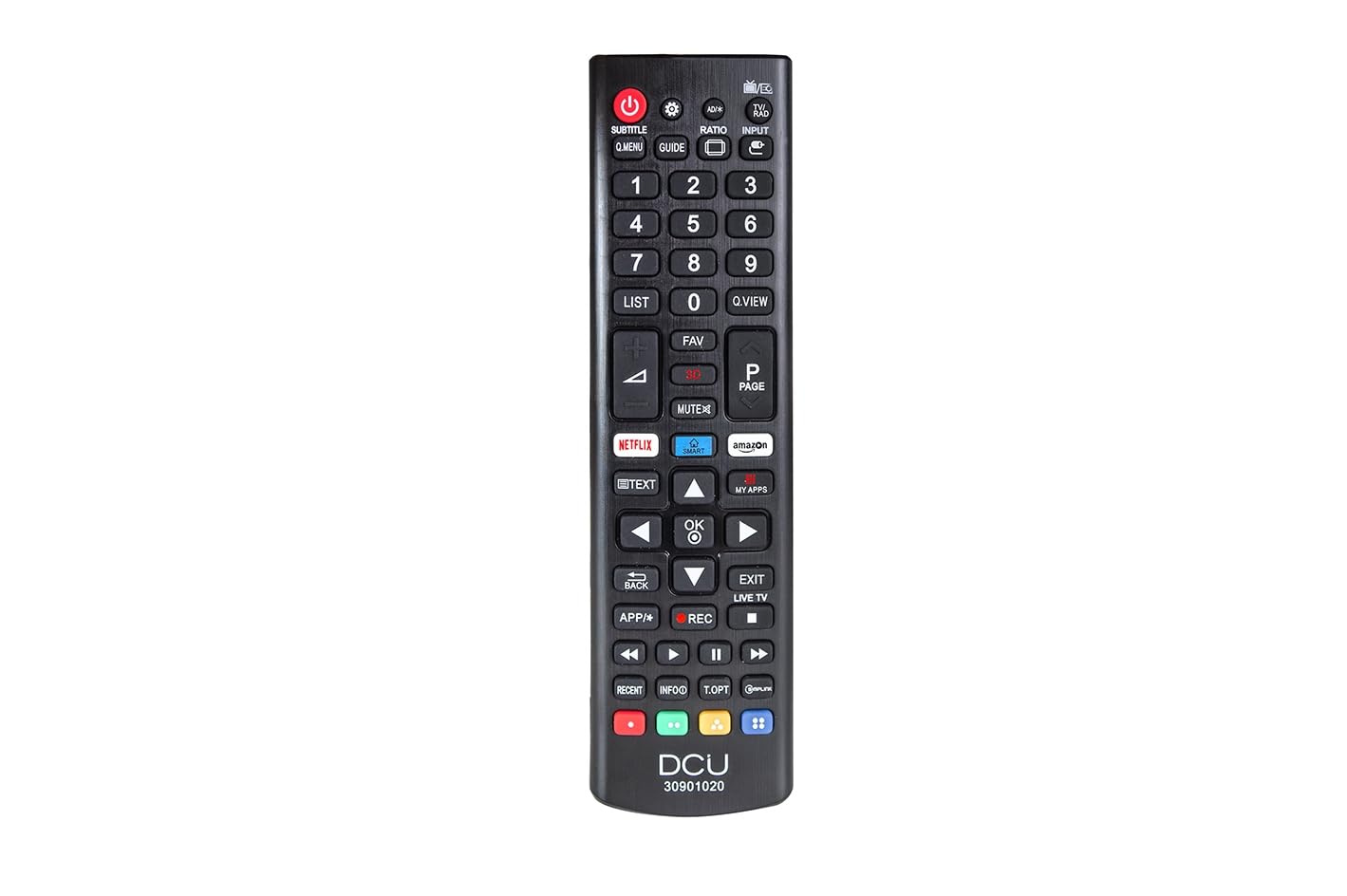
Image showing the front view of the DCU TECNOLOGIC LG Universal Remote Control, highlighting its button layout including dedicated Netflix and Prime Video buttons.
2. Persediaan
2.1 Pemasangan Bateri
The remote control requires two (2) AAA batteries for operation. Batteries are not included with the product.
- Cari petak bateri di belakang alat kawalan jauh.
- Luncurkan penutup petak bateri ke bawah atau mengikut arah yang ditunjukkan oleh anak panah untuk membukanya.
- Masukkan dua bateri AAA, pastikan terminal positif (+) dan negatif (-) sejajar dengan tanda di dalam petak.
- Gantikan penutup petak bateri dengan menggelongsorkannya semula ke tempatnya sehingga ia berbunyi dengan selamat.
The remote control is now ready for use. No additional programming or pairing is required for compatible LG LCD/LED TVs.
3. Arahan Operasi
This remote control functions identically to an original LG remote for basic TV operations.
3.1 Fungsi Asas
- Butang Kuasa: Menghidupkan atau mematikan TV.
- Kelantangan Naik/Turun: Melaraskan tahap bunyi.
- Saluran Atas/Bawah: Menukar saluran TV.
- Butang Nombor (0-9): Directly select TV channels.
- Navigation Buttons (Up, Down, Left, Right, OK/Enter): Digunakan untuk navigasi menu dan pemilihan.
- Butang Bisukan: Mendiamkan audio TV.
3.2 Special Features: Netflix and Prime Video Buttons
The remote includes dedicated buttons for quick access to Netflix and Amazon Prime Video. Pressing these buttons will launch the respective application on your LG Smart TV.
Nota Penting: The functionality of the Netflix and Prime Video buttons depends on whether your original LG TV remote control had these specific buttons and if your TV supports these applications. If your original remote did not feature these buttons, or if your TV model does not support direct app launch via remote, these buttons on the universal remote may not function.
4. Penyelenggaraan
- Pembersihan: Gunakan kain lembut dan kering untuk membersihkan alat kawalan jauh. Jangan gunakan pembersih cecair atau bahan yang melelas.
- Penggantian Bateri: Gantikan bateri apabila tindak balas alat kawalan jauh menjadi lembap atau berhenti berfungsi. Sentiasa gantikan kedua-dua bateri pada masa yang sama dengan yang baharu.
- Storan: Store the remote in a dry place, away from direct sunlight, extreme temperatures, and high humidity.
- Elakkan Titisan: Lindungi alat kawalan jauh daripada kesan fizikal, kerana titisan boleh merosakkan komponen dalaman.
5. Penyelesaian masalah
| Masalah | Kemungkinan Punca | Penyelesaian |
|---|---|---|
| Alat kawalan jauh tidak berfungsi. | Dead or incorrectly inserted batteries. Obstruction between remote and TV. Remote is too far from the TV. | Check and replace batteries, ensuring correct polarity. Remove any objects blocking the line of sight to the TV's IR receiver. Move closer to the TV (within 8 meters). |
| Netflix/Prime Video buttons do not work. | Original TV remote did not have these buttons. TV model does not support direct app launch. | Verify if your original LG TV remote had these specific buttons. Ensure your TV is a Smart TV and supports these applications. The universal remote replicates original remote functions; if the original lacked these, the universal remote's buttons may not activate them. |
| Butang tidak responsif atau melekit. | Kotoran atau serpihan di bawah butang. | Clean the remote control with a soft, dry cloth. Avoid pressing buttons excessively hard. |
6. Spesifikasi
| Ciri | Perincian |
|---|---|
| Jenama | DCU TECNOLOGIC |
| Nombor Model | 30901020 |
| Peranti Serasi | LG LCD/LED Televisions |
| Teknologi Ketersambungan | Inframerah (IR) |
| Julat Maksimum | 8 meter |
| Sumber Kuasa | 2 x Bateri AAA (tidak termasuk) |
| Dimensi Produk | 5 x 5 x 15 cm |
| Berat badan | 120 g |
| Ciri Khas | Universal, Dedicated Netflix & Prime Video Buttons |
7. Waranti dan Sokongan
Information regarding product warranty and customer support is not provided in the available product details. Please refer to the product packaging or contact the retailer for specific warranty terms and support options.


