1. Pengenalan
This manual provides detailed instructions for the installation, operation, and maintenance of your Antec NX210 Mid-Tower ATX Computer Cabinet. Please read this manual thoroughly before beginning assembly or use to ensure proper functionality and safety.
The Antec NX210 is designed to accommodate ATX, Micro-ATX, and ITX motherboards, offering ample space for components and efficient cooling with pre-installed ARGB fans.
2. Maklumat Keselamatan
Patuhi langkah berjaga-jaga keselamatan berikut semasa pemasangan dan pengendalian:
- Sentiasa putuskan sambungan bekalan kuasa dari alur keluar dinding sebelum memasang atau menanggalkan sebarang komponen untuk mengelakkan kejutan elektrik.
- Handle components with care to avoid damage from static electricity. Consider using an anti-static wrist strap.
- Keep the cabinet away from direct sunlight, heat sources, and moisture.
- Pastikan pengudaraan yang betul untuk mengelakkan terlalu panas. Jangan sekat lubang udara.
- Jauhkan bahagian kecil dan alatan daripada kanak-kanak.
3. Kandungan Pakej
Sahkan bahawa semua item terdapat dalam pakej:
- Antec NX210 Mid-Tower ATX Computer Cabinet
- 4 x 120mm ARGB Fans (3 pre-installed in front, 1 pre-installed in rear)
- Accessory Box (screws, cable ties, etc.)
- Manual Pengguna (dokumen ini)
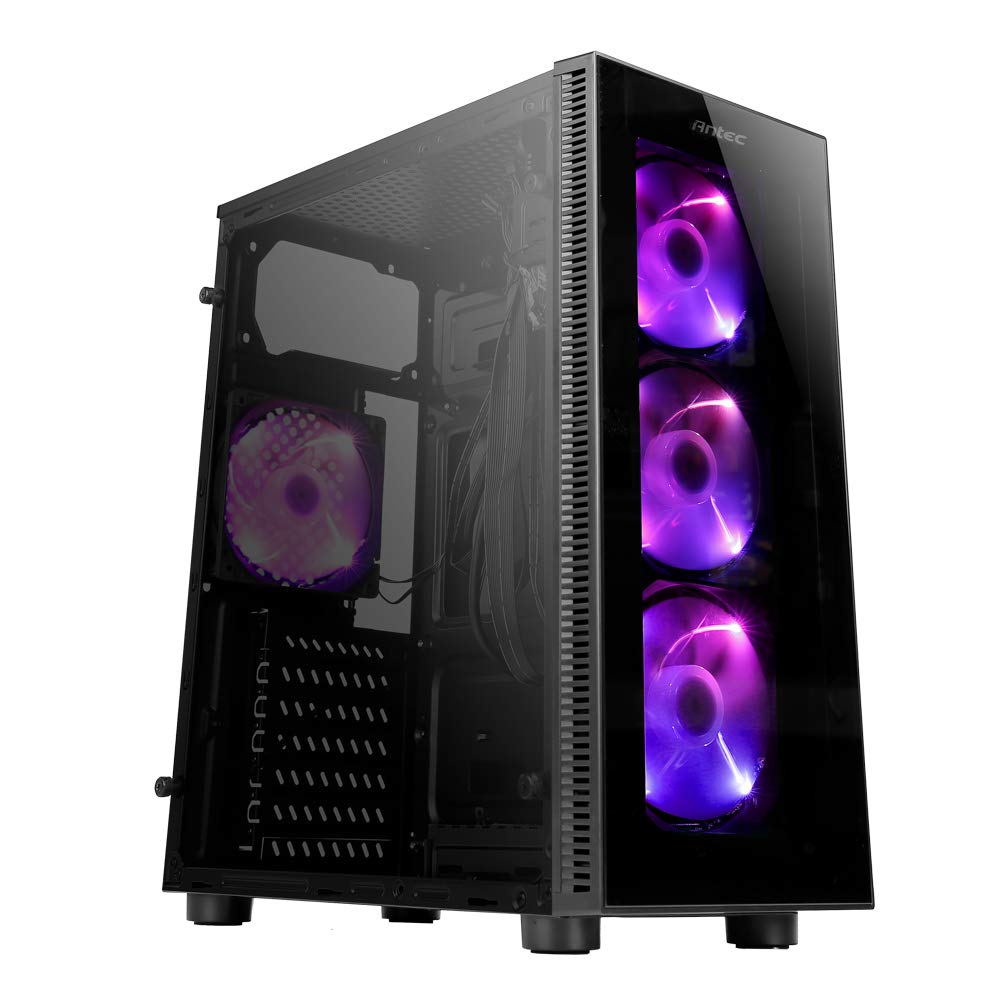
Image: Antec NX210 Mid-Tower ATX Computer Cabinet, showcasing its tempered glass side panel and front ARGB fans.
4. Product Features and Layout
4.1 Luaran Views

Imej: Depan dan belakang views of the Antec NX210 cabinet, highlighting the tempered glass front panel with ARGB fans and the rear I/O panel layout.

Image: Left side (tempered glass) and right side (solid panel) views of the Antec NX210 cabinet.
4.2 Panel I/O Atas
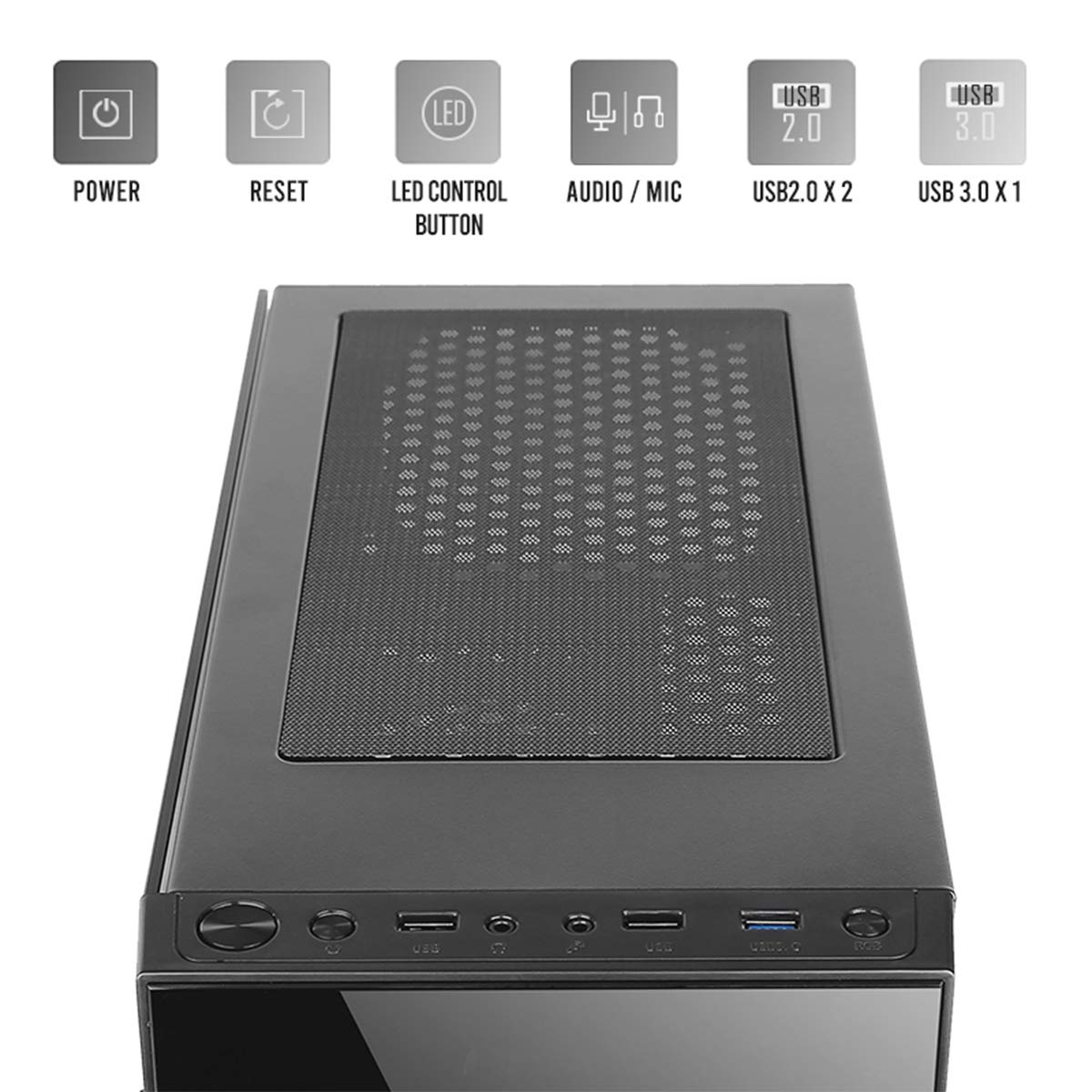
Image: Close-up of the top I/O panel, showing the Power button, Reset button, LED Control button, Audio/Mic jacks, 2x USB 2.0 ports, and 1x USB 3.0 port.
- Butang Kuasa: Untuk menghidupkan atau mematikan sistem.
- Butang Tetapkan Semula: Untuk memulakan semula sistem.
- Butang Kawalan LED: To cycle through ARGB lighting effects for the pre-installed fans.
- Audio / Mic Jacks: Untuk menyambungkan fon kepala dan mikrofon.
- Port USB 2.0 (x2): For connecting USB 2.0 devices.
- Port USB 3.0 (x1): For connecting USB 3.0 devices, offering faster data transfer speeds.
4.3 Susun Atur Dalaman dan Sokongan Komponen

Image: Diagram illustrating the internal layout of the Antec NX210, indicating locations for motherboard, SSDs, HDDs, GPU, CPU cooler, and PSU.
- Sokongan Papan Induk: Up to ATX (also supports Micro-ATX, ITX).
- 2.5" SSD Support: 3 drive bays.
- 3.5" HDD Support: 1 drive bay.
- Graphics Card Support: Up to 310mm in length.
- CPU Cooler Support: Up to 155mm in height.
- Sokongan PSU: Up to 220mm in length (top-mounted).
4.4 Sistem Penyejukan

Image: Diagram showing fan and radiator mounting options for the Antec NX210, including pre-installed fans.
- Peminat prapasang: 4 x 120mm ARGB fans (3 in front, 1 in rear).
- Front Fan Support: 3 x 120mm.
- Rear Fan Support: 1 x 120mm.
- Sokongan Radiator: Front up to 240mm, Rear up to 120mm.
5. Persediaan dan Pemasangan
Follow these general steps for installing components into your Antec NX210 cabinet. Specific component manuals should be consulted for detailed installation instructions.
5.1 Menyediakan Jemaah Menteri
- Place the cabinet on a stable, flat surface.
- Tanggalkan panel sisi kaca temper dengan membuka skru ibu jari di bahagian belakang dan tarik panel dengan berhati-hati.
- Remove the right-side metal panel by unscrewing the thumbscrews at the rear.
5.2 Pemasangan Motherboard
- Install the I/O shield into the rear opening of the cabinet.
- Align your motherboard with the standoffs inside the cabinet. Ensure the standoffs match your motherboard's form factor (ATX, Micro-ATX, ITX).
- Selamatkan papan induk dengan skru yang disediakan.
5.3 Pemasangan Unit Bekalan Kuasa (PSU)
- The Antec NX210 supports a top-mounted ATX PS2 power supply.
- Slide the PSU into the designated top compartment from the rear of the cabinet.
- Secure the PSU with screws from the rear of the cabinet.
5.4 Pemasangan Pemacu Storan (HDD/SSD)
- 3.5" HDD: Locate the 3.5" drive bay. Slide the HDD into the bay and secure it with screws.
- 2.5" SSD: Locate the 2.5" SSD mounting points behind the motherboard tray. Secure the SSDs with screws.
5.5 Pemasangan Kad Grafik (GPU)
- Remove the necessary PCIe slot covers from the rear of the cabinet.
- Insert the graphics card into the appropriate PCIe slot on the motherboard.
- Selamatkan kad grafik dengan skru.
5.6 Pengurusan Kabel
Gunakan potongan penghalaan kabel dan titik pengikat di belakang dulang papan induk untuk menguruskan kabel. Ini meningkatkan aliran udara dan estetika.
5.7 Connecting Front Panel Cables
Connect the front panel cables (Power SW, Reset SW, HDD LED, Power LED, USB 2.0, USB 3.0, HD Audio) to the corresponding headers on your motherboard. Refer to your motherboard manual for exact pin layouts.
6. Arahan Operasi
6.1 Menghidupkan
After all components are installed and cables connected, close both side panels. Connect the power cable to the PSU and a wall outlet. Press the Power button on the top I/O panel to turn on your system.
6.2 Kawalan Kipas ARGB
The pre-installed ARGB fans are connected to an internal controller. Use the Butang Kawalan LED on the top I/O panel to cycle through various lighting modes and effects. The fans will display a default lighting effect upon initial power-up.
7. Penyelenggaraan
Regular maintenance helps ensure optimal performance and longevity of your computer cabinet.
- Penapis Habuk: The Antec NX210 features a dust filter on the top panel. Regularly remove and clean this filter to prevent dust buildup and maintain good airflow.
- Pembersihan Dalaman: Periodically open the side panels and use compressed air to remove dust from internal components and fan blades. Ensure the system is powered off and unplugged before cleaning.
- Pembersihan Luaran: Lap permukaan luar dengan lembut, damp kain. Elakkan pembersih atau pelarut yang melelas.
8. Penyelesaian masalah
If you encounter issues, consider the following basic troubleshooting steps:
- Tiada Kuasa:
- Pastikan PSU disambungkan dengan betul ke alur keluar dinding dan suis kuasa pada PSU berada dalam kedudukan 'HIDUP'.
- Verify that the front panel Power button cable is correctly connected to the motherboard header.
- Periksa semua sambungan kuasa dalaman (ATX 24-pin, CPU 8-pin, kuasa PCIe untuk GPU).
- Fans Not Spinning / ARGB Not Working:
- Ensure all fan power cables are securely connected to the motherboard or fan controller.
- Verify ARGB cables are correctly connected to the internal controller and the controller is powered.
- Try pressing the LED Control Button on the top I/O panel to cycle effects.
- Port USB Tidak Berfungsi:
- Check that the USB 2.0 and USB 3.0 front panel cables are correctly connected to the corresponding headers on your motherboard.
For more complex issues, consult the manuals for your individual components or seek professional assistance.
9. Spesifikasi

Image: Diagram showing the physical dimensions of the Antec NX210 cabinet.
| Ciri | Perincian |
|---|---|
| Model | NX210 |
| Jenis Kes | Mid Tower |
| Dimensi (L x W x H) | 43.99 x 38.99 x 21.01 sm (lebih kurang 395 x 210 x 445 mm) |
| bahan | SPCC, Kaca Terbaja |
| Sokongan Papan Induk | ATX, Mikro-ATX, ITX |
| Slot Pengembangan | 7 |
| Drive Bays | 1 x 3.5" HDD, 3 x 2.5" SSD |
| Pelabuhan I / O Depan | Power, Reset, LED Control Button, MIC/Audio, 2 x USB 2.0, 1 x USB 3.0 |
| Peminat prapasang | 4 x 120mm ARGB fans (3 front, 1 rear) |
| Sokongan Kipas (Depan) | 3 x 120mm |
| Sokongan Kipas (Belakang) | 1 x 120mm |
| Sokongan Radiator (Depan) | Sehingga 240mm |
| Sokongan Radiator (Belakang) | Sehingga 120mm |
| Panjang GPU Maks | 310mm |
| Ketinggian Penyejuk CPU Maks | 155mm |
| Sokongan PSU | ATX PS2 (Top Mounted), Max length 220mm |
| Penapis Habuk | Atas |
| Berat Barang | 4.8 kg |
10. Waranti dan Sokongan
The Antec NX210 Computer Cabinet comes with a Waranti 1 Tahun dari tarikh pembelian. Sila simpan bukti pembelian anda untuk tuntutan waranti.
For technical support or warranty inquiries, please contact Antec customer service or your local distributor.
Pengeluar: Antec Inc. 8F, No 107, Jhouzih St, Neihu District, Taipei City 114, Taiwan
Pengimport (India): Acro Engineering Company, Khasra No 522/1, Village Jonapur, Delhi - 110 030
Anda boleh mendapatkan lebih banyak maklumat dan sumber sokongan di laman rasmi Antec Store on Amazon.


