1. Pengenalan
Terima kasih kerana membeliasing the VIVIBRIGHT GP100UP LED Projector. This manual provides essential information for the safe and efficient operation of your device. Please read it thoroughly before use and retain it for future reference.
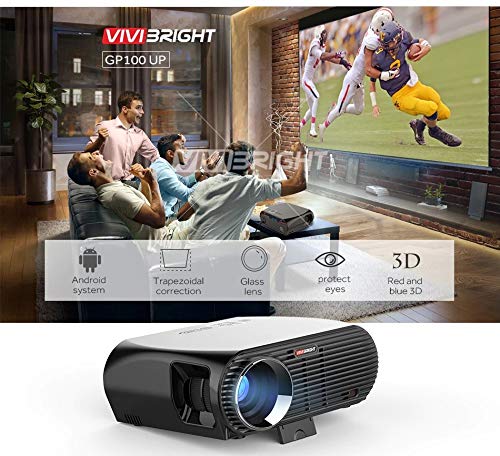
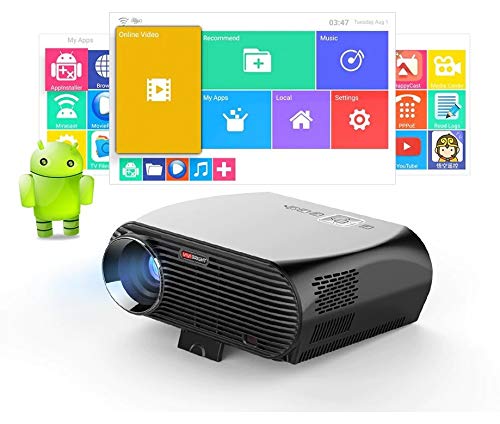
The VIVIBRIGHT GP100UP is an Android 6.0-based LED projector featuring built-in Wi-Fi and Bluetooth, designed for home theater and office presentations. It supports Full HD content and offers a bright projection experience.
2. Maklumat Keselamatan
- Bekalan Kuasa: Gunakan hanya penyesuai kuasa yang ditentukan. Pastikan voltage sepadan dengan bekalan kuasa tempatan anda.
- Pengudaraan: Jangan halang bukaan pengudaraan. Pastikan aliran udara yang mencukupi di sekitar projektor untuk mengelakkan terlalu panas.
- Pendedahan Cecair: Keep the projector away from water or other liquids. Do not operate in damp persekitaran.
- Pembersihan: Disconnect power before cleaning. Use a soft, dry cloth. Avoid liquid or aerosol cleaners.
- Sisipan Objek: Never insert objects of any kind into the projector openings as they may touch dangerous voltagmata e atau bahagian pintasan.
- Servis: Jangan cuba servis produk ini sendiri. Rujuk semua perkhidmatan kepada pegawai perkhidmatan yang berkelayakan.
- Perlindungan Mata: Jangan lihat terus ke dalam kanta projektor apabila lamp sedang dihidupkan. Cahaya terang boleh menyebabkan kerosakan mata.
3. Kandungan Pakej
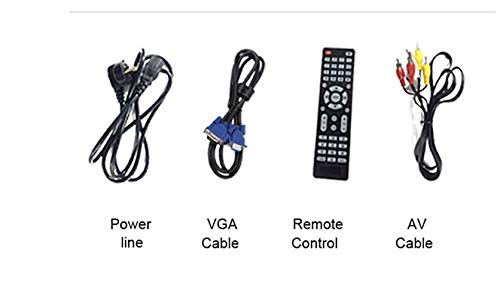
Sahkan bahawa semua item yang disenaraikan di bawah disertakan dalam pakej anda:
- VIVIBRIGHT GP100UP Projector
- Kabel Kuasa
- Kabel VGA
- AV kabel
- Alat Kawalan Jauh
- Manual Pengguna (dokumen ini)
Rajah 3.1: Included accessories with the VIVIBRIGHT GP100UP projector, including power cable, VGA cable, remote control, and AV cable.
4. Produk Lebihview
4.1. Projector Dimensions
Rajah 4.1: Depan dan atas view of the VIVIBRIGHT GP100UP projector with approximate dimensions: 11 inches (length), 8.85 inches (width), and 4 inches (height).
4.2. Port Input/Output
The projector features various ports for connecting external devices:
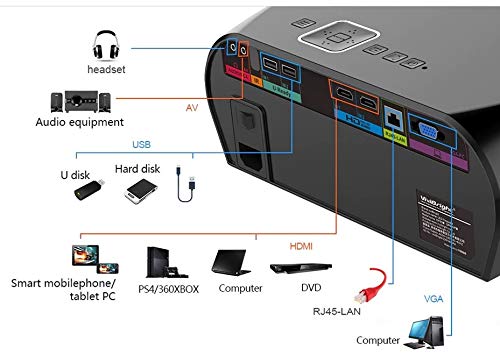
Rajah 4.2: Detailed diagram of the projector's rear panel, illustrating connectivity options including headset, audio equipment (AV), USB ports for U disk and hard disk, HDMI ports, RJ45-LAN, and VGA port.
- HDMI: Connect to Blu-ray players, gaming consoles, laptops, or other HDMI-enabled devices.
- USB: For connecting USB drives (U disk) or external hard drives.
- DARI: Untuk menyambungkan peranti lama menggunakan video komposit dan audio stereo.
- VGA: For connecting to computers or laptops with a VGA output.
- RJ45-LAN: Untuk sambungan rangkaian berwayar.
- Jack fon kepala: Untuk menyambungkan fon kepala atau pembesar suara luaran.
4.3. Alat Kawalan Jauh
Alat kawalan jauh yang disertakan membolehkan pengendalian projektor yang mudah.
Rajah 4.3: Remote control layout with key functions: ON/OFF, Volume Up/Down, OK, Menu, Home, Speed, Mute, Back, Mouse Mode, and the USB receiver.
- HIDUP/MATI: Power on or off the projector.
- Jilid +/-: Laraskan kelantangan audio.
- OK: Sahkan pemilihan.
- Menu: Access projector settings.
- Rumah: Return to the main Android interface.
- Belakang: Kembali ke skrin sebelumnya.
- Mod tetikus: Activate/deactivate air mouse function (if applicable).
- Redam: Redamkan atau nyahredamkan audio.
5. Persediaan
5.1. penempatan
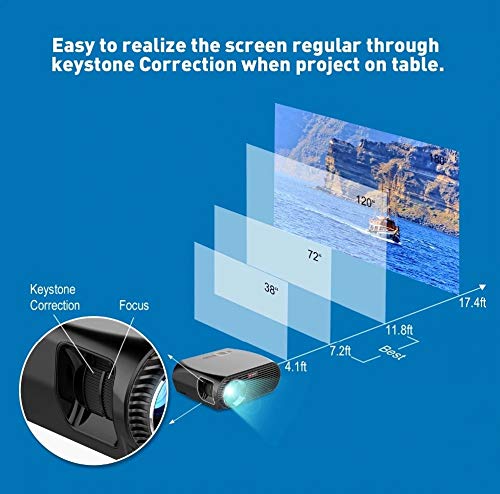
Place the projector on a stable, flat surface or mount it to the ceiling. Ensure there are no obstructions to the lens or ventilation ports. The optimal projection distance for a clear image is between 1 to 5 meters.
Rajah 5.1: Illustration of projection distances and corresponding screen sizes, along with the location of the keystone correction and focus rings on the projector.
- For a 72-inch screen, the recommended distance is approximately 7.2 feet (2.2 meters).
- For a 120-inch screen, the recommended distance is approximately 11.8 feet (3.6 meters).
5.2. Sambungan Kuasa
- Sambungkan kabel kuasa ke input kuasa projektor.
- Palamkan hujung kabel kuasa yang satu lagi ke salur keluar elektrik yang sesuai.
- Lampu penunjuk kuasa pada projektor harus menyala.
5.3. Pembetulan Fokus dan Keystone
After powering on, adjust the image for clarity and proper geometry.
- Fokus: Rotate the focus ring near the lens until the projected image is sharp and clear.
- Pembetulan Keystone: If the projected image appears trapezoidal (wider at the top or bottom), use the keystone correction ring or lever (usually located near the focus ring) to adjust the image until it is rectangular. The GP100UP supports +/- 15 degrees vertical keystone correction.
6. Arahan Operasi
6.1. Initial Power On and Android Interface
Press the power button on the projector or remote control to turn on the device. The projector will boot into its Android 6.0 operating system interface.
Rajah 6.1: The VIVIBRIGHT GP100UP projector in operation, highlighting its Android system capabilities and other features.
Navigate the Android interface using the remote control. You can access pre-installed applications, settings, and media files.
6.2. Menyambung Peranti Luaran
To project content from external sources:
- Connect your device (e.g., laptop, gaming console, USB drive) to the appropriate port on the projector (HDMI, USB, AV, VGA).
- On the projector's Android interface, navigate to the "Input Source" or "Source" option.
- Select the corresponding input source (e.g., HDMI1, USB, AV, VGA) to display content from your connected device.
6.3. Wireless Connectivity (Wi-Fi, Bluetooth, Screen Mirroring)
The GP100UP supports various wireless functions:
- Wi-Fi:
- Go to "Settings" on the Android interface.
- Pilih "Wi-Fi" dan hidupkannya.
- Choose your desired network and enter the password to connect.
- Bluetooth:
- Go to "Settings" on the Android interface.
- Select "Bluetooth" and turn it on.
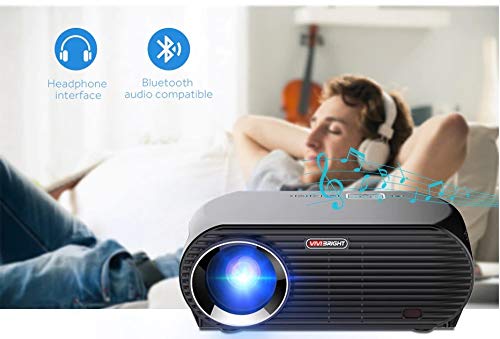
- Pair with Bluetooth audio devices like headphones or speakers.
Rajah 6.2: The projector's Bluetooth audio compatibility, allowing connection to wireless headphones or speakers.
- Screen Mirroring (Miracast/Airplay/DLNA):
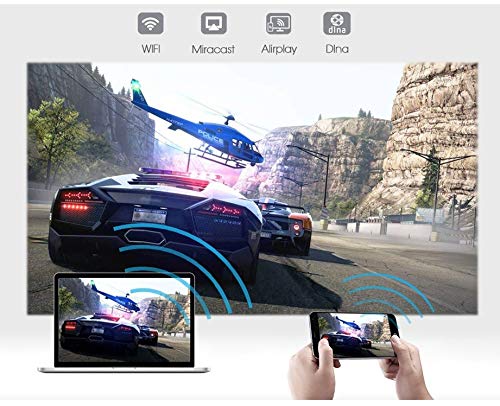
The projector supports mirroring content from compatible smartphones, tablets, and laptops via Wi-Fi, Miracast, Airplay, and DLNA.
- Ensure both your device and the projector are connected to the same Wi-Fi network.
- On the projector's Android interface, open the relevant screen mirroring application (e.g., Miracast, Airplay, DLNA).
- On your smartphone/tablet/laptop, activate its screen mirroring function (e.g., "Screen Mirroring," "Smart View," "Cast," "AirPlay").
- Select the projector from the list of available devices to begin mirroring.

Rajah 6.3: Wireless screen mirroring capabilities, enabling content from mobile devices and laptops to be displayed on the projector.
7. Penyelenggaraan
7.1. Membersihkan Lensa
Gunakan kain lembut dan tidak berbulu yang direka khas untuk kanta optik. Lap kanta dengan lembut untuk menghilangkan habuk atau kotoran. Elakkan menggunakan bahan kasar atau bahan kimia yang keras.
7.2. Cleaning the Projector Casing
Lap bahagian luar projektor dengan kain lembut dan kering. Untuk tanda degil, sedikit damp cloth can be used, followed by a dry cloth. Ensure no liquid enters the ventilation openings.
7.3. Air Filter (if applicable)
While LED projectors typically have sealed optical engines, regularly check ventilation openings for dust accumulation. Use a soft brush or compressed air to clear any blockages.
8. Penyelesaian masalah
| Masalah | Kemungkinan Punca | Penyelesaian |
|---|---|---|
| Tiada imej dipaparkan |
|
|
| Imej kabur |
|
|
| Imej adalah trapezoid |
|
|
| Tiada bunyi |
|
|
| Isu sambungan Wi-Fi/Bluetooth |
|
|
9. Spesifikasi
| Ciri | Perincian |
|---|---|
| Nombor Model | GP100UP |
| Teknologi Paparan | LCD |
| Resolusi Asli | 1280x800dpi (WXGA) |
| Kecerahan | 3500 Lumen |
| Nisbah Kontras | 1000:1-2000:1 |
| Sumber Cahaya | LED |
| Kehidupan Sumber Cahaya | Not specified (typically 20,000+ hours for LED) |
| Jarak Unjuran | 1-5m |
| Dimensi Unjuran | 40-300 inches (Best image size: 72-120 inches) |
| Skala Skrin | 4:3/16:9 |
| Pembetulan Batu Kunci | Manual Correction, +/- 15 degrees (vertical) |
| Sistem | Android 6.0.1, CPU: Quad core ARM Cortex-A53 |
| Memori (RAM/ROM) | RAM: 1G / ROM: 8G |
| Kesambungan Wayarles | Wi-Fi, Bluetooth, DLNA, Miracast, Airplay |
| Port Input | HDMI, USB, AV, VGA, RJ45-LAN |
| Bekalan Kuasa | AC 90-240V, 50/60Hz |
| Penggunaan Kuasa | 140W |
| Dimensi (lebih kurang) | 37 x 30.5 x 15.9 cm |
| Berat (lebih kurang) | 2.6kg |
| Fungsi 3D | Red-blue 3D |
10. Waranti dan Sokongan
The VIVIBRIGHT GP100UP Projector comes with a Waranti 1 Tahun dari tarikh pembelian. Waranti ini meliputi kecacatan pembuatan di bawah penggunaan biasa.
For technical support, warranty claims, or service inquiries, please contact your retailer or the official VIVIBRIGHT customer service channel. Please have your product model number (GP100UP) and proof of purchase ready when contacting support.


