1. Pengenalan
This manual provides detailed instructions for the setup, operation, maintenance, and troubleshooting of your EMART 9” Selfie Ring Light. This device is designed to provide adjustable illumination for various applications such as live streaming, makeup tutorials, YouTube videos, and photography. Please read this manual thoroughly before use to ensure proper functionality and safety.
2. Ciri-ciri Produk
- Dimmable LED Ring Light: Features 3 LED light modes (Cold White, Warm White, Warm Yellow) and 10 adjustable brightness levels to suit various lighting needs.
- Stand Tripod Boleh Laras: The aluminum alloy tripod stand is adjustable from 17 inches to 51 inches, suitable for both desktop and floor use. It can also function as a mobile phone selfie stick.
- Alat Kawalan Jauh Berganda: Includes a 433MHz one-to-one remote control for all ring light functions and a Bluetooth camera phone remote for convenient photo capture.
- Pemegang Telefon Fleksibel: Equipped with a flexible phone holder to securely mount your smartphone in the center of the ring light.
- Dikuasakan USB: Easily powered via USB, compatible with laptops, desktop mainframes, power banks, and USB wall chargers.
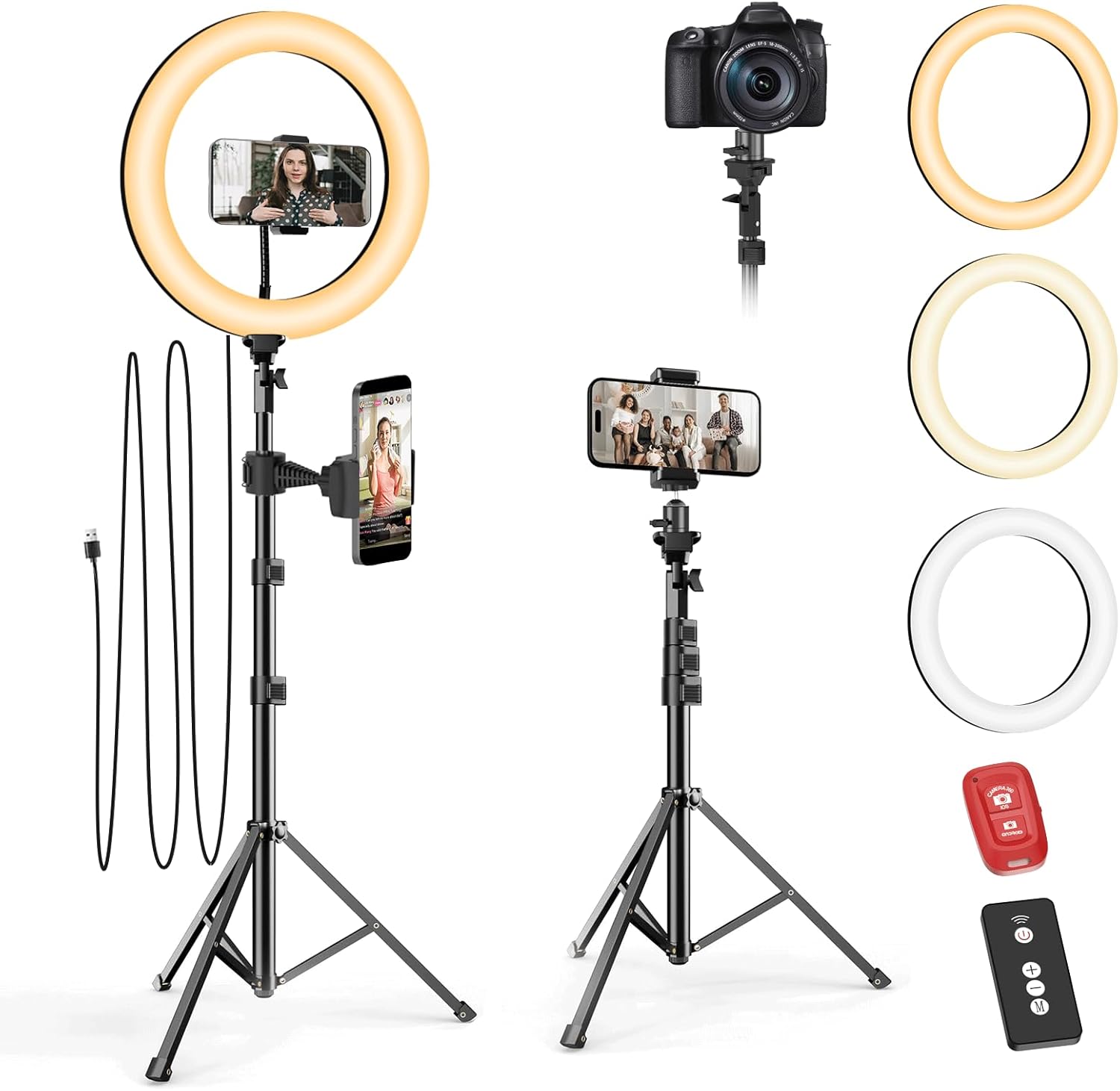
Gambar 2.1: Lebihview of the EMART 9-inch Selfie Ring Light setup, showing the ring light, adjustable tripod, and phone holder. It also illustrates compatibility with both smartphones and cameras.
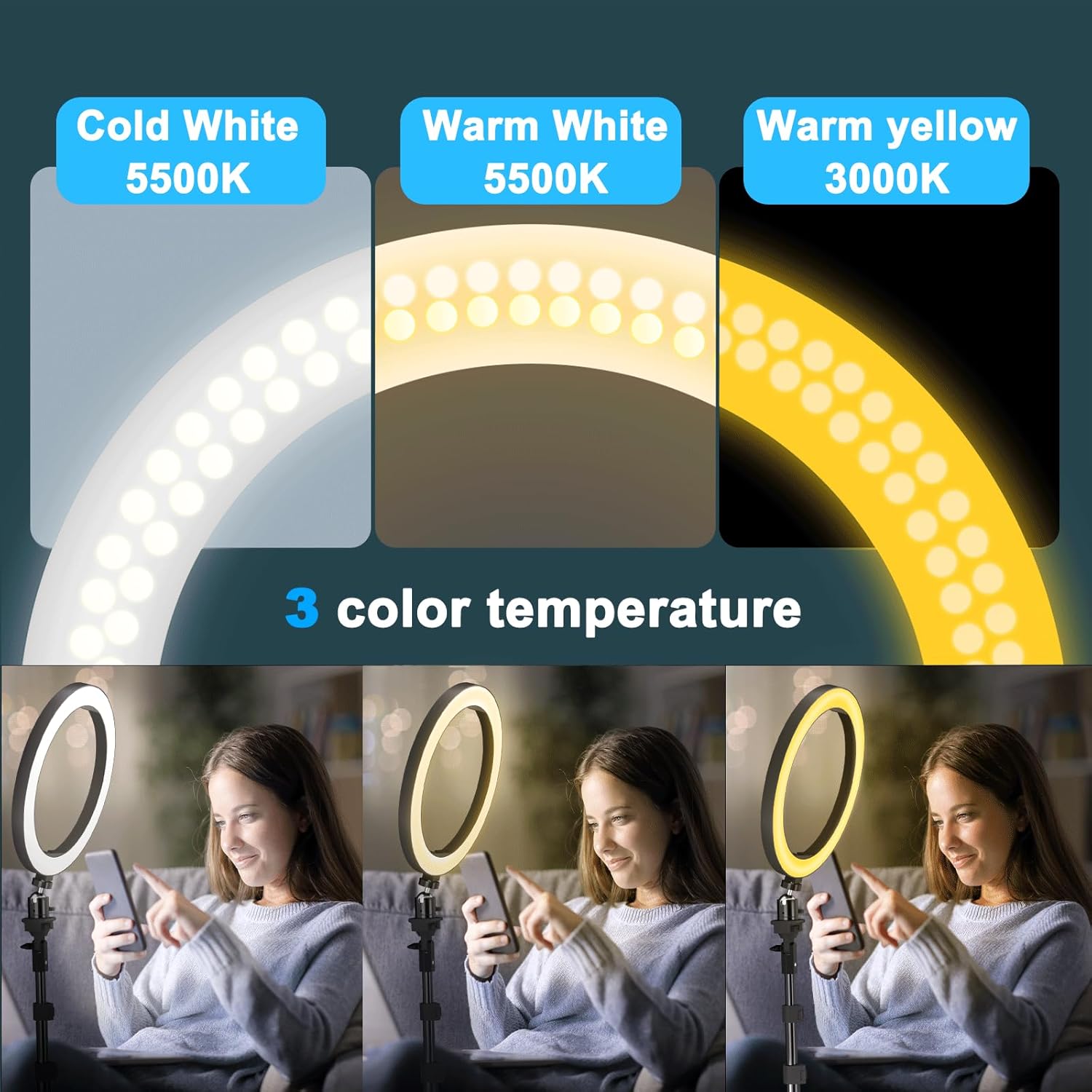
Figure 2.2: Illustration of the three distinct color temperature modes: Cold White (5500K), Warm White (5500K), and Warm Yellow (3000K), demonstrating their visual effect on a subject.

Figure 2.3: Depiction of the 10 brightness levels (10% to 100%) and the two control methods: a wireless remote control and an in-line cable control for power, brightness, and mode settings.
3. Kandungan Pakej
Sila sahkan bahawa semua komponen terdapat dalam pakej:
- Lampu Cincin LED 9 inci
- Stand Tripod Boleh Laras
- Pemegang Telefon Fleksibel
- Penyesuai Kepala Bola
- Clamp-on Phone Holder
- Light Remote (in-line cable control)
- Bluetooth Camera Phone Remote
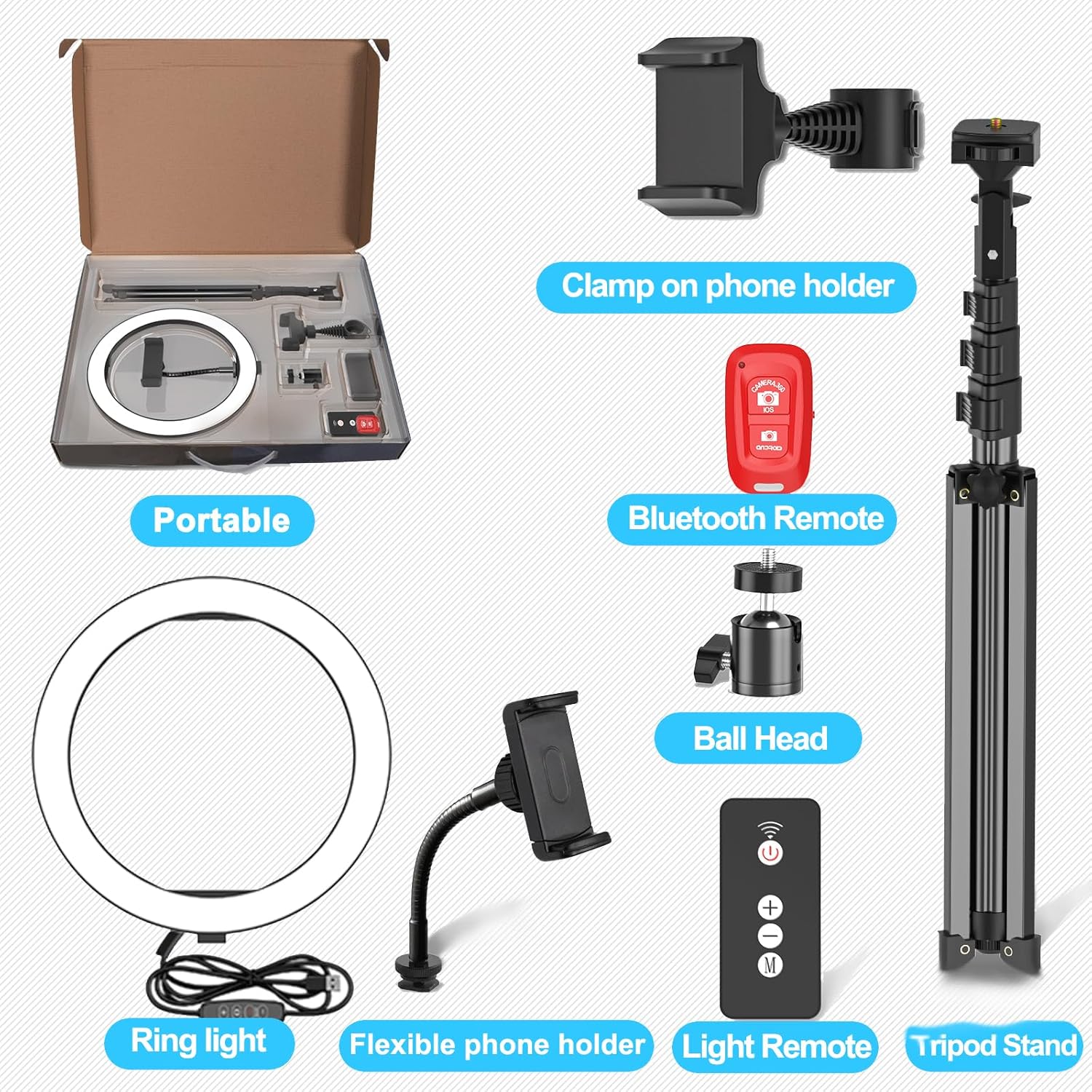
Figure 3.1: Visual representation of all components included in the EMART 9-inch Selfie Ring Light package, laid out for easy identification.
4. Arahan Persediaan
Follow these steps to assemble and set up your EMART 9” Selfie Ring Light:
- Unfold the Tripod Stand: Gently spread the legs of the tripod stand until it is stable on a flat surface. Adjust the height by extending the telescopic sections and securing them with the locking clips. The stand is adjustable from 17 to 51 inches.
- Attach the Ball Head: Screw the ball head adapter onto the top of the tripod stand. Ensure it is tightened securely.
- Pasang Lampu Cincin: Screw the 9-inch LED ring light onto the ball head adapter. The ball head allows for angle adjustment of the ring light.
- Attach Phone Holder: Insert the flexible phone holder into the designated slot in the center of the ring light. Alternatively, use the clamp-on phone holder to attach your phone to the tripod pole.
- Sambungkan Kuasa: Plug the USB cable from the ring light into a compatible USB power source (e.g., laptop, power bank, USB wall adapter).

Figure 4.1: Visual guide demonstrating the easy setup process, adjustable height (20-51 inches), and various USB charging options for the EMART ring light.

Figure 4.2: Image showing the angle-adjustable feature of the ring light and the Bluetooth control compatibility with iOS and Android systems.
5. Arahan Operasi
Once assembled, operate your ring light using the in-line cable control or the wireless remote control.
5.1. Using the In-line Cable Control
- Hidupkan/Mati Kuasa: Press the 'On/Off' button to turn the ring light on or off.
- Laraskan Kecerahan: Use the '+' button to increase brightness and the '-' button to decrease brightness. There are 10 levels of brightness.
- Tukar Mod Cahaya: Press the 'M' (Mode Setting) button to cycle through the 3 color temperature modes: Cold White, Warm White, and Warm Yellow.
5.2. Menggunakan Alat Kawalan Jauh Tanpa Wayar
- Hidupkan/Mati Kuasa: Press the power button on the wireless remote.
- Laraskan Kecerahan: Use the '+' and '-' buttons to adjust the brightness levels.
- Tukar Mod Cahaya: Use the 'M' button to switch between the 3 color modes.
5.3. Using the Bluetooth Camera Phone Remote
- Berpasangan: Turn on Bluetooth on your smartphone. Press and hold the button on the Bluetooth remote until the indicator light flashes. Select 'AB Shutter3' or similar from your phone's Bluetooth device list to pair.
- Capture Photos/Videos: Once paired, open your phone's camera app. Press the corresponding button on the Bluetooth remote to trigger the shutter for photos or start/stop video recording.
6. Penyelenggaraan
- Pembersihan: Use a soft, dry cloth to wipe the ring light and tripod stand. Do not use abrasive cleaners or solvents.
- Storan: When not in use, disassemble the ring light and store it in a dry, cool place away from direct sunlight.
- Penjagaan Kabel: Avoid bending or crimping the USB power cable excessively to prevent damage.
7. Penyelesaian masalah
| Masalah | Kemungkinan Punca | Penyelesaian |
|---|---|---|
| Ring light does not turn on. | Tiada kuasa, sambungan longgar, port USB rosak. | Ensure USB cable is securely connected. Try a different USB power source or port. Check if the power button on the in-line control is pressed. |
| Brightness or color mode cannot be adjusted. | In-line control or wireless remote malfunction. | Ensure the ring light is powered on. Try using the other control method (if one is not working). Check battery in wireless remote if applicable (though this model uses 433MHz, not IR, so battery is less likely an issue for the light remote itself, but the Bluetooth remote does use a battery). |
| Bluetooth remote does not pair with phone. | Bluetooth not enabled, remote not in pairing mode, interference. | Ensure Bluetooth is enabled on your phone. Put the remote into pairing mode (refer to section 5.3). Move closer to the phone. Restart phone and remote. |
| Tripod stand is unstable. | Legs not fully extended, locking clips not secured, uneven surface. | Fully extend all tripod legs and ensure locking clips are firmly engaged. Place the stand on a flat, stable surface. Do not overload the stand. |
8. Spesifikasi
| Ciri | Perincian |
|---|---|
| Dimensi Produk | 10 x 10 x 51 inci (dipanjangkan sepenuhnya) |
| Berat Barang | 2.9 paun |
| Nombor Model | EM-SRL-10 |
| Mod Cahaya | 3 (Cold White, Warm White, Warm Yellow) |
| Tahap Kecerahan | 10 |
| Pelarasan Ketinggian Tripod | 17 inci hingga 51 inci |
| Sumber Kuasa | USB (5V/2A disyorkan) |
| Teknologi Ketersambungan | Infrared (for light remote), Bluetooth (for camera remote) |
| UPC | 733205101288, 782855721223 |
| Tarikh Mula-mula Tersedia | 25 Jun 2019 |
9. Waranti dan Sokongan
For detailed warranty information and further support, please refer to the official EMART documentation. A PDF version of the user manual is available online:
Muat turun Manual Pengguna Rasmi (PDF)
For additional assistance, please contact EMART customer support through their official channels.


