1. Pengenalan
The AIYIMA DAC-A2 is a versatile Digital-to-Analog Converter (DAC) and headphone amplifier designed to enhance your audio experience. It features multiple digital input options and provides both RCA line-out and a 3.5mm headphone output, along with adjustable bass and treble controls for personalized sound. This manual provides detailed instructions for setup, operation, and maintenance of your DAC-A2.

Figure 1: AIYIMA DAC-A2 Headphone AmpDAC yang lebih hidup
2. Ciri-ciri Utama
- Integrated DAC and Headphone Amplifier: Built-in Hi-Fi headphone amplifier chip capable of driving 16ohm to 200ohm headphones.
- Advanced Chipset: Utilizes SA9023+CS8416+97220+NE5532 for optimal audio performance.
- Multiple Digital Inputs: Supports PC-USB, Optical, and Coaxial S/PDIF inputs, compatible with most home audio systems, PCs, and Macs.
- Versatile Outputs: Features RCA line-out for connecting to powered speakers or external amplifiers, and a 3.5mm headphone output.
- High-Resolution Audio: PC-USB input supports up to 24Bit/96KHz; Optical/Coaxial inputs support up to 24Bit/192kHz.
- Tone Controls: Independent bass and treble controls to customize your audio output.
- Compact and Portable: DC 5V power input allows for a portable and professional desktop audio device.

Figure 2: Internal Chipset and Features Overview
3. Kandungan Pakej
Sila semak pakej untuk item berikut:
- AIYIMA DAC-A2 Unit
- Kabel USB (Jenis A hingga Jenis B)
- Optical Cable (Toslink)
- DC 5V Power Cable (USB-C for power)
- Manual Pengguna
4. Kawalan dan Antara Muka

Rajah 3: Susun Atur Panel Depan dan Belakang
4.1 Panel Depan
- Suis Input: Toggle between USB, Optical (OPT), and Coaxial (COA) inputs.
- Output Fon Kepala 3.5mm: Sambungkan fon kepala anda di sini.
- Bass Control Knob: Adjust the low-frequency response.
- Treble Control Knob: Adjust the high-frequency response.
- Tombol Kawalan Kelantangan: Adjust the overall output volume. This knob also acts as the power switch (push to turn on/off) and has a power indicator light.
4.2 Panel Belakang
- Input Kuasa DC 5V: Connect the provided DC 5V power cable.
- Output Audio RCA (Kiri/Belakang): Connect to powered speakers or an external amplebih hidup.
- Coaxial Input (COA): Connect a coaxial digital audio source.
- Input Optik (OPT): Connect an optical digital audio source.
- Input PC-USB: Connect to your computer for USB audio.
5. Persediaan dan Sambungan
Follow these steps to connect your AIYIMA DAC-A2 to your audio system:
- Sambungan Kuasa: Connect the provided DC 5V power cable to the "DC 5V" input on the rear panel of the DAC-A2. Connect the other end to a suitable 5V power source (e.g., a USB wall adapter, not included). Ensure the power indicator light on the front panel illuminates when the volume knob is pressed to turn on.
- Sambungan Sumber Input: Pilih salah satu daripada kaedah input berikut:
- PC-USB: Connect the provided USB cable from your computer's USB port to the "PC-USB" input on the DAC-A2.
- Optik: Connect an optical cable from your audio source (e.g., TV, game console) to the "OPTICAL" input.
- Sepaksi: Connect a coaxial cable from your audio source to the "COAXIAL" input.
- Sambungan Output: Choose one of the following output methods:
- Keluaran RCA: Connect RCA cables from the "AUDIO OUT" (L/R) ports on the DAC-A2 to your powered speakers or an external ampinput penguat.
- Output Fon Kepala 3.5mm: Pasangkan fon kepala anda ke bicu 3.5mm di panel hadapan. Note: The headphone output takes priority. If headphones are connected, sound will be routed to them and not the RCA outputs.
- Pilih Input: Use the input switch on the front panel to select the desired audio source (USB, OPT, or COA).
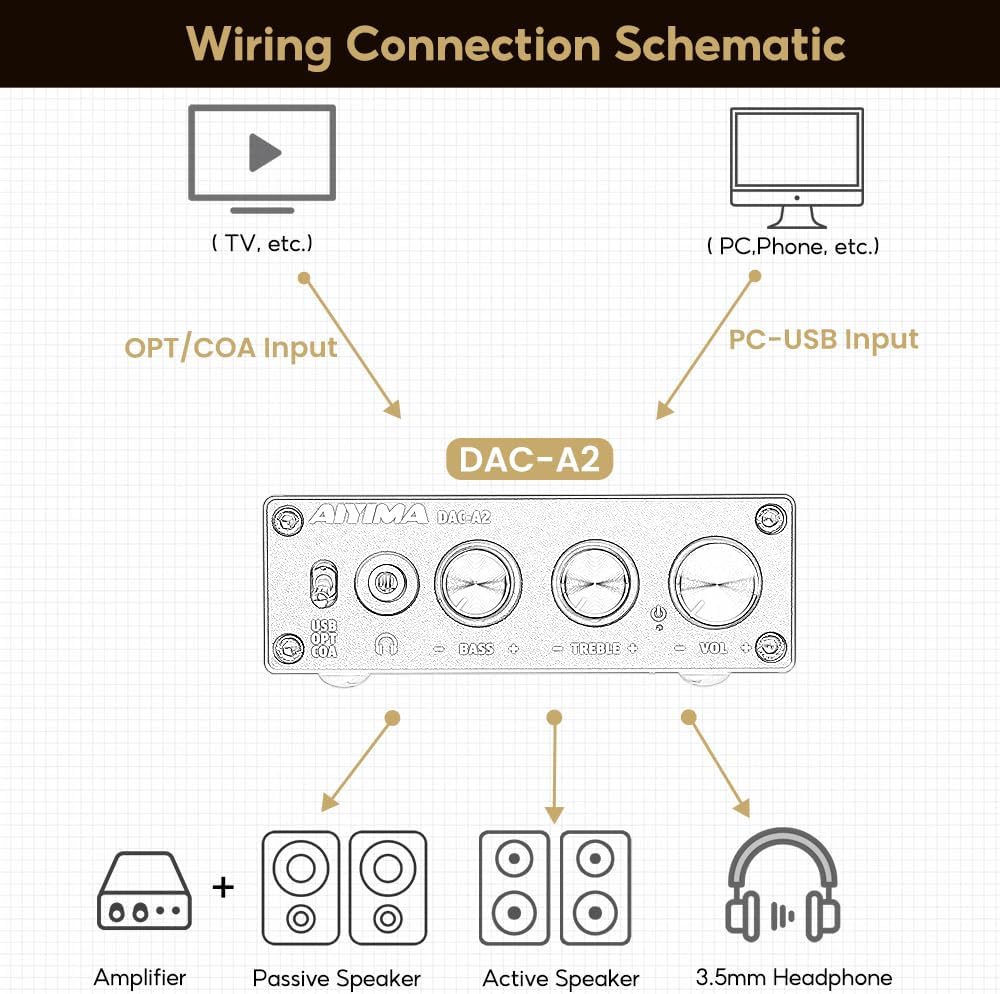
Rajah 4: Rajah Sambungan
Video 1: Demonstrates connecting the AIYIMA DAC-A2 to a laptop and an amplifier, showing the audio output to speakers and headphones. It illustrates switching between PC-USB input and adjusting volume, bass, and treble controls.
6. Arahan Operasi
- Hidupkan/Mati Kuasa: Press the Volume Control Knob to turn the unit on or off. The power indicator light will illuminate when on.
- Pemilihan Input: Use the Input Switch (USB/OPT/COA) on the front panel to select your active audio source.
- Pelarasan Kelantangan: Rotate the Volume Control Knob clockwise to increase volume and counter-clockwise to decrease it.
- Pelarasan Bes: Rotate the Bass Control Knob to increase or decrease the bass frequencies according to your preference.
- Pelarasan Treble: Rotate the Treble Control Knob to increase or decrease the treble frequencies according to your preference.

Figure 5: Adjustable Bass and Treble Controls
Video 2: Shows the AIYIMA DAC-A2 in a desktop setup, demonstrating the connection of headphones and the adjustment of volume, bass, and treble controls for an enhanced audio experience.
7. Spesifikasi

Rajah 6: Dimensi Produk
| Ciri | Spesifikasi |
|---|---|
| Jenama | AIYIMA |
| Nombor Model | DAC-A2 |
| Chipset | SA9023+CS8416+97220+NE5532 |
| Input PC-USB SampKadar ling | 24Bit/96KHz |
| Input Optik/Koaksial SampKadar ling | 24Bit/192kHz |
| Julat Impedans Fon Kepala | 16ohm to 200ohm |
| Bekalan Maksimum Voltage | 5 Volt |
| Bekalan Minimum Voltage | 5 Volt (DC) |
| Jenis Antaramuka | Koaksial, USB, Optik |
| Bilangan Saluran | 1 |
| Dimensi Produk (L x W) | 3.86"P x 2.89"L (lebih kurang 98mm x 73mm) |
| Berat Barang | 14.8 auns (lebih kurang 420g) |
8. Penyelesaian masalah
If you encounter issues with your DAC-A2, please refer to the following common problems and solutions:
- Tiada Keluaran Bunyi:
- Ensure the DAC-A2 is powered on and the power indicator is lit.
- Verify that the correct input source (USB, OPT, COA) is selected using the front panel switch.
- Check all cable connections (input and output) are secure.
- If using headphones, ensure they are fully plugged into the 3.5mm jack. Remember the headphone output has priority over RCA.
- Adjust the volume knob on the DAC-A2 and ensure your connected speakers/amplifier also have their volume turned up.
- For PC-USB input, check your computer's sound settings to ensure the DAC-A2 is selected as the default playback device.
- Kualiti Bunyi Herot atau Lemah:
- Pastikan semua kabel disambungkan dengan betul dan tidak rosak.
- Semak sumber audio untuk masalah kualiti.
- Adjust the Bass and Treble controls to see if they are set to extreme levels causing distortion.
- Ensure the power supply is stable and providing sufficient 5V power. An unstable power supply can cause noise.
- Bunyi Selang-seli:
- Periksa sambungan kabel yang longgar.
- Ensure the power supply is consistent.
- If using PC-USB, try a different USB port on your computer or a different USB cable.
9. Penyelenggaraan
- Pembersihan: Gunakan kain lembut dan kering untuk membersihkan bahagian luar unit. Jangan gunakan pembersih cecair atau pelarut.
- Storan: Simpan unit di tempat yang sejuk dan kering jauh dari cahaya matahari langsung dan suhu yang melampau.
- Pengendalian: Elakkan daripada menjatuhkan atau menyebabkan unit terkena hentakan yang kuat.
- Pengudaraan: Pastikan pengudaraan yang mencukupi di sekeliling unit untuk mengelakkan terlalu panas.
10. Waranti dan Sokongan
AIYIMA products are designed for reliability and performance. For warranty information, technical support, or service inquiries, please refer to the contact information provided with your purchase or visit the official AIYIMA webtapak. Sila simpan bukti pembelian anda untuk tuntutan waranti.
11. Maklumat Keselamatan Penting
- Do not expose this unit to rain, moisture, or extreme temperatures.
- Jangan buka casing. Tiada bahagian yang boleh diservis pengguna di dalamnya. Rujuk semua servis kepada kakitangan yang berkelayakan.
- Use only the specified power supply (DC 5V).
- Elakkan meletakkan unit berhampiran sumber haba atau di bawah cahaya matahari langsung.
- Jauhkan daripada kanak-kanak.


