pengenalan
Thank you for choosing the NEDIS Wi-Fi Smart Fan Heater. This manual provides essential information for the safe and efficient operation of your new device. Please read these instructions carefully before use and retain them for future reference. Proper use and maintenance will ensure optimal performance and longevity of the product.
Arahan Keselamatan
Untuk mengurangkan risiko kebakaran, kejutan elektrik atau kecederaan, sentiasa ikuti langkah berjaga-jaga keselamatan asas ini:
- Baca semua arahan sebelum menggunakan pemanas ini.
- Jangan gunakan pemanas ini di sekitar kawasan mandian, pancuran mandian atau kolam renang.
- Jangan tutup pemanas. Menutup pemanas boleh menyebabkan terlalu panas dan kebakaran.
- Keep combustible materials such as furniture, pillows, bedding, papers, clothes, and curtains at least 1 meter (3 feet) from the front of the heater and keep them away from the sides and rear.
- Sentiasa cabut plag pemanas apabila tidak digunakan.
- Jangan beroperasi pemanas dengan kabel atau palam yang rosak atau setelah kerosakan pemanas, terjatuh, atau rosak dengan cara apa pun.
- Jangan gunakan tali di bawah permaidani. Jangan tutup tali dengan permaidani lempar, pelari, atau penutup yang serupa. Susun kord jauh dari kawasan lalu lintas dan di mana ia tidak akan tersandung.
- Berhati-hati yang amat diperlukan apabila mana-mana pemanas digunakan oleh atau berhampiran kanak-kanak atau orang yang tidak sah dan apabila pemanas dibiarkan beroperasi dan tanpa pengawasan.
- This heater is equipped with a tip-over protection switch that automatically shuts off the heater if it is accidentally knocked over.
- Pastikan pemanas diletakkan pada permukaan yang stabil dan rata.
- Untuk kegunaan dalaman sahaja.
Produk Selesaiview
Familiarize yourself with the main components of your NEDIS Wi-Fi Smart Fan Heater.
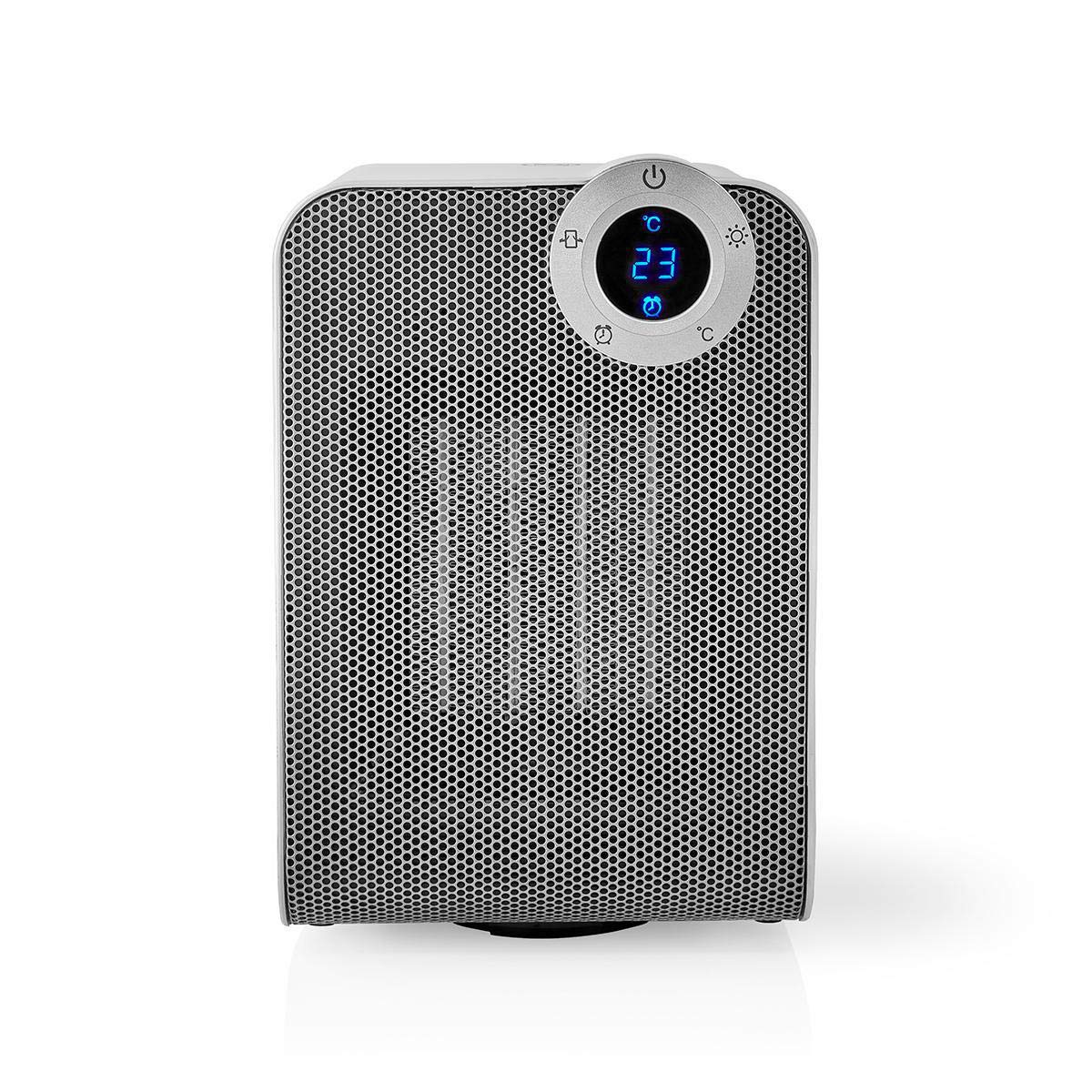
The front panel features a digital display that shows the current temperature and settings. Surrounding the display are touch-sensitive buttons for power, mode selection, oscillation, and timer functions.

The rear of the heater includes the main power switch (often a rocker switch) and the air intake grille. Ensure this area is not obstructed for proper airflow.

The compact design of the heater allows for easy placement in various indoor settings.
Persediaan
Membongkar
- Keluarkan pemanas dari bungkusannya dengan berhati-hati.
- Semak sebarang kerosakan semasa transit. Jika rosak, jangan beroperasi dan hubungi sokongan pelanggan.
- Simpan bungkusan untuk penyimpanan atau pengangkutan masa hadapan.
Penempatan
- Letakkan pemanas pada permukaan yang kukuh dan rata.
- Ensure there is at least 1 meter (3 feet) of clear space around the heater to allow for proper air circulation and to prevent fire hazards.
- Do not place the heater near curtains, drapes, or other loose fabrics that could block the air intake or outlet.
- Pastikan kord kuasa tidak tersepit atau diletakkan di bawah objek berat.
Kuasa Awal Hidup
- Plug the heater into a suitable electrical outlet (220-240V AC, 50/60Hz).
- Flip the main power switch on the back of the unit to the 'ON' position.
- The digital display on the front will illuminate, indicating the heater is in standby mode.
Wi-Fi Connection & App Setup
The NEDIS Wi-Fi Smart Fan Heater can be controlled via the Nedis SmartLife app, offering advanced features and remote control.
- Muat turun Nedis SmartLife aplikasi daripada App Store (iOS) atau Google Play Store (Android).
- Daftar untuk akaun baharu atau log masuk jika anda sudah mempunyai akaun.
- Pastikan telefon pintar anda disambungkan ke rangkaian Wi-Fi 2.4 GHz.
- Dalam apl, ketik ikon '+' untuk menambah peranti baharu.
- Follow the on-screen instructions in the app to connect your heater to your Wi-Fi network. This usually involves putting the heater into pairing mode (refer to the app for specific instructions, often by pressing and holding a button on the heater).
- Once connected, you can control the heater from anywhere using the app.
Arahan Operasi
Kawalan Manual
The heater can be operated directly using the touch buttons on the front panel:
- Butang Kuasa: Tekan untuk menghidupkan atau mematikan pemanas.
- Butang Mod: Cycle through heating modes (e.g., High Heat 1800W, Low Heat 900W, Fan Only).
- Pelarasan Suhu: Use the '+' and '-' buttons (or similar) to set the desired temperature. The heater will operate at 1800W for rapid heating and automatically switch to 900W once the set temperature is approached.
- Butang ayunan: Press to activate or deactivate the horizontal oscillation feature, distributing heat across a wider area.
- Butang Pemasa: Set a timer for the heater to automatically turn off after a specified duration.
SmartLife App Control
Once connected to the Nedis SmartLife app, you can access advanced control features:
- Hidup/Mati Kuasa Jauh: Control the heater from anywhere.
- Pelarasan Suhu: Precisely set and monitor the room temperature.
- Pemilihan Mod: Choose between different heating levels or fan-only mode.
- Kawalan Ayunan: Hidupkan atau matikan ciri ayunan.
- Penjadualan: Create custom heating schedules for different times of the day or week.
- Fungsi Pemasa: Set a countdown timer for automatic shutdown.
Kawalan Suara
The heater supports voice control through popular smart assistants. To enable this, link your Nedis SmartLife account with your preferred voice assistant (Google Home or Amazon Alexa) via their respective apps. Once linked, you can use voice commands such as:
- "Hey Google, turn on the heater."
- "Alexa, set the heater to 22 degrees."
- "Hey Google, turn off the heater."
Penyelenggaraan
Pembersihan
Pembersihan berkala membantu mengekalkan kecekapan pemanas dan memanjangkan jangka hayatnya.
- Sentiasa cabut plag pemanas dan biarkan ia sejuk sepenuhnya sebelum dibersihkan.
- Lap permukaan luar dengan lembut, damp kain. Jangan gunakan pembersih atau pelarut yang melelas.
- Gunakan pembersih vakum dengan alat tambahan berus untuk menghilangkan habuk daripada gril pengambilan dan pengeluaran udara.
- Pastikan tiada air memasuki bahagian dalam pemanas.
Penyimpanan
Apabila tidak digunakan untuk tempoh yang lama:
- Unplug the heater and clean it as described above.
- Store the heater in its original packaging or a suitable box to protect it from dust and damage.
- Keep it in a cool, dry place, away from direct sunlight and moisture.
Menyelesaikan masalah
Jika anda menghadapi masalah dengan pemanas anda, rujuk kepada masalah dan penyelesaian biasa berikut:
| Masalah | Kemungkinan Punca | Penyelesaian |
|---|---|---|
| Pemanas tidak dihidupkan. | No power, main switch off, tip-over switch activated. | Check power outlet, ensure main switch is ON, place heater upright on a stable surface. |
| Tiada keluaran haba. | Incorrect mode, thermostat setting too low. | Select a heating mode (High/Low), increase the thermostat setting above the current room temperature. |
| Sambungan Wi-Fi gagal. | Kata laluan Wi-Fi yang salah, rangkaian 5GHz, jarak dari penghala. | Verify Wi-Fi password, ensure you are on a 2.4GHz network, move heater closer to the router, try re-pairing. |
| Pemanas dimatikan tanpa diduga. | Overheating protection, tip-over protection, timer activated. | Ensure heater is not covered, clear obstructions, place upright, check timer settings. Allow to cool before restarting. |
Spesifikasi
| Ciri | Spesifikasi |
|---|---|
| Nombor Model | WIFIFNH20CWT |
| Sumber Kuasa | Elektrik Bertali |
| Output Kuasa | 1800W (Tinggi), 900W (Rendah) |
| Kaedah Pemanasan | Konvensyen |
| Dimensi (L x W x H) | 16.5 x 14.5 x 25 cm |
| Berat Barang | 1.8 kg |
| warna | Putih / Perak |
| Ciri Khas | On/Off Timer, Oscillation, Tip-over Protection, Thermostat, Wi-Fi, App Control, Voice Control (Alexa, Google Home) |
| Jenis Pemasangan | Lantai Lantai |
| Penggunaan yang Disyorkan | Indoor, Home, Study Room |
| Bateri Diperlukan | Tidak |
Waranti dan Sokongan
Your NEDIS Wi-Fi Smart Fan Heater is covered by a manufacturer's warranty. Please refer to the warranty card included with your purchase for specific terms and conditions, including the warranty period and coverage details.
For technical support, troubleshooting assistance, or warranty claims, please contact NEDIS customer service. Contact information can typically be found on the product packaging, the NEDIS webtapak, atau resit pembelian anda.