1. Pengenalan
Thank you for choosing the DOSS SoundBox Plus Bluetooth Speaker. This manual provides essential information for setting up, operating, and maintaining your speaker to ensure optimal performance and longevity. The DOSS SoundBox Plus delivers 16W HD stereo sound with deep bass, features intuitive touch controls, and offers dynamic LED lights that sync with your music. It supports wireless stereo pairing for an enhanced audio experience and provides up to 20 hours of playtime.
2. Kandungan Pakej
Sila semak pakej untuk item berikut:
- DOSS SoundBox Plus Bluetooth Speaker
- Kabel Pengecas USB Mikro
- Manual Pengguna (dokumen ini)
3. Produk Lebihview
Familiarize yourself with the components and controls of your DOSS SoundBox Plus speaker.

Rajah 3.1: Depan view of the DOSS SoundBox Plus Bluetooth Speaker, showing the speaker grilles and top panel controls.
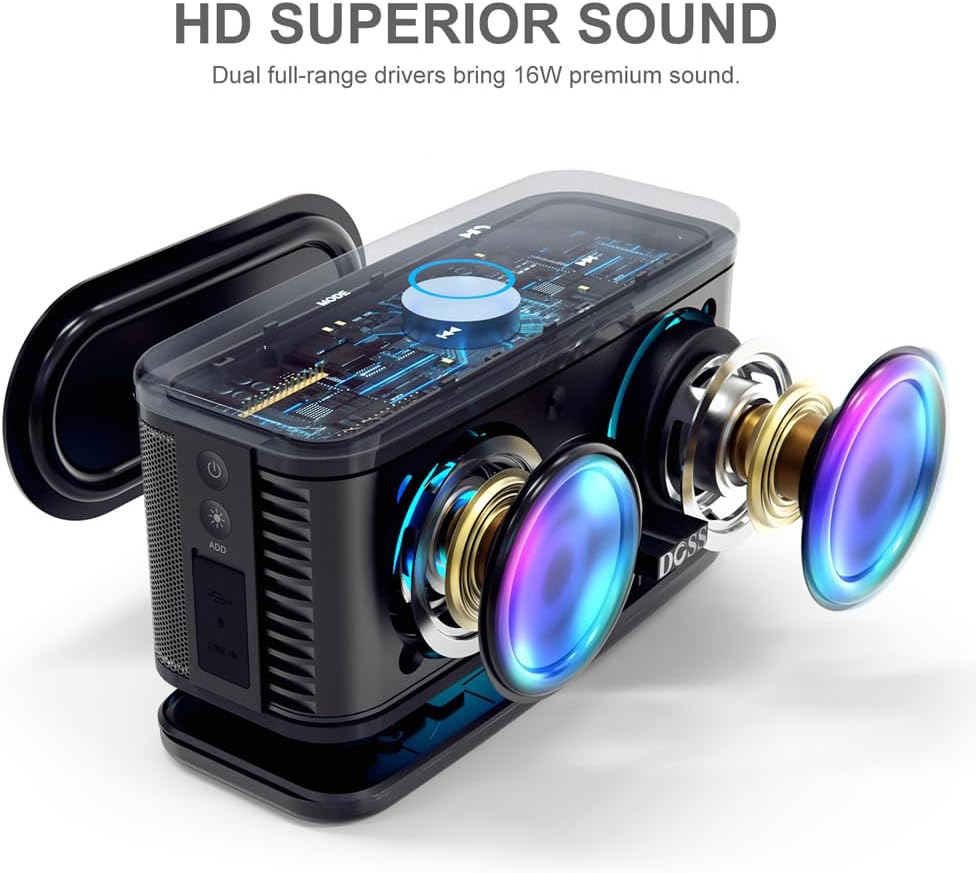
Rajah 3.2: Meletup view illustrating the dual full-range drivers and passive radiator for HD superior sound.
Kawalan dan Penunjuk:
- Butang Kuasa: Menghidupkan atau mematikan pembesar suara.
- Butang Mod: Switches between Bluetooth, AUX, and TF card modes.
- Butang Main/Jeda: Mengawal main balik muzik.
- Volume Control (Touch Ring): Rotate clockwise/counter-clockwise on the illuminated ring to adjust volume.
- Butang Trek Sebelumnya/Seterusnya: Skips to the previous or next song.
- Butang Mod Cahaya: Cycles through different LED light effects or turns them off.
- Port USB Mikro: Untuk mengecas pembesar suara.
- Port AUX-masuk: Untuk sambungan audio berwayar.
- Slot Kad TF: For playing music directly from a TF (Micro SD) card.
4. Persediaan
4.1 Mengecas Speaker
Before first use, fully charge your DOSS SoundBox Plus speaker. A full charge takes approximately 3-4 hours using the provided micro USB cable. The built-in 3200mAh rechargeable battery provides up to 20 hours of playtime at 50% volume (without lights).
- Sambungkan kabel USB mikro ke port pengecasan pada pembesar suara.
- Sambungkan hujung kabel yang satu lagi ke penyesuai kuasa USB (tidak disertakan) atau port USB komputer.
- Penunjuk LED akan menunjukkan status pengecasan dan dimatikan apabila dicas sepenuhnya.

Figure 4.1: The speaker is designed for extended playtime, indicating its 3200mAh battery capacity and 20-hour duration.
4.2 Menghidupkan/Mematikan
- Untuk menghidupkan kuasa, tekan dan tahan butang Kuasa sehingga anda mendengar gesaan yang boleh didengar.
- Untuk mematikan kuasa, tekan dan tahan butang Kuasa sekali lagi sehingga pembesar suara dimatikan.
4.3 Berpasangan Bluetooth
Pembesar suara akan memasuki mod pasangan Bluetooth secara automatik apabila dihidupkan buat kali pertama atau jika tiada peranti disambungkan.
- Ensure the speaker is powered on and in Bluetooth mode (indicated by a flashing blue light).
- Pada peranti anda (telefon pintar, tablet, komputer), dayakan Bluetooth dan cari peranti yang tersedia.
- Select "DOSS SoundBox Plus" from the list of devices.
- Once connected, you will hear a confirmation sound, and the blue light will become solid.
Note: The speaker will automatically reconnect to the last paired device if it's within range.
5. Mengendalikan Pembesar Suara Anda
5.1 Main Semula Muzik Asas
- Main/Jeda: Tekan butang Main/Jeda sekali.
- Lagu Seterusnya: Press the Next Track button once.
- Trek Sebelumnya: Press the Previous Track button once.
5.2 Kawalan Kelantangan
The DOSS SoundBox Plus features a sensitive touch control ring for volume adjustment.

Figure 5.1: Adjust volume effortlessly using the capacitive touch control ring on the speaker's top panel.
- Tingkatkan Kelantangan: Gently slide your finger clockwise along the illuminated touch ring.
- Kurangkan Kelantangan: Gently slide your finger counter-clockwise along the illuminated touch ring.
5.3 Mod Lampu LED
Enhance your listening experience with dynamic LED lights that sync to the rhythm of your music.

Figure 5.2: The speaker's lights dynamically change color and pattern in sync with the music.
- Press the Light Mode button to cycle through different light patterns.
- Teruskan menekan untuk mematikan lampu.
5.4 Wireless Stereo Pairing (TWS Function)
You can pair two DOSS SoundBox Plus speakers together for a true stereo sound experience and double the volume.

Figure 5.3: Two DOSS SoundBox Plus speakers wirelessly paired for an immersive stereo sound experience.
- Ensure both DOSS SoundBox Plus speakers are powered on and not connected to any Bluetooth device.
- On one speaker (this will be the primary speaker), press and hold the "ADD" button (usually near the charging port) until you hear a pairing prompt.
- The two speakers will automatically connect to each other. You will hear a confirmation sound once paired.
- Once paired, connect your device to the primary speaker via Bluetooth as described in Section 4.3.
Note: TWS pairing only works with two DOSS SoundBox Plus speakers.
6. Penyelenggaraan
- Pembersihan: Gunakan kain lembut dan kering untuk membersihkan pembesar suara. Jangan gunakan pembersih atau pelarut yang kasar.
- Storan: Simpan pembesar suara di tempat yang sejuk dan kering jauh dari cahaya matahari langsung dan suhu yang melampau.
- Penjagaan Bateri: Untuk menjimatkan hayat bateri, cas sepenuhnya pembesar suara sekurang-kurangnya sekali setiap tiga bulan jika tidak digunakan secara tetap. Elakkan daripada kerap mencas bateri sepenuhnya.
- Tahan Air: This product is NOT waterproof. Avoid exposure to water or excessive moisture.
7. Penyelesaian masalah
| Masalah | Kemungkinan Punca | Penyelesaian |
|---|---|---|
| Speaker tidak dihidupkan. | Bateri habis. | Charge the speaker fully using the micro USB cable. |
| Tiada suara dari pembesar suara. | Volume is too low or muted. Device not connected. Incorrect mode selected. | Increase volume on both the speaker (using the touch ring) and your connected device. Ensure Bluetooth is connected or AUX/TF card is properly inserted. Press the Mode button to cycle through modes. |
| Sambungan Bluetooth gagal. | Speaker is out of range. Device's Bluetooth is off. Speaker is connected to another device. | Move the speaker closer to your device (within 66 feet). Ensure Bluetooth is enabled on your device. Disconnect from other devices or reset the speaker's Bluetooth. |
| Bunyi diherotkan. | Volume is too high. Low battery. | Decrease the volume. Charge the speaker. |
| Volume control via touch ring is unresponsive or difficult. | Improper touch technique. | Ensure you are gently sliding your finger along the illuminated blue circle on the top panel, rather than just tapping. A continuous slide is required for adjustment. |
8. Spesifikasi
| Ciri | Perincian |
|---|---|
| Nama Model | SoundBox Plus |
| Kuasa Output Maksimum Pembesar Suara | 16 Watt |
| Teknologi Ketersambungan | Bluetooth, USB (untuk mengecas) |
| Teknologi Komunikasi Tanpa Wayar | Bluetooth 4.2 |
| Julat Bluetooth | Sehingga 66 Kaki (20 meter) |
| Kapasiti Bateri | Polimer Litium 3200 mAh |
| Hayat Bateri | Up to 20 Hours (at 50% volume, without lights) |
| Masa Mengecas | 3-4 Jam |
| Dimensi Produk | 4.1"D x 8.6"W x 4.2"H (10.4cm D x 21.8cm W x 10.7cm H) |
| Berat Barang | 1.4 paun (0.64 kg) |
| Kaedah Kawalan | Sentuh |
| Komponen yang Disertakan | Kabel USB mikro |

Figure 8.1: Detailed dimensions of the DOSS SoundBox Plus speaker.
9. Waranti dan Sokongan
DOSS products are backed by a 12-month warranty, starting from the date of purchase, covering any quality-related concerns.
If you encounter any issues with your product or require assistance, please feel free to contact DOSS customer support. We are committed to providing you with 24-hour prompt assistance and support.

Figure 9.1: DOSS customer support details, including phone number and email address.
- telefon: 1-833-275-3677
- e-mel: support@dossav.com


