Arahan Keselamatan Penting
Please read this manual carefully before operating the fan and retain it for future reference. Failure to follow these instructions may result in electric shock, fire, or serious injury.
- Pastikan bekalan kuasa voltage sepadan dengan label penarafan pada kipas.
- Jangan rendam kipas, palam atau kord di dalam air atau cecair lain.
- Cabut plag kipas dari soket apabila tidak digunakan, apabila mengalihkannya dari satu lokasi ke lokasi lain dan sebelum membersihkan.
- Jauhkan kipas daripada kanak-kanak dan haiwan peliharaan.
- Jangan kendalikan kipas dengan kord atau palam yang rosak.
- Do not insert fingers or other objects through the grille when the fan is operating.
- Letakkan kipas di atas permukaan yang stabil dan rata untuk mengelakkannya daripada terbalik.
Komponen Produk
Familiarize yourself with the parts of your Midea FS40-15AR Pedestal Fan.

Imej: The Midea FS40-15AR Pedestal Fan, showing its main body, fan head, base, and the included remote control.
- Ketua Kipas: Includes front and rear grilles, fan blades, and motor housing.
- Panel Kawalan: Located on the fan body, with LED display and control buttons.
- Pendirian boleh laras: Allows for height adjustment.
- Pangkalan: Provides stability for the fan.
- Kawalan Jauh: Untuk memudahkan operasi dari jauh.
Persediaan dan Perhimpunan
Follow these steps to assemble your Midea FS40-15AR Pedestal Fan.
- Perhimpunan asas: Attach the fan stand to the base. Ensure it is securely fastened.
- Pelarasan Ketinggian: The fan features an adjustable stand. Loosen the height adjustment knob, extend or retract the stand to the desired height, and then tighten the knob securely.

Imej: Illustration of the fan's adjustable height mechanism, showing arrows indicating upward and downward movement.
- Perhimpunan Ketua Kipas: Secure the rear grille, fan blades, and front grille to the motor housing according to the diagrams in the full manual (not provided here). Ensure all components are correctly aligned and locked into place.
- penempatan: Place the assembled fan on a firm, level surface. Ensure there is adequate space around the fan for optimal airflow and oscillation.
- Sambungan Kuasa: Plug the power cord into a suitable electrical outlet (220-240V).
Arahan Operasi
Your Midea FS40-15AR fan can be operated using the control panel on the unit or the included remote control.
Panel Kawalan


Imej: Icons illustrating key features: 3 modes, 26 speeds, and a low noise level of 30 dB.
- Butang Kuasa: Tekan untuk menghidupkan atau mematikan kipas.
- Pelarasan Kelajuan: Use the speed control buttons to select from 26 available speed settings. The current speed will be displayed on the LED screen.
- Butang Mod: Cycle through the available modes:
- Mod Biasa: Menyediakan aliran udara berterusan pada kelajuan yang dipilih.
- Mod Semula Jadi: Mensimulasikan angin semula jadi dengan mengubah kelajuan kipas.
- Mod tidur: Operates at a very low speed and noise level (as low as 27 dB) for quiet operation, ideal for sleeping.
- Mod ECO: Adjusts fan speed automatically based on room temperature to optimize energy consumption.
- Butang ayunan: Press to activate or deactivate the 80-degree oscillation function, which distributes air across a wider area.
- Butang Pemasa: Set the fan to automatically turn off after a specified period, up to 12 hours. Each press typically increases the timer by 1 hour.
Alat Kawalan Jauh
The remote control allows for convenient operation of all fan functions from a distance.

Imej: The remote control for the Midea FS40-15AR fan, highlighting the power button and the 12-hour timer function.

Imej: A hand holding the remote control, pointing towards the Midea FS40-15AR fan, demonstrating wireless operation.
- Insert batteries into the remote control (type and orientation usually indicated inside the battery compartment).
- Point the remote control towards the fan's receiver for optimal response.
- All functions available on the control panel are also accessible via the remote control.
Penyelenggaraan
Pembersihan dan penyelenggaraan yang kerap akan memastikan prestasi optimum dan jangka hayat kipas anda.
- Membersihkan Bahagian Luar:
- Sentiasa cabut plag kipas sebelum membersihkan.
- Lap permukaan luar dengan lembut, damp kain. Jangan gunakan pembersih atau pelarut yang melelas.
- Ensure no water enters the motor housing or electrical components.
- Cleaning the Grilles and Blades:
- Periodically remove the front grille (refer to assembly instructions for removal) to clean dust from the fan blades.
- Use a soft cloth or a vacuum cleaner with a brush attachment to remove dust.
- Ensure all parts are completely dry before reassembling and operating the fan.
- Storan:
- If storing the fan for an extended period, clean it thoroughly.
- Store it in its original packaging or cover it to protect it from dust.
- Simpan di tempat yang sejuk dan kering.
Menyelesaikan masalah
If you encounter any issues with your Midea FS40-15AR fan, refer to the following common problems and solutions.
| Masalah | Kemungkinan Punca | Penyelesaian |
|---|---|---|
| Kipas tidak dihidupkan. | Tiada bekalan kuasa. Kord kuasa tidak dipasang dengan betul. | Periksa sama ada salur keluar kuasa berfungsi. Ensure the power cord is securely plugged into the outlet and the fan. |
| Aliran udara yang lemah. | Kelajuan kipas ditetapkan terlalu rendah. Grilles or blades are dusty. | Tingkatkan tetapan kelajuan kipas. Unplug the fan and clean the grilles and blades as per maintenance instructions. |
| Kipas membuat bunyi yang luar biasa. | Bahagian longgar. Obstruction in the fan blades. | Unplug the fan and check for any loose components or foreign objects. Ensure the fan is on a stable surface. |
| Alat kawalan jauh tidak berfungsi. | Bateri mati. Halangan antara alat kawalan jauh dan kipas. | Gantikan bateri dalam alat kawalan jauh. Pastikan terdapat garis penglihatan yang jelas antara alat kawalan jauh dan penerima kipas. |
| Ayunan tidak berfungsi. | Fungsi ayunan dimatikan. Halangan mekanikal. | Press the oscillation button to activate it. Check for any obstructions preventing the fan head from rotating. |
Jika masalah berterusan selepas mencuba penyelesaian ini, sila hubungi sokongan pelanggan.
Spesifikasi
Technical details for the Midea FS40-15AR DC Pedestal Fan.
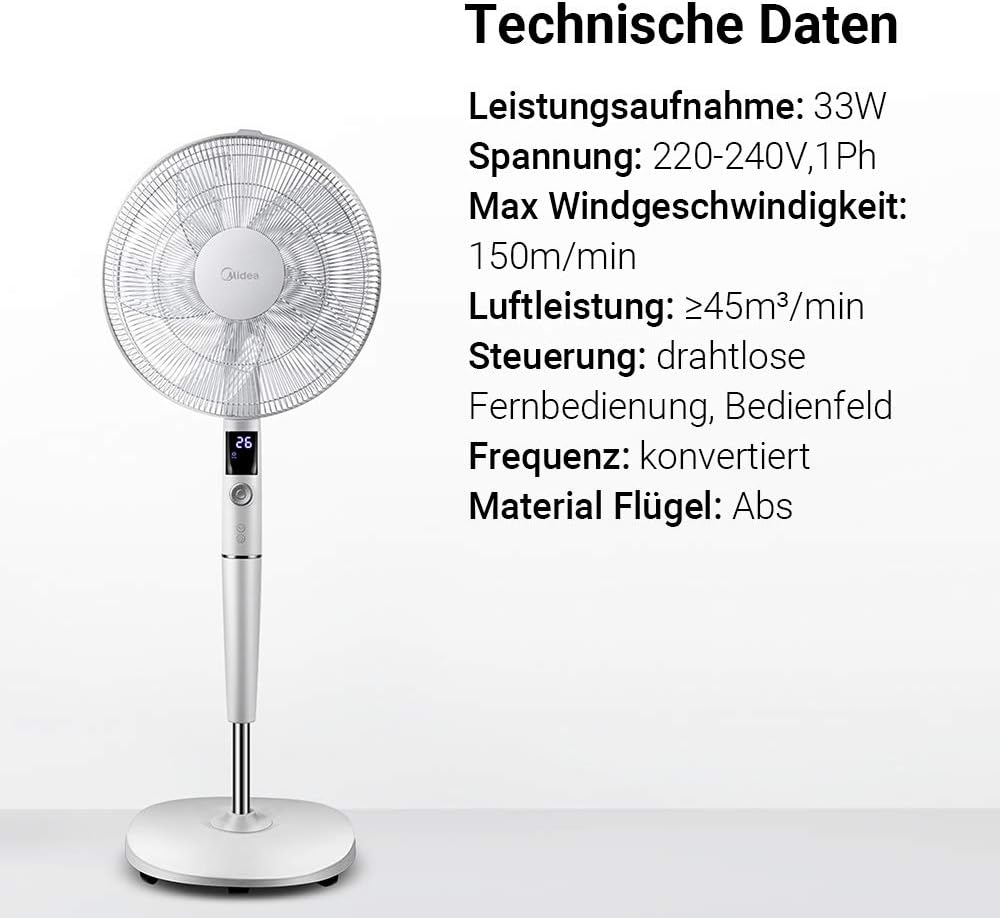
Imej: A visual representation of the Midea FS40-15AR fan alongside its technical data, including power consumption, voltage, and control methods.
| Ciri | Perincian |
|---|---|
| Nombor Model | FS40-15AR |
| Jenama | Midea |
| taip | Kipas Alas DC |
| Penggunaan Kuasa | 30 Watt |
| Voltage | 220-240V |
| Kelajuan Angin Maksimum | 150 m/min |
| Aliran udara | ≥45 m³/min |
| Bilangan Kelajuan | 26 |
| Tahap Kebisingan | 27 Decibels (min) |
| Sudut Ayunan | 80 darjah |
| Fungsi Pemasa | Sehingga 12 jam |
| Kaedah Kawalan | Wireless Remote Control, On-unit Control Panel |
| Bahan (Bilah) | Plastik ABS |
| Dimensi Produk (L x W x H) | 45.3 x 40 x 137 cm |
| Berat badan | 7.8 kg |
| Ciri Khas | Adjustable Height, Tiltable Head, ECO Mode, Sleep Mode |
Waranti dan Sokongan
For warranty information and customer support, please refer to the warranty card included with your product or visit the official Midea webtapak. Simpan resit pembelian anda sebagai bukti pembelian.
For technical assistance or service inquiries, please contact Midea customer service through their official channels.
- Sokongan dalam talian: www.midea.com/global/support
- Maklumat Hubungan: Refer to your regional Midea webtapak untuk butiran hubungan tempatan.


