pengenalan
This manual provides detailed instructions for the setup, operation, and maintenance of your Sunbuck TAV-339BT Wireless Karaoke Bluetooth Power Amplifier System. This 2-channel stereo amplifier is designed for home audio and karaoke applications, featuring Bluetooth connectivity, USB/SD card playback, FM radio, and dual microphone inputs. Please read this manual thoroughly before using the product to ensure proper operation and to prevent damage.

Rajah 1: Depan view of the Sunbuck TAV-339BT amplifier. This image displays the main unit with its various controls and inputs on the front panel, including the power switch, microphone inputs, volume knobs, and digital display.
Maklumat Keselamatan
- Sumber Kuasa: Sambungkan amplifier only to the specified power supply (AC 110V or DC 12V 5A). Ensure the voltage matches the requirements before plugging in.
- Pengudaraan: Jangan sekat bukaan pengudaraan. Pastikan aliran udara yang mencukupi di sekeliling unit untuk mengelakkan terlalu panas.
- Air dan Kelembapan: Jangan dedahkan unit kepada hujan, lembapan atau cecair menitis/percikan. Jangan letakkan objek yang diisi dengan cecair, seperti pasu, pada radas.
- Sumber Haba: Jauhkan unit daripada sumber haba seperti radiator, daftar haba, dapur, atau radas lain (termasuk amppenghidup) yang menghasilkan haba.
- Pembersihan: Cabut plag unit daripada soket kuasa sebelum membersihkan. Gunakan kain kering untuk membersihkan.
- Servis: Jangan cuba servis produk ini sendiri. Rujuk semua perkhidmatan kepada pegawai perkhidmatan yang berkelayakan.
- Kanak-kanak: Keep the unit and its accessories out of reach of children.
Kandungan Pakej
Sila semak pakej untuk item berikut:
- 1 x Sunbuck TAV-339BT Amppenyambung (110V)
- 1 x Alat Kawalan Jauh
- 1 x Manual Pengguna
Ciri-ciri Produk
- Compact and powerful 2-channel stereo ampsistem penguat.
- Integrated Bluetooth for wireless audio streaming from compatible devices (smartphones, tablets, PCs).
- Supports USB flash drive and SD memory card playback.
- Penala radio FM terbina dalam.
- Dual 1/4-inch microphone input jacks for karaoke functions.
- RCA (L/R) audio input for external devices.
- Front panel controls for master volume, bass, treble, microphone volume, echo, and microphone bass/treble.
- Traditional VU meter display.
- Includes a remote control for convenient operation.
Panel Depan Terlaluview
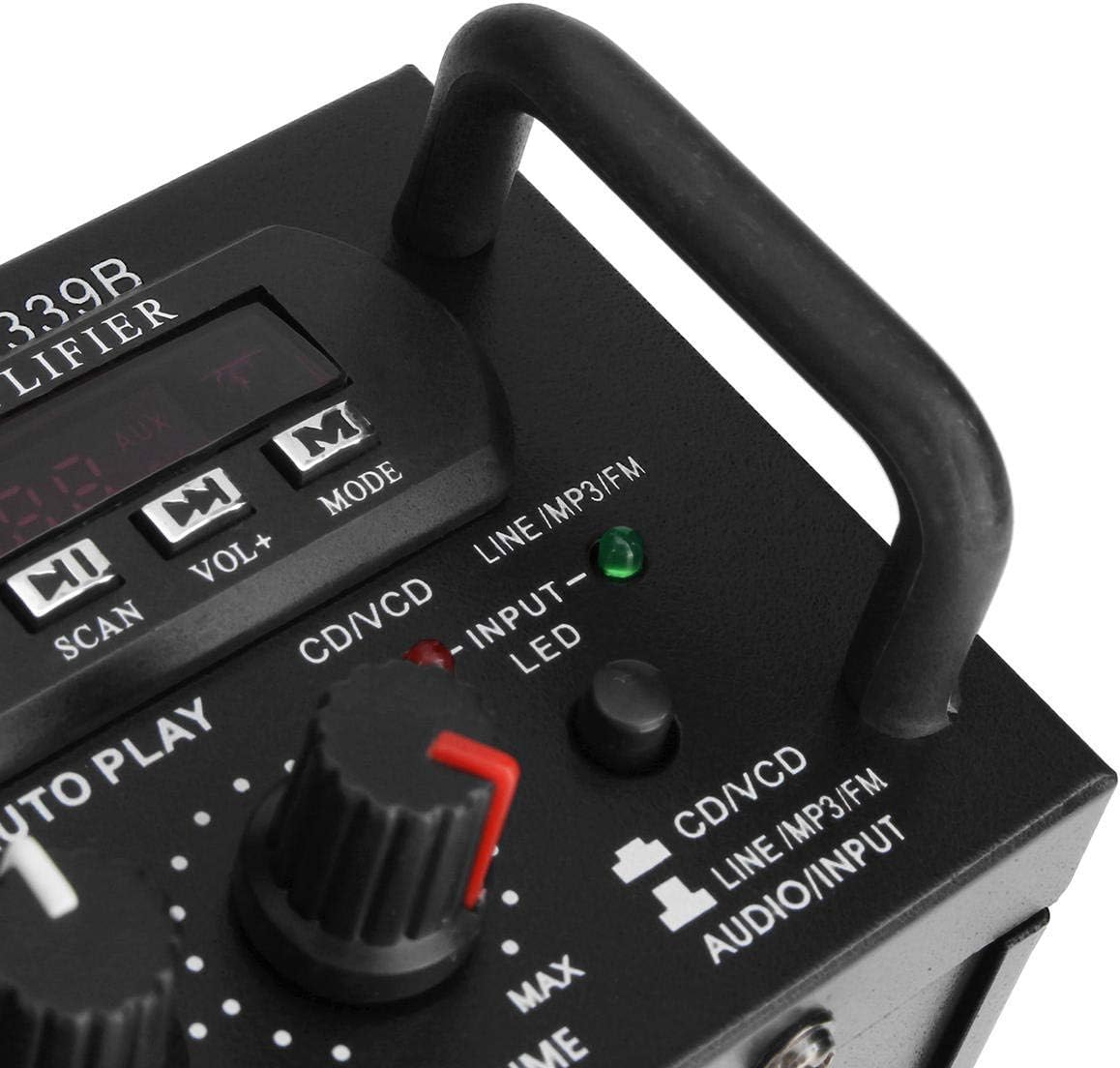
Rajah 2: Terperinci view daripada amplifier's front panel, highlighting the various knobs, buttons, and input ports.
- Suis kuasa: Berpusing amphidup atau mati.
- Kawalan ECHO: Adjusts the echo effect for microphones.
- MIC1/MIC2 Input: 1/4-inch jacks for connecting microphones.
- M.BASS/M.TREBLE: Adjusts bass and treble for microphone input.
- MIC/VOL: Adjusts the volume level for microphones.
- METER VU: Memaparkan tahap output audio.
- USB/SD Card Slot: For connecting USB flash drives or SD memory cards.
- Paparan Digital: Shows current mode, track number, or FM frequency.
- Control Buttons (SCAN, VOL-, VOL+, MODE): For navigating USB/SD/FM functions.
- BASS/TREBLE: Adjusts the main audio bass and treble levels.
- JILID: Kawalan kelantangan induk untuk semua sumber audio.
- Pemilih INPUT: Cycles through input sources (CD/VCD, LINE, MP3/FM, Bluetooth).
- INPUT LED Indicators: Lights up to show the currently selected input source.
Panel Belakang Terlaluview

Rajah 3: Belakang view daripada amplifier, showing the various input and output terminals for connecting speakers and audio sources.
- INPUT (CD/VCD, LINE): RCA (L/R) audio input jacks for connecting external audio sources like CD/DVD players, TVs, or other line-level devices.
- SISTEM SPEAKER: Spring clip terminals for connecting passive speakers. Ensure correct polarity (+ to + and - to -).
- POWER DC 12V INPUT: DC power input for 12V power supply (e.g., car battery, not included).
- AC 110V 60Hz: AC power input for standard household power.
- Antena FM: Connector for the included FM antenna.
Kawalan Jauh Lebihview
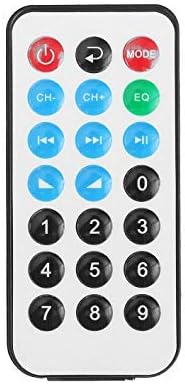
Rajah 4: Susun atur butang alat kawalan jauh.
The remote control allows for convenient operation of the amplifier's functions from a distance. It typically includes buttons for power, mode selection, volume adjustment, track navigation (for USB/SD), and FM radio controls.
Pemasangan Bateri untuk Alat Kawalan Jauh

Figure 5: Step-by-step guide for installing the CR2025 lithium battery into the remote control.
The remote control requires a CR2025 lithium battery (3V). To install or replace the battery:
- Cari petak bateri di belakang alat kawalan jauh.
- Push the small tab to release the battery tray.
- Tarik keluar dulang bateri.
- Masukkan bateri CR2025 dengan sisi positif (+) menghadap ke atas.
- Slide the battery tray back into the remote until it clicks into place.
Persediaan
1. Sambungan Pembesar Suara
Connect your passive speakers to the "SPEAKER SYSTEM" terminals on the rear panel. Ensure that the positive (+) terminal of the amplifier connects to the positive (+) terminal of the speaker, and the negative (-) terminal of the amplifier connects to the negative (-) terminal of the speaker. Incorrect polarity can affect sound quality.
2. Sambungan Input Audio
- RCA Inputs (CD/VCD, LINE): Use RCA cables to connect external audio sources (e.g., CD player, DVD player, TV audio output) to the corresponding "INPUT" jacks on the rear panel.
- Kad USB/SD: Insert a USB flash drive or SD memory card into the respective slot on the front panel.
- Bluetooth: No physical connection is needed for Bluetooth. Refer to the "Operating Instructions" section for pairing.
3. Sambungan Mikrofon
Connect up to two 1/4-inch microphones to the "MIC1" and "MIC2" input jacks on the front panel for karaoke use.
4. Sambungan Antena FM
Connect the included FM antenna to the FM antenna terminal on the rear panel for improved radio reception.
5. Sambungan Kuasa
Connect the power cord to the AC 110V 60Hz input on the rear panel and then plug it into a standard wall outlet. Alternatively, for DC operation, connect a 12V DC power source (not included) to the "POWER DC 12V INPUT" terminals.
Arahan Operasi
1. Hidupkan/Mati Kuasa
Press the "POWER" switch on the front panel to turn the amplampu hidup atau mati. Paparan digital akan menyala apabila unit dihidupkan.
2. Pemilihan Sumber
Press the "INPUT" button on the front panel or the "MODE" button on the remote control to cycle through available input sources: CD/VCD, LINE, MP3/FM, and Bluetooth. The corresponding LED indicator on the front panel will light up.
3. Operasi Bluetooth
- Select "Bluetooth" as the input source using the "INPUT" or "MODE" button. The digital display will show "BLUE" or a similar indicator.
- Enable Bluetooth on your mobile device (smartphone, tablet, PC).
- Cari untuk available Bluetooth devices and select "TAV-339BT" or "Sunbuck" from the list.
- Setelah dipasangkan, anda boleh menstrim audio secara wayarles dari peranti anda ke amplebih hidup.
4. Main semula USB/Kad SD
- Masukkan pemacu kilat USB atau kad SD yang mengandungi audio MP3 files into the respective slot on the front panel.
- Select "MP3/FM" as the input source. The amplifier will automatically detect and begin playing audio files.
- Use the "SCAN", "VOL-", "VOL+" buttons on the front panel or the corresponding buttons on the remote control to navigate tracks (play/pause, next/previous).
5. Operasi Radio FM
- Pastikan antena FM disambungkan.
- Select "MP3/FM" as the input source.
- Press the "SCAN" button to automatically scan and store available FM radio stations.
- Use the "VOL-" and "VOL+" buttons (or remote control) to manually tune or select stored stations.
6. Fungsi Karaoke
- Connect microphones to the "MIC1" and "MIC2" jacks.
- Adjust the "MIC/VOL" knob to control the microphone volume.
- Use the "ECHO" knob to add an echo effect to the vocals.
- Adjust "M.BASS" and "M.TREBLE" to fine-tune the microphone's tone.
7. Kawalan Kelantangan dan Nada
- JILID: Use the large "VOLUME" knob on the front panel to adjust the overall output volume.
- BASS/TREBLE: Use the "BASS" and "TREBLE" knobs to adjust the low and high frequencies of the main audio output.
Penyelenggaraan
- Pembersihan: Disconnect the power before cleaning. Use a soft, dry cloth to wipe the exterior of the unit. Do not use liquid cleaners or aerosol cleaners.
- Pengudaraan: Ensure that the ventilation openings are clear of dust and debris to maintain proper cooling.
- Storan: Jika menyimpan unit untuk tempoh yang lama, putuskan sambungannya daripada bekalan kuasa dan simpan di tempat yang sejuk dan kering.
Menyelesaikan masalah
| Masalah | Kemungkinan Punca | Penyelesaian |
|---|---|---|
| Tiada kuasa | Kord kuasa tidak disambungkan; Matikan kuasa; Tiada kuasa dari alur keluar. | Ensure power cord is securely connected. Turn the POWER switch on. Check the power outlet with another device. |
| Tiada keluaran bunyi | Incorrect input source selected; Speaker wires loose or incorrectly connected; Volume too low; Mute activated (if applicable). | Select the correct input source. Check speaker connections and polarity. Increase the VOLUME. Ensure no mute function is active. |
| Bluetooth tidak bersambung | Amplifier not in Bluetooth mode; Device too far; Device already connected to another amplifier; Bluetooth on device is off. | Select Bluetooth input on the amplifier. Move device closer. Disconnect from other devices. Enable Bluetooth on your device. |
| Kad USB/SD tidak dimainkan | Incorrect input source; Files not in supported format (MP3); USB/SD card corrupted or empty. | Select MP3/FM input. Ensure files are MP3 format. Try another USB/SD card. |
| Alat kawalan jauh tidak berfungsi | Battery depleted or incorrectly installed; Obstruction between remote and amppengukur; Sensor jarak jauh disekat. | Replace battery (CR2025) and ensure correct polarity. Remove any obstructions. Ensure the remote sensor on the amppenghidrat adalah jelas. |
Spesifikasi
| Ciri | Perincian |
|---|---|
| Model | TAV-339BT |
| Impedans Ternilai | 4 hingga 8 Ohms |
| Output Kuasa RMS | 200W + 200W (Recommended for speaker boxes with speakers less than 8") |
| Peak Music Power Output (P.M.P.O) | 300W + 300W (Jumlah 600W) |
| Bekalan Kuasa | AC: 110V 60Hz or DC: 12V 5A |
| Saluran | 2 Saluran |
| Input Audio | Multi-channel signal input (RCA L/R), USB, SD, Bluetooth |
| Input Mikrofon | Dual 1/4-inch Jack |
| Teknologi Ketersambungan | Bluetooth, USB, RCA |
| Jenis Wayarles | Bluetooth, Infrared (for remote) |
| Dimensi Produk (L x W x H) | 25.4 x 20.32 x 7.01 cm (10 x 8 x 2.76 inci) |
| Berat Produk | 2.72 kg (6 lbs) |
| Peranti Serasi | Headphones, Laptops, Smartphones |
Waranti dan Sokongan
For warranty information or technical support, please refer to the documentation provided at the time of purchase or contact your retailer. Keep your proof of purchase for warranty claims.


