1. Pengenalan
This manual provides essential information for the safe and effective operation, setup, and maintenance of your KERN DB 50-2 Digital Torque Meter. Please read this manual thoroughly before using the device and keep it for future reference.
The KERN DB 50-2 is designed for precise torque testing of various tools, including torque wrenches, electric manual screwdrivers, and cordless screwdrivers. It features a robust metal housing suitable for demanding industrial environments.
2. Maklumat Keselamatan
Sentiasa patuhi langkah keselamatan berikut untuk mengelakkan kecederaan dan kerosakan pada peranti:
- Pastikan peranti diletakkan di atas permukaan yang stabil dan rata semasa operasi.
- Do not exceed the maximum measuring range of 50 Nm.
- Elakkan mendedahkan peranti kepada suhu, kelembapan atau bahan menghakis yang melampau.
- Jangan cuba membuka atau membaiki peranti sendiri. Rujuk kepada kakitangan perkhidmatan yang berkelayakan.
- Pastikan peranti bersih dan bebas daripada habuk dan serpihan.
3. Produk Lebihview
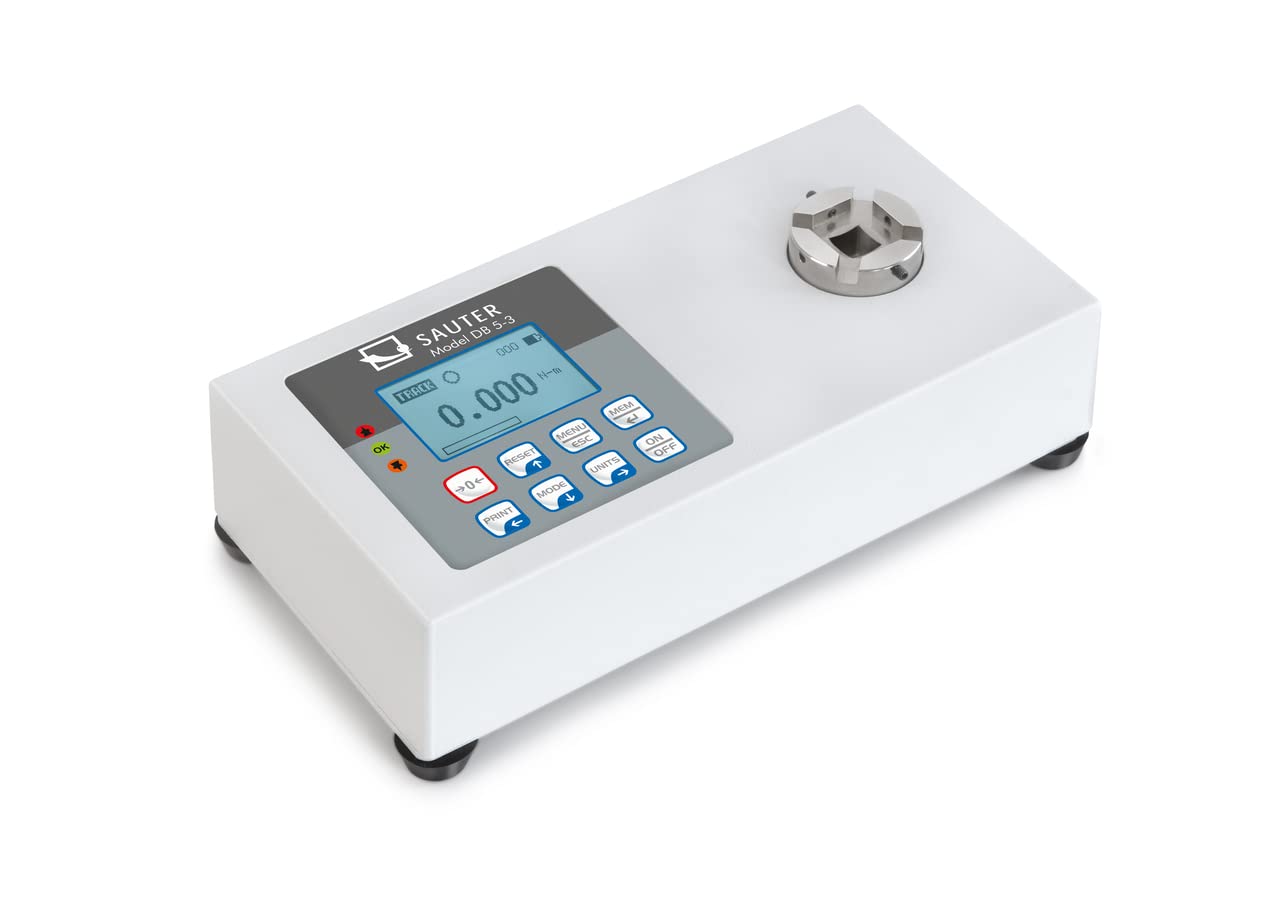
The KERN DB 50-2 Digital Torque Meter is equipped with several features to ensure accurate and convenient torque measurement:
- Rotary Transducer System: Enables dynamic testing of electric screwdrivers.
- Perumahan Logam: Provides durability for rugged environmental conditions.
- Paparan Kapasiti: A visual strip indicates the remaining measurement range.
- Backlit Graphic LCD Display: Memastikan kebolehbacaan yang jelas dalam pelbagai keadaan pencahayaan.
- Kaki Getah Anti-gelincir: Memberi kestabilan semasa penggunaan.
- Sturdy Mounting Plate: For solid mounting.
- Antara Muka Data: USB and RS-232 are included for data transfer.
- Memori Data Dalaman: Stores up to 500 measurement data points.
- Fungsi Pegang Puncak: Captures and displays the maximum torque value.
- Track Function: Provides continuous measurement display.
- Pengukuran dua arah: Can be used in both clockwise and counter-clockwise directions.
- Tolerance Range (Limit Function): Allows programming of upper and lower limit values with acoustic and optical signals for measurement process support.
- Fungsi Automatik: Menjimatkan hayat bateri.
4. Persediaan
- Membongkar: Carefully remove the torque meter and all accessories from the packaging. Inspect for any signs of damage.
- penempatan: Place the device on a stable, vibration-free surface. Ensure adequate space for operation and connection of tools.
- Sambungan Kuasa: Connect the appropriate power adapter (if applicable) or ensure batteries are correctly installed.
- Pemasangan (Pilihan): If using the sturdy mounting plate, secure the device firmly to a workbench or designated testing station.
- Kuasa Awal Hidup: Tekan ke HIDUP/MATI button to power on the device. The display should illuminate and show the initial measurement screen.
5. Operasi
5.1 Pengukuran Asas
- Hidupkan kuasa: Tekan ke HIDUP/MATI butang.
- Sifar: Ensure no load is applied to the transducer and press the TETAP SEMULA butang untuk sifar paparan.
- Pilih Unit: Tekan ke UNIT button to cycle through available measurement units (e.g., N-m, lbf-ft).
- Gunakan Tork: Carefully apply torque to the transducer using the tool to be tested. The display will show the real-time torque value.
- Baca Pengukuran: For peak hold, the maximum value will be displayed. For track mode, the value updates continuously.
5.2 Peak Hold and Track Function
The device supports both Peak Hold and Track functions. Use the MODE butang untuk bertukar antara mod ini.
- Pegangan Puncak: Displays and holds the maximum torque value reached during a measurement cycle.
- Lagu: Displays the torque value in real-time as it is applied.
5.3 Tolerance Range (Limit Function)
To set upper and lower tolerance limits:
- Enter the menu by pressing MENU/ESC.
- Navigate to the "Limits" or "Tolerance" setting using the arrow buttons.
- Set the desired upper and lower torque values.
- Confirm settings. During measurement, an acoustic and optical signal will indicate if the applied torque is within, above, or below the set limits.
5.4 Penyimpanan dan Pemindahan Data
The device can store up to 500 measurement data points internally. To access and transfer data:
- Tekan ke MEM butang untuk kembaliview data yang disimpan.
- Connect the device to a PC using the provided USB or RS-232 interface cable.
- Use optional software (not included) to transfer the memory content to the PC for analysis and archiving.
6. Penyelenggaraan
- Pembersihan: Lap peranti dengan lembut, damp kain. Jangan gunakan pembersih atau pelarut yang melelas.
- Storan: When not in use, store the torque meter in its robust carrying case in a dry, dust-free environment.
- Penentukuran: Regular calibration by authorized service personnel is recommended to maintain measurement accuracy. Refer to the manufacturer's guidelines for calibration intervals.
- Penggantian Bateri: If the device uses batteries, replace them as indicated by the low battery warning on the display. Ensure correct polarity.
7. Penyelesaian masalah
Bahagian ini menangani isu biasa yang mungkin anda hadapi. Untuk masalah yang tidak disenaraikan di sini, hubungi sokongan pelanggan.
| Masalah | Kemungkinan Punca | Penyelesaian |
|---|---|---|
| Peranti tidak dihidupkan. | No power, dead batteries, or faulty power adapter. | Check power connection, replace batteries, or try a different power source. |
| Bacaan yang tidak tepat. | Device not zeroed, overload, or needs calibration. | Press RESET button, ensure load is within range, or schedule calibration. |
| Paparan menunjukkan mesej ralat. | Overload, internal fault, or incorrect operation. | Refer to specific error codes in a more detailed manual (if available) or contact support. Remove load and restart. |
8. Spesifikasi
- model: KERN DB 50-2
- Julat Pengukuran: 50 Nm
- Dimensi Produk: 3.94 x 7.87 x 1.97 inci
- Berat produk: 7.39 paun
- Pengeluar: KERN & SOHN GmbH
- Antara Muka Data: USB, RS-232
- Memori Dalaman: Up to 500 measurement data points
9. Kandungan Kotak
Selepas membongkar, anda harus mencari item berikut:
- KERN DB 50-2 Digital Torque Meter (Torque Gauge)
- Transduser Putar
- Robust Carrying Case
- Plat Pemasangan
- Kabel USB
- Kabel RS-232
- Manual Pengguna (dokumen ini)
10. Waranti dan Sokongan
For warranty information, technical support, or service inquiries, please contact KERN & SOHN GmbH directly or your authorized dealer. Keep your purchase receipt as proof of purchase.
Manufacturer: KERN & SOHN GmbH
For the most up-to-date support information, please visit the official KERN webtapak.


