1. Pengenalan
Terima kasih kerana membeliasing the 2BOOM BX390 Bass King Wireless Bluetooth Boombox Stereo Speaker. This manual provides essential information for setting up, operating, and maintaining your speaker to ensure optimal performance and longevity. Please read this manual thoroughly before using the product.

Image 1.1: The 2BOOM BX390 Bass King Wireless Bluetooth Boombox Stereo Speaker.
This image shows the 2BOOM BX390 Bass King speaker in blue, featuring a cylindrical design with a handle/strap attached. The front panel displays the control interface and speaker grille.
2. Kandungan Pakej
Sila semak pakej untuk item berikut:
- 1 x 2BOOM BX390 Bass King Speaker
- 1 x Kabel Aux 3.5mm
- 1 x Kabel Pengecas USB
- 1 x Manual Pengguna (dokumen ini)
- 1 x Attachable Shoulder Strap

Image 2.1: The 2BOOM BX390 speaker shown with its detachable shoulder strap, 3.5mm Aux cable, and USB charging cable.
This image displays the blue 2BOOM BX390 speaker from an angled perspective, highlighting the included shoulder strap attached to its side rings. The USB charging cable and 3.5mm Aux cable are visible in the foreground.
3. Ciri-ciri Produk
- Powerful Bass Sound: Equipped with 4-inch subwoofers and vibrating disks for crisp, clear, loud sound, booming low tones, and dynamic sound effects.
- Kesambungan Bluetooth: Connects wirelessly to smartphones, tablets, and other Bluetooth-enabled devices up to 33 ft.
- Mikrofon terbina dalam: Supports hands-free calls.
- Reka Bentuk Tahan Lama dan Mudah Alih: Features a rugged, rubberized exterior and an attachable strap for easy carrying.
- Pelbagai Pilihan Input: Includes FM Radio, Aux-in Line, USB port, and SD Card slot.
- Panel Kawalan Bersepadu: Direct control over volume, bass, and sound equalizer.

Image 3.1: The 2BOOM BX390 speaker with visual callouts for Deep Digital Bass, FM Radio, Long-Lasting Battery, and Straps Included.
This image shows the blue 2BOOM BX390 speaker from the front, with graphic overlays pointing out its key features: deep digital bass, FM radio capability, long-lasting battery, and the inclusion of straps for portability.
4. Kawalan dan Pelabuhan
Familiarize yourself with the control panel and input ports of your BX390 speaker:

Image 4.1: Detailed diagram of the 2BOOM BX390 control panel and input ports.
Imej ini menyediakan jarak dekat view of the speaker's front panel, clearly labeling each button, port, and indicator. Labels include USB, DC 5V (charging), AUX, Previous, Play/Pause, Next, Mode, EQ, SD card slot, LED display, Power ON/OFF switch, Volume controls, and Bass controls.
- Port USB: Untuk main balik pemacu USB.
- DC 5V (Charging Port): Connect the USB charging cable here to charge the speaker.
- Input AUX: 3.5mm jack for connecting external audio devices via an Aux cable.
- Previous / Volume -: Short press for previous track; long press to decrease volume.
- Main/Jeda: Press to play or pause audio. In FM mode, short press to auto-scan.
- Next / Volume +: Short press for next track; long press to increase volume.
- Mod: Press to switch between Bluetooth, FM Radio, USB, SD Card, and AUX modes.
- EQ (Penyama): Press to cycle through different equalizer presets.
- Slot Kad SD: Insert an SD card for audio playback.
- Paparan led: Shows current mode, track number, or FM frequency.
- Suis ON / OFF Kuasa: Slide to turn the speaker on or off.
- Jilid +/-: Butang untuk menambah atau mengurangkan jumlah keseluruhan.
- Bes +/-: Buttons to increase or decrease the bass level.
5. Persediaan
5.1 Mengecas Speaker
Before first use, fully charge the speaker. Connect the supplied USB charging cable to the DC 5V port on the speaker and the other end to a USB power adapter (not included) or a computer's USB port. The LED display may indicate charging status.
- Masa pengecasan mungkin berbeza-beza.
- Putuskan sambungan pengecas setelah dicas sepenuhnya untuk menjimatkan hayat bateri.
5.2 Menghidupkan/Mematikan
Untuk memusingkan pembesar suara ON, slide the Power ON/OFF switch to the 'ON' position. You will hear an audible prompt, and the LED display will light up.
Untuk memusingkan pembesar suara DIMATIKAN, slide the Power ON/OFF switch to the 'OFF' position.
6. Arahan Operasi
6.1 Mod Bluetooth
The speaker automatically enters Bluetooth pairing mode when powered on if no other input source is connected, or after pressing the MODE button until "Bluetooth" is indicated.
- Pastikan pembesar suara dihidupkan.
- Pada peranti berdaya Bluetooth anda (telefon pintar, tablet, dll.), dayakan Bluetooth dan cari peranti yang tersedia.
- Pilih "2BOOM BX390" or similar from the list.
- Once paired, the speaker will confirm with an audible prompt.
- Anda kini boleh memainkan audio daripada peranti anda melalui pembesar suara.
Nota: The speaker will automatically reconnect to the last paired device if it's within range and Bluetooth is enabled.

Image 6.1: The 2BOOM BX390 speaker highlighting its Bluetooth connectivity.
This image shows the blue 2BOOM BX390 speaker with a prominent "Bluetooth" logo and "PORTABLE WIRELESS BASS KING SPEAKER" text, emphasizing its wireless audio capabilities.
Mod Radio 6.2 FM
To switch to FM Radio mode, press the MODE button until "FM" or the radio frequency is displayed.
- In FM mode, short press the Main/Jeda button to automatically scan and save available FM stations. The speaker will cycle through frequencies and store them.
- Gunakan Sebelumnya dan Seterusnya butang untuk menavigasi antara stesen yang disimpan.
- For better reception, extend the antenna (if applicable, or reposition the speaker).
6.3 USB / SD Card Mode
The speaker supports audio playback from USB flash drives and SD cards.
- Masukkan pemacu kilat USB ke dalam Port USB atau kad SD ke dalam Slot Kad SD.
- The speaker will automatically switch to the corresponding mode (USB or SD) and begin playing audio files. Jika tidak, tekan MODE butang untuk memilih.
- Gunakan Sebelumnya, Main/Jeda, dan Seterusnya butang untuk mengawal main balik.
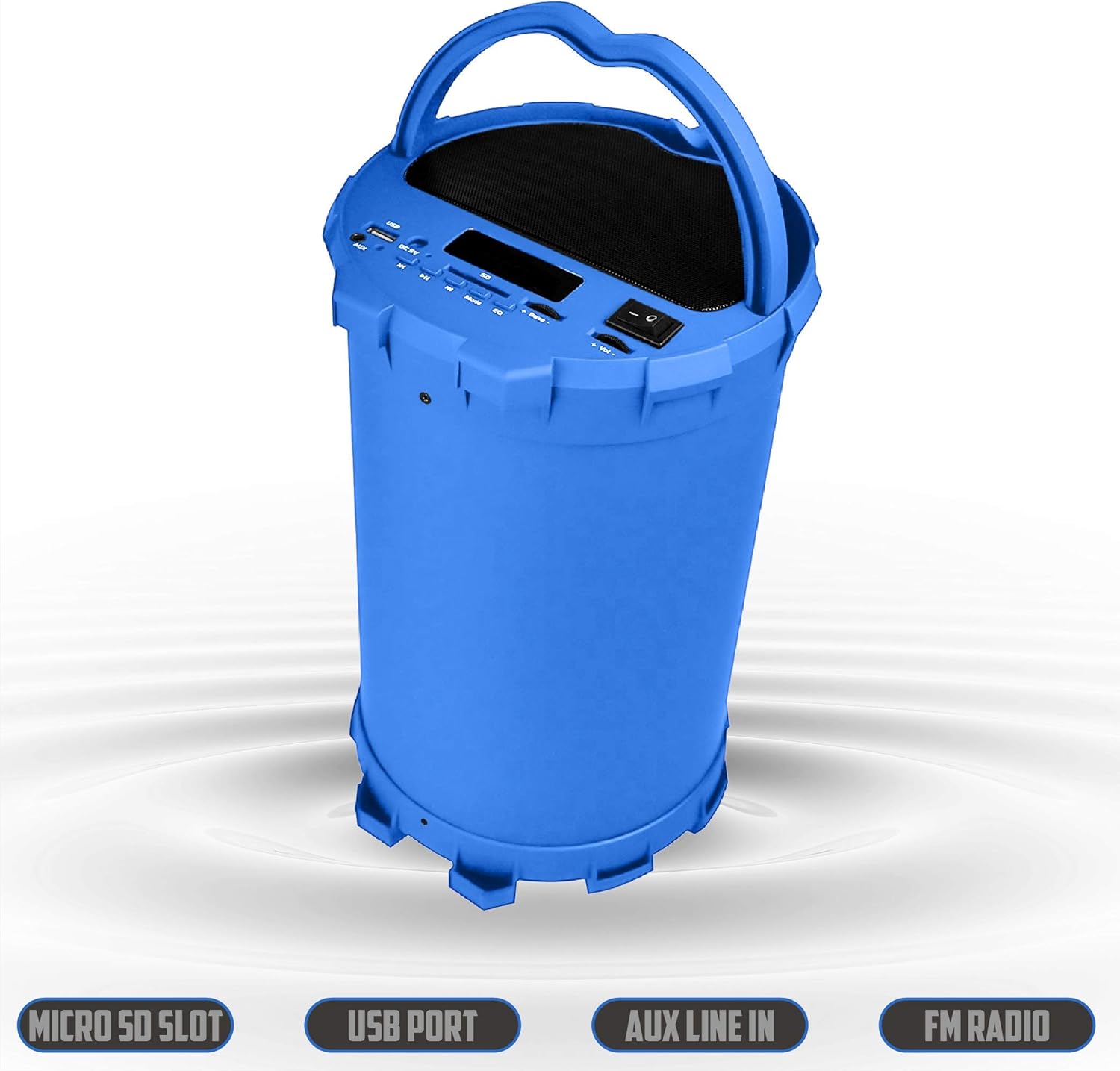
Image 6.2: The 2BOOM BX390 speaker shown upright, emphasizing the Micro SD Slot, USB Port, Aux Line In, and FM Radio capabilities.
This image displays the blue 2BOOM BX390 speaker in an upright position, with graphic overlays highlighting the Micro SD Slot, USB Port, Aux Line In, and FM Radio features on its control panel.
6.4 Mod Input AUX
Connect external audio devices (e.g., MP3 players, computers) using the supplied 3.5mm Aux cable.
- Connect one end of the 3.5mm Aux cable to the Input AUX port pada pembesar suara.
- Sambungkan hujung yang satu lagi ke bicu output audio peranti luaran anda.
- The speaker will automatically switch to AUX mode. If not, press the MODE butang untuk memilih.
- Kawal main balik daripada peranti luaran anda.
6.5 Adjusting Volume, Bass, and Equalizer
- Kelantangan: Gunakan Jilid +/- buttons (long press Previous/Next) to increase or decrease the overall volume.
- Bes: Gunakan Bes +/- buttons to adjust the bass level to your preference.
- Penyamaan (EQ): Tekan ke EQ button to cycle through various preset equalizer modes (e.g., Pop, Rock, Jazz, Classical, Normal) to optimize sound for different music genres.
7. Penyelenggaraan
- Pembersihan: Gunakan kain lembut dan kering untuk membersihkan bahagian luar pembesar suara. Jangan gunakan pembersih atau pelarut yang melelas.
- Storan: Simpan pembesar suara di tempat yang sejuk dan kering jauh dari cahaya matahari langsung dan suhu yang melampau apabila tidak digunakan untuk tempoh yang lama.
- Penjagaan Bateri: Untuk memanjangkan hayat bateri, elakkan daripada menyahcas sepenuhnya bateri dengan kerap. Cas pembesar suara dengan kerap, walaupun tidak digunakan.
- Tahan Air: Pembesar suara ini tidak kalis air. Elakkan pendedahan kepada air atau kelembapan berlebihan.
8. Penyelesaian masalah
| Masalah | Kemungkinan Punca | Penyelesaian |
|---|---|---|
| Tiada kuasa | Bateri lemah atau mati. | Cas pembesar suara sepenuhnya menggunakan kabel USB yang dibekalkan. |
| Tiada bunyi | Kelantangan terlalu rendah; mod yang dipilih salah; peranti tidak disambungkan dengan betul. | Tingkatkan kelantangan pada pembesar suara dan peranti yang disambungkan. Tekan. MODE to select correct input. Reconnect Bluetooth or Aux cable. |
| Penggandingan Bluetooth gagal | Pembesar suara tidak dalam mod berpasangan; peranti terlalu jauh; gangguan. | Ensure speaker is in Bluetooth mode. Move device closer to speaker. Turn off other Bluetooth devices. Forget "2BOOM BX390" on your device and re-pair. |
| Penerimaan FM yang lemah | Weak signal; speaker position. | Reposition the speaker. Try auto-scanning again. |
| Kad USB/SD tidak dimainkan | Tidak disokong file format; kad/pemacu tidak dimasukkan dengan betul; rosak files. | pastikan files are in a supported format (e.g., MP3). Reinsert the USB drive/SD card. Try a different drive/card. |
9. Spesifikasi
| Ciri | Perincian |
|---|---|
| Jenama | 2BOOM |
| Model | BX390 Bass King |
| Teknologi Ketersambungan | Tambahan, Bluetooth, USB |
| Jenis Pembesar Suara | Stereo |
| Peranti Serasi | Komputer riba, Telefon Pintar, Tablet |
| Subwoofer | 4-inch (Quantity not specified, but implied by "subwoofers" and "dual subwoofers" in image) |
| Julat Bluetooth | Sehingga 33 kaki (10 meter) |
| Port Input | USB, SD Card, 3.5mm AUX |
| Radio | Radio FM |
10. Waranti dan Sokongan
The 2BOOM BX390 Bass King speaker comes with an UNLIMITED 2BOOM WARRANTY.
For warranty claims or technical support, please contact 2BOOM customer service. Refer to the product packaging or 2BOOM's official webtapak untuk maklumat hubungan.
Sila simpan bukti pembelian anda untuk tujuan waranti.


