1. Produk Lebihview
The ANENG Q1 is a 9999 counts True RMS digital multimeter designed for accurate measurement of various electrical parameters. It features an EBTN black screen with a large, backlit LCD for clear readability in diverse lighting conditions. This device supports both automatic and manual ranging, offering flexibility for different measurement needs. It includes an analog bar graph display for quick visual indication of readings.
Ciri-ciri Utama:
- Pengukuran RMS Sebenar: Menyediakan bacaan yang tepat untuk bentuk gelombang bukan sinusoidal.
- NCV (Voltage) Pengesanan: For safe identification of live wires without direct contact.
- Pengisaran Auto/Manual: User-selectable measurement range for convenience and precision.
- Analog Bar Graph: Visual representation of measurement trends.
- LCD Lampu Belakang Besar: Enhanced visibility in low-light environments.
- Perlindungan Lebihan: Ensures safety across all measurement ranges.
- Petunjuk Bateri Rendah: Makluman apabila penggantian bateri diperlukan.
- Fungsi Pegangan Data: Membekukan bacaan yang dipaparkan untuk memudahkan rakaman.
- Auto Matikan: Menjimatkan hayat bateri.
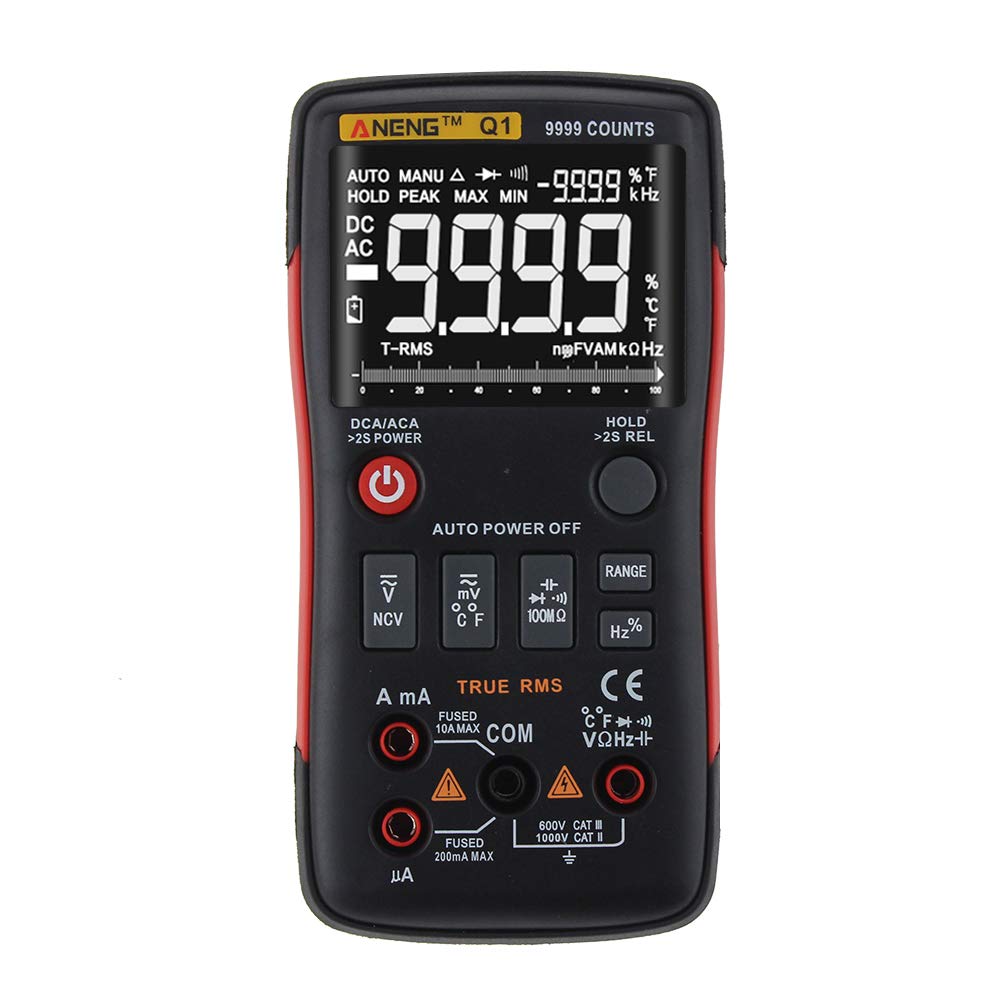
Figure 1: ANENG Q1 Digital Multimeter with its display and function buttons.
2. Maklumat Keselamatan
Always observe basic safety precautions when using this multimeter to prevent personal injury or damage to the device. Read and understand all safety information before operation.
- Jangan melebihi nilai input maksimum untuk sebarang fungsi.
- Berhati-hati apabila bekerja dengan voltagadalah melebihi 30V AC RMS, puncak 42V atau 60V DC. Ini voltagia menimbulkan bahaya kejutan.
- Before measuring current, ensure the circuit is de-energized and the multimeter is connected in series.
- Always disconnect test leads from the circuit before changing functions.
- Periksa petunjuk ujian untuk penebat yang rosak atau logam terdedah sebelum digunakan. Gantikan jika rosak.
- Jangan kendalikan multimeter jika penutup bateri tidak ditutup dengan betul.
- Gantikan bateri dengan segera apabila penunjuk bateri lemah muncul untuk memastikan bacaan yang tepat.
- Patuhi kod keselamatan tempatan dan kebangsaan.
3. Persediaan
3.1 Pemasangan Bateri
- Ensure the multimeter is powered off.
- Cari petak bateri di bahagian belakang peranti.
- Tanggalkan penutup petak bateri dan tanggalkannya.
- Insert two 1.5V AA batteries, observing the correct polarity (+/-).
- Gantikan penutup bateri dan kencangkannya dengan skru.
3.2 Menghubungkan Petunjuk Ujian
The multimeter comes with a set of test leads. Always connect the black lead to the 'COM' (Common) jack. Connect the red lead to the appropriate input jack based on the measurement function:
- VΩHz+ jack for Voltage, Pengukuran Rintangan, Frekuensi, Kapasitans, Diod dan Kesinambungan.
- mA jack for current measurements up to 999.9mA.
- 10A jack for current measurements up to 10A.

Figure 2: Included test leads and probes.

Figure 3: Complete ANENG Q1 Multimeter kit with accessories.
4. Arahan Operasi
The ANENG Q1 multimeter offers both automatic and manual ranging. Press the 'RANGE' button to switch between auto and manual modes. In manual mode, press 'RANGE' repeatedly to cycle through available ranges.
4.1 Hidupkan/Mati Kuasa
Press the red power button to turn the multimeter on or off. The device features an auto power-off function to conserve battery life after a period of inactivity.
4.2 Mengukur Vol. AC/DCtage (V)
- Connect the black test lead to the 'COM' jack and the red test lead to the 'VΩHz+' jack.
- Pilih voltage measurement function (AC V or DC V) using the function button.
- Connect the test probes in parallel across the circuit or component to be measured.
- Baca voltagnilai e pada paparan.
4.3 Measuring AC/DC Current (A/mA/µA)
- Penting: Ensure the circuit is de-energized before connecting the multimeter for current measurement.
- Connect the black test lead to the 'COM' jack. Connect the red test lead to the 'mA' jack for currents up to 999.9mA, or to the '10A' jack for currents up to 10A.
- Select the current measurement function (AC A or DC A).
- Open the circuit and connect the multimeter in series with the load.
- Tenagakan semula litar dan baca nilai semasa pada paparan.
4.4 Mengukur Rintangan (Ω)
- Connect the black test lead to 'COM' and the red test lead to 'VΩHz+'.
- Select the resistance measurement function.
- Pastikan litar atau komponen dinyahtenagakan sebelum mengukur rintangan.
- Sambungkan kuar ujian merentasi komponen.
- Baca nilai rintangan pada paparan.
4.5 Mengukur Kapasitansi (F)
- Connect the black test lead to 'COM' and the red test lead to 'VΩHz+'.
- Select the capacitance measurement function.
- Ensure the capacitor is fully discharged before measurement to prevent damage to the multimeter.
- Sambungkan kuar ujian merentasi terminal kapasitor.
- Baca nilai kapasitans pada paparan.
4.6 Measuring Frequency (Hz) and Duty Cycle (%)
- Connect the black test lead to 'COM' and the red test lead to 'VΩHz+'.
- Select the frequency/duty cycle measurement function.
- Sambungkan prob ujian merentasi sumber isyarat.
- Baca nilai frekuensi atau kitaran tugas pada paparan.
4.7 Measuring Temperature (°C/°F)
- Connect the temperature probe to the appropriate input jacks (usually 'COM' and 'VΩHz+' or dedicated temperature jacks if available).
- Select the temperature measurement function.
- Letakkan hujung probe suhu pada atau berhampiran objek yang suhunya hendak diukur.
- Baca nilai suhu pada paparan.
4.8 Ujian Diod
- Connect the black test lead to 'COM' and the red test lead to 'VΩHz+'.
- Select the diode test function.
- Sambungkan kuar merah ke anod dan kuar hitam ke katod diod.
- Paparan akan menunjukkan vol ke hadapantage drop. Reverse the probes; an open circuit (OL) indicates a good diode.
4.9 Ujian Kesinambungan
- Connect the black test lead to 'COM' and the red test lead to 'VΩHz+'.
- Pilih fungsi ujian kesinambungan.
- Sambungkan kuar ujian merentasi litar atau komponen.
- A continuous beep indicates a low resistance path (continuity).
4.10 NCV (Not-Contact Voltage) Pengesanan
- Select the NCV function.
- Bring the top of the multimeter close to the conductor or outlet.
- Peranti akan menunjukkan kehadiran volum ACtage melalui penggera boleh didengar dan/atau penunjuk visual.
5. Penyelenggaraan
5.1 Pembersihan
Lap kes dengan iklanamp kain dan detergen lembut. Jangan gunakan bahan pelelas atau pelarut. Pastikan peranti benar-benar kering sebelum digunakan.
5.2 Penyimpanan
When not in use for extended periods, remove the batteries to prevent leakage. Store the multimeter in a cool, dry place, away from direct sunlight and extreme temperatures. The recommended storage conditions are -20°C to 60°C (-4°F to 140°F) with humidity less than 80% RH.
6. Penyelesaian masalah
- Tiada Paparan: Periksa pemasangan bateri dan pastikan bateri tidak habis. Gantikan jika perlu.
- Bacaan yang salah: Verify that the correct function and range are selected. Ensure test leads are properly connected and not damaged. Check battery level.
- Paparan 'OL' (Lebihan): The measured value exceeds the selected range or the maximum input limit. Switch to a higher range or ensure the input is within the device's specifications.
- Tiada Bip Kesinambungan: Check if the circuit is truly continuous and has very low resistance. Ensure test leads are making good contact.
7. Spesifikasi
7.1 Spesifikasi Elektrik

Figure 4: Electrical Specifications - DC and AC Voltage.

Figure 5: Electrical Specifications - DC and AC Current, and Resistance.

Figure 6: Electrical Specifications - Capacitance, Frequency, and Duty Cycle.

Figure 7: Electrical Specifications - Temperature, Diode, Continuity, and NCV.
7.2 General, Mechanical, and Environmental Specifications

Figure 8: General, Mechanical, and Environmental Specifications.
| Parameter | Nilai |
|---|---|
| Paparan | 9999 Kiraan LCD |
| Bermula | Auto/Manual |
| bahan | ABS+TPE |
| Kadar Kemas Kini | 3 Kali/Kedua |
| RMS sebenar | ya |
| Pegangan Data | ya |
| Lampu latar | ya |
| Petunjuk Bateri Rendah | ya |
| Auto Matikan | ya |
| Parameter | Nilai |
|---|---|
| Dimensi | 146*74*34mm |
| Berat badan | 125g |
| Jenis Bateri | 2 x Bateri AA 1.5V (tidak termasuk) |
| Parameter | Nilai |
|---|---|
| Suhu Operasi | 0~40°C |
| Kelembapan Operasi | <75% RH |
| Suhu Penyimpanan | -20~60°C |
| Kelembapan Penyimpanan | <80% RH |
8. Waranti dan Sokongan
8.1 Waranti
This ANENG Q1 Digital Multimeter comes with a waranti setahun from the date of purchase, covering manufacturing defects. This warranty does not cover damage caused by misuse, accident, unauthorized modification, or normal wear and tear. Please retain your proof of purchase for warranty claims.
8.2 Sokongan Pelanggan
For technical assistance, troubleshooting, or warranty inquiries, please contact the retailer or manufacturer's customer service. Refer to your purchase documentation for specific contact details.