pengenalan
This manual provides essential information for the safe and efficient operation of your HH Electronics Tessen TNP-1201 Speaker Cabinet. Please read this manual thoroughly before using the product to ensure proper setup, operation, and maintenance. Retain this manual for future reference.

Imej 1: Depan view of the HH Electronics Tessen TNP-1201 Speaker Cabinet, showcasing the protective grille and HH logo.
Arahan Keselamatan Penting
- Baca Arahan: Baca dan fahami semua arahan keselamatan dan pengendalian sebelum menggunakan produk ini.
- Kekalkan Arahan: Simpan arahan ini untuk rujukan masa hadapan.
- Perhatikan Amaran: Patuhi semua amaran pada produk dan dalam arahan pengendalian.
- Ikuti Arahan: Ikut semua arahan pengendalian dan penggunaan.
- Air dan Kelembapan: Jangan gunakan alat ini berhampiran air.
- Pembersihan: Bersihkan hanya dengan kain kering.
- Pengudaraan: Jangan sekat sebarang bukaan pengudaraan. Pasang mengikut arahan pengilang.
- haba: Jangan pasang berhampiran mana-mana sumber haba seperti radiator, daftar haba, dapur, atau radas lain (termasuk amppenghidup) yang menghasilkan haba.
- Perlindungan Kord Kuasa: Lindungi kord kuasa daripada berjalan atau tersepit, terutamanya pada palam, bekas kemudahan dan tempat keluar dari radas.
- Lampiran: Gunakan hanya lampiran/aksesori yang ditentukan oleh pengilang.
- Pemasangan: Gunakan hanya dengan troli, dirian, tripod, pendakap atau meja yang ditentukan oleh pengilang, atau dijual dengan radas. Apabila troli digunakan, berhati-hati apabila menggerakkan kombinasi troli/radas untuk mengelakkan kecederaan daripada terbalik.
- Cabut plag: Cabut plag radas ini semasa ribut petir atau apabila tidak digunakan untuk jangka masa yang lama.
- Servis: Rujuk semua servis kepada kakitangan perkhidmatan yang berkelayakan. Servis diperlukan apabila radas telah rosak dalam apa jua cara, seperti kord bekalan kuasa atau palam rosak, cecair telah tertumpah atau objek jatuh ke dalam radas, radas telah terdedah kepada hujan atau lembapan, tidak beroperasi seperti biasa. , atau telah digugurkan.
Produk Selesaiview
The HH Electronics Tessen TNP-1201 is a high-performance speaker cabinet designed for live sound and stage applications. It features robust construction and advanced audio components to deliver clear and powerful sound reproduction.
Ciri-ciri Utama:
- 1 x 12” Precision engineered high efficiency HH woofer with Kevlar fiber reinforced cones, highly detailed mid range for vocal clarity.
- Italian designed LaVoce 1” throat compression drivers, high open area steel grille with acoustic foam backing for maximum protection of drivers without compromising sound.
- High power handling without compression for dynamic performance, High quality, High power passive x-overs, with bi-amp bypass switch.
- 35 mm pole mount, 35° monitor angle, asymmetric profile to prevent standing wave distortion.
- High open area steel grille with acoustic foam backing for maximum protection of drivers without compromising sound.
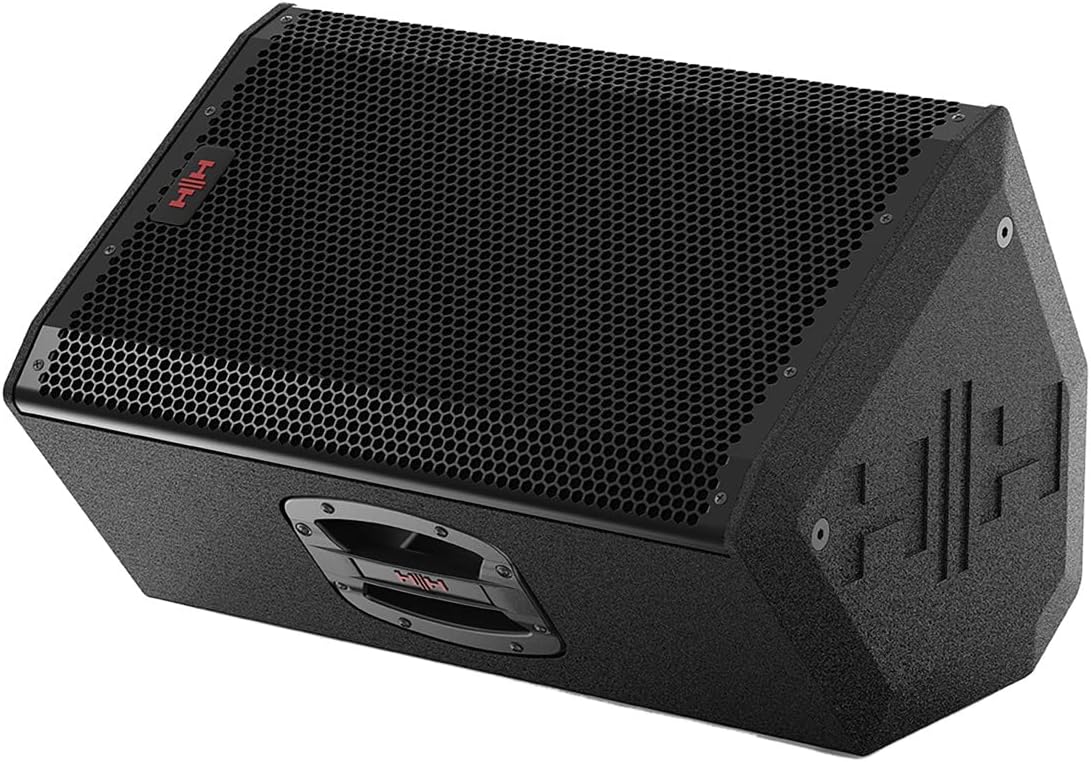
Imej 2: Bahagian hadapan bersudut view of the Tessen TNP-1201 speaker, highlighting its robust grille and cabinet design.
Persediaan dan Sambungan
Follow these steps to properly set up your Tessen TNP-1201 speaker cabinet:
- penempatan: Position the speaker on a stable, flat surface or mount it using a compatible 35mm pole mount. Ensure adequate ventilation around the unit. The asymmetric profile allows for a 35° monitor angle when placed on its side.
- Sambungan Kuasa: Connect the power cord to the AC inlet on the rear panel of the speaker and then to a suitable power outlet. Ensure the power switch is in the OFF position before connecting.
- Input Audio: Connect your audio source (e.g., mixer, instrument) to the input connectors on the rear panel. The TNP-1201 typically uses standard XLR or 1/4" TRS connectors for audio input.
- Output (if applicable): If linking multiple speakers, use the output connectors to send the audio signal to another speaker.
- Kuasa Awal Hidup: Once all connections are secure, switch the power ON. Start with volume levels at minimum and gradually increase to the desired level.

Imej 3: Belakang view of the Tessen TNP-1201, detailing the input/output panel, power connection, and integrated handles.
Arahan Operasi
The Tessen TNP-1201 is designed for straightforward operation. Familiarize yourself with the controls on the rear panel:
- Kawalan Tahap Input: Adjusts the overall input sensitivity of the speaker. Start low and increase gradually to avoid distortion.
- EQ Controls (if present): Some models may include basic EQ adjustments (e.g., Bass, Treble) to fine-tune the sound to your environment.
- bi-Amp Suis Pintas: This speaker features a high-quality passive crossover with a bi-amp bypass switch. Consult advanced audio guides if you intend to use bi-amplification. For standard operation, ensure it is set correctly for passive mode.
- Penunjuk Kuasa: An LED indicator typically illuminates when the unit is powered on.
- Clip/Limit Indicator: This LED illuminates when the input signal is too high, indicating potential distortion. Reduce the input level if this light frequently activates.
Always ensure that the input signal is clean and not overdriven from your source device to achieve optimal sound quality and prevent damage to the speaker.
Penyelenggaraan dan Penjagaan
Proper maintenance ensures the longevity and performance of your Tessen TNP-1201 speaker cabinet.
- Pembersihan: Clean the exterior of the cabinet with a soft, dry cloth. Do not use abrasive cleaners, solvents, or waxes. Avoid spraying liquids directly onto the speaker.
- Penjagaan gril: The steel grille with acoustic foam backing protects the drivers. Ensure it remains free of dust and debris. Do not attempt to remove the grille unless necessary for servicing by qualified personnel.
- Storan: When not in use for extended periods, store the speaker in a dry, temperature-controlled environment, away from direct sunlight and extreme temperatures.
- Pemeriksaan: Periodically inspect the power cord and all cables for any signs of damage. Replace damaged cables immediately.

Imej 4: Sisi view of the Tessen TNP-1201, illustrating its asymmetric cabinet profile designed to prevent standing wave distortion and allow for monitor use.
Menyelesaikan masalah
If you encounter issues with your Tessen TNP-1201, refer to the following common problems and solutions:
| Masalah | Kemungkinan Punca | Penyelesaian |
|---|---|---|
| Tiada Bunyi |
|
|
| Bunyi Herot |
|
|
| Hum atau Buzz |
|
|
If the problem persists after attempting these solutions, please contact HH Electronics customer support or a qualified service technician.
Spesifikasi
Detailed technical specifications for the HH Electronics Tessen TNP-1201 Speaker Cabinet:
| Ciri | Perincian |
|---|---|
| Jenama | Elektronik HH |
| Nama Model | TNP-1201 |
| Jenis Pembesar Suara | Woofer |
| Saiz Pembesar Suara | 12 Inci |
| Penceramah AmpJenis lifikasi | Passive (with bi-amp bypass switch) |
| Output Wattage | 800 Watts (Power Handling) |
| Sumber Kuasa | Elektrik Bertali |
| Jenis Pemasangan | Floor Standing, 35 mm Pole Mount |
| Berat Barang | 33 paun |
| Dimensi Pakej | 23 x 15 x 14 inci |
| Pengeluar | Elektronik HH |
| ASIN | B07RTSFYG4 |
| Tarikh Mula-mula Tersedia | 12 Mei 2019 |
| Adakah Kalis Air | PALSU |
Maklumat Waranti
HH Electronics products are manufactured to high standards and are warranted against manufacturing defects. Specific warranty terms and conditions may vary by region and retailer. Please retain your proof of purchase. For detailed warranty information, please refer to the official HH Electronics webtapak atau hubungi pengedar sah anda.
Sokongan Pelanggan
For technical assistance, service inquiries, or further information regarding your HH Electronics Tessen TNP-1201 Speaker Cabinet, please visit the official HH Electronics website or contact their customer support department. Contact details can typically be found on the manufacturer's webtapak atau dalam pembungkusan produk.


