Arahan Keselamatan Penting
Please read these instructions carefully before using your Coredy R650 Ultra Robot Vacuum and retain them for future reference. Failure to follow these instructions may result in electric shock, fire, or serious injury.
- Perkakas ini boleh digunakan oleh kanak-kanak berumur 8 tahun ke atas dan orang yang kurang keupayaan fizikal, deria atau mental atau kurang pengalaman dan pengetahuan jika mereka telah diberi penyeliaan atau arahan mengenai penggunaan perkakas dengan cara yang selamat dan memahami bahaya yang terlibat .
- Kanak-kanak harus diawasi untuk memastikan bahawa mereka tidak bermain dengan perkakas.
- Pembersihan dan penyelenggaraan pengguna tidak boleh dibuat oleh kanak-kanak tanpa pengawasan.
- Hanya gunakan penyesuai kuasa asal yang disediakan oleh pengilang.
- Jangan gunakan vakum robot dalam persekitaran basah atau berhampiran air.
- Remove all loose cables, small objects, and fragile items from the floor before operation to prevent entanglement or damage.
- Do not operate the robot vacuum in areas with open flames or flammable materials.
- Pastikan tapak pengecasan diletakkan pada permukaan yang rata pada dinding, dengan ruang kosong yang mencukupi di sekelilingnya.
- Do not carry the robot vacuum by its handle when it is powered on.
- Turn off the robot vacuum and unplug the charging base before performing any maintenance or cleaning.
Kandungan Pakej
Sahkan bahawa semua komponen ada dan dalam keadaan baik semasa membongkar.
- 1x Coredy R650 Ultra Robotic Vacuum Cleaner
- 1x Dok Pengecasan
- 1x 500ml Dust Bin (pre-installed)
- 2x Side Brushes (one pair)
- 1x Filter (pre-installed)
- 1x Alat Kawalan Jauh
- 1x Penyesuai Kuasa
- 1x Cleaning Tool
- 1x Manual Pengguna

Image: The Coredy R650 Ultra Robot Vacuum, its remote control, and a smartphone displaying the Coredy app interface.
Produk Selesaiview
Komponen Vakum Robot
- Penutup atas: Houses the power button and Wi-Fi indicator.
- Butang Kuasa: Initiates or pauses cleaning, powers on/off.
- Tong sampah: Collects debris, located at the rear of the robot.
- Berus Sisi: Two rotating brushes on the front sides for edge and corner cleaning.
- Berus Utama: V-shaped roller brush located underneath for deep cleaning.
- Roda Memandu: Two large wheels for movement across various surfaces.
- Roda Universal: Front wheel for navigation.
- Mengecas Kenalan: Two metal strips on the bottom for connecting to the charging base.
- Drop Sensors: Located on the bottom to prevent falls.
- Penderia Inframerah: Front-facing sensors for obstacle detection.
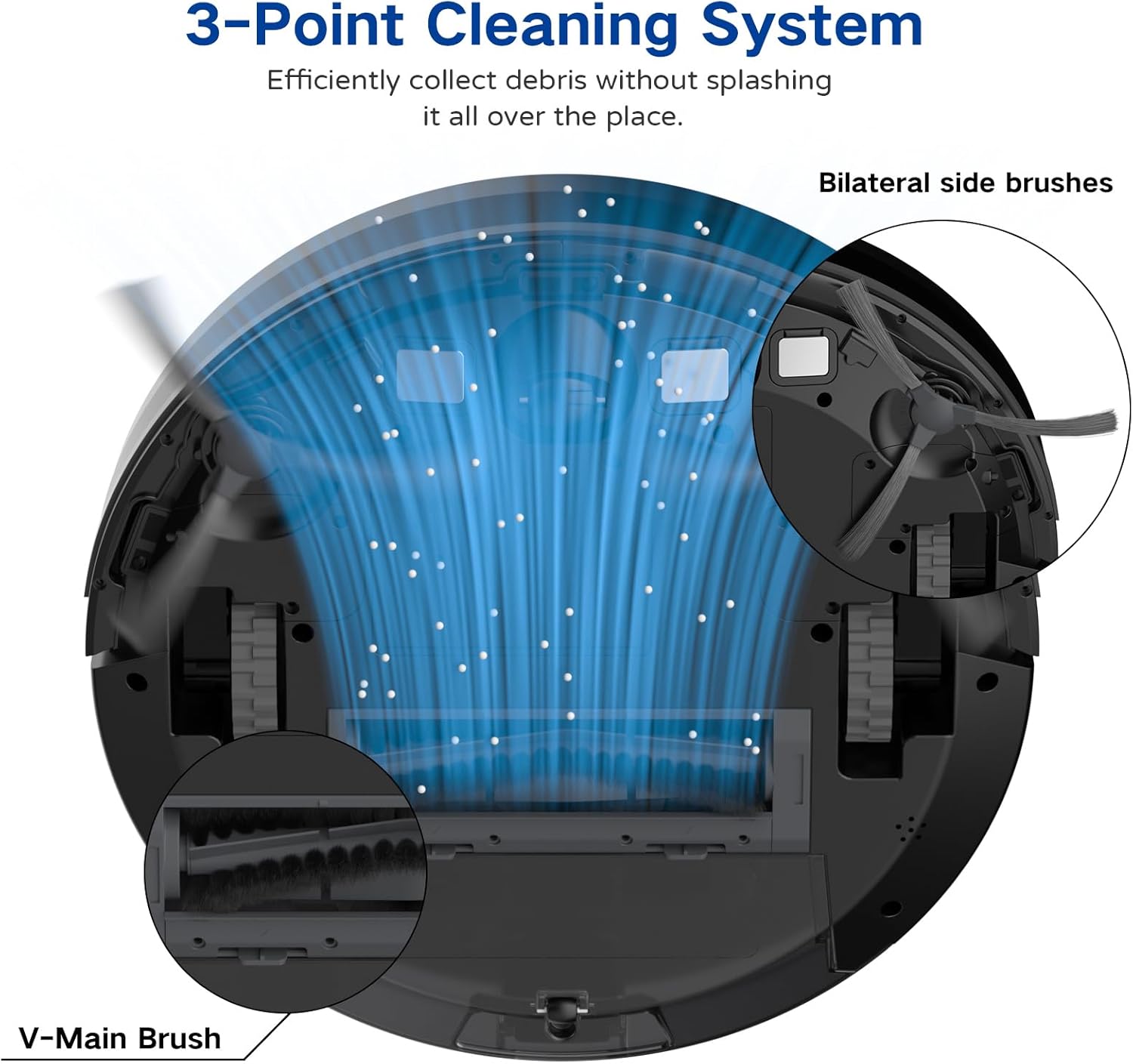
Image: A diagram illustrating the robot vacuum's 3-Point Cleaning System, showing bilateral side brushes and the V-main brush efficiently collecting debris.
Komponen Asas Pengecasan
- Pin Pengecasan: Connect with the robot's charging contacts.
- Penunjuk Kuasa: Menunjukkan status pengecasan.
- Pelabuhan Kuasa: Menyambung kepada penyesuai kuasa.
Persediaan
1. Positioning the Charging Base
Place the charging base on a hard, level surface against a wall. Ensure there is at least 3 feet (1 meter) of clear space to the front and 1.5 feet (0.5 meters) to each side of the charging base to allow the robot to dock properly. Plug the power adapter into the charging base and then into a wall outlet.
2. Pengecasan Awal
Place the robot vacuum onto the charging base, ensuring the charging contacts align. The robot will begin charging automatically. For first-time use, charge the robot for at least 5-6 hours until the indicator light turns solid green, indicating a full charge.
3. Memasang Berus Sisi
Attach the two side brushes to the posts on the bottom of the robot by pressing them down until they click into place. Ensure they are securely fastened.
4. Connecting to the Coredy App
- Download the 'Coredy' app from the App Store (iOS) or Google Play Store (Android).
- Daftar akaun dan log masuk.
- Follow the in-app instructions to add your R650 Ultra robot vacuum to your account. This typically involves connecting your phone to a 2.4GHz Wi-Fi network and then connecting the robot to the same network.

Image: A hand interacting with a smartphone showing the Coredy app, which displays a real-time map of the robot's cleaning path and offers control options.
5. Integrasi Pembantu Suara (Alexa/Google Assistant)
Once connected to the Coredy app, you can link your robot vacuum to Amazon Alexa or Google Assistant for voice control.
- Buka apl Alexa atau Google Home.
- Navigasi ke bahagian 'Kemahiran & Permainan' (Alexa) atau 'Bekerja dengan Google' (Google Home).
- Cari untuk the 'Coredy' skill/service and enable it.
- Log in with your Coredy app account credentials when prompted.
- Discover devices. You can now use voice commands like "Alexa, turn on Coredy R650 Ultra" or "Hey Google, start cleaning with Coredy R650 Ultra."

Image: The Coredy R650 Ultra Robot Vacuum positioned near its charging dock, with an Amazon Echo Dot in the background, illustrating voice control capabilities.
Mengendalikan Robot Vakum
Starting/Stopping Cleaning
- Permulaan Manual: Press the power button on the robot or the 'Clean' button on the remote control.
- Kawalan Apl: Use the Coredy app to start or stop cleaning.
- Kawalan Suara: Use compatible voice assistants (e.g., "Alexa, start Coredy R650 Ultra").
- Jeda: Press the power button on the robot or the 'Clean' button on the remote during operation to pause. Press again to resume.
Mod Pembersihan
The R650 Ultra offers various cleaning modes to suit different needs:
- Pembersihan Auto: The robot automatically cleans in a Z-shaped path, adjusting to different floor types.
- Pembersihan Tempat: The robot intensely cleans a specific small area in a spiral pattern.
- Pembersihan Tepi: Robot membersihkan sepanjang dinding dan tepi perabot.
- Kawalan manual: Gunakan alat kawalan jauh atau aplikasi untuk mengarahkan robot secara manual.

Image: The Coredy R650 Ultra Robot Vacuum cleaning a hard floor, illustrating its Gyroscopic Dynamic Navigation and Z-shaped cleaning path for thorough coverage.
Penjadualan Pembersihan
You can schedule cleaning times using the Coredy app or the remote control. Refer to the app's interface or the remote control section of this manual for detailed instructions on setting schedules.
Penyesuaian Kuasa Sedutan
The R650 Ultra features adjustable suction power, with a maximum of 2200 Pa. It also includes an Auto Carpet Boost feature that automatically increases suction when carpet is detected.
Pengisian Semula Automatik
When the battery level is low or a cleaning cycle is complete, the robot will automatically return to its charging base to recharge.
Penyelenggaraan
Penyelenggaraan tetap memastikan prestasi optimum dan memanjangkan jangka hayat vakum robot anda.
1. Mengosongkan Tong Sampah
It is recommended to empty the dustbin after each use.
- Tekan butang pelepas tong sampah dan tarik keluar tong sampah.
- Open the dustbin cover and empty the contents into a trash bin.

Image: The Coredy R650 Ultra Robot Vacuum on a wooden floor, with its 500ml dustbin detached and placed beside it, highlighting its capacity.
2. Membersihkan Penapis
Clean the filter weekly, or more frequently if you have pets or high usage.
- Keluarkan penapis dari tong sampah.
- Tap the filter gently to remove loose dirt.
- Rinse the filter under running water. Ensure it is completely dry before reinstalling.
3. Membersihkan Berus Utama
Clean the main brush weekly.
- Balikkan robot dan keluarkan penutup berus utama.
- Angkat berus utama.
- Use the provided cleaning tool to remove hair and debris wrapped around the brush.
- Pasang semula berus utama dan penutup.
4. Membersihkan Berus Sisi
Check side brushes regularly for tangled hair or debris.
- Tarik perlahan-lahan berus sisi ke atas untuk mengeluarkannya.
- Keluarkan sebarang rambut atau serpihan.
- Reattach the side brushes, ensuring they click into place.
5. Membersihkan Penderia dan Mengecas Kenalan
Wipe the drop sensors, infrared sensors, and charging contacts on both the robot and the charging base with a clean, dry cloth monthly.
Menyelesaikan masalah
If you encounter issues with your Coredy R650 Ultra, refer to the table below for common problems and solutions.
| Masalah | Kemungkinan Punca | Penyelesaian |
|---|---|---|
| Robot tidak dihidupkan | Bateri lemah; Matikan kuasa | Charge the robot; Ensure power switch is on. |
| Robot tidak mengecas | Mengecas kenalan kotor; Tapak pengecasan dicabut | Clean charging contacts; Ensure charging base is plugged in. |
| Robot kerap tersangkut | Obstacles on floor; Robot stuck under furniture | Clear floor of cables/small items; Use boundary strips or block off low-clearance areas. |
| Prestasi pembersihan yang lemah | Tong sampah penuh; Berus kusut; Penapis tersumbat | Tong sampah kosong; Bersihkan berus utama dan sisi; Bersihkan atau ganti penapis. |
| Tidak dapat menyambung ke Wi-Fi/Apl | Incorrect Wi-Fi password; 5GHz Wi-Fi network; Robot too far from router | Verify password; Ensure 2.4GHz Wi-Fi; Move robot closer to router. |
Spesifikasi
Technical specifications for the Coredy R650 Ultra Robot Vacuum.
| Ciri | Perincian |
|---|---|
| Jenama | Coredy |
| Nama Model | Coredy R650 Ultra Robotic Vacuum Cleaner |
| Kuasa Sedutan | Sehingga 2200 Pa |
| Hayat Bateri | Sehingga 120 minit |
| Kapasiti tong sampah | 500 mililiter |
| Dimensi Produk | 12.7"L x 12.7"W x 2.76"H |
| Kaedah Kawalan | Apl, Kawalan Jauh, Kawalan Suara |
| Peranti Serasi | Amazon Echo, Google Home, Telefon Pintar |
| Jenis Penapis | Cartridge (HEPA) |
| Jenis Navigasi | Gyroscopic Dynamic Navigation |

Image: A technical drawing illustrating the top and side dimensions of the Coredy R650 Ultra Robot Vacuum, showing its 12.7-inch diameter and 2.72-inch height.
Waranti dan Sokongan
For warranty information, please refer to the warranty card included in your product packaging or visit the official Coredy website. If you require technical support or have questions not covered in this manual, please contact Coredy customer service through the contact information provided on their webtapak atau dalam dokumentasi pembelian anda.