Produk Selesaiview
The Feit Electric Smart Wi-Fi LED Color Changing Dimmable 60W Light Bulbs offer advanced lighting control for your home. These A19 shape bulbs provide 800 lumens of brightness and are designed for indoor use. They feature color-changing capabilities, tunable white light, and dimming functionality, all controllable via a smartphone app or voice commands through compatible smart assistants.

Image: Front packaging of the Feit Electric Smart Wi-Fi LED Light Bulbs, showing two bulbs and features like Wi-Fi connectivity, Energy Star rating, 800 lumens brightness, and compatibility with Alexa, Siri, and Google Assistant.
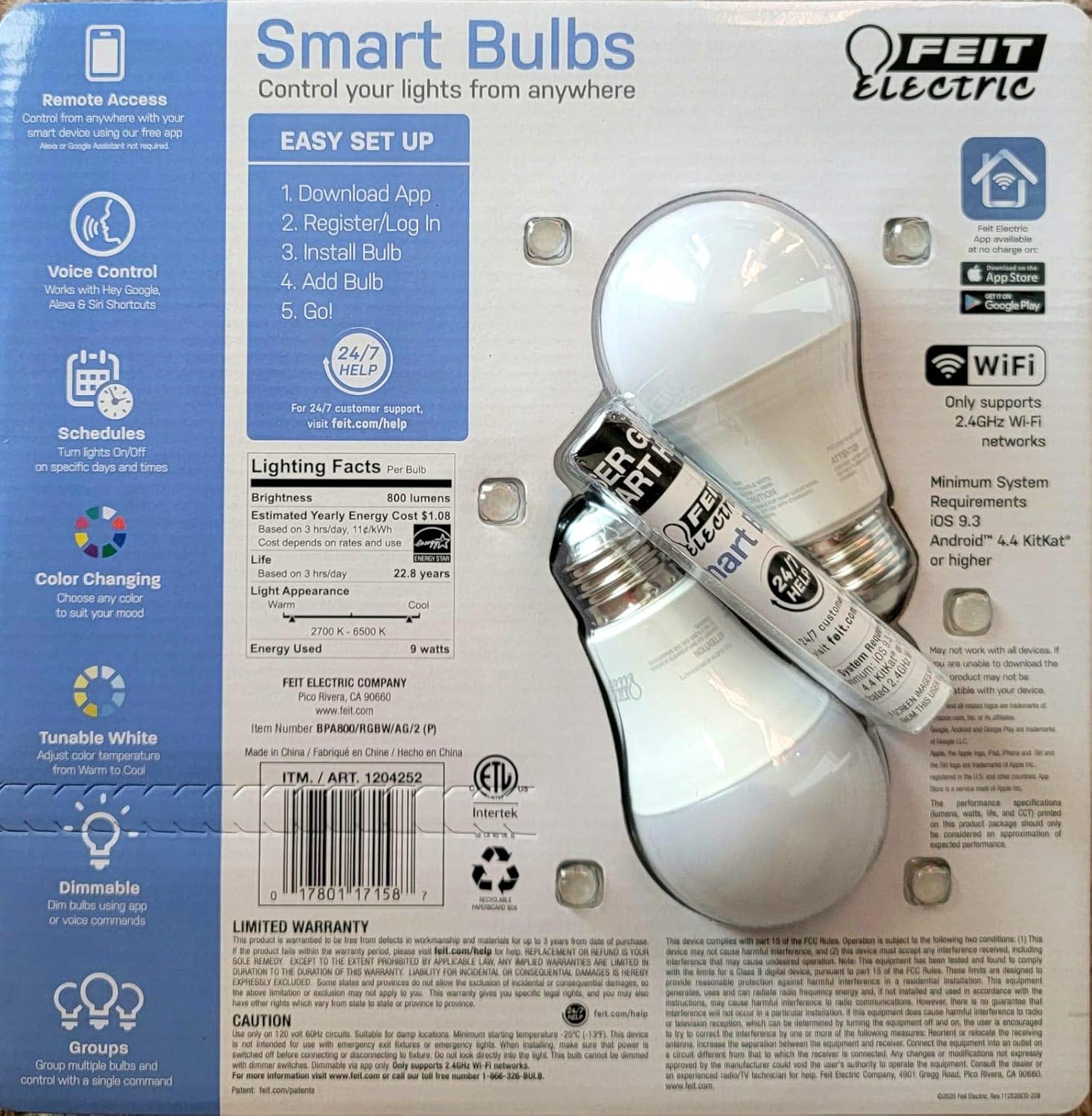
Image: Back packaging of the Feit Electric Smart Wi-Fi LED Light Bulbs, detailing easy setup steps, lighting facts (800 lumens, $1.08 estimated yearly cost, 22.8 years life), and system requirements.
Ciri-ciri Utama
- Color Changing and Tunable White: Adjust light color from millions of options or choose from various shades of white (2700K-6500K).
- Boleh dimalapkan: Smooth dimming from 100% down to 1% via the app or voice commands.
- Kawalan Suara: Works seamlessly with Amazon Alexa, Google Assistant, and Siri Shortcuts.
- Akses Jauh: Kawal lampu anda dari mana-mana sahaja menggunakan aplikasi mudah alih Feit Electric.
- Jadual: Set custom schedules to turn lights on/off at specific times.
- Cekap Tenaga: 9W power consumption, equivalent to a 60W incandescent bulb, with an estimated yearly energy cost of $1.08.
- Jangka hayat yang panjang: Designed to last up to 22.8 years based on 3 hours of daily use.
Panduan Persediaan
Follow these steps to set up your Feit Electric Smart Wi-Fi LED Bulbs:
- Muat turun Aplikasi Feit Electric: Cari untuk "Feit Electric" in the Apple App Store or Google Play Store and download the official app.
- Daftar/Log Masuk: Buka apl dan buat akaun baharu atau log masuk jika anda sudah memilikinya.
- Pasang Mentol: Screw the Feit Electric Smart Wi-Fi LED bulb into any standard E26 medium base light fixture. Ensure the fixture is powered on.
- Add the Bulb in App:
- Open the Feit Electric app.
- Ketik ikon "+" untuk menambah peranti baharu.
- Select "Lighting" and then "Light Source (Wi-Fi)".
- Follow the in-app instructions to connect the bulb to your 2.4GHz Wi-Fi network. (Note: These bulbs only support 2.4GHz Wi-Fi networks).
- The bulb will blink to indicate pairing mode. If it doesn't, turn the light switch off and on 5 times to reset it.
- Go!: Once connected, you can rename your bulb and start controlling it from the app.
For a visual guide, you can scan the QR code on the product packaging for a "HOW TO" video (if available).
Arahan Operasi
Kawalan Apl
The Feit Electric app provides full control over your smart bulbs:
- Hidup/Mati: Tap the power icon next to the bulb's name to turn it on or off.
- Kecerahan: Gunakan gelangsar untuk melaraskan tahap kecerahan dari 1% hingga 100%.
- Pilihan Warna: Access the color wheel to choose from millions of colors.
- Pelarasan Cahaya Putih: Select different shades of white, from warm (2700K) to cool (6500K).
- Adegan: Apply pre-set scenes or create custom scenes for different moods or activities.
- Jadual: Set daily or weekly schedules for your lights to turn on/off automatically.
- Pengelompokan: Group multiple bulbs together to control them simultaneously.
Kawalan Suara
Integrate your Feit Electric Smart Bulbs with your preferred voice assistant:
- Amazon Alexa:
- Enable the "Feit Electric" skill in the Alexa app.
- Temui peranti.
- Example commands: "Alexa, turn on [Light Name]", "Alexa, dim [Light Name] to 50%", "Alexa, set [Light Name] to blue".
- Pembantu Google:
- Link your Feit Electric account in the Google Home app.
- Example commands: "Hey Google, turn off [Light Name]", "Hey Google, change [Light Name] to warm white".
- Pintasan Siri:
- Create custom Siri Shortcuts within the Feit Electric app or Apple's Shortcuts app to control your lights with voice commands.
- Example: "Hey Siri, good morning lights" (if you've set up a shortcut for this).
Penyelenggaraan
Feit Electric Smart Wi-Fi LED bulbs are designed for long-lasting performance with minimal maintenance. Follow these general guidelines:
- Pembersihan: Pastikan mentol padam dan sejuk sebelum dibersihkan. Lap dengan kain lembut dan kering. Jangan gunakan cecair atau pembersih yang melelas.
- Pemasangan: Always ensure the bulb is securely screwed into the fixture. Do not overtighten.
- Persekitaran: These bulbs are designed for indoor use in dry locations. Avoid exposure to water or high humidity.
- Lonjakan Kuasa: While LED bulbs are generally robust, consider using surge protectors for your lighting circuits in areas prone to power fluctuations.
Menyelesaikan masalah
If you encounter issues with your Feit Electric Smart Wi-Fi LED Bulbs, try the following solutions:
| Masalah | Kemungkinan Punca / Penyelesaian |
|---|---|
| Bulb not connecting to Wi-Fi / App |
|
| Mentol tidak bertindak balas kepada arahan suara |
|
| Bulb is flickering or dimming unexpectedly |
|
Spesifikasi
| Ciri | Perincian |
|---|---|
| Jenama | Elektrik Feit |
| Jenis Cahaya | LED |
| Ciri Khas | Color Changing, Tunable White |
| Wattage | 9 Watt (Setara Pijar 60 Watt) |
| Saiz Bentuk Mentol | A19 |
| Warna Cerah | Pelbagai Warna |
| Voltage | 110 Volt |
| Kiraan Unit | 2 Kiraan |
| Suhu Warna | 2700-6500 Kelvin |
| Kecerahan | 800 Lumen |
| bentuk | Bulat |
| bahan | Tembaga |
| Teknologi Ketersambungan | Wi-Fi (2.4GHz sahaja) |
| Penggunaan Dalaman/Luar | Dalaman |
| Jenis Pengawal | Amazon Alexa, Google Assistant, Siri Shortcuts |
| Indeks Paparan Warna (CRI) | 80 |
| Anggaran Kos Tenaga Tahunan | $1.08 (based on 3 hrs/day) |
| Jangka hayat | 22.8 years (based on 3 hrs/day) |
| UPC | 810744036599 |
| ASIN | B07RL48PFF |
Waranti dan Sokongan
For customer support, warranty information, and additional resources, please visit the official Feit Electric webtapak:
Feit Electric offers 24/7 customer support to assist with any questions or issues you may have regarding your smart bulbs.


