1. Pengenalan dan Lebihview
The Luminous Shakti Charge+ 1150 900Va Square Wave Inverter is designed to provide reliable power backup for your home or office. This inverter features advanced technology to ensure efficient performance and protection for your appliances. It is built with quality materials and advanced techniques to meet high standards.
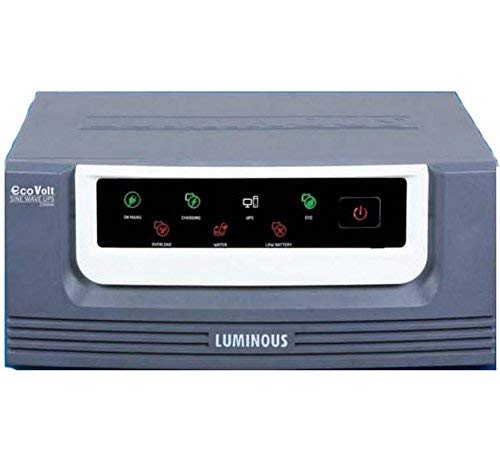
Rajah 1: Depan view of the Luminous Shakti Charge+ 1150 900Va Square Wave Inverter, showcasing its compact design and user interface.
Ciri-ciri Utama:
- Fast charging and efficient low voltage charging capability.
- Inbuilt battery gravity builder for enhanced battery life.
- Powerful charging mechanism for quick replenishment.
- Dual operating modes: Eco Mode for energy saving and UPS Mode for sensitive appliances.
- Ability to charge the battery with full current even at 95V input.
2. Arahan Keselamatan
Please read all safety instructions carefully before installing or operating the inverter. Failure to follow these instructions may result in electric shock, fire, or serious injury.
- Pemasangan: Ensure the inverter is installed by a qualified technician.
- Pengudaraan: Place the inverter in a well-ventilated area, away from direct sunlight, heat sources, and flammable materials. Maintain adequate clearance around the unit for airflow.
- Air dan Kelembapan: Do not expose the inverter to water, rain, or excessive humidity. Avoid operating it with wet hands.
- Pembumian: Always ensure the inverter is properly grounded to prevent electric shock.
- Keselamatan Bateri: Batteries contain corrosive acid. Wear protective gear (gloves, eye protection) when handling batteries. Do not short-circuit battery terminals.
- Kanak-kanak dan Haiwan Kesayangan: Keep the inverter and batteries out of reach of children and pets.
- Lebihan beban: Do not overload the inverter beyond its specified capacity. This can damage the unit and connected appliances.
- Penyelenggaraan: Disconnect all power before performing any maintenance or cleaning.
- Pembaikan: Jangan cuba membuka atau membaiki inverter sendiri. Rujuk semua servis kepada kakitangan servis yang berkelayakan.
3. Panduan Persediaan
Follow these steps for the initial setup of your Luminous Shakti Charge+ 1150 inverter. It is recommended to have a qualified electrician assist with the installation.
- Membongkar: Carefully unpack the inverter and inspect it for any damage. Report any damage to your dealer immediately.
- penempatan: Choose a cool, dry, and well-ventilated location. Ensure the inverter is placed on a stable, non-flammable surface.
- Sambungan Bateri:
- Connect the positive (+) terminal of the battery to the positive (+) terminal of the inverter.
- Connect the negative (-) terminal of the battery to the negative (-) terminal of the inverter.
- Ensure connections are tight and secure. Incorrect polarity can cause severe damage.
- Sambungan Input AC: Connect the inverter's AC input cord to a properly grounded wall outlet. Ensure the mains supply voltage berada dalam julat operasi penyongsang.
- Muatkan Sambungan: Connect your appliances (lights, fans, etc.) to the output sockets of the inverter. Do not exceed the inverter's rated capacity.
- Kuasa Awal Hidup: After all connections are secure, switch on the inverter's main power switch. Observe the indicator lights for normal operation.
4. Arahan Operasi
Understanding the basic operation of your inverter will ensure optimal performance and longevity.
- Hidupkan/Mati Kuasa: Use the main power switch on the front panel to turn the inverter ON or OFF.
- Mod Sesalur: When the mains supply is present and within acceptable limits, the inverter will charge the battery and pass the mains power to the connected loads.
- Mod Penyongsang: Sekiranya berlaku kuasa outage atau sesalur voltage fluctuation, the inverter will automatically switch to battery power, providing backup to your connected appliances.
- Mod Eko: This mode is suitable for general appliances like lights and fans. It optimizes battery usage by allowing a wider input voltage range, reducing frequent switching to battery mode.
- Mod UPS: This mode is ideal for sensitive electronic devices such as computers, ensuring a stable and uninterrupted power supply with a narrower input voltage window.
- mengecas: The inverter features fast charging and an inbuilt battery gravity builder to maintain battery health. It can charge the battery effectively even at low input voltages (down to 95V).
- Petunjuk: Pay attention to the LED indicators on the front panel, which typically show Mains ON, Battery Charging, Inverter ON, Overload, and Battery Low status. Refer to the specific indicator guide in your product's physical manual for detailed explanations.
5. Penyelenggaraan
Regular maintenance ensures the long life and efficient operation of your inverter and battery.
- Pembersihan: Keep the inverter clean and free from dust. Use a dry, soft cloth to wipe the exterior. Do not use liquid cleaners.
- Pengudaraan: Ensure that the ventilation openings are not blocked. Clear any dust or debris that might obstruct airflow.
- Battery Water Level (for lead-acid batteries): If using a lead-acid battery, regularly check the electrolyte level and top up with distilled water as needed. Do not overfill.
- Sambungan Terminal: Periodically check battery and inverter terminal connections for tightness. Loose connections can cause overheating and power loss.
- Keadaan Persekitaran: Ensure the inverter is operating within its specified temperature and humidity ranges.
- Professional Check-up: Consider having a qualified technician inspect your inverter and battery system annually.
6. Penyelesaian masalah
Bahagian ini menyediakan penyelesaian kepada isu biasa yang mungkin anda hadapi. Untuk masalah yang tidak disenaraikan di sini, hubungi khidmat pelanggan.
| Masalah | Kemungkinan Punca | Penyelesaian |
|---|---|---|
| Inverter not turning ON | Main switch OFF, loose battery connections, discharged battery. | Ensure main switch is ON. Check and tighten battery terminals. Allow battery to charge if mains is present. |
| No output power in Inverter Mode | Battery low, overload, inverter fault. | Reduce load. Check battery charge level. If problem persists, contact service. |
| Penggera berlebihan | Too many appliances connected. | Disconnect some appliances to reduce the load below the inverter's capacity. |
| Bateri tidak dicas | Mains supply absent, loose AC input connection, charger fault. | Check mains supply. Ensure AC input cord is securely plugged in. Contact service if charger fault is suspected. |
| Unusual noise from inverter | Loose components, fan obstruction, internal fault. | Ensure inverter is on a stable surface. Check for fan obstruction. If noise persists, contact service. |
7. Spesifikasi
Detailed technical specifications for the Luminous Shakti Charge+ 1150 900Va Square Wave Inverter.
| Ciri | Perincian |
|---|---|
| Jenama | Bercahaya |
| Nombor Model | Shakti Charge+ 1150 |
| taip | Square Wave Inverter |
| Penarafan VA | 900 VA |
| Voltage | 95 Volts (minimum charging) |
| Berat Barang | 11 kg 700 g |
| Pengeluar | Bercahaya |
| Nama Generik | Home Inverter & UPS |
Nota: Spesifikasi boleh berubah tanpa notis terlebih dahulu untuk penambahbaikan produk.
8. Waranti dan Sokongan
Luminous products are known for their quality and reliability.
- Waranti: Please refer to the warranty card provided with your product for detailed terms and conditions regarding the warranty period and coverage. Keep your purchase receipt for warranty claims.
- Waranti Lanjutan: Extended warranty plans may be available from authorized providers to further protect your investment. For example, 1-Year and 2-Year Extended Warranty Plans by Onsitego are often available.
- Sokongan Pelanggan: For technical assistance, service requests, or any queries, please contact Luminous customer support. You can find contact details on the official Luminous webtapak atau dokumentasi produk anda.
- Sumber Dalam Talian: Lawati pegawai Luminous Store on Amazon untuk maklumat lanjut produk dan kemas kini.