pengenalan
The GoXtreme GX1 Dual Gimbal is a versatile 3-axis stabilizer designed to capture smooth, professional-quality video footage using either a smartphone or an action camera. This manual provides essential information for setting up, operating, and maintaining your GX1 Dual Gimbal to ensure optimal performance and longevity.
Produk Selesaiview
Ciri-ciri Utama
- Penstabilan 3-Paksi: Provides smooth, shake-free video recording.
- Keserasian Dwi: Supports both smartphones and action cameras with an included adapter.
- Reka bentuk ergonomik: Cengkaman yang selesa untuk kegunaan berpanjangan.
- Kawalan Bersepadu: Easy access to gimbal modes and zoom functions.
Komponen
Familiarize yourself with the main components of your GoXtreme GX1 Dual Gimbal:
- Gimbal Handle with Control Panel
- Telefon Pintar Clamp
- Action Camera Adapter Plate
- Bateri Litium-ion Boleh Dicas semula
- Kabel Pengecasan USB (tidak disenaraikan secara eksplisit tetapi tersirat)

Rajah 1: The GoXtreme GX1 Dual Gimbal with a smartphone securely mounted, ready for use. The image shows the overall design and the smartphone clamp.

Rajah 2: A terperinci view of the gimbal's control panel, showing the joystick, mode buttons (M, L, H), and zoom controls (W-T). A smartphone is mounted in the clamp.
Persediaan
1. Mengecas Bateri
- Ensure the gimbal is powered off.
- Connect the USB charging cable to the gimbal's charging port.
- Sambungkan hujung kabel yang satu lagi ke sumber kuasa USB (cth, penyesuai dinding, port USB komputer).
- The charging indicator light will illuminate. Once fully charged, the light will change or turn off (refer to specific indicator behavior in the quick start guide if available).
Nota: For first-time use, fully charge the battery before operation.
2. Mounting a Smartphone
- Gently extend the smartphone clamp.
- Letakkan telefon pintar anda dengan berhati-hati ke dalamamp, ensuring it is centered and securely held.
- Laraskan clamp to balance the smartphone as evenly as possible. Proper balancing is crucial for optimal gimbal performance and battery life.

Rajah 3: The GoXtreme GX1 Dual Gimbal's universal mounting clamp, designed to securely hold smartphones. The image shows the clamp dalam kedudukan terbuka.
3. Mounting an Action Camera
- Attach your action camera to the provided action camera adapter plate. Ensure it is securely fastened.
- Insert the action camera adapter plate (with the camera attached) into the gimbal's smartphone clamp.
- Adjust the position of the adapter plate within the clamp to achieve optimal balance for your action camera.

Rajah 4: The dedicated adapter plate for mounting an action camera onto the gimbal's smartphone clamp.

Rajah 5: An action camera securely attached to the adapter plate, demonstrating how it prepares for gimbal mounting.
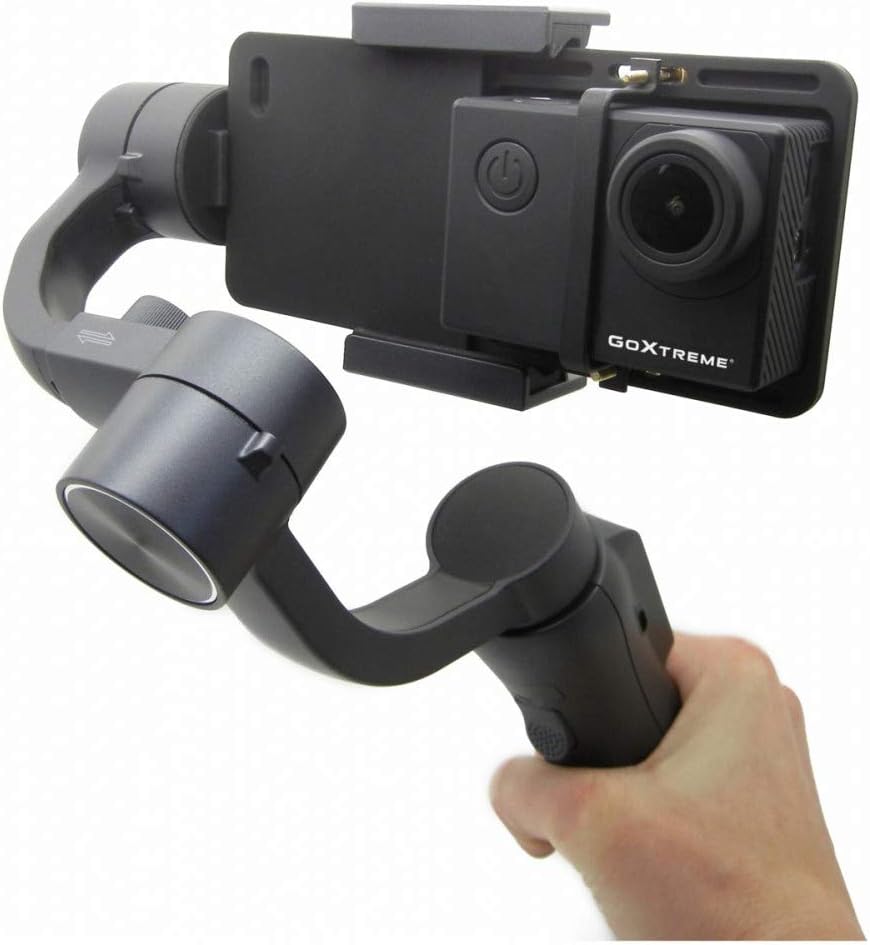
Rajah 6: The GoXtreme GX1 Dual Gimbal in use with an action camera, held by a hand, illustrating its compact and portable nature.
Arahan Operasi
1. Hidupkan/Mati Kuasa
- Hidupkan kuasa: Press and hold the power button (usually located on the handle) for a few seconds until the indicator lights illuminate and the gimbal initializes.
- Matikan: Tekan dan tahan butang kuasa sekali lagi sehingga lampu penunjuk padam.
2. Mod Gimbal
The GX1 Dual Gimbal typically offers various stabilization modes, accessible via the mode buttons (M, L, H) on the control panel:
- Pan Follow Mode (M): The camera pans left and right following your hand movements, while the tilt and roll axes remain locked.
- Mod Kunci (L): All three axes (pan, tilt, roll) are locked, keeping the camera pointed in a fixed direction regardless of your hand movements.
- Full Follow Mode (H): The camera follows both your pan and tilt movements, while the roll axis remains locked.
Nota: Specific mode names and functionalities may vary slightly. Refer to the quick start guide for precise details.
3. Fungsi Panel Kawalan
- joystick: Used to manually control the pan and tilt direction of the camera.
- Mode Buttons (M, L, H): Cycle through different gimbal stabilization modes.
- Zoom Slider (W-T): Controls the digital zoom function of your connected smartphone or action camera (if supported).
- Butang Rekod: Initiates and stops video recording on the connected device (requires Bluetooth pairing for smartphones).
Penyelenggaraan
- Pembersihan: Use a soft, dry cloth to clean the gimbal. Avoid using harsh chemicals or abrasive materials.
- Storan: Store the gimbal in a cool, dry place, away from direct sunlight and extreme temperatures.
- Penjagaan Bateri: For long-term storage, charge the battery to approximately 50-60% every three months to maintain battery health.
- Elakkan Kesan: Protect the gimbal from drops or impacts, as this can damage the motors and internal components.
Menyelesaikan masalah
Isu dan Penyelesaian Biasa
- Gimbal tidak dihidupkan: Pastikan bateri terisi penuh.
- Gimbal vibrating or unstable: Check if the smartphone or action camera is properly balanced in the clamp. Recalibrate the gimbal if necessary (refer to the quick start guide for calibration steps).
- Kawalan tidak bertindak balas: Ensure the gimbal is powered on and properly connected (if using Bluetooth for smartphone control).
- Poor stabilization: Verify that the device is securely mounted and balanced. Avoid overloading the gimbal with excessively heavy devices.
Jika masalah berterusan, hubungi sokongan pelanggan untuk bantuan lanjut.
Spesifikasi
| Ciri | Spesifikasi |
|---|---|
| Jenama | easypix |
| Model | 55238 (GX1) |
| warna | Hitam |
| Peranti Serasi | Mobile Phone, Action Camera |
| Dimensi Produk (L x W x H) | 10.8 x 7 x 29 cm |
| Berat Barang | 1.1 kg |
| Jenis Bateri | 1 Litium-ion (termasuk) |
| Tahun Model | 2019 |
Waranti dan Sokongan
For warranty information, technical support, or service inquiries, please refer to the documentation included with your purchase or visit the official Easypix webtapak. Simpan bukti pembelian anda untuk tuntutan waranti.


