1. Pengenalan
Welcome to the artfone CS182 Mobile Phone User Manual. This guide provides comprehensive instructions to help you set up, operate, and maintain your new mobile phone. Please read this manual carefully to ensure proper use and to maximize the device's features.
The artfone CS182 is designed for ease of use, featuring large buttons, a clear display, and essential functions for reliable communication.
2. Maklumat Keselamatan
Sentiasa ikuti langkah berjaga-jaga keselamatan asas apabila menggunakan produk ini untuk mengurangkan risiko kecederaan, kebakaran atau kejutan elektrik.
- Do not expose the phone to extreme temperatures, direct sunlight, or moisture.
- Gunakan hanya bateri, pengecas dan aksesori yang diluluskan.
- Elakkan daripada menjatuhkan atau menyebabkan telefon terkena hentaman yang teruk.
- Jauhkan telefon daripada peranti perubatan, kerana ia boleh mengganggu operasinya.
- Jangan cuba membuka atau mengubah suai telefon.
3. Kandungan Pakej
Sahkan bahawa semua item terdapat dalam pakej produk anda:
- 1x artfone CS182 Mobile Phone
- Bateri 1x 1400mAh
- 1x Kabel Pengecasan USB
- 1x Pangkalan Pengecasan
- 1x User Manual (in French, refer to this English version for clarity)
Note: A wall charger plug is not included. You can connect the USB cable to any compatible USB power adapter for charging.

Rajah 3.1: Kandungan Pakej - This image displays the artfone CS182 mobile phone, its charging base, USB cable, battery, and the user manual, all neatly arranged as they would appear in the product box.
4. Peranti Lebihview
Familiarize yourself with the physical components of your artfone CS182 mobile phone.

Rajah 4.1: Depan View in Charging Dock - The phone is shown upright in its charging dock, displaying its screen and large keypad. The screen shows an image of two elderly people.

Rajah 4.2: Depan dan Belakang View dengan Ciri - This image presents both the front of the phone in its charging dock and the back of the phone, highlighting key features such as the 1.77-inch screen, large font (A), SOS button, FM radio, camera, music player, and calculator icons.

Figure 4.3: Large Keys Detail - A close-up view of the phone held in a hand, emphasizing the large, clearly labeled buttons designed for easy dialing and navigation.

Figure 4.4: Rear Design Detail - This image shows the textured back cover of the phone, indicating a design intended for better grip and durability.
5. Persediaan
5.1 Memasukkan Kad SIM dan Bateri
The artfone CS182 supports dual SIM cards. Ensure the phone is powered off before inserting or removing SIM cards or the battery.
- Remove the back cover by gently prying it open from the notch.
- Insert your 2G GSM SIM card(s) into the designated SIM slots (SIM1 and SIM2). Ensure the gold contacts face downwards and the card is correctly oriented.
- Insert the 1400mAh battery into its compartment, aligning the contacts.
- Gantikan penutup belakang, tekan dengan kuat sehingga ia berbunyi pada tempatnya.
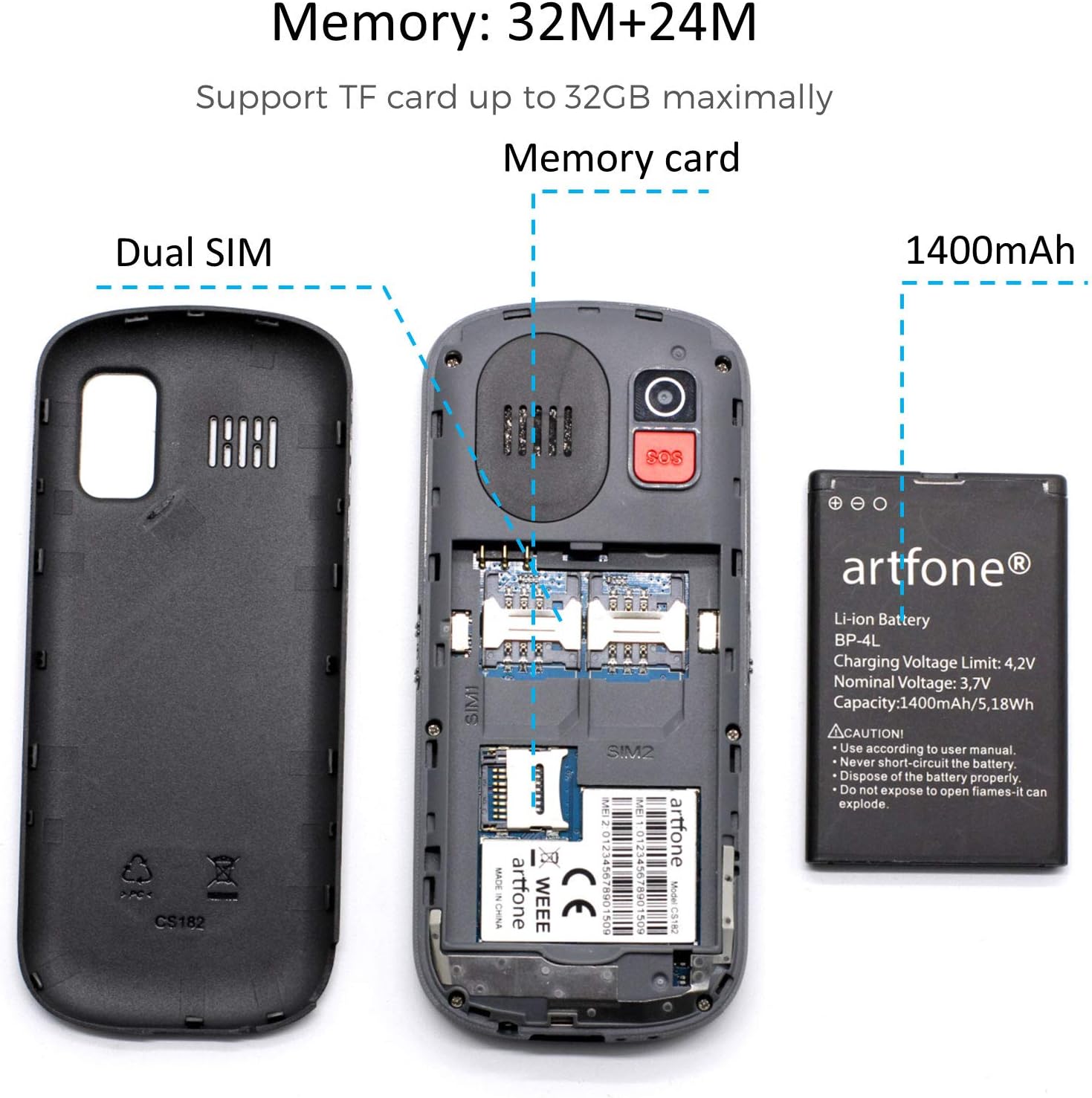
Figure 5.1: SIM and Battery Installation - An exploded view showing the phone's internal compartments for dual SIM cards and the 1400mAh battery, with the back cover removed.
5.2 Mengecas Telefon
Before first use, fully charge the phone battery.
- Menggunakan Pangkalan Pengecasan: Place the phone into the charging base, ensuring it sits securely and the charging indicator lights up.
- Menggunakan Kabel USB: Connect the USB charging cable to the phone's charging port and then to a compatible USB power adapter (not included) or a computer's USB port.
The charging indicator will show the charging status. Once fully charged, disconnect the phone from the charger.
6. Operasi Asas
6.1 Hidupkan/Mati Kuasa
- Untuk Menghidupkan: Tekan dan tahan butang Kunci Panggilan Hijau sehingga skrin menyala.
- Untuk Mematikan: Tekan dan tahan butang Kekunci Panggilan Tamat Merah until the power off options appear, then confirm.
6.2 Membuat dan Menerima Panggilan
- Untuk Membuat Panggilan: Masukkan nombor telefon menggunakan pad kekunci dan tekan butang Kunci Panggilan Hijau.
- Untuk Menerima Panggilan: Apabila telefon berdering, tekan butang Kunci Panggilan Hijau untuk menjawab.
- Untuk Menamatkan Panggilan: Tekan ke Kekunci Panggilan Tamat Merah.
The phone features a voice broadcast function that announces the dialed numbers. This can be enabled or disabled in the settings menu.
6.3 Sending and Receiving Messages
Navigate to the "Messages" menu to compose and read SMS messages. The large font and clear interface facilitate easy text entry and reading.

Figure 6.1: User Interface Menu - This image displays various menu options on the phone's screen, including FM Radio, Call logs, Multimedia, SOS setting, Messages, Organizer, Settings, and Phonebook, demonstrating the user-friendly interface.
6.4 Melaraskan Kelantangan
Use the dedicated volume keys on the side of the phone to adjust the call volume, ringtone volume, and media volume.
6.5 Lampu suluh
The phone includes a built-in flashlight. Activate it using the dedicated side button for convenience in dark environments.
Kamera 6.6
Access the camera function from the main menu to take basic photos. The camera resolution is VGA.
6.7 Radio FM
Tune into your favorite FM radio stations using the FM Radio application found in the menu.
6.8 Fungsi Lain
The phone also includes a calculator, alarm clock, and calendar, accessible through the main menu for daily utility. It can store up to 200 contacts in the phonebook.
7. Fungsi Kecemasan SOS
The artfone CS182 features an SOS button for emergency situations. When activated, the phone will call and send SMS messages to pre-set emergency contacts.
7.1 Setting Up SOS Contacts
- Navigate to the "SOS Setting" menu.
- Add up to 5 emergency contact numbers. These numbers will be called sequentially until one answers.
- You can also customize the emergency SMS message that will be sent.
7.2 Using the SOS Button
Dalam keadaan kecemasan, tekan dan tahan butang SOS located on the back of the phone. The phone will then initiate the emergency sequence:
- It will sound a loud alarm (if enabled).
- It will send the pre-set emergency SMS message to all 5 emergency contacts.
- It will then call the emergency contacts one by one until a connection is made.

Figure 7.1: SOS Emergency Call Feature - This image illustrates the SOS button on the back of the phone and the concept of supporting up to 5 family numbers for emergency calls.
8. Penyelenggaraan
- Pembersihan: Gunakan kain lembut dan kering untuk membersihkan permukaan telefon. Elakkan pencuci cecair.
- Penjagaan Bateri: To prolong battery life, avoid fully discharging the battery frequently. Charge the phone regularly.
- Storan: If storing the phone for an extended period, charge it to about 50% and store it in a cool, dry place.
9. Penyelesaian masalah
| Masalah | Kemungkinan Punca | Penyelesaian |
|---|---|---|
| Telefon tidak dihidupkan | Bateri lemah; Bateri tidak dimasukkan dengan betul | Cas bateri; Masukkan semula bateri dengan betul |
| Tidak boleh membuat panggilan | No SIM card; SIM card not activated; No network signal | Insert SIM card; Contact your service provider; Move to an area with better signal |
| Kualiti panggilan yang lemah | Weak network signal; Obstructions | Move to an open area; Check for network coverage |
| SOS button not working | No emergency contacts set; Incorrect numbers | Set up emergency contacts in the SOS settings menu |
10. Spesifikasi
- model: CS182
- Chipset: MTK6261M
- paparan: 1.77-inch QVGA (120*160 resolution)
- kamera: VGA (0.08 effective fixed resolution)
- Ingatan: 32MB ROM + 24MB RAM (Supports TF card up to 32GB)
- Bateri: 1400mAh Litium-ion
- Penceramah: Box speaker and earpiece
- Lampu suluh: ya
- Notification Light: ya
- Ketersambungan: 2G GSM (Supports all 2G networks in Europe), Bluetooth
- Sistem pengendalian: Android 10.0 (Note: This is likely a simplified OS, not a full Android smartphone experience)
- Bahan: plastik
11. Waranti dan Sokongan
The artfone CS182 mobile phone comes with a Waranti 1 tahun dari tarikh pembelian.
If you encounter any issues or have questions regarding your device, please do not hesitate to contact our customer service. Our support team is available to assist you.
For customer support, please refer to the contact information provided with your purchase or visit the official artfone webtapak.


