1. Pengenalan
Thank you for choosing the NGS SKYGAZER 2.1 Sound Tower. This manual provides essential information for the safe and efficient operation of your new audio system. Please read this manual thoroughly before using the device and retain it for future reference.
2. Maklumat Keselamatan
- Jangan dedahkan peranti kepada hujan, lembapan atau suhu yang melampau.
- Pastikan pengudaraan yang betul di sekeliling unit. Jangan sekat sebarang bukaan pengudaraan.
- Jangan letakkan peranti berhampiran sumber haba seperti radiator, daftar haba, dapur, atau radas lain (termasuk amppenghidup) yang menghasilkan haba.
- Gunakan hanya lampiran/aksesori yang ditentukan oleh pengilang.
- Cabut plag peranti semasa ribut petir atau apabila tidak digunakan untuk tempoh yang lama.
- Rujuk semua perkhidmatan kepada pegawai perkhidmatan yang berkelayakan. Servis diperlukan apabila alat telah rosak dengan cara apa pun.
- Jauhkan peranti daripada medan magnet yang kuat.
3. Kandungan Pakej
Sila pastikan item berikut disertakan dalam pakej anda:
- NGS SKYGAZER 2.1 Sound Tower
- Kabel Kuasa
- Alat Kawalan Jauh
- 3.5mm Audio Cable (AUX-in)
- Manual Pengguna (dokumen ini)
4. Produk Lebihview
The NGS SKYGAZER is a 2.1 channel sound tower designed for versatile audio playback and convenience. It features a CD player, USB port, AUX-in, Bluetooth connectivity, and a wireless charging pad.

Rajah 1: Depan view of the NGS SKYGAZER Sound Tower, showcasing its tall, sleek design and speaker arrangement.
Top Panel Controls and CD Player

Rajah 2: Terperinci view of the top panel, showing the CD tray, LED display, and control buttons for power, source, volume, and playback.
Komponen Pembesar Suara

Figure 3: Close-up of the speaker drivers, including a larger woofer and a smaller tweeter, indicating a multi-driver audio setup.
Wireless Charging Pad and Controls
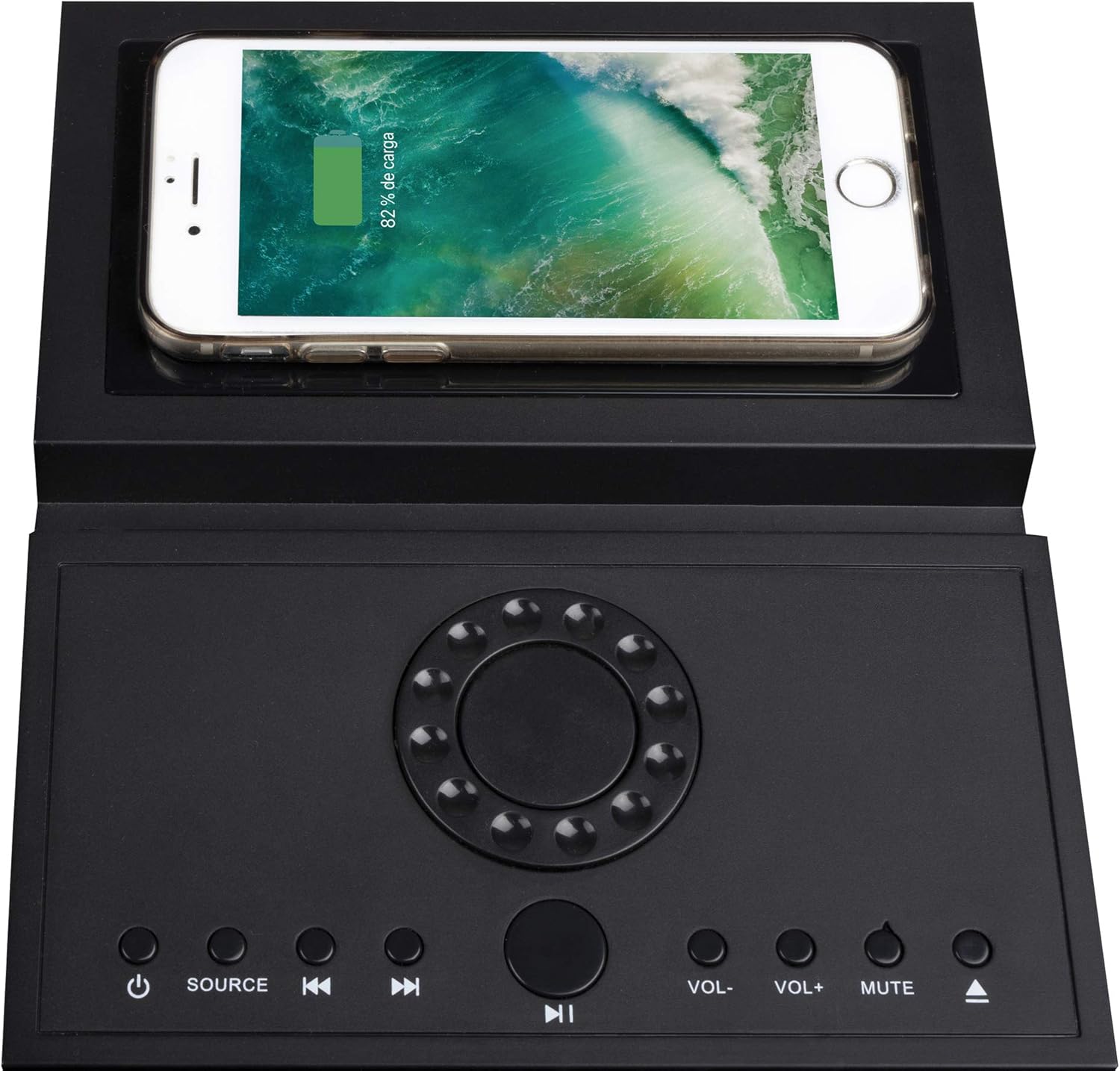
Figure 4: The top panel featuring a smartphone placed on the integrated wireless charging pad, demonstrating its functionality alongside the control buttons.
5. Persediaan
5.1 Membongkar dan Meletakkan
- Carefully remove the sound tower and all accessories from the packaging.
- Place the sound tower on a stable, flat surface. Ensure there is adequate space around the unit for ventilation.
- Attach the base to the bottom of the tower if it is not pre-assembled, following any specific instructions provided with the base.
5.2 Sambungan Kuasa
- Connect the power cable to the AC IN port on the back of the sound tower.
- Pasangkan hujung kabel kuasa yang satu lagi ke soket dinding standard.
- Unit akan memasuki mod siap sedia.
6. Arahan Operasi
6.1 Hidupkan/Mati Kuasa
Tekan ke KUASA butang ( ) on the top panel or remote control to turn the unit on or off. The LED display will illuminate when the unit is powered on.
6.2 Pemilihan Sumber
Tekan ke SUMBER button on the top panel or remote control repeatedly to cycle through available input modes: Bluetooth, CD, USB, and AUX.
6.3 Operasi Bluetooth
- Turn on the sound tower and select Bluetooth mode using the SOURCE button. The LED display will show "BT" and flash, indicating pairing mode.
- Dayakan Bluetooth pada peranti mudah alih anda (telefon pintar, tablet, dll.).
- Cari untuk "NGS SKYGAZER" in your device's Bluetooth settings and select it to pair.
- Once paired, the "BT" indicator on the sound tower's display will stop flashing and remain solid. You can now play audio from your device.
- Gunakan VOL+ / vol- buttons on the unit or remote to adjust volume. Use the Trek Sebelumnya / Seterusnya butang untuk melangkau trek.
6.4 Operasi Pemain CD
- Pilih CD mode using the SOURCE button.
- Gently insert a CD into the motorized CD tray located on the top panel. The tray will automatically pull the CD in.
- Playback will begin automatically. If not, press the MAIN/JEDA butang.
- Gunakan Trek Sebelumnya / Seterusnya butang untuk menavigasi antara trek.
- To eject the CD, press the LEPASKAN button (usually combined with the CD icon on the remote or top panel).
6.5 Main Semula USB
- Masukkan pemacu kilat USB yang mengandungi audio MP3 files ke dalam port USB.
- Pilih USB mode using the SOURCE button.
- Playback will begin automatically. If not, press the MAIN/JEDA butang.
- Gunakan Trek Sebelumnya / Seterusnya butang untuk menavigasi antara trek.
6.6 AUX-in Connection
- Connect one end of the 3.5mm audio cable to the AUX-in port on the sound tower.
- Connect the other end of the cable to the headphone jack or audio output of your external audio device (e.g., MP3 player, TV).
- Pilih AUX mode using the SOURCE button.
- Kawal main balik dan kelantangan daripada peranti luaran anda.
6.7 Pengecasan Tanpa Wayar
The NGS SKYGAZER features a wireless charging pad on its top surface. To use this function:
- Ensure the sound tower is powered on.
- Place your Qi-compatible smartphone directly onto the designated wireless charging area on the top panel.
- The phone should indicate that it is charging. If not, adjust its position until charging begins.
Note: Wireless charging functionality may vary depending on the smartphone model and case.
7. Penyelenggaraan
7.1 Pembersihan
- Sentiasa cabut plag peranti daripada salur keluar kuasa sebelum membersihkan.
- Use a soft, dry cloth to wipe the exterior surfaces of the sound tower.
- Do not use liquid cleaners, aerosols, or abrasive cleaning agents, as these may damage the finish or internal components.
7.2 Penyimpanan
If you plan to store the sound tower for an extended period, unplug it from the power source and store it in a cool, dry place, away from direct sunlight and extreme temperatures.
8. Penyelesaian masalah
| Masalah | Kemungkinan Punca | Penyelesaian |
|---|---|---|
| Tiada kuasa | Kabel kuasa tidak disambungkan dengan selamat. | Check power cable connection to the unit and wall outlet. Ensure the outlet is functional. |
| Tiada bunyi | Volume too low; incorrect source selected; audio cable not connected (AUX). | Increase volume. Select the correct input source. Ensure audio cables are properly connected. |
| Penggandingan Bluetooth gagal | Device too far; Bluetooth not enabled on source; "NGS SKYGAZER" not selected. | Ensure device is within 10 meters. Enable Bluetooth on your device. Select "NGS SKYGAZER" from the list. Try restarting both devices. |
| CD tidak dimainkan atau dilangkau | CD kotor, tercalar atau dimasukkan dengan salah. | Clean the CD with a soft cloth. Check for deep scratches. Re-insert the CD correctly. Try a different CD. |
| Pengecasan tanpa wayar tidak berfungsi | Phone not Qi-compatible; phone not positioned correctly; phone case too thick. | Ensure your phone supports Qi wireless charging. Adjust phone position on the pad. Remove thick phone cases. |
9. Spesifikasi
- Nama Model: SKYGAZER
- Kuasa Output: 120 Watt (Saluran 2.1)
- Ketersambungan: Bluetooth, USB, AUX-in, CD Player
- Komunikasi Tanpa Wayar: Bluetooth
- Kaedah Kawalan: Remote Control, Top Panel Buttons
- Sumber Kuasa: Kabel AC
- Ciri Khas: Wireless Charging Pad, LED Display
- warna: Hitam
- Berat Barang: Lebih kurang 1 Kilogram
- Peranti Serasi: Komputer Riba, Telefon Pintar, Tablet
10. Waranti dan Sokongan
NGS products are designed and manufactured to the highest quality standards. For detailed warranty information and technical support, please refer to the warranty card included with your product or visit the official NGS website. Please note that spare parts availability information is not provided.
For further assistance, contact NGS customer support.


