1. Pengenalan dan Lebihview
The Asustor AS5304T is a high-performance 4-bay Network Attached Storage (NAS) device designed for personal private cloud storage, media streaming, and data backup. Featuring an Intel Celeron Quad-Core processor and 4GB DDR4 RAM (expandable), it offers robust performance for various applications. Dual 2.5GbE ports provide high-speed network connectivity, ensuring efficient data transfer.

Figure 1: Asustor AS5304T 4-Bay NAS device.
Video 1: Selesaiview of Asustor Nimbustor NAS AS5202T AS5304T features.
2. Apa yang ada di dalam Kotak
Upon unboxing your Asustor AS5304T, you should find the following items:
- Asustor AS5304T NAS Unit
- Panduan Mula Pantas
- 2x RJ-45 Cat 5e Ethernet Cables
- 1x AC Adapter & Power Cable
- 16x Phillips Screws for 2.5" Drives
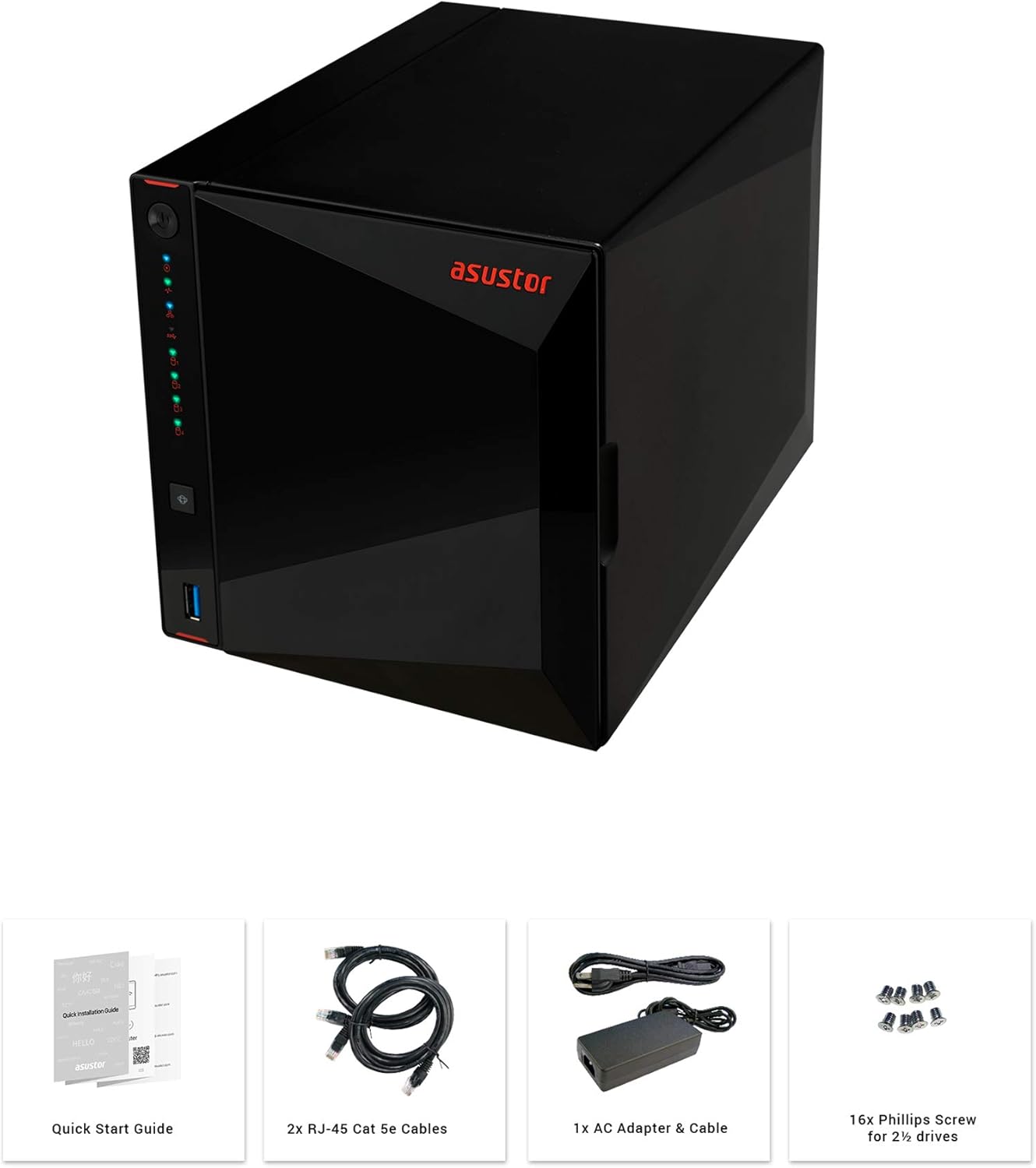
Figure 2: Unboxing contents of the Asustor AS5304T.
3. Hardware Features and Specifications
The Asustor AS5304T is equipped with advanced hardware for reliable and high-performance network storage.
- Pemproses: Intel Celeron Quad-Core
- RAM: 4GB DDR4 (expandable)
- Teluk Pandu: 4x Hot-swappable 3.5"/2.5" SATA HDD/SSD bays
- Port Rangkaian: 2x 2.5 Gigabit Ethernet (2.5GbE) ports
- Port USB: 3x USB 3.2 Gen 1 ports (1 front, 2 rear)
- HDMI: 1x HDMI 2.0a port
- Dimensi: 9.06 x 6.85 x 6.69 inci
- Berat: 4.84 paun
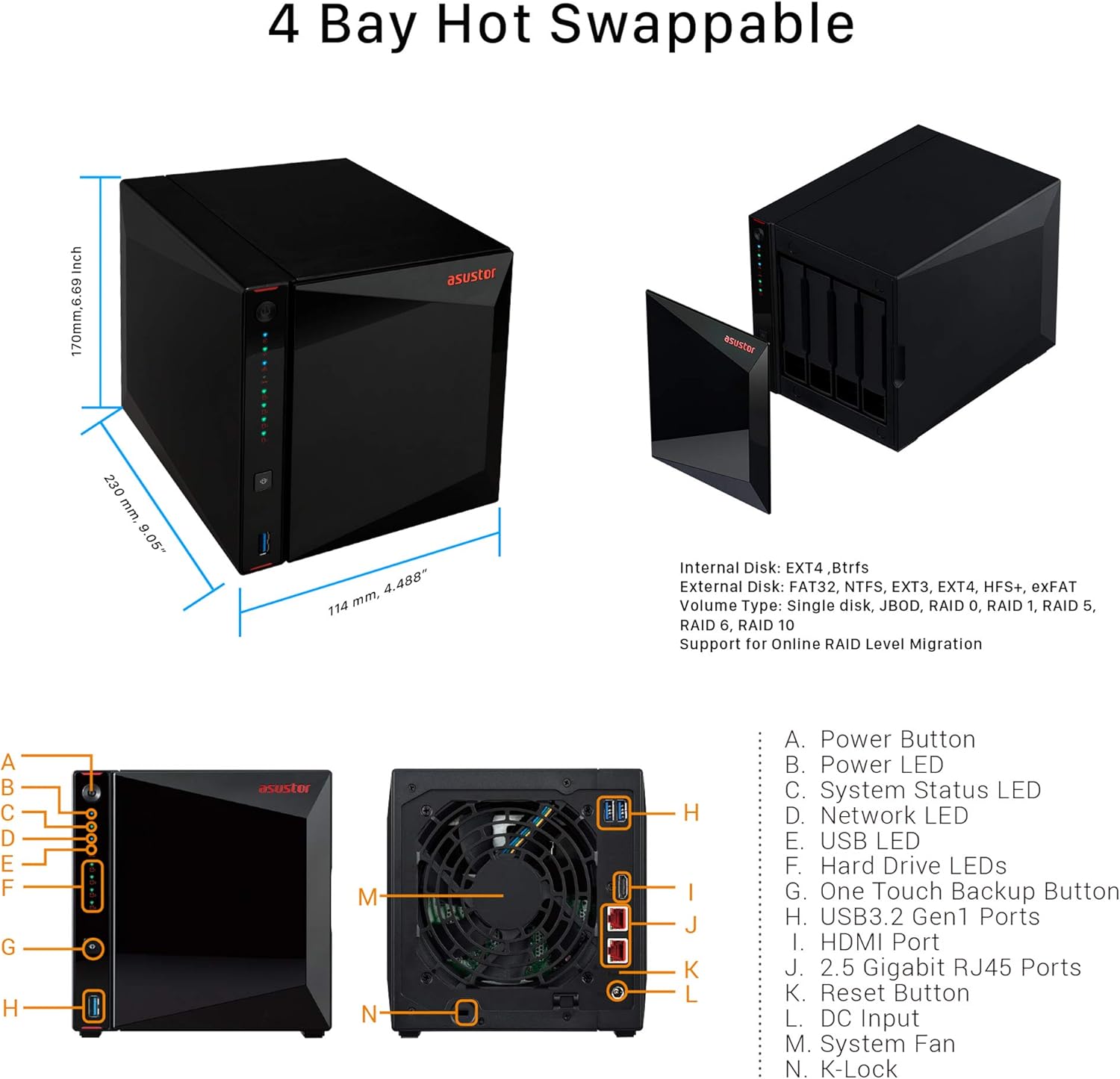
Figure 3: Asustor AS5304T dimensions and port layout.
4. Persediaan dan Pemasangan
Follow these steps to set up and install your Asustor AS5304T NAS:
- Pasang Pemacu Keras: Unlock the drive tray, place your 3.5" or 2.5" hard drive or SSD into the tray, and relock the tray. Slide the tray back into the NAS unit.
- Sambungkan Kabel: Connect the power adapter to the NAS and plug it into a power outlet. Connect one or both Ethernet cables from the NAS to your network router or switch.
- Hidupkan kuasa: Press the power button on the front of the NAS.
- Initialize NAS: Download and install the ASUSTOR Control Center software on your Windows or macOS computer, or the AiMaster app for Android/iOS devices. Use the software/app to easily initialize your NAS.

Figure 4: Drive installation and cable connection steps.
Video 2: Quickstart Guide for ASUSTOR NAS devices, demonstrating initial setup procedures.
5. Arahan Operasi
The Asustor AS5304T runs on the ASUSTOR Data Master (ADM) operating system, providing a user-friendly interface for managing your NAS. Key operating features include:
- File Pengurusan: Access, organize, and share files melalui web interface or mobile apps.
- Pusat Apl: Expand NAS functionality with a wide range of apps for media streaming (Plex, Kodi), surveillance (Surveillance Center), download management, and more.
- Backup Solutions: Configure comprehensive backup plans to external drives, cloud services, or other NAS devices.
- Akses Mudah Alih: Use AiMaster, AiFoto, AiMusic, and other mobile apps to access your files, stream media, and manage your NAS from anywhere.
- Hiburan di rumah: Stream 4K video, manage music libraries, and share content across your home network.

Gambar 5: Lebihview of Asustor NAS features and applications.
6. Penyelenggaraan
Regular maintenance ensures the longevity and optimal performance of your NAS:
- Jaga kebersihan: Periodically clean the exterior of the NAS and ensure ventilation areas are free from dust.
- Kemas kini Firmware: Regularly check for and install ADM firmware updates to benefit from new features, security patches, and performance improvements.
- Drive Health Check: Utilize the Storage Manager in ADM to monitor the health status of your hard drives.
- Data Sandaran: Always maintain up-to-date backups of critical data stored on your NAS.
7. Penyelesaian masalah
If you encounter issues with your NAS, consider the following basic troubleshooting steps:
- Tiada Kuasa: Ensure the power cable is securely connected to both the NAS and the power outlet. Test the outlet with another device.
- Tiada Sambungan Rangkaian: Verify that Ethernet cables are securely connected to the NAS and your router/switch. Check network settings in ADM.
- Pemanduan Tidak Dikesan: Ensure hard drives are properly seated in their trays. Check drive health status in Storage Manager.
- Prestasi Perlahan: Check network traffic and CPU/RAM usage in ADM. Consider upgrading RAM if consistently high.
- Mula Semula Sistem: Mula semula yang mudah selalunya boleh menyelesaikan gangguan perisian kecil.
8. Spesifikasi
| Ciri | Spesifikasi |
|---|---|
| Dimensi Produk | 9.06 x 6.85 x 6.69 inci |
| Berat Barang | 4.84 paun |
| Pengeluar | Asustor |
| ASIN | B07PYJ2KNC |
| Nombor model item | 90IX0181-BW3S10 |
| Bateri | 1 bateri CR123A diperlukan. |
| Jenama | Asustor |
| Peranti Serasi | Kamera |
9. Waranti dan Sokongan
The Asustor AS5304T comes with a 3-year manufacturer's warranty. For technical support, firmware updates, and additional resources, please visit the official Asustor webtapak atau hubungi sokongan pelanggan mereka.


