1. Pengenalan
The Fanimation Celano V2 ceiling fan is designed to provide efficient air circulation and integrated lighting for indoor spaces. This 52-inch fan features a dark bronze finish with cherry/dark walnut blades, an 18-watt LED light kit, and is operated via a handheld remote control. It offers three forward and reverse speeds for year-round comfort.
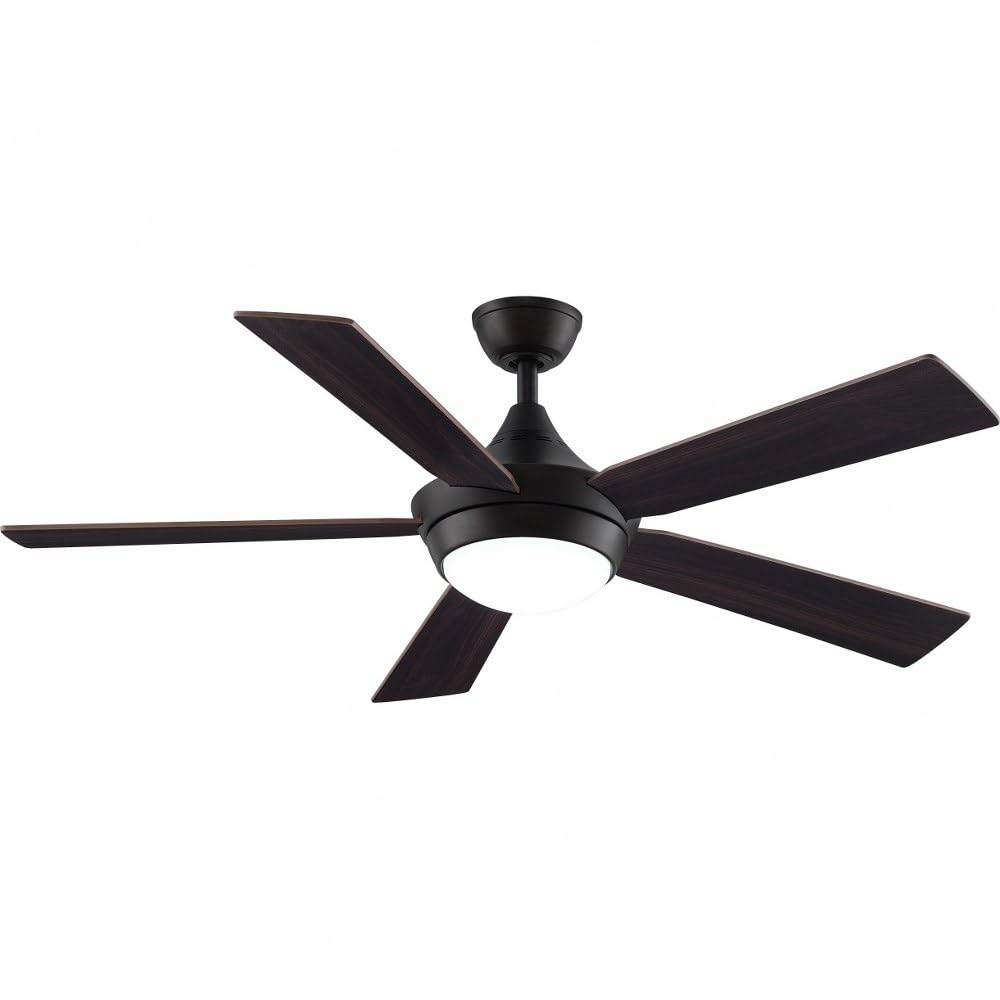
Image 1.1: Fanimation Celano V2 Ceiling Fan (Dark Bronze finish with Cherry/Dark Walnut blades)
2. Maklumat Keselamatan
Read all instructions carefully before installation and use. Failure to follow these instructions may result in electric shock, fire, or personal injury.
- Keselamatan Elektrik: Always disconnect power at the main circuit breaker before attempting any installation, repair, or cleaning. Ensure all electrical connections comply with local codes and ordinances.
- Pemasangan: The fan must be mounted to a structurally sound ceiling joist or outlet box capable of supporting the fan's weight (approximately 17.86 pounds).
- Pembersihan Bilah: Pastikan terdapat ruang yang mencukupi antara bilah kipas dan sebarang halangan, termasuk dinding dan perabot.
- Pendedahan Cecair: Keep the fan and its electrical components away from liquids to prevent electric shock and damage.
- Pemasangan Profesional: If you are unfamiliar with electrical wiring or installation procedures, consult a qualified electrician.
3. Kandungan Pakej
Sahkan bahawa semua komponen hadir sebelum memulakan pemasangan:
- Pemasangan Motor Kipas Siling
- 5 Fan Blades (Cherry/Dark Walnut)
- Light Kit with Opal Glass Diffuser
- TR500 Handheld Remote Control (battery included)
- Downrod (4.5 inci)
- Pemasangan Braket dan Perkakasan
- Manual Arahan
4. Persediaan dan Pemasangan
This section outlines the general steps for installing your Celano V2 ceiling fan. Specific details and diagrams are typically found in the detailed installation guide provided in the product packaging.
4.1 Pra-Pemasangan
- Matikan kuasa pada pemutus litar.
- Ensure the mounting location is suitable for a ceiling fan and can support its weight.
- Buka semua komponen dan periksa sebarang kerosakan.
4.2 Memasang Kipas
- Secure the mounting bracket to the ceiling outlet box and ceiling joist using appropriate hardware.
- Assemble the downrod to the fan motor assembly.
- Angkat pemasangan kipas dengan berhati-hati dan gantungkannya dari pendakap pelekap.
4.3 Sambungan Elektrik
- Sambungkan wayar elektrik kipas ke pendawaian rumah mengikut gambarajah pendawaian dalam manual penuh. Pastikan semua sambungan kukuh.
- Pembumian yang betul adalah penting untuk keselamatan.
4.4 Memasang Bilah dan Kit Ringan
- Attach the five fan blades to the motor housing using the provided screws.
- Pasang kit lampu LED ke bahagian bawah pemasangan motor kipas.
- Secure the opal glass diffuser to the light kit.
Once installation is complete, restore power at the circuit breaker and test the fan's operation.
5. Operasi
The Celano V2 fan is controlled using the included TR500 handheld remote control.
5.1 Kawalan Kelajuan Kipas
- Use the remote control to select one of three fan speeds (low, medium, high).
- The fan delivers airflow up to 5,596 cubic feet per minute.
5.2 Aliran Udara Boleh Balik
- The fan features a reversible airflow function, typically controlled via a switch on the fan housing or the remote.
- Aliran Udara Ke Bawah (Musim Panas): Mencipta angin yang menyejukkan.
- Aliran Udara Ke Atas (Musim Sejuk): Circulates warm air trapped near the ceiling.
5.3 Light Kit Operation
- The remote control operates the integrated 18-watt LED light kit.
- The light provides warm 3000K illumination with a high Color Rendering Index (CRI) of 90.
- A sleep timer function may be available on the remote for the light or fan.
5.4 Smart Home Compatibility
The Celano V2 is compatible with WiFi and Bluetooth smart home systems. Control units for smart home integration are sold separately.
6. Penyelenggaraan
Penyelenggaraan tetap memastikan prestasi optimum dan memanjangkan hayat kipas siling anda.
- Pembersihan: Bersihkan bilah kipas dan perumah motor secara berkala dengan lap lembutamp kain. Jangan gunakan pembersih atau pelarut yang melelas.
- Pemeriksaan Bilah: Check fan blades for any cracks or damage. Ensure all blade screws are tight.
- Kit Cahaya: The integrated LED light kit does not require bulb replacement. If the light fails, consult the troubleshooting section or contact support.
- Pengumpulan habuk: Dust can affect fan performance and appearance. Clean regularly.
7. Penyelesaian masalah
If you experience issues with your Celano V2 ceiling fan, refer to the following common problems and solutions:
| Masalah | Kemungkinan Punca | Penyelesaian |
|---|---|---|
| Kipas tidak bermula | No power; loose wiring; remote control issue | Periksa pemutus litar; sahkan sambungan pendawaian; gantikan bateri alat kawalan jauh. |
| Cahaya tidak berfungsi | Loose wiring; remote control issue; LED driver failure | Check light kit wiring; replace remote battery; contact support if LED is faulty. |
| Kipas bergoyang secara berlebihan | Loose blades; uneven blade balance; improper mounting | Tighten all blade screws; use a balancing kit (not included); ensure mounting bracket is secure. |
| Operasi bising | Loose screws; motor issue; interference | Check all screws; ensure no wires are rubbing; contact support if motor noise persists. |
8. Spesifikasi
| Ciri | Perincian |
|---|---|
| Jenama | Fanimasi |
| Nama Model | Celano V2 |
| Nombor Model Item | FP8062BDZ |
| Dimensi Produk | 52"D x 52"W x 14.71"H |
| Berat Barang | 17.86 paun |
| Bilangan Bilah | 5 |
| Kapasiti Aliran Udara | 3402 Kaki Kubik Seminit |
| Kelajuan (Maks) | 5596 Kaki Kubik Seminit |
| Voltage | 120 Volt |
| Wattage | 38 watt |
| Jenis Mentol | LED |
| Fluks Bercahaya | 1400 Lumen |
| Kaedah Kawalan | Jauh |
| Panjang Downrod | 4.5 Inci |
| Penggunaan Dalaman/Luar | Dalaman |
| Jenis Motor | Induksi AC |
| Jenis Selesai | Painted (Dark Bronze) |
9. Waranti dan Sokongan
9.1 Maklumat Waranti
The Fanimation Celano V2 ceiling fan comes with a Waranti Pengeluar 1 Tahun. Please refer to the warranty card included with your product for specific terms and conditions, including coverage details and limitations.
9.2 Sokongan Pelanggan
For technical assistance, replacement parts, or warranty claims, please contact Fanimation customer support. Contact information can typically be found on the manufacturer's official webtapak atau dalam pembungkusan produk.
When contacting support, please have your model number (FP8062BDZ) and purchase date available.


