pengenalan
Thank you for choosing the Ford 18V Cordless Impact Drill. This manual provides essential information for the safe and efficient operation, maintenance, and troubleshooting of your new tool. Please read this manual thoroughly before first use and keep it for future reference. This drill is designed for various drilling and fastening tasks, offering versatility and power in a compact design.

Image: The Ford 18V Cordless Impact Drill, showcasing its blue and black design with an 18V Lithium-Ion battery attached.
Arahan Keselamatan
Sentiasa ikuti langkah berjaga-jaga keselamatan asas untuk mengurangkan risiko kebakaran, kejutan elektrik dan kecederaan diri. Simpan manual ini untuk rujukan masa hadapan.
- Keselamatan Kawasan Kerja: Pastikan kawasan kerja anda bersih dan terang. Kawasan bersepah atau gelap mengundang kemalangan. Jangan kendalikan alatan kuasa dalam atmosfera yang mudah meletup, seperti di hadapan cecair mudah terbakar, gas atau habuk.
- Keselamatan Elektrik: Elakkan sentuhan badan dengan permukaan yang dibumikan atau dibumikan. Jangan dedahkan alatan kuasa kepada hujan atau keadaan basah. Air yang memasuki alat kuasa akan meningkatkan risiko kejutan elektrik.
- Keselamatan Diri: Sentiasa pakai pelindung mata. Gunakan perlindungan pendengaran apabila beroperasi untuk tempoh yang lama. Berpakaian dengan betul; elakkan pakaian atau barang kemas yang longgar. Jauhkan rambut, pakaian dan sarung tangan daripada bahagian yang bergerak.
- Penggunaan dan Penjagaan Alat Kuasa: Jangan paksa alat kuasa. Gunakan alat kuasa yang betul untuk aplikasi anda. Putuskan sambungan pek bateri daripada alat kuasa sebelum membuat sebarang pelarasan, menukar aksesori atau menyimpan alatan kuasa.
- Penggunaan dan Penjagaan Pek Bateri: Recharge only with the charger specified by the manufacturer. Do not use battery packs with any other power tools. When the battery pack is not in use, keep it away from other metal objects.
Kandungan Pakej
Carefully unpack your Ford 18V Cordless Impact Drill and check that all items are present and in good condition. If any items are missing or damaged, please contact your retailer.
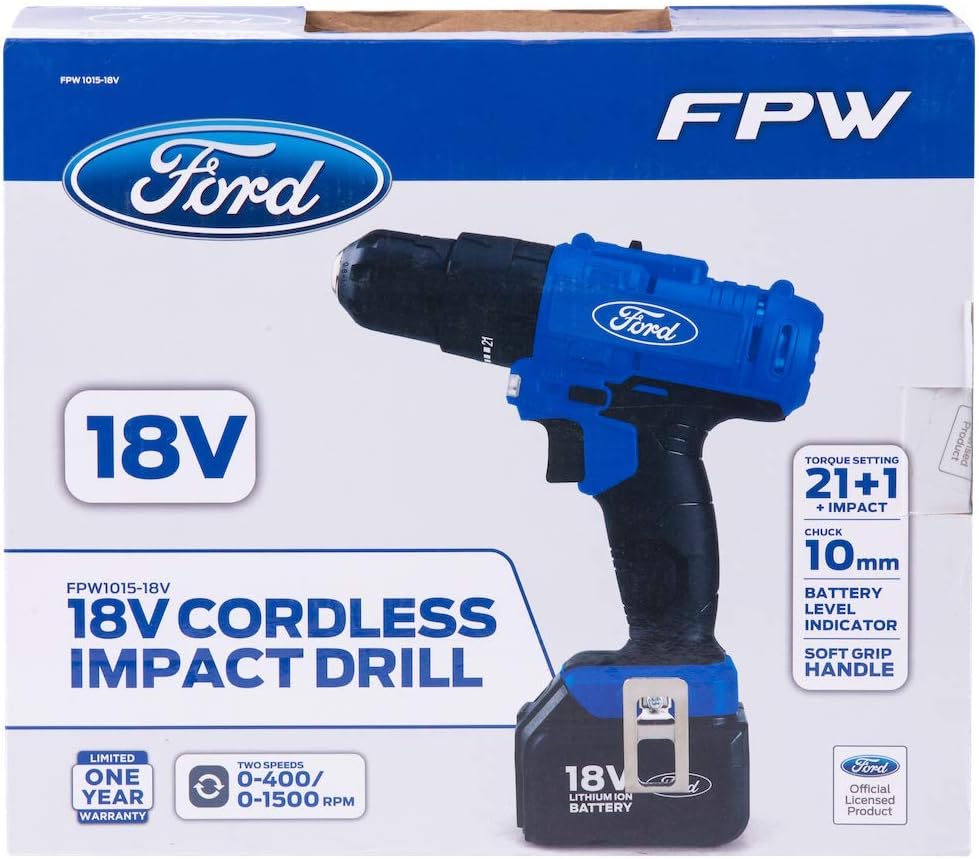
Image: The retail packaging for the Ford 18V Cordless Impact Drill, showing the drill, battery, and charger.
- 1 x Ford 18V Cordless Impact Drill
- 2 x 18V Lithium-Ion Battery Packs
- 1 x Pengecas Bateri
- 1 x Klip Tali Pinggang
- 1 x Magnetic Bit Holder
- 1 x Manual Arahan
- 1 x BMC (Blow Molded Case) Box
Ciri-ciri Produk
The Ford 18V Cordless Impact Drill is engineered for performance and user comfort:
- Reka bentuk ringan: Allows for easy handling and access in confined spaces.
- Cengkaman yang selesa: Ergonomically designed handle for reduced fatigue during prolonged use.
- Pencetus Kelajuan Berubah: Provides enhanced control for various drilling and fastening applications.
- Lampu Kerja LED Bersepadu: Illuminates the work area for improved visibility in dark conditions.
- Motor Berprestasi Tinggi: Equipped with a powerful motor for fast drilling and strong torque control.
- Tetapan Tork 21+1: Offers precise torque adjustment for screwdriving, plus dedicated drill and hammer drill modes.
- 10mm Chuck Capacity: Chuck tanpa kunci untuk penukaran mata gerudi yang cepat dan mudah.
- Bateri Lithium-Ion: Provides consistent power and longer run-time.
- Kunci Spindle Automatik: For single-hand bit changes.
- Belt Clip & Magnetic Bit Holder: For convenient storage and accessibility of bits and the tool.
Persediaan
1. Mengecas Bateri
Before first use, fully charge the battery pack. The battery can be charged independently or while attached to the drill.
- Connect the charger to a standard power outlet (220-240V ~ 50-60Hz).
- Insert the charger plug into the charging port on the battery pack.
- Allow 5-7 hours for a full charge. The charging indicator light on the charger will show the charging status.
- Once fully charged, disconnect the charger from the battery and the power outlet.
2. Memasang dan Menanggalkan Pek Bateri
To attach the battery, align the battery pack with the base of the drill handle and slide it in until it clicks securely into place. To remove, press the battery release buttons on the sides of the battery pack and slide it out.
3. Inserting and Removing Drill Bits
The drill features a 10mm keyless chuck for easy bit changes.
- To open the chuck, rotate the front collar of the chuck counter-clockwise until the jaws are wide enough to accept the bit.
- Insert the drill bit or screwdriver bit into the chuck. Ensure the bit is centered.
- To secure the bit, rotate the front collar clockwise until the chuck jaws firmly grip the bit. Hand-tighten for best results.
- To remove the bit, rotate the front collar counter-clockwise.
Video: This video demonstrates the unboxing, battery attachment, and basic handling of the Ford 18V Cordless Impact Drill, including chuck operation.
Arahan Operasi
1. Power On/Off and Variable Speed Control
The drill is activated by pressing the trigger switch. The speed is variable; the further the trigger is pressed, the faster the drill operates.
2. Putaran Maju/Undur
A switch located above the trigger controls the direction of rotation. Push the switch to the left for forward rotation (drilling/tightening) and to the right for reverse rotation (removing screws). Ensure the switch is in the center position to lock the trigger and prevent accidental starting.
3. Torque Settings and Mode Selection
The torque collar allows you to select from 21 torque settings for screwdriving, plus a drill mode and an impact drill mode.
- Tetapan Tork (1-21): Use lower settings for smaller screws and softer materials, and higher settings for larger screws and harder materials. The clutch will disengage when the set torque is reached, preventing overtightening or stripping.
- Mod Gerudi (Ikon Gerudi): For general drilling tasks without impact.
- Impact Drill Mode (Hammer Icon): For drilling into masonry or harder materials where impact action is required.
Rotate the torque collar to the desired setting or mode before operating the drill.
4. Pemilihan Gear
A two-speed gear selector is located on top of the drill. Use '1' for lower speed and higher torque (e.g., screwdriving or large diameter drilling) and '2' for higher speed and lower torque (e.g., small diameter drilling).
Penyelenggaraan
Penyelenggaraan tetap memastikan prestasi optimum dan memanjangkan hayat alat anda.
- Pembersihan: Pastikan slot pengudaraan bersih untuk mengelakkan terlalu panas. Gunakan kain lembut danamp kain untuk membersihkan alatan casing. Jangan gunakan bahan kimia yang keras atau pembersih yang kasar.
- Penjagaan Bateri: Store batteries in a cool, dry place away from direct sunlight. Do not store fully discharged batteries for extended periods. Charge them periodically if not in use.
- Penyelenggaraan Chuck: Bersihkan rahang chuck secara berkala untuk memastikan cengkaman bit yang betul.
- Storan: When not in use, store the drill and its accessories in the BMC box in a dry, secure location out of reach of children.
Menyelesaikan masalah
If you encounter issues with your drill, refer to the following common problems and solutions:
| Masalah | Kemungkinan Punca | Penyelesaian |
|---|---|---|
| Gerudi tidak bermula | Bateri tidak dicas atau dimasukkan dengan tidak betul. | Ensure battery is fully charged and securely attached. |
| Kehilangan kuasa semasa operasi | Caj bateri rendah. | Isi semula pek bateri. |
| Sedikit tergelincir dalam chuck | Chuck tidak diketatkan dengan cukup atau batang mata bor kotor. | Retighten chuck firmly. Clean bit shank before insertion. |
| Gerudi terlalu panas | Ventilation slots blocked or prolonged heavy use. | Bersihkan slot pengudaraan. Benarkan alat menjadi sejuk. Kurangkan beban. |
| Impact function not working | Mod salah dipilih. | Ensure the torque collar is set to the 'Impact Drill' mode. |
Spesifikasi
Technical data for the Ford 18V Cordless Impact Drill FPW1015-18V:
| Ciri | Perincian |
|---|---|
| Pengeluar | Ford |
| Nombor Model Item | FPW1015-18V |
| Berat Barang | 2.5 Kilogram |
| Dimensi Produk | 10.4 x 32.2 x 25.8 cm (Panjang x Lebar x Tinggi) |
| Bateri | 2 Bateri Litium-Ion diperlukan (termasuk) |
| Jenis Sel Bateri | Litium-Ion |
| Kapasiti Bateri | 1300 mAh |
| Saiz Chuck | 10 mm |
| warna | Multi-color (Blue/Black) |
| bahan | logam |
| Jenis Sumber Kuasa | Dikuasakan Bateri |
| Voltage | 18 Volt |
| Kuasa Maksimum | 600 Watt |
| Kelajuan | 0-400 / 0-1500 RPM |
| Ciri Khas | Kelajuan Berubah |
Waranti dan Sokongan
Your Ford 18V Cordless Impact Drill comes with a manufacturer's warranty. Please refer to the warranty card included in your package for specific terms and conditions. For technical support, spare parts, or warranty claims, please contact your retailer or the official Ford tools service center.
Always ensure you have your model number (FPW1015-18V) and proof of purchase available when contacting support.