1. Pengenalan
Thank you for choosing the EMPIRE GAMING Hellhounds Gaming Pack. This comprehensive kit includes a semi-mechanical gaming keyboard, a high-precision gaming mouse, and a durable mousepad, designed to enhance your gaming experience. This manual provides detailed instructions for setup, operation, maintenance, and troubleshooting to ensure optimal performance of your new gaming peripherals.

Figure 1: EMPIRE GAMING Hellhounds Gaming Mouse lineup.
2. Kandungan Pakej
Sila pastikan semua item ada dalam pakej anda:
- EMPIRE GAMING Hellhounds Semi-Mechanical Gaming Keyboard
- EMPIRE GAMING Hellhounds Gaming Mouse
- EMPIRE GAMING Hellhounds Mousepad
- Manual Pengguna (dokumen ini)
3. Panduan Persediaan
3.1 Menyambungkan Papan Kekunci dan Tetikus
- Cari port USB yang tersedia pada komputer anda.
- Plug the USB connector of the EMPIRE GAMING Hellhounds Keyboard into the USB port.
- Plug the USB connector of the EMPIRE GAMING Hellhounds Mouse into another available USB port.
- Sistem pengendalian anda sepatutnya mengesan dan memasang pemacu yang diperlukan secara automatik.
3.2 Mouse Weight Adjustment
The Hellhounds Gaming Mouse features adjustable weights for personalized feel and control.
- Carefully open the weight compartment located on the underside of the mouse.
- Add or remove weights as desired to achieve your preferred mouse balance and feel.
- Close the weight compartment securely.

Figure 2: Hellhounds Gaming Mouse with adjustable weights.
3.3 Pemasangan Perisian
To unlock the full customization potential of your Hellhounds Gaming Pack, including macro programming and advanced RGB lighting effects, download and install the dedicated software from the official EMPIRE GAMING webtapak: www.empiregaming.eu.
- melawat www.empiregaming.eu.
- Navigate to the 'Support' or 'Downloads' section.
- Locate the software for the Hellhounds Gaming Pack (Model OE-KB-88DE3).
- Muat turun dan jalankan pemasang, ikut arahan pada skrin.
- Mulakan semula komputer anda jika digesa.

Figure 3: EMPIRE GAMING Macro Manager software interface.
4. Arahan Operasi
4.1 Ciri-ciri Papan Kekunci
The Hellhounds Keyboard offers advanced features for gaming and productivity.
- Programmable Macros: The keyboard supports up to 33 configurable macros across three distinct profiles. Use the dedicated software to record and assign complex key sequences to the macro keys (M1, M2, M3, G1-G5).
- Pintasan Multimedia: Access multimedia controls directly using function key combinations (e.g., Fn + F5-F11 for music settings).
- Kunci Kekunci Windows: Prevent accidental interruptions during gaming by disabling the Windows key.
- Adjustable Wrist Rest: The integrated wrist rest and adjustable feet provide comfort during extended gaming sessions.
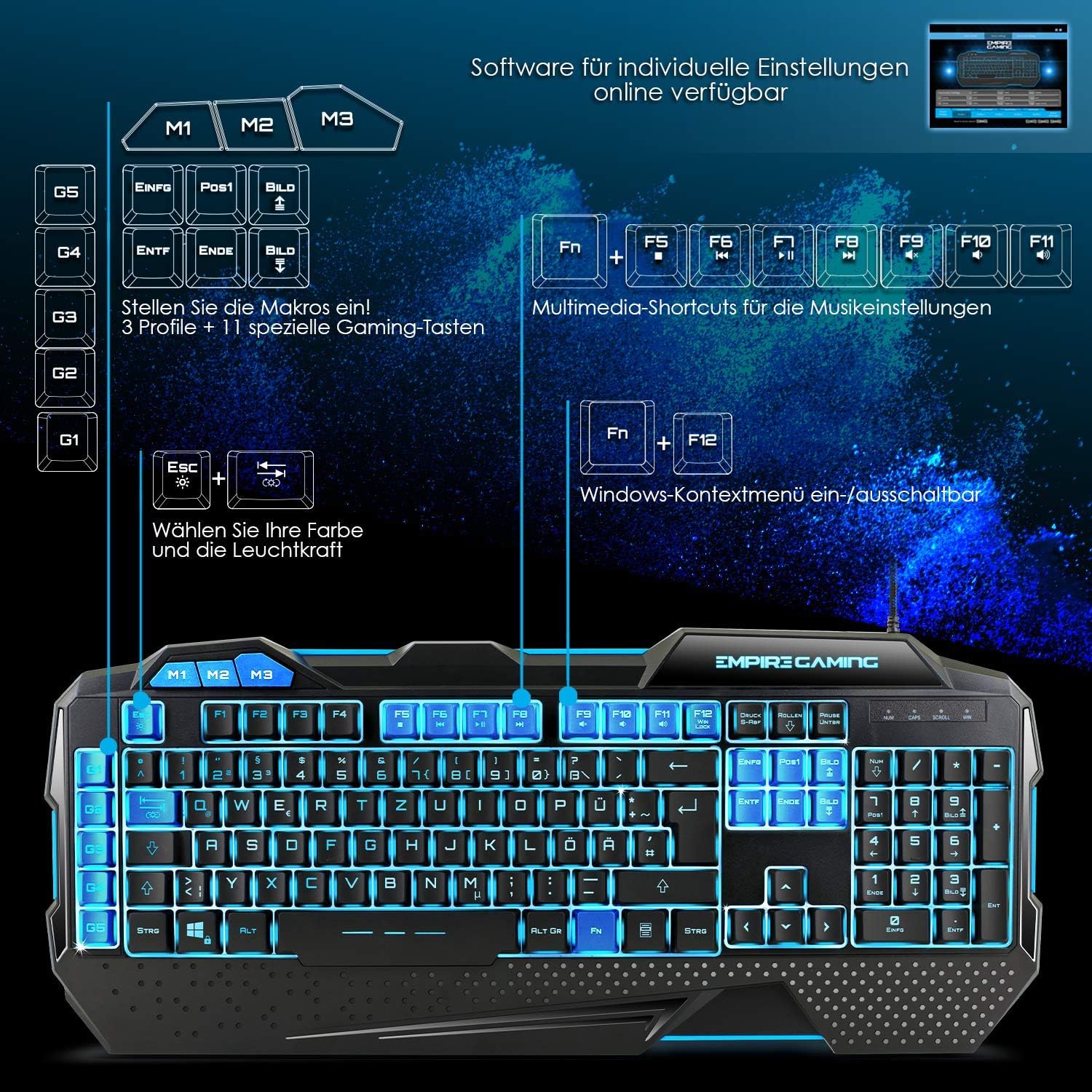
Figure 4: Hellhounds Keyboard layout highlighting macro and multimedia keys.
4.2 Ciri-ciri Tetikus
The Hellhounds Mouse is designed for precision and comfort.
- DPI boleh laras: Cycle through DPI settings up to 7200 DPI for precise cursor control. DPI levels can be adjusted via dedicated buttons on the mouse or through the software.
- Butang Boleh Aturcara: The mouse features 7 programmable buttons. Utilize the software to assign custom functions, macros, or rapid-fire commands to these buttons.
- Reka bentuk ergonomik: Ergonomic finger rests and adjustable weights contribute to comfortable handling during long gaming sessions.
4.3 Kawalan Pencahayaan RGB
Both the keyboard and mouse feature customizable RGB LED backlighting.
- Lampu Latar Papan Kekunci: The keyboard offers seven colors and various lighting effects. Adjustments can be made directly on the keyboard using function key combinations (e.g., Fn + Esc for brightness, Fn + PrtSc for mode) or through the dedicated software.
- Lampu Latar Tetikus: Customize the mouse's LED backlight colors and effects using the dedicated software.

Figure 5: Hellhounds Keyboard showcasing various RGB lighting options.

Figure 6: Software interface for assigning custom functions to keys.
5. Penyelenggaraan
Proper maintenance ensures the longevity and performance of your gaming pack.
- Pembersihan: Use a soft, dry cloth to wipe down the keyboard, mouse, and mousepad regularly. For deeper cleaning, a slightly damp kain dengan sabun lembut boleh digunakan, memastikan tiada cecair memasuki peranti.
- Penyingkiran habuk: Use compressed air to remove dust and debris from between keyboard keys and mouse sensors.
- Elakkan Cecair: Do not expose the devices to excessive moisture or immerse them in water.
- Storan: Simpan peranti di tempat yang sejuk dan kering jauh dari cahaya matahari langsung dan suhu yang melampau apabila tidak digunakan.
6. Penyelesaian masalah
If you encounter issues with your EMPIRE GAMING Hellhounds Pack, refer to the following common solutions:
- Peranti Tidak Dikenali:
- Ensure the USB cables are securely plugged into your computer's USB ports.
- Try plugging the devices into different USB ports.
- Mulakan semula komputer anda.
- Check your operating system's Device Manager to see if the devices are listed and drivers are installed correctly. - Kekunci Papan Kekunci Tidak Memberi Respons:
- Check for any physical obstructions under the keys.
- Ensure the keyboard is not in a locked mode (e.g., gaming mode disabling certain keys).
- Reinstall the keyboard software. - Mouse Cursor Lag or Inaccuracy:
- Clean the mouse sensor with a soft cloth.
- Ensure the mousepad surface is clean and free of debris.
- Adjust the DPI settings of the mouse.
- Try the mouse on a different surface.
- Reinstall the mouse software. - Pencahayaan RGB Tidak Berfungsi:
- Ensure the software is installed and running.
- Check the lighting settings within the software.
- For the keyboard, try cycling through lighting modes and brightness levels using the dedicated function key combinations. - Isu Perisian:
- Ensure you have downloaded the correct software version for your model (OE-KB-88DE3) from www.empiregaming.eu.
- Run the software as an administrator.
- Temporarily disable antivirus software during installation if issues persist.
7. Spesifikasi
Technical specifications for the EMPIRE GAMING Hellhounds Gaming Pack:
| Ciri | Spesifikasi |
|---|---|
| Jenama | EMPIRE GAMING |
| Nombor Model | OE-KB-88DE3 |
| warna | Hitam |
| Teknologi Ketersambungan | USB |
| Peranti Serasi | PC, Laptop |
| Sistem Operasi | Windows 10, Windows XP (and newer versions) |
| Jenis Papan Kekunci | Semi-mechanical, Gaming |
| Susun atur papan kekunci | QWERTZ (German layout) |
| Keyboard Macros | 33 configurable macros across 3 profiles |
| DPI tetikus | Sehingga 7200 DPI (boleh laras) |
| Butang Tetikus | 7 butang boleh diprogramkan |
| Pencahayaan latar | RGB LED (7 colors, various effects) |
| Ciri Khas | Ergonomic design, adjustable mouse weights, dedicated software |

Figure 7: Dimensions of the Hellhounds Keyboard and Mouse.
8. Waranti dan Sokongan
For warranty information, technical support, and to download the latest software and drivers, please visit the official EMPIRE GAMING webtapak:
EMPIRE GAMING is committed to providing high-quality products and customer satisfaction. If you have any questions or require further assistance, please do not hesitate to contact our support team through the webtapak.


