pengenalan
This manual provides detailed instructions for the proper setup, operation, and maintenance of your Timex TW4B17400 Analog-Digital Watch. Please read this manual thoroughly to ensure optimal performance and longevity of your timepiece. Keep this manual for future reference.
Produk Selesaiview
The Timex TW4B17400 is a men's analog-digital watch featuring a black dial and a brown leather strap. It combines traditional analog timekeeping with digital functionalities.
Ciri-ciri Utama:
- Paparan Masa Analog dan Digital
- Durable Leather Strap
- Cahaya Malam Indiglo
- Chronograph Functionality
- Fungsi Penggera
Komponen Tontonan:
Familiarize yourself with the main components of your watch:

Imej: Sisi view of the Timex TW4B17400 watch. This image displays the watch case from the side, highlighting the crown (center knob) and two pushers (buttons) on either side of the crown, used for adjusting time and accessing digital functions. The brown leather strap is also visible.
- Mahkota: Digunakan untuk menetapkan masa analog.
- Penolak (Butang): Used for operating digital functions such as setting digital time, date, alarm, and chronograph.
- dail: Displays analog time and includes a digital display window.
- Tali: Brown leather strap with a buckle closure.
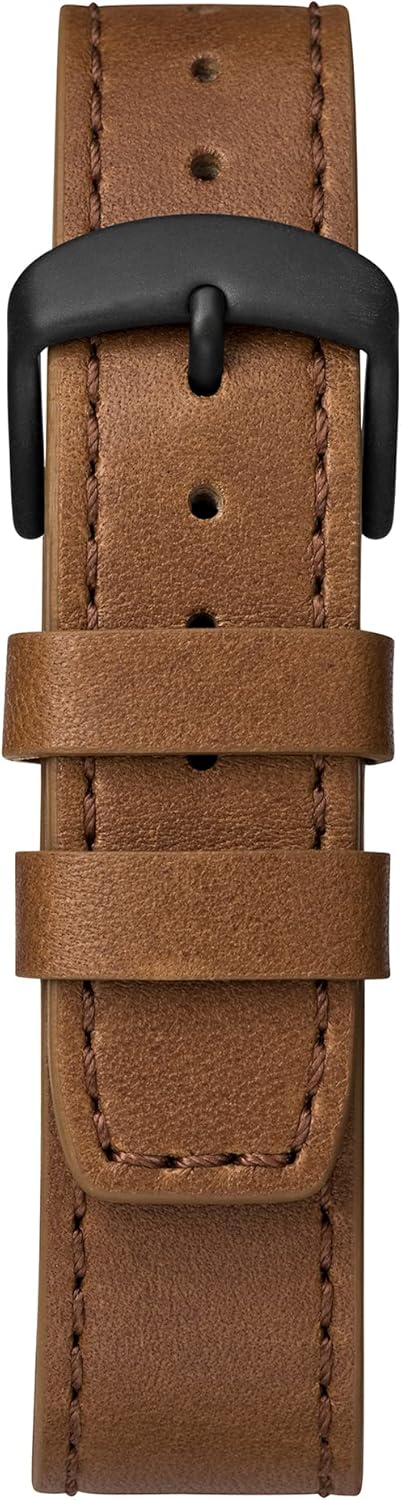
Image: Close-up of the brown leather strap and black buckle of the Timex TW4B17400 watch. The detailed stitching on the leather and the two strap loops are clearly visible.
Persediaan
Battery Installation (If Required):
Your watch comes with a CR2 battery installed. If the watch is not functioning, the battery may need to be replaced. It is recommended to have battery replacement performed by a qualified watch technician to ensure proper sealing and water resistance.
Menetapkan Masa Analog:
- Pull the crown (center knob) out to the furthest position.
- Pusingkan mahkota mengikut arah jam atau lawan jam untuk menggerakkan jarum jam dan minit ke masa yang betul.
- Setelah masa ditetapkan, tolak mahkota kembali ke kedudukan asalnya untuk memulakan pergerakan jam tangan.
Menetapkan Masa dan Tarikh Digital:
The digital functions are typically controlled by the pushers. Refer to the specific instructions below for common digital settings. The exact sequence may vary slightly; consult the full Timex manual for your movement if detailed steps are needed.
- Press the MODE button (usually one of the side pushers) repeatedly until the digital display shows the time setting mode (often indicated by flashing digits).
- Use the SET/ADJUST button (another pusher) to select the digit you wish to change (e.g., hours, minutes, 12/24-hour format).
- Use the START/STOP button (another pusher) to increase the value of the flashing digit.
- Repeat steps 2 and 3 for minutes, year, month, and day.
- Setelah semua tetapan betul, tekan butang MOD untuk keluar dari mod tetapan.
Beroperasi
Reading Analog Time:
The hour and minute hands indicate the current time in a traditional format.
Using Digital Functions:
- Butang Mod: Cycles through different digital modes (Time, Date, Alarm, Chronograph, Timer).
- Set/Adjust Button: Used to select items for adjustment within a mode.
- Butang Mula / Berhenti: Used to start/stop functions (e.g., chronograph) or increment values during setting.
Lampu Malam Indiglo:
To illuminate the watch face in low-light conditions, press and hold the crown or a designated pusher (refer to your watch's specific button layout). The Indiglo feature will light up the dial for a few seconds.
Fungsi Penggera:
- Press the MODE button until the alarm mode is displayed.
- Use the SET/ADJUST button to select the hour or minute to set.
- Use the START/STOP button to change the alarm time.
- Press the MODE button to confirm and exit.
- To activate/deactivate the alarm, typically press a specific pusher while in alarm mode.
Chronograph (Jam randik):
- Press the MODE button until the chronograph mode is displayed (usually shows 00:00:00).
- Press the START/STOP button to start timing.
- Press the START/STOP button again to stop timing.
- Press the RESET button (often the same as SET/ADJUST) to clear the chronograph to zero.
Penyelenggaraan
Membersihkan Jam Tangan Anda:
Lap bekas jam tangan dan kristal dengan lembut, damp kain. Untuk tali kulit, gunakan kain kering dan lembut. Elakkan menggunakan bahan kimia yang keras atau bahan yang melelas, kerana ini boleh merosakkan kemasan atau tali jam tangan.
Tahan Air:
While your watch may be water-resistant, it is not waterproof. Avoid prolonged exposure to water, such as swimming or showering, unless the specific water resistance rating (e.g., 50m, 100m) is clearly indicated on the watch and suitable for such activities. Always ensure the crown is pushed in completely to maintain water resistance.
Leather Strap Care:
Leather straps can be affected by moisture, sweat, and direct sunlight. To prolong the life of your leather strap:
- Elakkan pendedahan berpanjangan kepada air.
- Bersihkan dengan kain kering dan lembut.
- Allow the strap to air dry if it gets wet; do not use direct heat.
- Avoid contact with cosmetics, oils, and perfumes.
Menyelesaikan masalah
Watch Not Running / Digital Display Blank:
- Periksa sama ada mahkota ditolak sepenuhnya.
- The battery may need replacement. Consult a professional watch technician.
Paparan Masa Salah:
- Refer to the "Setting Analog Time" and "Setting Digital Time and Date" sections to reset the time.
- Ensure the watch has not been exposed to strong magnetic fields, which can affect accuracy.
Indiglo Tidak Berfungsi:
- Pastikan bateri mempunyai kuasa yang mencukupi.
- Confirm you are pressing the correct button for Indiglo activation.
Spesifikasi
| Ciri | Perincian |
|---|---|
| Jenama | Timex |
| Nombor Model | TW4B17400 |
| Jabatan | Lelaki |
| bahan | Leather (Strap) |
| Dimensi Produk | 3.99 x 10.01 x 5.99 cm |
| Berat Barang | 66.3 gram |
| Jenis Bateri | 1 CR2 (Termasuk) |
| Tarikh Tersedia Pertama | 26 Ogos 2019 |
| ASIN | B07PJCC2TK |
Waranti dan Sokongan
Untuk maklumat jaminan dan sokongan pelanggan, sila rujuk Timex rasmi webtapak atau kad jaminan yang disertakan dengan pembelian anda. Simpan bukti pembelian anda untuk sebarang tuntutan jaminan.
For further assistance, you may visit the official Timex support page: Sokongan Timex


