1. Pengenalan
Terima kasih kerana membeliasing the WamGra BY28 P Bluetooth Speaker Night Light Alarm Clock. This device combines a high-quality Bluetooth speaker, a versatile night light with touch control, a digital alarm clock, and an MP3 player, offering multiple functionalities in one compact unit. Please read this manual carefully to ensure proper use and optimal performance.

Imej 1.1: The WamGra BY28 P Bluetooth Speaker Night Light Alarm Clock, showcasing its main design and available color variations.
2. Kandungan Pakej
Sila semak pakej untuk item berikut:
- WamGra BY28 P Bluetooth Speaker Night Light Alarm Clock x 1
- Manual Pengguna x 1
3. Produk Lebihview
Familiarize yourself with the various parts and controls of your device.

Imej 3.1: Berakhirview of the device's features, including the control panel, Bluetooth connectivity, hands-free call function, and various input ports.
Panel Kawalan (Atas)
- Touch Mesh Net: Controls light modes and brightness.
- Butang Kuasa: Turns the device on/off, displays time when light is off.
- Butang Mod: Switches between Bluetooth, MP3, AUX, and Clock modes.
- Butang Naik Kelantangan/Trek Seterusnya: Increases volume, skips to next track.
- Kelantangan Turun/Butang Trek Sebelumnya: Decreases volume, skips to previous track.
- Butang Main/Jeda/Panggil: Plays/pauses music, answers/ends calls.
Pelabuhan Belakang
- Slot Kad Mikro SD: Untuk memainkan MP3 files from a micro SD card.
- Port Hos USB: Untuk memainkan MP3 files dari pemacu denyar USB.
- Port AUX-IN: Untuk menyambungkan peranti audio luaran melalui kabel audio 3.5mm.
- USB DC 5V Charging Port: Untuk mengecas peranti.
- Suis ON / OFF: Suis kuasa utama.
4. Persediaan Awal
4.1 Mengecas Peranti
- Sebelum penggunaan pertama, cas peranti sepenuhnya.
- Connect the provided USB charging cable to the USB DC 5V charging port on the back of the speaker.
- Sambungkan hujung kabel yang satu lagi ke penyesuai kuasa USB (tidak disertakan) atau port USB komputer.
- Lampu penunjuk pengecasan akan menyala. Pengecasan penuh mengambil masa kira-kira 6 jam.
- Once fully charged, the indicator light will turn off or change color.
The built-in rechargeable battery provides approximately 8 hours of operation, depending on usage (volume, light brightness).
4.2 Hidupkan/Mati Kuasa
- To power on, slide the ON/OFF switch on the back of the device to the 'ON' position. The display will light up.
- Untuk mematikan kuasa, luncurkan suis ON/OFF ke kedudukan 'OFF'.
5. Mod Operasi
5.1 Mod Pembesar Suara Bluetooth
The device functions as a Bluetooth 4.0 speaker, allowing wireless audio streaming from compatible devices up to 10 meters (32.81 feet).
- Pastikan peranti dihidupkan.
- Tekan ke Mod button until you hear a voice prompt indicating Bluetooth mode. The Bluetooth indicator will flash.
- Pada telefon pintar, tablet atau peranti lain yang didayakan Bluetooth anda, dayakan Bluetooth dan cari peranti yang tersedia.
- Select "BY28 P" from the list to pair. Once paired, you will hear a confirmation sound, and the Bluetooth indicator will stop flashing.
- You can now play audio from your connected device.
Panggilan Bebas Tangan
- When a call comes in during Bluetooth mode, press the Main / Jeda / Panggil butang untuk menjawab.
- Tekan ke Main / Jeda / Panggil butang sekali lagi untuk menamatkan panggilan.
- Tekan dan tahan butang Main / Jeda / Panggil butang untuk menolak panggilan masuk.
5.2 Mod Cahaya Malam
The device features a touch-activated lamp with warm white and color-changing light options.
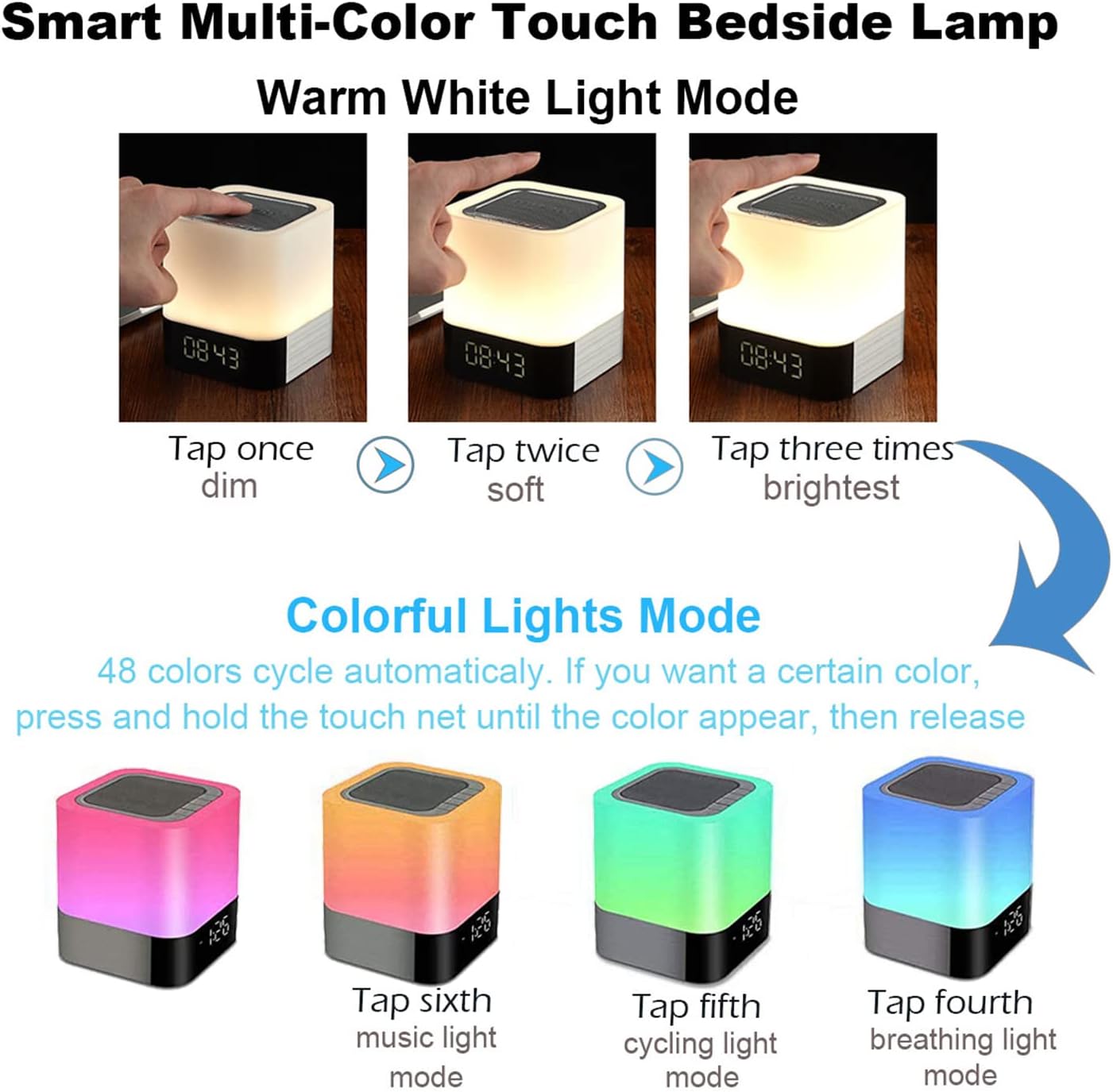
Imej 5.1: Visual guide for controlling the warm white and colorful light modes using the touch mesh net.
Mod Cahaya Putih Hangat
- Tap the top mesh net once to turn on the dim warm white light.
- Tap a second time for soft warm white light.
- Tap a third time for the brightest warm white light.
- Tap a fourth time to turn off the warm white light.
Colorful Lights Mode (48 Colors)
- From any warm white light setting, press and hold the top mesh net until the light switches to the colorful mode.
- The colors will cycle automatically.
- To select a specific color, press and hold the touch net again when your desired color appears, then release. The light will stay on that color.
- To switch back to automatic color cycling, tap the mesh net.
- To turn off the colorful light, tap the mesh net until the light turns off.
5.3 Mod Jam Penggera
The device features a digital alarm clock with snooze function and the ability to set custom alarm sounds.
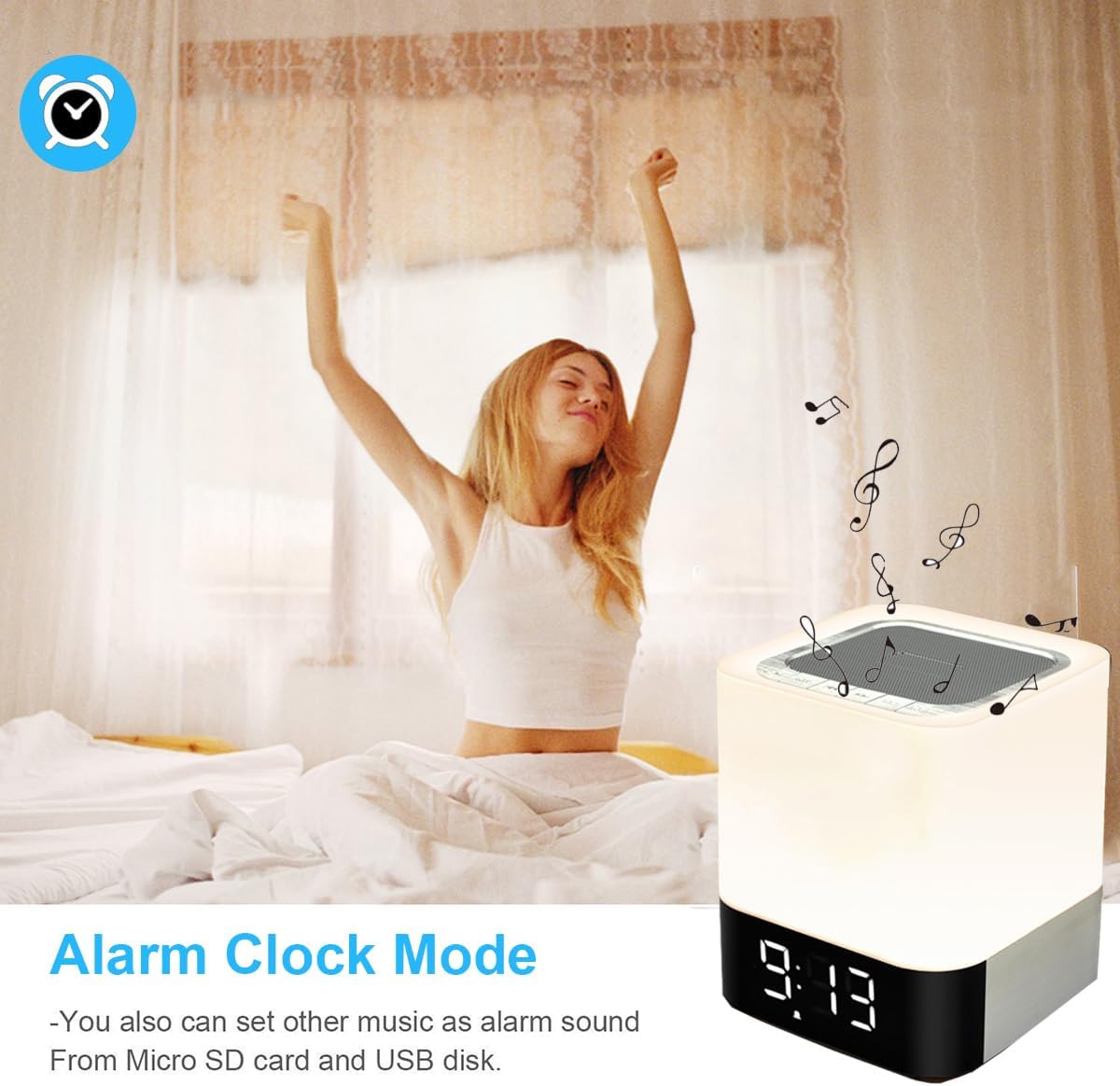
Imej 5.2: The alarm clock mode, highlighting the option to use custom MP3 songs as alarm sounds.
Menetapkan Masa
- Tekan ke Mod button until the clock display is active.
- Tekan dan tahan butang Mod butang sehingga digit jam mula berkelip.
- Gunakan Jilid Naik / Laluan Seterusnya dan Turunkan Volume / Laluan Sebelumnya butang untuk melaraskan jam.
- Tekan ke Mod button again to switch to minute adjustment. Adjust minutes using the volume buttons.
- Tekan ke Mod button a third time to confirm the time setting.
Menetapkan Penggera
- In clock display mode, press the Jam Penggera button (usually indicated by an alarm icon, or a long press of the Mode button after time setting).
- The alarm hour digits will flash. Use the Jilid Naik / Laluan Seterusnya dan Turunkan Volume / Laluan Sebelumnya butang untuk menetapkan waktu penggera.
- Tekan ke Jam Penggera button again to switch to minute adjustment. Adjust minutes using the volume buttons.
- Tekan ke Jam Penggera button a third time to confirm the alarm setting. The alarm icon will appear on the display.
Custom Alarm Sound (MP3)
- To use your favorite song as an alarm, save an MP3 file to a micro SD card or USB flash drive.
- Create a folder named "ALARM" on the root directory of your micro SD card or USB flash drive and place your desired MP3 file(s) inside.
- Insert the micro SD card or USB flash drive into the corresponding port on the device.
- The device will automatically use the MP3 file(s) in the "ALARM" folder as the alarm sound.
Fungsi Tunda
- When the alarm rings, tap the top mesh net once to activate the snooze function. The alarm will ring again after 5 minutes.
- To stop the alarm completely, quickly tap the top mesh net twice.
5.4 MP3 Player Mode
Play music directly from a micro SD card or USB flash drive.
- Insert a micro SD card or USB flash drive containing MP3 files ke dalam port yang sepadan.
- Tekan ke Mod button until you hear a voice prompt indicating MP3 mode (or card/USB mode).
- The device will automatically start playing the MP3 files.
- Gunakan Jilid Naik / Laluan Seterusnya dan Turunkan Volume / Laluan Sebelumnya butang untuk menavigasi trek.
- Gunakan Main/Jeda butang untuk menjeda atau menyambung semula main semula.
5.5 Mod AUX-IN
Sambungkan peranti audio luaran menggunakan kabel audio 3.5mm.
- Connect one end of a 3.5mm audio cable (not included) to the AUX-IN port on the back of the speaker.
- Sambungkan hujung yang satu lagi ke bicu output audio peranti luaran anda (cth., pemain MP3, komputer riba).
- Tekan ke Mod button until you hear a voice prompt indicating AUX mode.
- Mainkan audio daripada peranti luaran anda. Kelantangan boleh dikawal melalui pembesar suara dan peranti luaran.
6. Penyelenggaraan
- Bersihkan peranti dengan kain lembut dan kering. Jangan gunakan pembersih atau pelarut yang melelas.
- Keep the device away from water and excessive moisture. Although it has some water resistance, it is not fully waterproof.
- Elakkan daripada mendedahkan peranti kepada suhu yang melampau atau cahaya matahari langsung.
- If not used for a long period, charge the battery at least once every three months to prolong its lifespan.
7. Penyelesaian masalah
| Masalah | Penyelesaian yang Mungkin |
|---|---|
| Peranti tidak dihidupkan. | Ensure the ON/OFF switch is in the 'ON' position. Check battery level and charge the device if necessary. |
| Tiada bunyi dari pembesar suara. | Check volume levels on both the speaker and the connected device. Ensure the correct mode (Bluetooth, MP3, AUX) is selected. For Bluetooth, ensure successful pairing. |
| Gandingan Bluetooth gagal. | Ensure the speaker is in Bluetooth mode and discoverable. Turn off and on Bluetooth on your device. Move the speaker closer to your device. |
| Light does not respond to touch. | Ensure the device is powered on. Try tapping the mesh net firmly. |
| Penggera tidak berbunyi. | Verify the alarm time is set correctly and the alarm function is activated (alarm icon visible). Ensure MP3 files for custom alarms are correctly placed in an "ALARM" folder on the root directory of the storage device. |
8. Spesifikasi
| Ciri | Perincian |
|---|---|
| Nama Model | BY28 P |
| Jenama | WamGra |
| Dimensi Produk | 3.9"D x 3.9"W x 4.4"H (10cm D x 10cm W x 11.2cm H) |
| Berat Barang | 1.35 paun (0.61 kg) |
| Jenis Pembesar Suara | Pembesar Suara Bluetooth Mudah Alih |
| Kuasa Output Maksimum Pembesar Suara | 5 Watt |
| Teknologi Komunikasi Tanpa Wayar | Bluetooth 4.0 |
| Julat Bluetooth | 10 Meter (32.81 Kaki) |
| Teknologi Ketersambungan | Bluetooth, Tambahan (3.5mm), USB |
| Kaedah Kawalan | Sentuh |
| Sumber Kuasa | Dikuasakan Bateri (termasuk 1 bateri Lithium Ion) |
| Kapasiti Bateri | 4400 mAh |
| Masa Mengecas | Lebih kurang 6 Jam |
| Ciri Khas | Color Changing Light, Dimmable Light, Rechargeable, MP3 Player, Hands-Free Call |
9. Waranti dan Sokongan
This product comes with a limited warranty. Please refer to the warranty information provided at the time of purchase for details regarding coverage and duration.
For technical support, troubleshooting assistance, or warranty claims, please contact your retailer or the manufacturer directly. Contact information can typically be found on the product packaging or the brand's official webtapak.


