pengenalan
These instructions provide detailed guidance for the safe and effective use of your AfterShokz Titanium Open Ear Wireless Bone Conduction Headphones, model AS600CR. This manual covers setup, operation, maintenance, and troubleshooting to ensure optimal performance and longevity of your device.
Produk Selesaiview
Ciri-ciri Utama
- Reka Bentuk Telinga Terbuka: Patented bone conduction technology delivers audio through the cheekbone, keeping you connected and aware of your surroundings.
- Padanan Selamat & Selesa: An open-ear design enables bud-free listening and a partial titanium frame keeps the headphones in place through any activity.
- Butang pelbagai fungsi: Easy controls to play, pause, skip, activate voice assistant, and answer calls.
- kalis peluh: IP55 certified to repel sweat, dust, and moisture. Ideal for various activities, including rainy runs.
- Hayat Bateri 6 Jam: Provides up to 6 hours of continuous music and calls on a single charge.
Kandungan Pakej
Your AfterShokz Titanium headphones package typically includes:
- AfterShokz Titanium Headphones (AS600CR)
- Kabel Pengecas Mikro-USB
- Beg Penyimpanan
- Earplugs (for optional use)
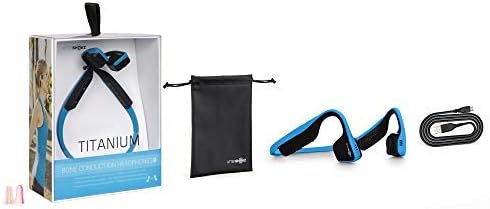
Image: Contents of the AfterShokz Titanium package, including the headphones, charging cable, storage pouch, and earplugs.
Persediaan
Mengecas Fon Kepala
- Locate the Micro-USB charging port on your headphones.
- Connect the Micro-USB charging cable to the headphones and the other end to a USB power adapter or computer USB port.
- Penunjuk LED akan menunjukkan lampu merah padu semasa mengecas.
- Once fully charged, the LED indicator will turn blue. A full charge takes approximately 1.5 hours.
Berpasangan dengan Peranti Bluetooth
- Pastikan fon kepala dimatikan.
- Press and hold the power button (usually the volume+ button) for 5-7 seconds until the LED indicator flashes red and blue alternately. This indicates pairing mode.
- Pada peranti anda (telefon pintar, tablet, komputer), dayakan Bluetooth dan cari peranti yang tersedia.
- Select "AfterShokz Titanium" from the list of found devices.
- Once successfully paired, the LED indicator will flash blue once, and a voice prompt will confirm "Connected."
Arahan Operasi
Memakai Fon Kepala
Place the headphones with the transducers resting on your cheekbones, just in front of your ears. The band should rest comfortably behind your head.

Image: A person wearing AfterShokz Titanium headphones, demonstrating the open-ear design and comfortable fit during physical activity.
Fungsi Butang
| Butang | Tindakan | Fungsi |
|---|---|---|
| Multifunction Button (Large button on left transducer) | Akhbar Tunggal | Play/Pause music, Answer call |
| Tekan dua kali | Langkau ke trek seterusnya | |
| Tekan dan Tahan (2 saat) | Activate voice assistant, Reject call | |
| Volume + / Power Button | Akhbar Tunggal | Tingkatkan kelantangan |
| Tekan dan Tahan (2 saat) | Hidupkan/Mati Kuasa | |
| Kelantangan - Butang | Akhbar Tunggal | Kurangkan volum |
Penyelenggaraan
Pembersihan
- Lap fon kepala dengan lembut, damp kain.
- Elakkan menggunakan bahan kimia yang keras atau bahan yang melelas.
- Pastikan port pengecasan kering sebelum mengecas.
Penyimpanan
- Store the headphones in the provided pouch when not in use to protect them from dust and damage.
- Elakkan menyimpan dalam suhu yang melampau.
Menyelesaikan masalah
Tiada Kuasa
- Ensure the headphones are fully charged. Connect to a power source and check the LED indicator.
- Cuba kabel pengecasan atau port USB yang berbeza.
Tidak Boleh Berpasangan
- Ensure the headphones are in pairing mode (LED flashing red and blue).
- Matikan dan hidupkan Bluetooth peranti anda.
- Gerakkan fon kepala lebih dekat dengan peranti anda.
- Kosongkan sambungan Bluetooth sebelumnya pada peranti anda jika anda mempunyai terlalu banyak.
Low Volume or Poor Sound Quality
- Laraskan kelantangan pada kedua-dua fon kepala dan peranti anda yang disambungkan.
- Pastikan transduser diletakkan dengan betul pada tulang pipi anda.
- If using earplugs, ensure they are inserted correctly.
- Semak gangguan daripada peranti wayarles lain.
Spesifikasi
| Ciri | Perincian |
|---|---|
| Model | AS600 |
| Ketersambungan | Bluetooth |
| Hayat Bateri | Sehingga 6 jam |
| Tahan Air | IP55 (Sweat and water-resistant) |
| Berat badan | 40 gram |
| bahan | titanium |
| Julat Kekerapan | 20 Hz - 20,000 Hz |
| Mikrofon | terbina dalam |
Waranti dan Sokongan
For warranty information and customer support, please refer to the official AfterShokz (now Shokz) webtapak atau hubungi perkhidmatan pelanggan mereka secara langsung. Simpan bukti pembelian anda untuk tuntutan waranti.
Note: AfterShokz has been rebranded to Shokz. Product support and warranty services are now provided under the Shokz brand.


