pengenalan
Thank you for choosing the EZQuest USB C Hub Docking Station 8-in-1. This manual provides detailed instructions for setting up, operating, and maintaining your device. Please read this manual thoroughly before use to ensure optimal performance and longevity of your product.
Produk Selesaiview
The EZQuest USB C Hub Docking Station 8-in-1 is designed to expand the connectivity of your USB-C enabled devices, offering a comprehensive solution for various peripherals and display needs. It features multiple ports for data transfer, video output, network connection, and power delivery.
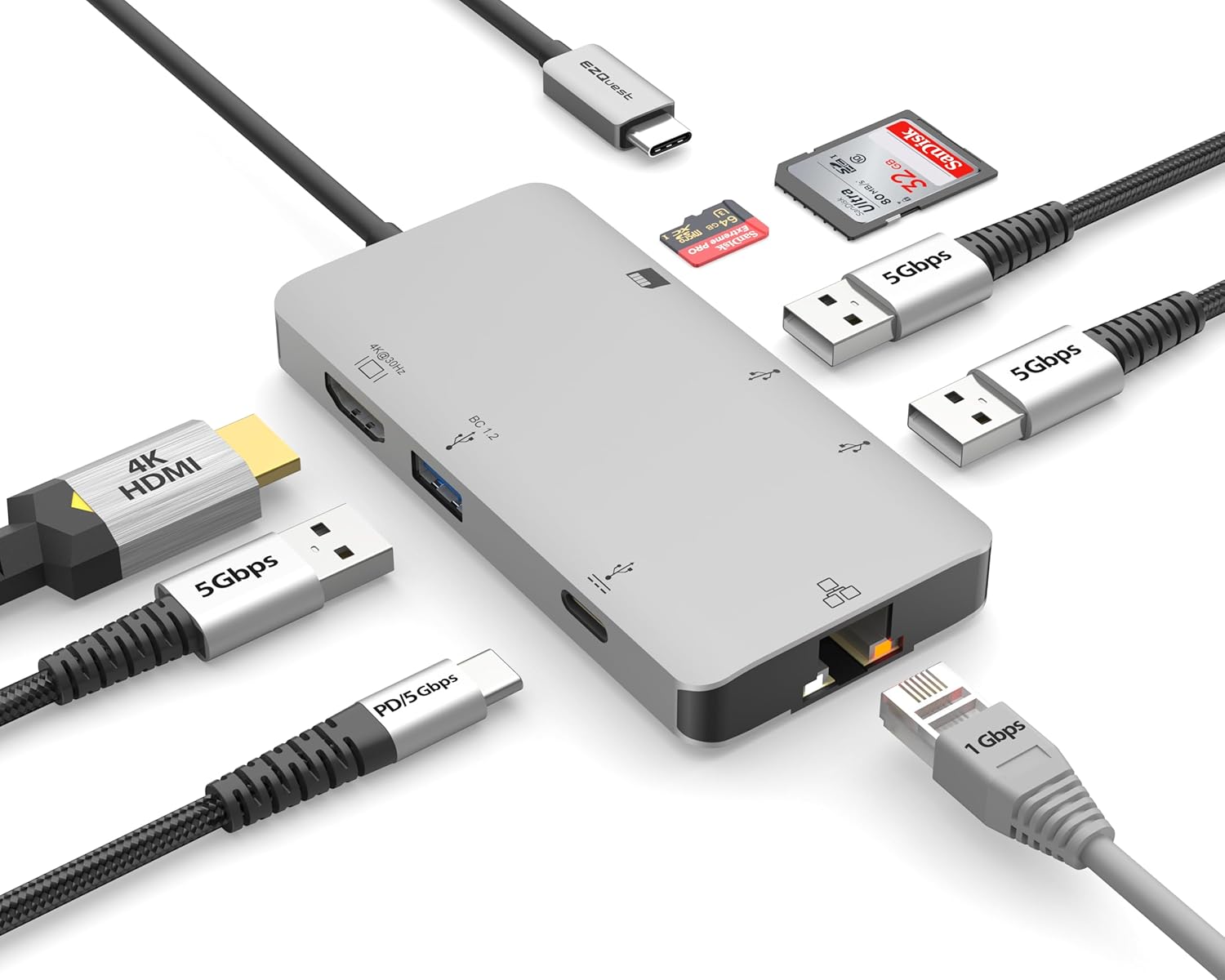
Image: The EZQuest USB C Hub Docking Station 8-in-1, showcasing its compact design and integrated USB-C cable.

Image: A diagram illustrating the 8-in-1 expansion capabilities of the hub, including HDMI, USB-C PD, USB 3.0, Ethernet, and card readers.
Arahan Persediaan
- Sambung ke Peranti Hos: Plug the integrated USB-C cable of the EZQuest hub into an available USB-C/Thunderbolt 3/4 port on your laptop, tablet, or smartphone.
- Penghantaran Kuasa (Pilihan): For charging your host device, connect your USB-C power adapter to the USB-C Power Delivery port on the hub. The hub supports up to 100W input with 85W pass-through charging.
- Paparan HDMI: Connect an HDMI cable from your monitor to the HDMI port on the hub for 4K 30Hz video output.
- Sambungan Ethernet: For a stable wired network, connect an Ethernet cable to the Gigabit Ethernet port on the hub.
- Peranti Persijilan USB: Connect your USB-A devices (e.g., mouse, keyboard, external hard drive) to the three USB-A 3.0 ports.
- SD/Micro SD Cards: Insert your SD or Micro SD cards into the respective slots for data transfer.

Image: A user connecting the EZQuest USB C Hub to a laptop's USB-C port.

Image: Illustrates connecting a power adapter to the hub for pass-through charging of a laptop.
Arahan Operasi
Output Paparan (HDMI)
The HDMI port supports 4K resolution at 30Hz. Connect an HDMI-enabled display to extend or mirror your desktop for enhanced productivity or multimedia viewing. Ensure your display and device support 4K 30Hz for optimal performance. Note that the USB-C ports on the hub are for data and power delivery, not for connecting a monitor.
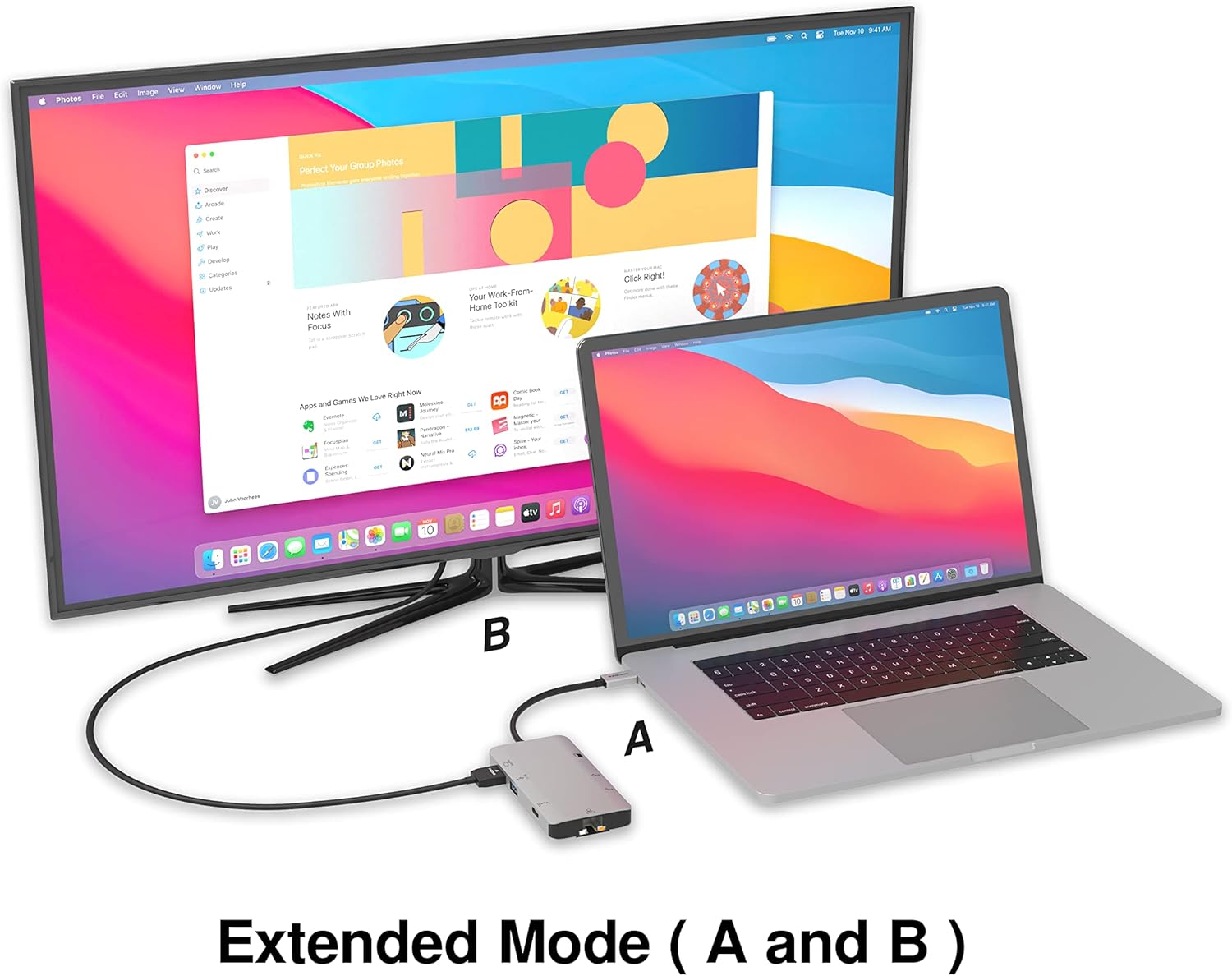
Image: A laptop connected to an external monitor via the hub, demonstrating extended display mode.
Data Transfer (USB-A & SD/Micro SD)
The three USB-A 3.0 ports offer data transfer speeds up to 5Gbps. The SD and Micro SD card slots allow for simultaneous read and write operations, facilitating quick file pemindahan daripada kad memori.

Image: Various devices like USB drives, SD cards, and an Ethernet cable connected to the EZQuest hub.
Network Connection (Gigabit Ethernet)
The Gigabit Ethernet port provides a stable and high-speed wired internet connection, ideal for large downloads, uploads, or streaming where Wi-Fi might be unreliable. An LED indicator confirms network activity.
Pengagihan Kuasa
The USB-A ports distribute power efficiently. One USB-A port with BC1.2 outputs 5V/1.5A (7.5W), while the other two USB-A ports deliver 5V/0.9A (4.5W) each. The total shared power when all ports are in use is 10 watts.

Image: A diagram detailing the power output and data transfer speeds of the USB-A ports on the hub.
Ciri dan Pelabuhan
| Jenis Pelabuhan | Kuantiti | Kefungsian |
|---|---|---|
| HDMI | 1 | 4K @ 30Hz Video Output (Extended/Mirror Mode) |
| USB-C Power Delivery/Data | 1 | Up to 100W Power Input (85W Pass-Through), 5Gbps Data Transfer |
| USB-A 3.0 | 3 | 5Gbps Data Transfer (One port BC1.2 5V/1.5A, two ports 5V/0.9A) |
| Gigabit Ethernet | 1 | 10/100/1000 Mbps Wired Network Connection with LED Indicator |
| Pembaca Kad SD | 1 | SDHC/SDXC Read/Write |
| Pembaca Kad SD Mikro | 1 | Micro SDHC/SDXC Read/Write |
Keserasian
This USB C Hub is compatible with a wide range of devices:
- Computers featuring USB-C, USB 4, Thunderbolt 4, or Thunderbolt 3 ports.
- USB-C smartphones and tablets equipped with OTG (On-The-Go) support.
Unsupported Device:
- The USB-A ports on this docking station do not support Apple SuperDrive. For connecting an Apple SuperDrive, an alternative adapter (e.g., EZQuest X40100 USB-C to USB-A Female Mini Adapter) directly to your Mac is recommended.
Menyelesaikan masalah
- Tiada Output Paparan:
- Pastikan port USB-C peranti hos anda menyokong output video (Mod Ganti DisplayPort).
- Periksa semua sambungan kabel (USB-C dari hab ke peranti, HDMI dari hab ke monitor).
- Verify your monitor input source is set correctly to HDMI.
- Cuba kabel HDMI atau monitor yang lain jika ada.
- Isu Pengecasan:
- Ensure your USB-C power adapter is connected to the hub's USB-C PD port.
- Sahkan penyesuai kuasa anda membekalkan kuasa yang mencukupitage (up to 100W recommended for laptops).
- Check if the host device's USB-C port supports Power Delivery.
- Pemindahan Data Lambat:
- Ensure you are using USB 3.0 compatible devices and cables for optimal speeds.
- The total shared power for USB-A ports is 10W; excessive power draw from multiple devices may affect performance.
- Ethernet Tidak Berfungsi:
- Periksa sambungan kabel Ethernet ke kedua-dua hab dan penghala/modem anda.
- Sahkan tetapan rangkaian pada peranti hos anda.
- Ensure the LED indicator on the Ethernet port is active.
- SD/Micro SD Card Not Recognized:
- Pastikan kad dimasukkan sepenuhnya ke dalam slot yang betul.
- Try reinserting the card or using a different card.
- Check if the card is damaged or corrupted.
Spesifikasi
| Ciri | Perincian |
|---|---|
| Nombor Model | X40030 |
| Dimensi Produk | 0.81 x 1.63 x 0.2 inci |
| Berat Barang | 1.6 auns |
| Antara Muka Perkakasan | USB Jenis C |
| Output HDMI | 4K @ 30Hz |
| Input PD USB-C | Sehingga 100W |
| Output PD USB-C | Sehingga 85W |
| Kelajuan Data USB-A 3.0 | 5Gbps |
| Kelajuan Ethernet | 1 Gigabit (10/100/1000 Mbps) |
| Sokongan Pembaca Kad | SDHC, SDXC, Micro SDHC, Micro SDXC |
| bahan | Anodized Aluminum Housing |
Penyelenggaraan
- Pembersihan: Gunakan kain lembut dan kering untuk membersihkan hab. Elakkan pembersih cecair atau aerosol.
- Storan: Simpan hab di tempat yang sejuk dan kering jauh dari cahaya matahari langsung dan suhu yang melampau.
- Pengendalian: Avoid dropping the device or subjecting it to strong impacts. Do not attempt to disassemble the hub.
Waranti dan Sokongan
The EZQuest USB C Hub Docking Station 8-in-1 comes with a Waranti Tanpa Risau 1 TahunWaranti ini meliputi kecacatan pembuatan dan memastikan ketenangan fikiran mengenai pelaburan anda.
For technical support, warranty claims, or any product-related inquiries, please visit the official EZQuest website or contact their customer service team through the contact information provided with your product packaging.


